Microsoft AppLocker is an optional security feature that helps organizations control which applications and files users can run, including executables, dynamic-link libraries (DLLs), scripts, installers, and packaged applications. This content pack processes App Control for Business (WDAC) events (8027-8040) that are logged in the AppLocker event channels.
Supported Version(s)
-
Windows 8 or later, though we recommended Windows 10 or 11 or Server 2022+
Requirements
-
Graylog 6.0.1+ with a valid Enterprise license
-
Microsoft AppLocker policies must be enabled and rules created via Group Policy or Local Security Policy
Stream Configuration
This technology pack includes 1 stream:
- Illuminate:Windows AppLocker Event Log Messages
Index Set Configuration
This technology pack includes 1 index set definition:
- Windows AppLocker Event Log Messages
Log Collection
The following log delivery agents are supported:
-
Winlogbeat
-
NXLog Enterprise Edition
-
NXLog Community Edition (limited support)
Graylog Sidecar Example Configuration
Please refer to the official documentation to set up Graylog Sidecar.
-
Create a Beats input for Winlogbeat or a GELF input for NXLog in Graylog. When sending to a Beats input, ensure that the option Do not add Beats type as prefix is disabled.
-
Create an API access token and a custom configuration for your chosen log delivery agent.
-
See the following example configuration for Winlogbeat:
Copy# Needed for Graylog
fields_under_root: true
fields.collector_node_id: ${sidecar.nodeName}
fields.gl2_source_collector: ${sidecar.nodeId}
output.logstash:
hosts: ["${user.graylog_host}:5044"]
path:
data: ${sidecar.spoolDir!"C:\\Program Files\\Graylog\\sidecar\\cache\\winlogbeat"}\data
logs: ${sidecar.spoolDir!"C:\\Program Files\\Graylog\\sidecar"}\logs
tags:
- windows
winlogbeat:
event_logs:
- name: "Microsoft-Windows-AppLocker/EXE and DLL"
ignore_older: 24h
- name: "Microsoft-Windows-AppLocker/MSI and SCRIPT"
ignore_older: 24h
- name: "Microsoft-Windows-AppLocker/Packaged app-Deployment"
ignore_older: 24h
- name: "Microsoft-Windows-AppLocker/Packaged app-Execution"
ignore_older: 24h -
See the following example configuration for NXLog:
Copydefine ROOT C:\Program Files (x86)\nxlog
Moduledir %ROOT%\modules
CacheDir %ROOT%\data
Pidfile %ROOT%\data\nxlog.pid
SpoolDir %ROOT%\data
LogFile %ROOT%\data\nxlog.log
LogLevel INFO
<Extension logrotate>
Module xm_fileop
<Schedule>
When @daily
Exec file_cycle('%ROOT%\data\nxlog.log', 7);
</Schedule>
</Extension>
<Extension gelfExt>
Module xm_gelf
# Avoid truncation of the short_message field to 64 characters.
ShortMessageLength 65536
</Extension>
<Input eventlog>
Module im_msvistalog
PollInterval 1
SavePos True
ReadFromLast True
<QueryXML>
<QueryList>
<Query Id='1'>
<Select Path="Microsoft-Windows-AppLocker/EXE and DLL">*</Select>
<Select Path="Microsoft-Windows-AppLocker/MSI and Script">*</Select>
<Select Path="Microsoft-Windows-AppLocker/Packaged app-Deployment">*</Select>
<Select Path="Microsoft-Windows-AppLocker/Packaged app-Execution">*</Select>
</Query>
</QueryList>
</QueryXML>
</Input>
<Output gelf>
Module om_tcp
Host ${user.graylog_host}
Port 12201
OutputType GELF_TCP
<Exec>
# These fields are needed for Graylog
$gl2_source_collector = '${sidecar.nodeId}';
$collector_node_id = '${sidecar.nodeName}';
</Exec>
</Output>
<Route route-1>
Path eventlog => gelf
</Route> -
Install Graylog Sidecar on the client host.
-
Edit the Graylog Sidecar client configuration with your Graylog server API URL and API access token.
C:\Program Files (x86)
                xlog
and not in the default folder. Also note the NXLog Community Edition does not send the
RuleAndFileData XML portion of the event. This suppressed event data contains key fields that are
important for effective Microsoft AppLocker activity monitoring. Due to this limitation, we recommend
you use NXLog Enterprise or Winlogbeat instead.
What Is Provided
-
Parsing rules to extract Microsoft AppLocker and App Control (WDAC) event logs into schema-compatible fields.
-
GIM detection categorization: hips_detection (301002) for blocked events, detection_message (309999) for audit-mode events.
-
Security Core compliance via stream category assignment and detection GIM codes.
-
Support for event IDs 8000-8025 (AppLocker) and 8027-8040 (App Control / WDAC).
-
Illuminate spotlight highlighting security events and statistics of interest.
Events Processed by This Technology Pack
The Microsoft AppLocker content pack supports the following event IDs. Generic processing is provided for event IDs not listed.
Event IDs
| Event ID | Event Action | Description |
|---|---|---|
| 8000 | modified | AppID policy conversion failed |
| 8001 | modified | A policy was successfully applied |
| 8002 | allowed | An EXE or DLL file was allowed to run |
| 8003 | allowed | An EXE or DLL file was allowed to run due to Audit policy but would be blocked otherwise |
| 8004 | blocked | An EXE or DLL file was blocked from running |
| 8005 | allowed | A script or MSI file was allowed to run |
| 8006 | allowed | A script or MSI file was allowed to run due to Audit policy but would be blocked otherwise |
| 8007 | blocked | A script or MSI file was blocked from running |
| 8020 | allowed | A packaged app was allowed to run |
| 8021 | allowed | A packaged app was allowed to run due to Audit policy but would be blocked otherwise |
| 8022 | blocked | A packaged app was blocked from running |
| 8023 | allowed | A packaged app installation was allowed |
| 8024 | allowed | A packaged app installation was allowed due to Audit policy but would be blocked otherwise |
| 8025 | blocked | A packaged app installation was blocked |
| 8027 | blocked | No packaged apps can be executed while EXE rules are being enforced and no Packaged app rules have been configured |
| 8028 | allowed | A script or MSI was allowed to run but would have been prevented by App Control policy (audit mode) |
| 8029 | blocked | A script or MSI was prevented from running due to App Control policy |
| 8030 | allowed | ManagedInstaller check succeeded during AppID verification |
| 8031 | allowed | SmartlockerFilter detected file being written by process |
| 8032 | blocked | ManagedInstaller check failed during AppID verification |
| 8033 | allowed | ManagedInstaller check failed during AppID verification but allowed due to audit policy |
| 8034 | allowed | ManagedInstaller Script check failed during AppID verification |
| 8035 | allowed | ManagedInstaller Script check succeeded during AppID verification |
| 8036 | blocked | COM object was blocked due to App Control policy |
| 8037 | allowed | File passed App Control policy and was allowed to run |
| 8038 | other | Signing information event correlated with App Control policy decision |
| 8039 | allowed | A packaged app was allowed to install or update but would have been blocked by App Control policy (audit mode) |
| 8040 | blocked | A packaged app was prevented from installing or updating due to App Control policy |
Parsed Fields
| Field Name | Example Value | Field Type | Description |
|---|---|---|---|
| event_action | allowed | keyword | The action taken by AppLocker, such as allowing or blocking a file execution |
| event_code | 8003 | long | The Windows Event ID associated with the AppLocker event |
| event_log_name | microsoft-windows-applocker/exe and dll | keyword | The name of the event log channel where the event was recorded |
| event_severity | low | keyword | The description of the normalized event severity rating |
| event_severity_level | 2 | long | The normalized numeric severity rating for the event |
| event_source_product | applocker | keyword | The primary identifier for AppLocker events |
| event_uid | 1005 | keyword | The unique Windows Event Record ID of the event |
| file_is_signed | 1 | boolean | Indicates whether the file is digitally signed |
| file_name | PSLIST.EXE | keyword | The name of the file being evaluated |
| file_path | %OSDRIVE%\USERS\TESTUSER\DESKTOP\PSLIST.EXE | keyword | The file path with environment variables |
| file_product | SYSINTERNALS PSLIST | keyword | The file product extracted from its FQBN |
| file_version | 1.41.0.00 | keyword | The file version extracted from its FQBN |
| file_signed_by | MICROSOFT CORPORATION | keyword | The entity that signed the file, if applicable |
| hash_sha256 | 015D546D0B1A31CF10A6DD00D36F5E17503EAF45C164F73B6E578970C08DA082 | keyword | The SHA-256 hash of the file |
| process_target_id | 7964 | keyword | The process ID of the application being executed |
| source | DESKTOP-CJL6M40 | keyword | Hostname or IP of the source system that generated the event |
| target_user_id | S-1-5-21-314323950-2314161084-4234690932-1002 | keyword | The SID of the user associated with the file execution |
| target_user_session_id | 0x2a36e | keyword | The Logon ID of the user session context under which the application runs |
| user_domain | GOODCORP | keyword | The domain or local machine name associated with the event |
| user_id | S-1-5-21-314323950-2314161084-4234690932-1002 | keyword | The SID of the user associated with the event |
| user_name | testuser | keyword | The name of the user associated with the event |
| vendor_event_description | An EXE or DLL file was allowed to run due to Audit policy but would be blocked otherwise | keyword | The description corresponding to the Event ID |
| vendor_event_severity | warning | keyword | The vendor-defined description of the event severity rating |
| vendor_event_severity_level | 3 | long | The vendor-defined numeric severity rating for the event severity rating |
| vendor_event_type | WARNING | keyword | The type of the event describing the severity |
| vendor_file_base_path | %USERPROFILE%\DOWNLOADS | keyword | The directory location of the file |
| vendor_file_extension | EXE | keyword | The extension of the filename |
| vendor_file_hash_length | 32 | keyword | The length of the file hash string |
| vendor_file_original_name | PSLIST.EXE | keyword | The original name of the file extracted from its FQBN |
| vendor_file_path_length | 43 | long | The length of the file path string |
| vendor_file_x509_subject_common_name | MICROSOFT CORPORATION | keyword | The common name field from the file's digital certificate |
| vendor_file_x509_subject_country | US | keyword | The country field from the file's digital certificate |
| vendor_file_x509_subject_locality | REDMOND | keyword | The locality field from the file's digital certificate |
| vendor_file_x509_subject_organization | MICROSOFT CORPORATION | keyword | The organization that issued the file's digital signature |
| vendor_file_x509_subject_state_or_province | WASHINGTON | keyword | The state or province field from the file's digital certificate |
| vendor_fqbn | O=MICROSOFT CORPORATION, L=REDMOND, S=WASHINGTON, C=US\SYSINTERNALS PSLIST\PSLIST.EXE\1.41.0.00 | keyword | The FQBN (Fully Qualified Binary Name) that uniquely identifies the software publisher and version information, used by rules based on the file's digital signature if it exists |
| vendor_fqbn_length | 95 | long | The length of the FQBN (Fully Qualified Binary Name) |
| vendor_full_file_path | C:\Users\testuser\Desktop\pslist.exe | keyword | The full file path without use of environment variables |
| vendor_full_file_path_length | 36 | long | The length of the full file path string |
| vendor_opcode | Info | keyword | The description of the Windows Event Opcode |
| vendor_opcode_value | 0 | keyword | The numeric representation of the Windows Event Opcode |
| vendor_package | MICROSOFT.WINDOWSMAPS | keyword | The name of the application package |
| vendor_package_length | 36 | long | The length of the package name string |
| vendor_policy_name | EXE | keyword | The AppLocker policy associated with the event |
| vendor_policy_name_length | 3 | long | The length of the policy name string |
| vendor_rule_id | {0A591A2E-66FC-40F5-A421-0E2B94D6D539} | keyword | The ID of the AppLocker rule the application was evaluated against |
| vendor_rule_name | (Default Rule) All files located in the Windows folder | keyword | The name of the AppLocker rule the application was evaluated against |
| vendor_rule_name_length | 54 | keyword | The length of the rule name string |
| vendor_rule_sddl | D:(XA;;FX;;;S-1-1-0;(APPID://PATH Contains \%WINDIR%\*\"))" | keyword | The Security Descriptor Definition Language (SDDL) string defining rule permissions |
| vendor_rule_sddl_length | 57 | long | The length of the rule SDDL string |
| vendor_user_type | User | keyword | The type of account associated with the event |
| vendor_xml_name | RuleAndFileData | keyword | The Event Log XML element containing details about the event |
Microsoft AppLocker Content Pack
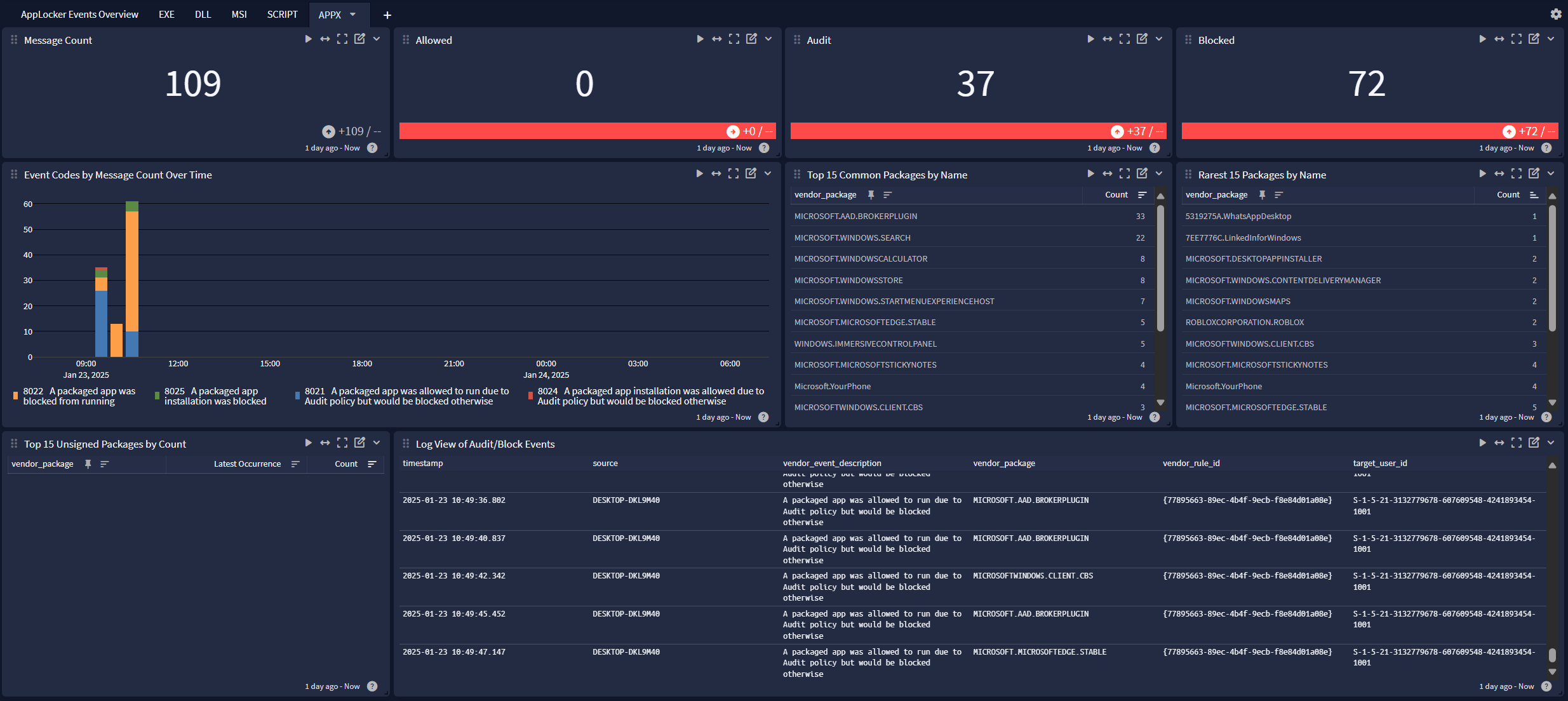
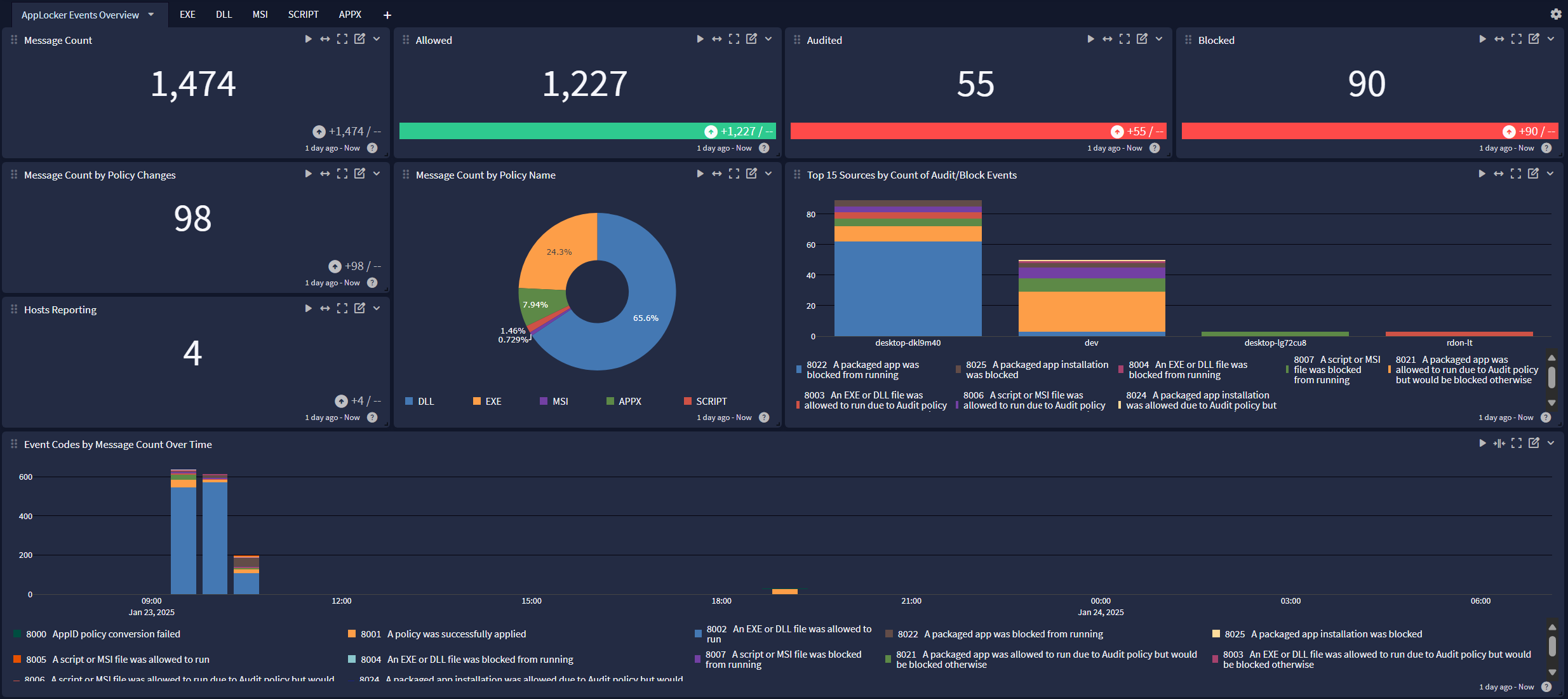
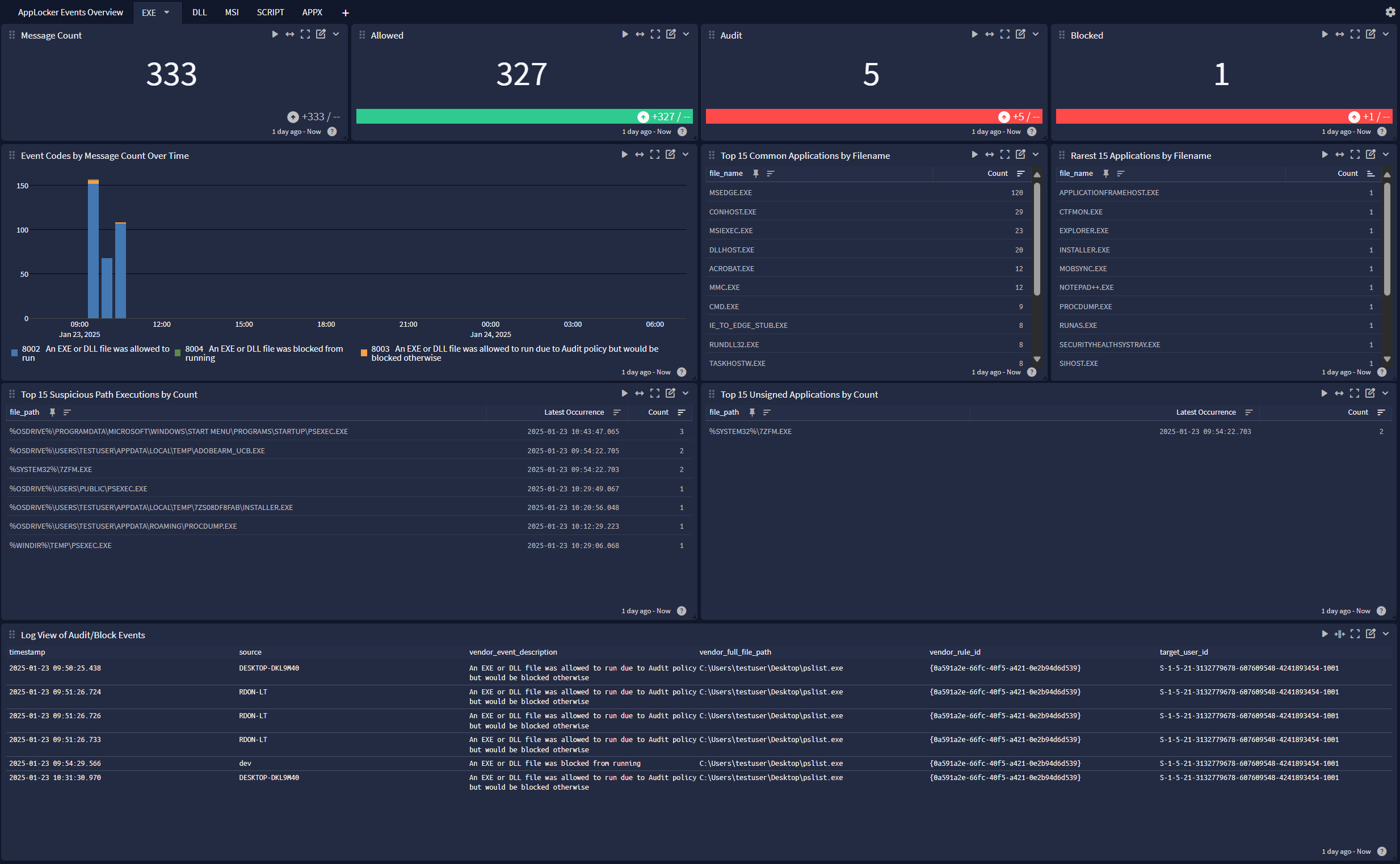
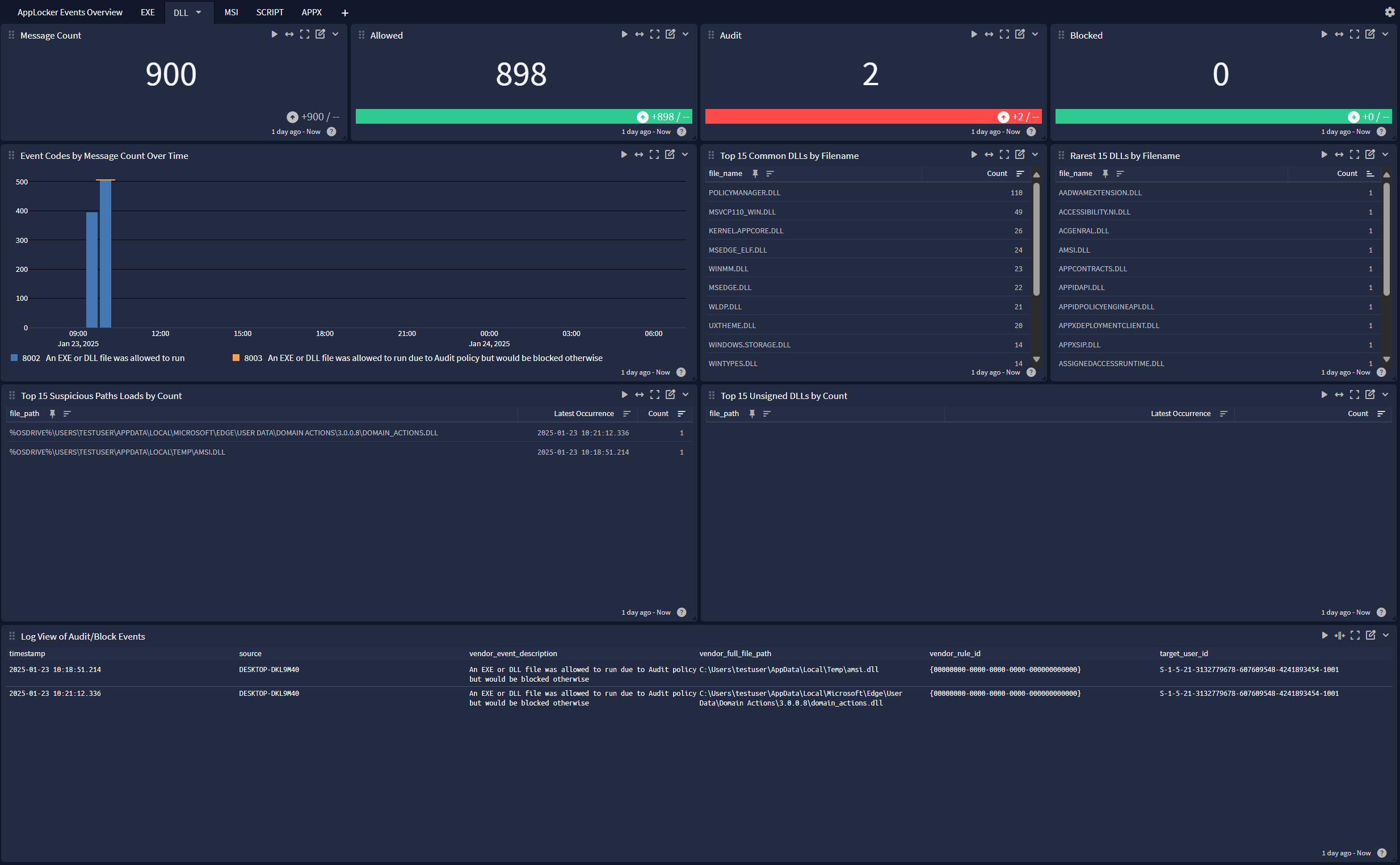
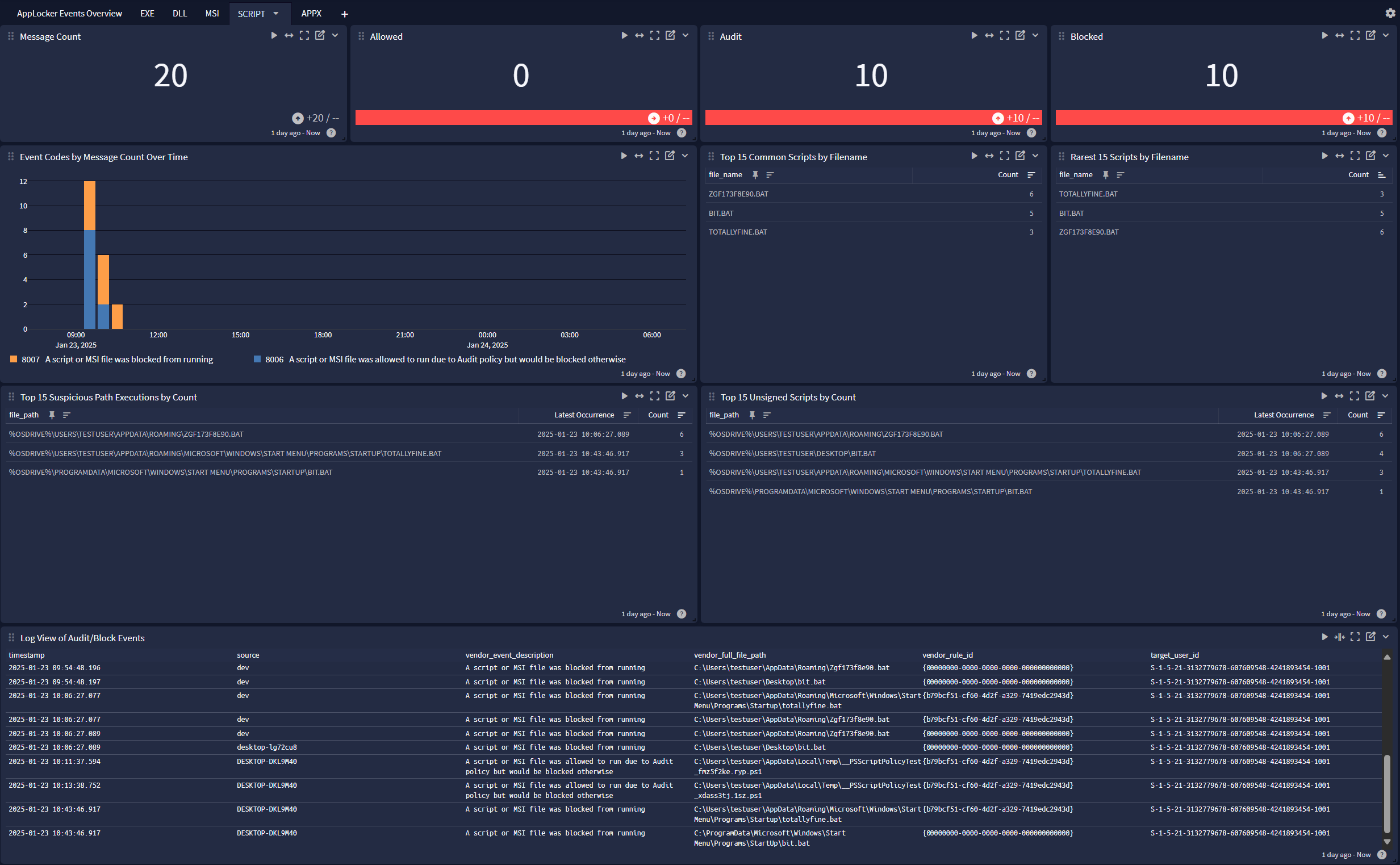
Microsoft AppLocker offers a dashboard with 6 tabs:
Overview
EXE
DLL
MSI

SCRIPT
APPX