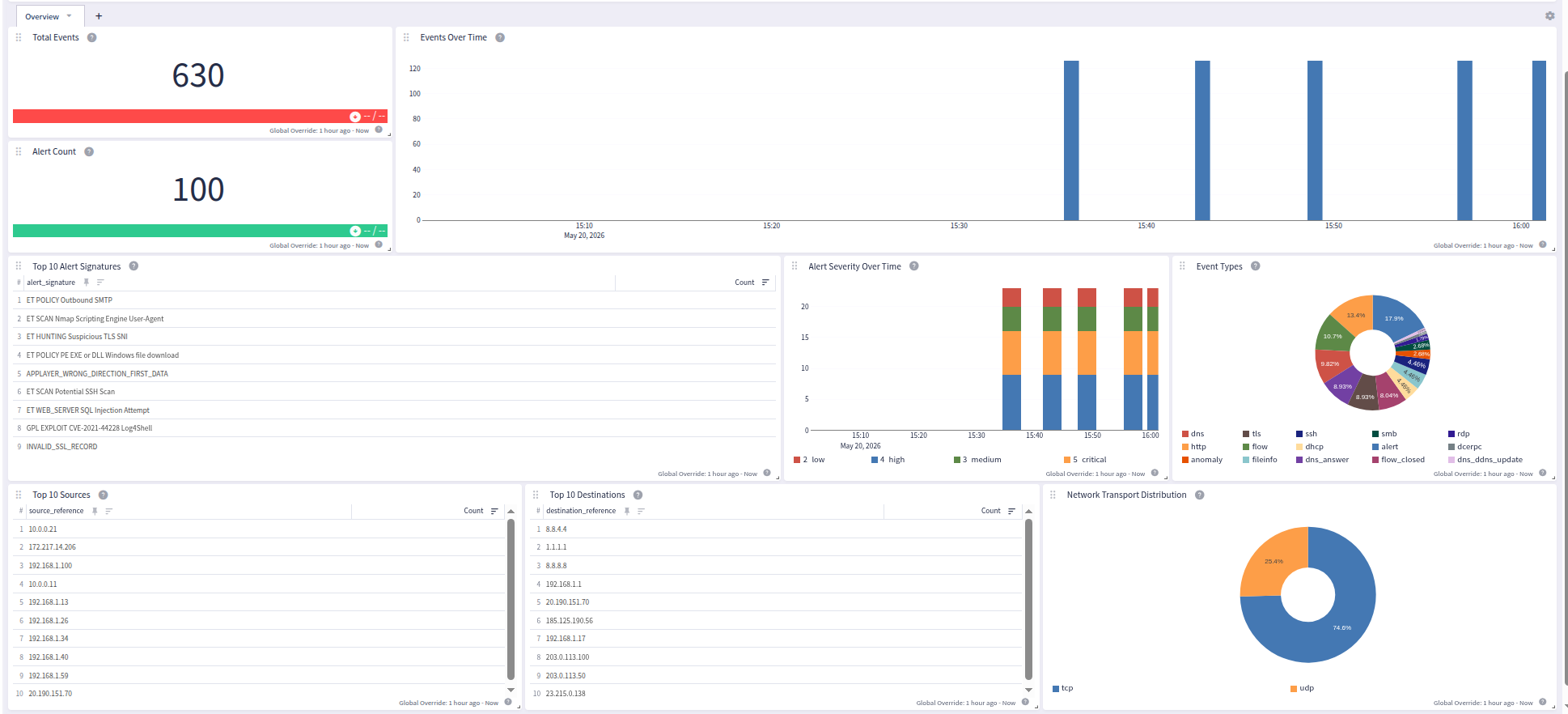
Suricata is a free and open-source network threat detection engine capable of real-time intrusion detection (IDS), intrusion prevention (IPS), network security monitoring (NSM), and offline pcap processing. This technology pack processes Suricata EVE JSON log output, providing normalization and enrichment of alert, anomaly, ARP, BitTorrent DHT, DCERPC, DHCP, DNS, FTP, HTTP, HTTP/2, IKE, IPS drop, Kerberos (KRB5), Modbus, MQTT, NetFlow, network flow, NFS, PgSQL, POP3, QUIC, RDP, RFB/VNC, SMB, SMTP, SNMP, SSH, TFTP, TLS, and file info events.
Supported Versions
-
Suricata 6.x and later (EVE JSON output)
-
Suricata 7.x and later (EVE JSON output)
-
Suricata 8.x (tested; EVE JSON output)
-
Suricata <= 7 legacy plain-text http.log and tls.log formats (deprecated)
Requirements
-
Suricata configured with EVE JSON output enabled
-
Graylog version 7.1.0+
Stream Configuration
This technology pack includes 1 stream:
- "Illuminate:Suricata Messages"
Index Set Configuration
This technology pack includes 1 index set definition:
- "Suricata IDS/IPS Logs"
Log Format Example
Suricata EVE JSON
{"timestamp":"2023-03-24T12:00:00.000000+0000","flow_id":123456789,"in_iface":"eth0","event_type":"alert","src_ip":"192.168.1.10","src_port":54321,"dest_ip":"203.0.113.1","dest_port":443,"proto":"TCP","alert.action":"blocked","alert.gid":1,"alert.signature_id":2100498,"alert.rev":7,"alert.signature":"GPL ATTACK_RESPONSE id check returned root","alert.category":"Potentially Bad Traffic","alert.severity":2}
        {"timestamp":"2023-03-24T12:01:00.000000+0000","flow_id":987654321,"in_iface":"eth0","event_type":"dns","src_ip":"192.168.1.20","src_port":52100,"dest_ip":"8.8.8.8","dest_port":53,"proto":"UDP","dns.type":"query","dns.id":12345,"dns.rrname":"example.com","dns.rrtype":"A","dns.tx_id":0}
        {"timestamp":"2023-03-24T12:02:00.000000+0000","flow_id":111222333,"in_iface":"eth0","event_type":"http","src_ip":"192.168.1.30","src_port":55000,"dest_ip":"93.184.216.34","dest_port":80,"proto":"TCP","app_proto":"http","http.hostname":"example.com","http.url":"/index.html","http.http_user_agent":"Mozilla/5.0","http.http_method":"GET","http.protocol":"HTTP/1.1","http.status":200,"http.length":1256}
        {"timestamp":"2023-03-24T12:03:00.000000+0000","flow_id":444555666,"in_iface":"eth0","event_type":"tls","src_ip":"192.168.1.40","src_port":56789,"dest_ip":"93.184.216.34","dest_port":443,"proto":"TCP","app_proto":"tls","tls.subject":"CN=example.com","tls.issuerdn":"CN=DigiCert TLS RSA SHA256 2020 CA1","tls.sni":"example.com","tls.version":"TLS 1.3","tls.notbefore":"2022-01-01T00:00:00","tls.notafter":"2023-01-01T00:00:00"}
        {"timestamp":"2023-03-24T12:04:00.000000+0000","flow_id":777888999,"in_iface":"eth0","event_type":"flow","src_ip":"10.0.0.5","src_port":60001,"dest_ip":"10.0.0.1","dest_port":22,"proto":"TCP","app_proto":"ssh","flow.pkts_toserver":12,"flow.pkts_toclient":10,"flow.bytes_toserver":1024,"flow.bytes_toclient":2048,"flow.start":"2023-03-24T12:04:00.000000+0000","flow.end":"2023-03-24T12:04:45.000000+0000","flow.state":"closed","flow.reason":"timeout","flow.alerted":false}
        {"timestamp":"2023-03-24T12:05:00.000000+0000","flow_id":112233445,"in_iface":"eth0","event_type":"ssh","src_ip":"10.0.0.5","src_port":60001,"dest_ip":"10.0.0.1","dest_port":22,"proto":"TCP","ssh.client.proto_version":"2.0","ssh.client.software_version":"OpenSSH_8.9","ssh.server.proto_version":"2.0","ssh.server.software_version":"OpenSSH_9.0"}
        {"timestamp":"2023-03-24T12:06:00.000000+0000","flow_id":556677889,"in_iface":"eth0","event_type":"fileinfo","src_ip":"192.168.1.50","src_port":57000,"dest_ip":"93.184.216.34","dest_port":80,"proto":"TCP","app_proto":"http","fileinfo.filename":"/downloads/update.exe","fileinfo.magic":"PE32 executable (GUI) Intel 80386","fileinfo.md5":"d41d8cd98f00b204e9800998ecf8427e","fileinfo.size":102400,"fileinfo.stored":false}
        {"timestamp":"2023-03-24T12:07:00.000000+0000","flow_id":998877665,"in_iface":"eth0","event_type":"krb5","src_ip":"10.0.0.50","src_port":49200,"dest_ip":"10.0.0.1","dest_port":88,"proto":"UDP","krb5.msg_type":"KRB_TGS_REP","krb5.cname":"robin","krb5.realm":"EXAMPLE.LAB","krb5.sname":"ldap/dc01","krb5.encryption":"aes256-cts-hmac-sha1-96","krb5.weak_encryption":false,"krb5.ticket_encryption":"aes256-cts-hmac-sha1-96","krb5.ticket_weak_encryption":false}
        {"timestamp":"2023-03-24T12:08:00.000000+0000","flow_id":334455667,"in_iface":"eth0","event_type":"rfb","src_ip":"192.168.1.10","src_port":54321,"dest_ip":"10.0.0.100","dest_port":5900,"proto":"TCP","rfb.server_protocol_version.major":"003","rfb.server_protocol_version.minor":"007","rfb.client_protocol_version.major":"003","rfb.client_protocol_version.minor":"007","rfb.authentication.security_type":2,"rfb.authentication.security_result":"OK","rfb.screen_shared":false,"rfb.framebuffer.width":1920,"rfb.framebuffer.height":1080,"rfb.framebuffer.name":"desktop@workstation.example.com"}
        {"timestamp":"2023-03-24T12:09:00.000000+0000","flow_id":778899001,"in_iface":"eth0","event_type":"bittorrent_dht","src_ip":"10.0.0.20","src_port":6881,"dest_ip":"185.21.216.44","dest_port":6881,"proto":"UDP","bittorrent_dht.transaction_id":"0c17","bittorrent_dht.client_version":"4c540126","bittorrent_dht.request_type":"ping"}
        {"timestamp":"2023-03-24T12:10:00.000000+0000","flow_id":223344556,"in_iface":"eth0","event_type":"anomaly","src_ip":"192.168.1.99","src_port":0,"dest_ip":"192.168.1.1","dest_port":0,"proto":"TCP","anomaly.type":"stream","anomaly.event":"SURICATA STREAM 3way handshake right seq wrong ack evasion","anomaly.layer":"stream"}
What is Provided
-
Parsing rules to extract Suricata EVE JSON fields into the Graylog Information Model (GIM)
-
GIM categorization of Suricata events and severity normalization (alert + log severity)
-
Input support for Filebeat/GELF, syslog TCP/UDP, and raw TCP/UDP, plus legacy Suricata http.log and tls.log plain-text formats
Log Collection and Delivery
This pack supports multiple log delivery methods:
Filebeat (recommended): Use the Elastic Filebeat agent with the ndjson input type via a Graylog Sidecar. Nested JSON fields are delivered using dot notation (e.g. alert.severity, dns.rrname).
Syslog: Suricata can be configured to send EVE JSON via syslog to a Graylog Syslog TCP or UDP input. The application_name field must be set to suricata. The EVE JSON payload is embedded in the syslog message field and parsed by the pack's syslog processing rule.
Legacy plain-text formats (Suricata <= 7): The pack also parses the legacy http.log and tls.log plain-text output formats that were deprecated in Suricata 8.0 and removed in Suricata 9.0. These are detected automatically alongside EVE JSON on syslog or raw inputs.
Configuring Suricata
Suricata must be configured to output logs in EVE JSON format. In suricata.yaml, ensure the eve-log output is enabled and includes the desired event types:
Configuring Sidecar
-
Please refer to the official documentation to set up Graylog Sidecar for Filebeat.
-
Create a matching Beats input in Graylog.
-
Ensure that the option Do not add Beats type as prefix is disabled.
-
Add the following example configuration snippet to your Filebeat configuration:
Copy- type: filestream
id: suricata-eve-filestream
enabled: true
paths:
- /var/log/suricata/eve.json
parsers:
- ndjson:
target: ""
add_error_key: true
expand_keys: false
fields_under_root: true
fields:
filebeat_event_source_product: suricata
Suricata Log Message Processing
Suricata EVE JSON events are identified by the event_type field. For DNS events, the pack further distinguishes between queries (dns.type = "query") and answers (dns.type = "answer"), and detects RFC 2136 DDNS UPDATE messages (dns.opcode = 5) to assign the appropriate GIM code (140000 query, 140200 answer, 140500 ddns update). For flow events, closed flows (flow.state = "closed") receive a distinct GIM code from established flows. For DHCP events, vendor_dhcp_type further refines the GIM code (e.g. discover -> 290200, request -> 290000, offer -> 290100, ack -> 290300); unrecognized types default to 299999.
Events Processed by This Technology Pack
The content pack supports the following Suricata EVE JSON event types:
| Event Type | Description |
|---|---|
| alert | IDS/IPS signature match |
| anomaly | Protocol anomaly detection |
| arp | ARP packets |
| bittorrent_dht | BitTorrent DHT messages |
| dcerpc | DCERPC sessions; relevant for lateral-movement detection |
| dhcp | DHCP lifecycle: discover, request, offer, ack |
| dns | DNS query and answer |
| drop | IPS-mode dropped packet |
| fileinfo | File metadata from network transfers |
| flow / flow_closed | Network flow lifecycle |
| ftp / ftp_data | FTP commands and data transfers |
| http / http2 / quic | HTTP communication |
| ike | IKE/IPsec key exchange |
| krb5 | Kerberos authentication |
| modbus | Modbus industrial protocol |
| mqtt | MQTT IoT messaging |
| netflow | NetFlow records |
| nfs | NFS file access |
| pgsql | PostgreSQL database |
| pop3 | POP3 email |
| rdp | Remote Desktop Protocol |
| rfb | RFB/VNC remote framebuffer |
| smb | SMB/CIFS file sharing |
| smtp | SMTP email |
| snmp | SNMP queries / traps |
| ssh | SSH connections |
| stats | Suricata engine statistics |
| tftp | TFTP file transfer |
| tls | TLS/SSL connections |
| Legacy http.log / tls.log | Suricata <= 7 plain-text formats |
GIM Categorization
Field extraction, normalization, and message enrichment for Suricata EVE JSON log messages, plus GIM categorization of the following messages:
| Vendor Event Type | Event Description | gim_event_type_code | gim_event_class | gim_event_category | gim_event_subcategory | gim_event_type |
|---|---|---|---|---|---|---|
| alert | A Suricata signature match triggered an alert or IPS action | 300000 | detection | detection.network_detection | ids_detection | |
| anomaly | An unexpected or malformed protocol behavior was detected | 300001 | detection | detection.network_detection | network_detection | |
| arp | An ARP packet was observed on the network | 129999 | network | network.default | network message | |
| bittorrent_dht | A BitTorrent DHT protocol message was observed on the network | 120200 | network | network.open | network connection initiated | |
| dcerpc | A DCERPC session was observed on the network (lateral-movement / AD-recon indicator) | 120200 | network | network.open | network connection initiated | |
| dhcp | A DHCP message was observed on the network (sub-categorized by vendor_dhcp_type) | 299999 | protocol | dhcp | dhcp.default | dhcp default event |
| dns | A DNS query was observed on the network | 140000 | protocol | name resolution | name resolution.dns request | dns query |
| dns_answer | A DNS answer was observed on the network (dns.type = "answer") | 140200 | protocol | name resolution | name resolution.dns answer | dns response |
| dns_ddns_update | A DNS UPDATE message (RFC 2136 dynamic DNS) was observed on the network (dns.opcode = 5) | 140500 | protocol | name resolution | name resolution.ddns update | ddns update |
| drop | A packet was dropped by the IPS engine (EVE event_type=drop) | 129999 | network | network.default | network message | |
| fileinfo | File metadata was captured from a network transfer | 129999 | network | network.default | network message | |
| flow | A network flow record was observed (non-closed state) | 120500 | network | network.flow | flow record | |
| flow_closed | A completed network flow was recorded (flow.state = "closed") | 120300 | network | network.close | network connection ended | |
| ftp | An FTP command or response was observed on the network | 120200 | network | network.open | network connection initiated | |
| ftp_data | An FTP data channel file transfer was observed | 120200 | network | network.open | network connection initiated | |
| http | An HTTP transaction was observed on the network | 180200 | protocol | http | http.communication | http communication |
| http2 | An HTTP/2 transaction was observed on the network | 180200 | protocol | http | http.communication | http communication |
| ike | An IKE/IPsec key exchange was observed on the network | 120200 | network | network.open | network connection initiated | |
| krb5 | A Kerberos 5 authentication exchange was observed on the network | 120200 | network | network.open | network connection initiated | |
| modbus | A Modbus industrial protocol transaction was observed | 120200 | network | network.open | network connection initiated | |
| netflow | A NetFlow/IPFIX network traffic record was observed | 120500 | network | network.flow | flow record | |
| nfs | An NFS file-access call was observed on the network | 120200 | network | network.open | network connection initiated | |
| mqtt | An MQTT publish/subscribe session was observed on the network | 120200 | network | network.open | network connection initiated | |
| pgsql | A PostgreSQL database transaction was observed on the network | 159999 | database | database.default | database message | |
| quic | A QUIC handshake was observed on the network (SNI/version exchange; HTTP/3 transactions over QUIC are not extracted) | 120200 | network | network.open | network connection initiated | |
| pop3 | A POP3 email retrieval session was observed on the network | 120200 | network | network.open | network connection initiated | |
| rdp | An RDP connection was observed on the network | 120200 | network | network.open | network connection initiated | |
| rfb | An RFB/VNC remote desktop connection was observed on the network | 120200 | network | network.open | network connection initiated | |
| smb | An SMB file sharing transaction was observed on the network | 120200 | network | network.open | network connection initiated | |
| smtp | An SMTP email transaction was observed on the network | 130000 | messaging | messaging.email | email sent | |
| snmp | An SNMP query/response or trap was observed on the network | 120200 | network | network.open | network connection initiated | |
| ssh | An SSH connection was observed on the network | 120200 | network | network.open | network connection initiated | |
| stats | Suricata performance and statistics counters | 000000 | message | message.log_message | message | |
| tftp | A TFTP file transfer was observed on the network | 120000 | network | network.network connection | network connection | |
| tls | A TLS/SSL handshake was observed on the network | 120200 | network | network.open | network connection initiated |
Message Fields Included in This Pack
General Parsing
| Field Name | Example Value | Field Type | Description |
|---|---|---|---|
| vendor_event_type | alert | keyword | Suricata EVE JSON event type (e.g., alert, dns, flow, tls, ssh, http) |
| vendor_flow_id | 1728633021554164 | long | Suricata internal flow identifier |
| vendor_event_created_raw | 2023-03-24T15:09:38.745706+0000 | keyword | Raw EVE JSON timestamp from the log (syslog ingestion path only) |
| network_interface_in | eth0 | keyword | Network interface on which the traffic was captured |
| network_community_id | 1:d/FP5EW3wiY1vCndhwleRRKHowQ= | keyword | Community-ID hash for cross-sensor flow correlation (Suricata emits when community-id: enabled is set in suricata.yaml) |
| vendor_icmp_type | 8 | integer | Raw ICMP type number prior to IANA name resolution (staging field for the lookup) |
| network_icmp_type | Echo | keyword | ICMP message type name resolved via the IANA ICMP/ICMPv6 parameter registry |
| vendor_icmp_code | 0 | integer | ICMP message code for ICMP flow events (no canonical Network schema field exists) |
| alert_category | Attempted Information Leak | keyword | Suricata alert rule category |
| alert_signature | ET SCAN Potential SSH Scan | keyword | Suricata alert rule signature name |
| alert_signature_id | 2001219 | keyword | Suricata alert rule signature identifier (SID) |
| vendor_alert_gid | 1 | long | Suricata alert generator group ID |
| vendor_alert_revision | 20 | long | Suricata alert rule revision number |
| vendor_alert_severity_level | 2 | long | Raw Suricata alert severity level (1=high, 2=medium, 3=low) |
| vendor_event_action | allowed | keyword | Action taken on the triggering flow (e.g., allowed, blocked) |
| vendor_verdict_action | alert | keyword | Suricata enforcement verdict (e.g., alert, drop, pass) |
| vendor_anomaly_event | APPLAYER_DETECT_PROTOCOL_ONLY_ONE_DIRECTION | keyword | Anomaly event identifier |
| vendor_anomaly_layer | proto_detect | keyword | Protocol layer at which the anomaly was detected |
| vendor_anomaly_type | applayer | keyword | Anomaly category (e.g., applayer, stream) |
| vendor_bittorrent_dht_client_version | 4c540126 | keyword | BitTorrent client version string |
| vendor_bittorrent_dht_request_type | ping | keyword | DHT request type (e.g., ping, find_node, get_peers) |
| vendor_bittorrent_dht_transaction_id | 0c17 | keyword | BitTorrent DHT transaction identifier |
| host_hostname | workstation01 | keyword | Hostname of the DHCP client (from dhcp.hostname) |
| vendor_dhcp_assigned_ip | 192.168.1.200 | keyword | IP address assigned by the DHCP server |
| vendor_dhcp_client_ip | 0.0.0.0 | keyword | Client IP address in the DHCP request (0.0.0.0 for new requests) |
| vendor_dhcp_client_mac | 08:00:27:ab:cd:ef | keyword | Client MAC address in the DHCP request |
| vendor_dhcp_id | 3713480 | long | DHCP transaction identifier |
| vendor_dhcp_relay_ip | 10.0.0.1 | keyword | IP address of the DHCP relay agent, if present |
| vendor_dhcp_type | request | keyword | DHCP message type (e.g., request, ack, discover) |
| query_record_type | A | keyword | DNS record type queried or answered (e.g., A, AAAA, MX, CNAME) |
| query_request | example.com | keyword | DNS query name (domain being looked up) |
| query_response | 93.184.216.34 | keyword | DNS response data (rdata) for answer events |
| query_result | NOERROR | keyword | DNS response code (e.g., NOERROR, NXDOMAIN, SERVFAIL) |
| vendor_dns_id | 12345 | long | DNS transaction ID |
| vendor_dns_ttl | 3600 | long | DNS record time-to-live in seconds |
| vendor_dns_type | query | keyword | DNS message direction (query or answer) |
| destination_hostname | example.com | keyword | Destination hostname from TLS SNI or HTTP Host header |
| file_hash_md5 | d41d8cd98f00b204e9800998ecf8427e | keyword | MD5 hash of the captured file (fileinfo events) |
| file_hash_sha256 | e3b0c44298fc1c149afbf4c8996fb92427ae41e4649b934ca495991b7852b855 | keyword | SHA-256 hash of the captured file (fileinfo events) |
| file_name | sensitive_document.pdf | keyword | Name of the file being transferred (fileinfo and ftp_data events) |
| file_size | 102400 | long | Size of the transferred file in bytes |
| file_type | PE32 executable (GUI) Intel 80386 | keyword | File magic string describing the file type |
| http_uri | /downloads/update.exe | keyword | HTTP request URI (fileinfo events) |
| vendor_fileinfo_gaps | false | boolean | Whether there were capture gaps in the file data |
| vendor_fileinfo_state | CLOSED | keyword | File transfer completion state (e.g., CLOSED, TRUNCATED) |
| destination_bytes_sent | 2048 | long | Bytes sent from server to client during the flow |
| destination_packets_sent | 10 | long | Packets sent from server to client during the flow |
| event_duration | 45 | long | Flow duration in seconds |
| event_end | 2023-03-24T15:10:23.000000+0000 | keyword | Flow end timestamp |
| event_start | 2023-03-24T15:09:38.000000+0000 | keyword | Flow start timestamp |
| source_bytes_sent | 1024 | long | Bytes sent from client to server during the flow |
| source_packets_sent | 12 | long | Packets sent from client to server during the flow |
| vendor_flow_reason | timeout | keyword | Reason the flow ended (e.g., timeout, forced) |
| vendor_flow_state | closed | keyword | Flow tracking state at end of event (e.g., closed, established) |
| vendor_ftp_command | RETR | keyword | FTP command issued (e.g., RETR, STOR, LIST) |
| vendor_ftp_command_data | sensitive_document.pdf | keyword | Argument to the FTP command (e.g., filename or path) |
| vendor_ftp_completion_code | ["150"] | keyword | FTP server reply code(s) |
| vendor_ftp_dynamic_port | 54322 | long | Data connection port used in passive mode |
| vendor_ftp_mode | passive | keyword | FTP data transfer mode (active or passive) |
| vendor_ftp_reply_received | true | boolean | Whether a server reply was received for the FTP command |
| user_command | RETR | keyword | FTP command associated with the ftp_data transfer (ftp_data events) |
| http_content_type | text/html; charset=UTF-8 | keyword | HTTP response Content-Type header |
| http_referrer | https://example.com/ | keyword | HTTP Referer header |
| http_request_method | GET | keyword | HTTP request method (GET, POST, PUT, etc.) |
| http_request_path | /index.html | keyword | HTTP request URL path |
| http_response_bytes | 1256 | long | HTTP response body length in bytes |
| http_response_code | 200 | long | HTTP response status code |
| http_user_agent | Mozilla/5.0 | keyword | HTTP User-Agent header |
| http_version | HTTP/1.1 | keyword | HTTP protocol version |
| vendor_ike_alg_auth | hmac-sha2-256 | keyword | IKE authentication algorithm |
| vendor_ike_alg_dh | modp2048 | keyword | IKE Diffie-Hellman group |
| vendor_ike_alg_enc | aes-cbc | keyword | IKE encryption algorithm |
| vendor_ike_alg_hash | sha256 | keyword | IKE hash algorithm |
| vendor_ike_exchange_type | IKE_SA_INIT | keyword | IKE exchange type |
| vendor_ike_init_spi | abc123def456 | keyword | IKE initiator Security Parameter Index (SPI) |
| vendor_ike_resp_spi | 123abc456def | keyword | IKE responder Security Parameter Index (SPI) |
| vendor_ike_version_major | 2 | long | IKE major version number |
| vendor_ike_version_minor | 0 | long | IKE minor version number |
| vendor_krb5_cname | robin | keyword | Kerberos client principal name |
| vendor_krb5_encryption | aes256-cts-hmac-sha1-96 | keyword | Kerberos session key encryption type |
| vendor_krb5_msg_type | KRB_TGS_REP | keyword | Kerberos message type (e.g., KRB_TGS_REQ, KRB_TGS_REP) |
| vendor_krb5_realm | EXAMPLE.LAB | keyword | Kerberos realm (domain) |
| vendor_krb5_sname | ldap/dc01 | keyword | Kerberos service principal name |
| vendor_krb5_ticket_encryption | aes256-cts-hmac-sha1-96 | keyword | Kerberos ticket encryption type |
| vendor_modbus_access_type | write | keyword | Modbus access type (e.g., read, write) |
| vendor_modbus_category | public assigned | keyword | Modbus function category |
| vendor_modbus_error_flags | INVALID_LENGTH | keyword | Modbus error flags |
| vendor_modbus_function_code | Write Multiple Registers | keyword | Modbus function code name |
| vendor_modbus_function_raw | 16 | long | Raw Modbus function code number |
| vendor_modbus_id | 1 | long | Modbus message identifier |
| vendor_modbus_transaction_id | 1234 | long | Modbus transaction identifier |
| vendor_modbus_unit_id | 1 | long | Modbus unit identifier |
| vendor_mqtt_dup | false | boolean | MQTT duplicate delivery flag |
| vendor_mqtt_qos | 1 | long | MQTT Quality of Service level (0, 1, or 2) |
| vendor_mqtt_retain | false | boolean | MQTT retain message flag |
| vendor_pgsql_tx_id | 1 | long | PostgreSQL transaction identifier |
| vendor_pop3_request_command | RETR | keyword | POP3 client command (e.g., RETR, LIST, DELE) |
| vendor_pop3_response_status | +OK | keyword | POP3 server response status (+OK or -ERR) |
| vendor_rdp_client_build | 2600 | long | RDP client build number |
| vendor_rdp_client_name | DESKTOP-ABC123 | keyword | RDP client machine name |
| vendor_rdp_client_version | 00080004 | keyword | RDP client version string |
| vendor_rdp_cookie | mstshash=user01 | keyword | RDP connection routing cookie |
| vendor_rdp_event_type | initial | keyword | RDP event subtype (e.g., initial, credssp, tls) |
| vendor_rdp_keyboard_layout | en-us | keyword | RDP client keyboard layout identifier |
| vendor_rdp_protocol | tls | keyword | Negotiated RDP security protocol (e.g., rdp, tls, hybrid) |
| vendor_rdp_tx_id | 0 | long | RDP transaction identifier |
| vendor_rfb_client_protocol_major | 003 | keyword | RFB/VNC client protocol major version |
| vendor_rfb_client_protocol_minor | 007 | keyword | RFB/VNC client protocol minor version |
| vendor_rfb_framebuffer_height | 800 | long | Remote framebuffer height in pixels |
| vendor_rfb_framebuffer_name | desktop@workstation.example.com | keyword | Remote framebuffer display name |
| vendor_rfb_framebuffer_width | 1280 | long | Remote framebuffer width in pixels |
| vendor_rfb_security_result | OK | keyword | RFB/VNC authentication result (OK or failed) |
| vendor_rfb_security_type | 2 | long | RFB/VNC security type number (e.g., 2 = VNC authentication) |
| vendor_rfb_server_protocol_major | 003 | keyword | RFB/VNC server protocol major version |
| vendor_rfb_server_protocol_minor | 007 | keyword | RFB/VNC server protocol minor version |
| source_mac | 08:00:27:ab:cd:ef | keyword | Source MAC address (set from DHCP client MAC in dhcp events) |
| vendor_smb_access | 0x00120089 | keyword | SMB file access flags |
| vendor_smb_command | SMB2_COMMAND_READ | keyword | SMB command name (e.g., SMB2_COMMAND_READ, SMB2_COMMAND_CREATE) |
| vendor_smb_disposition | FILE_OPEN | keyword | SMB file create disposition flags |
| vendor_smb_filename | \share\document.docx | keyword | SMB file or path name accessed |
| vendor_smb_filesize | 24576 | long | SMB file size in bytes |
| vendor_smb_session_id | 35184975798785 | long | SMB session identifier |
| vendor_smb_share_type | DISK | keyword | SMB share type (e.g., DISK, IPC, PRINTER) |
| vendor_smb_status | STATUS_SUCCESS | keyword | SMB status string |
| vendor_smb_status_code | 0x0 | keyword | SMB status code in hexadecimal |
| vendor_smb_tree_id | 1 | long | SMB tree connect identifier |
| vendor_ssh_client_hassh | b12d2871a1189eff20364cf5333619ee | keyword | HASSH fingerprint hash of the SSH client |
| vendor_ssh_client_proto | 2.0 | keyword | SSH protocol version used by the client |
| vendor_ssh_client_software | OpenSSH_8.9p1 Ubuntu-3ubuntu0.1 | keyword | SSH client software version string |
| vendor_ssh_server_hassh | ec7378c1a92f5a8dde7e8b7a1ddf33d1 | keyword | HASSH fingerprint hash of the SSH server |
| vendor_ssh_server_proto | 2.0 | keyword | SSH protocol version used by the server |
| vendor_ssh_server_software | OpenSSH_8.9p1 Debian | keyword | SSH server software version string |
| vendor_tftp_file | firmware.bin | keyword | TFTP filename being transferred |
| vendor_tftp_mode | octet | keyword | TFTP transfer mode (octet or netascii) |
| vendor_tftp_packet | RRQ | keyword | TFTP packet type (RRQ for read, WRQ for write) |
| vendor_tls_fingerprint | aa:bb:cc:dd:ee:ff:00:11:22:33:44:55:66:77:88:99:aa:bb:cc:dd | keyword | TLS certificate SHA-1 fingerprint |
| vendor_tls_issuerdn | CN=DigiCert TLS RSA SHA256 2020 CA1 | keyword | TLS certificate issuer Distinguished Name |
| vendor_tls_ja3_hash | 772e8c7d1f1c5d2c2c1d6a0b2a3e4f5a | keyword | JA3 TLS client fingerprint hash |
| vendor_tls_ja3s_hash | a5e2d8c3b4f1e9a7c6b0d2e4f8a3c7e1 | keyword | JA3S TLS server fingerprint hash |
| vendor_tls_not_after | 2024-02-13T23:59:59 | keyword | TLS certificate expiry date |
| vendor_tls_not_before | 2023-01-13T00:00:00 | keyword | TLS certificate validity start date |
| vendor_tls_serial | 0F:BE:08:B0:85:4D:05:73:8A:B0:CC:E1:C9:AF:EE:C9 | keyword | TLS certificate serial number |
| vendor_tls_subject | CN=example.com | keyword | TLS certificate subject Distinguished Name |
| vendor_tls_version | TLS 1.3 | keyword | TLS protocol version (e.g., TLS 1.2, TLS 1.3) |
Suricata IDS/IPS Content Pack
This spotlight offers a dashboard with 1 tab:
Overview