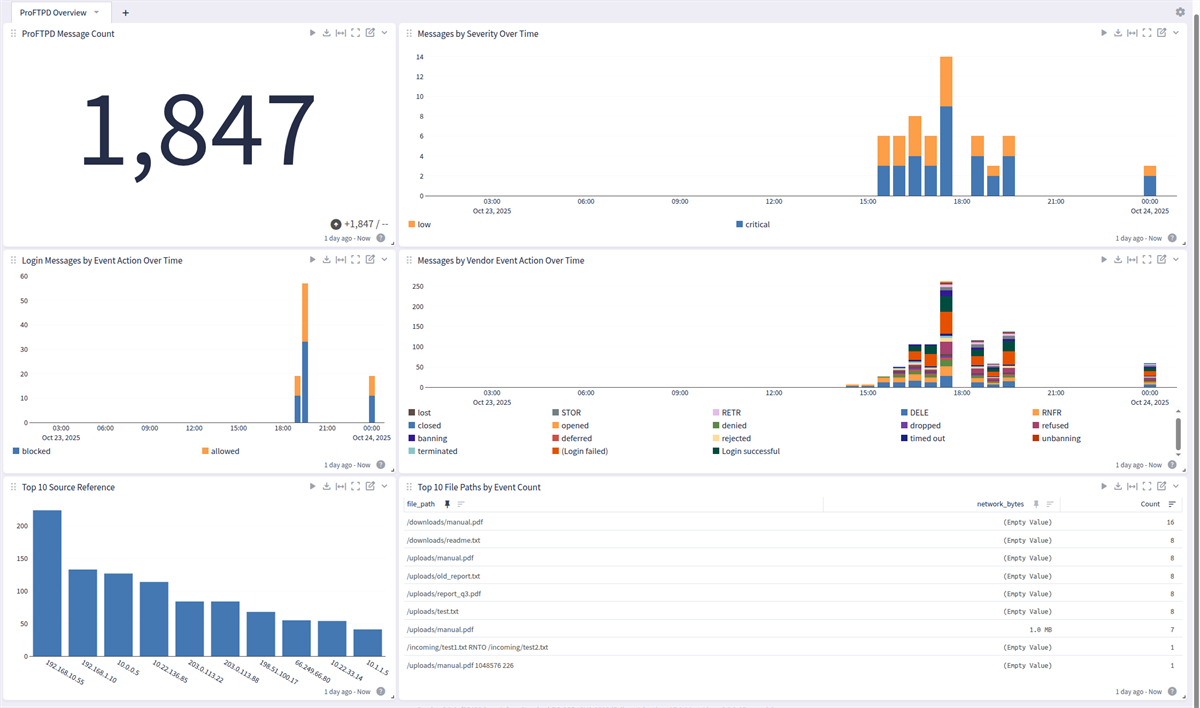
The ProFTPD Server Pack is designed to extract, normalize, and enrich ProFTPD event data for more effective analysis and monitoring.
It parses default logs and enhanced logs into structured fields and adds useful context like event categorization (e.g., authentication and file events).
This enables faster search, correlation, and dashboarding across diverse environments.
Supported Versions
This pack was constructed to work with both standard and enhanced logs.
Custom log formats are not supported.
-
ProFTPD 1.3.9
-
ProFTPD 1.3.8d
Log Collection and Delivery
This pack is designed to collect ProFTPD logs delivered via Syslog via the local Rsyslog service, see the ProFTPD How-To website. Fine-tune wanted log types via Syslog Facility or Loglevel if needed. The application_name has to be proftpd.
Beta support: Filebeat.
-
Syslog
-
Filebeat (Beta)
(Example) Rsyslog Configuration
-
Create a matching Syslog input in Graylog.
-
Configure rsyslog to send logs under e.g.
/var/log/proftpd/*.logto Graylog. -
If needed, create a custom template that identifies the logs as ProFTPD logs for the parser to recognize.
-
ProFTPD messages with the field
application_nameand the valueproftpdwill get parsed. Graylog's syslog input should parse out these fields.
(Example) Filebeat Configuration
-
Please refer to the official documentation to set up Graylog Sidecar for Filebeat.
-
Create a matching Beats input in Graylog.
-
Ensure that the option Do not add Beats type as prefix is disabled.
-
Create an API access token and custom Linux Filebeat collector.
-
Configure the collector to ship messages in syslog and auth.log to Graylog. The Filebeat input must add the field
event_source_product: proftpdfor the parser to identify the log source as ProFTPD. -
In addition, the option
fields_under_rootmust be set totruefor message identification to work. See the following example:Copy- input_type: log
paths:
- /var/log/proftpd/*.log # adjust the paths accordingly to your settings
- /var/log/proftpd/proftpd.log
type: filestream
fields_under_root: true
fields:
event_source_product: proftpd -
Install Graylog Sidecar on the client host.
-
Edit the Graylog Sidecar client configuration with your Graylog server API URL and API access token.
-
Note: Filebeat support is not tested. Only test it if Syslog is not possible.
Requirements
-
Graylog 6.2.0+ with a valid Enterprise license
Stream Configuration
This technology pack includes 1 stream:
- Illuminate:ProFTPD FTP Server Messages
Index Set Configuration
This technology pack includes 1 index set definition:
- ProFTPD FTP Server Logs
Log Format Example
These are normal and enhanced ProFTPD example logs.
ProFTPD Logs
Oct 20 10:06:03 ftp01 proftpd[24523]: 10.0.0.15 (remote01[10.0.0.15]) - USER bob: Login successful.
        Oct 20 10:06:03 ftp01 proftpd[24523]: USER bob: Login successful.
        Oct 20 10:10:34 ftp01 proftpd[24688]: 192.168.10.55 (client01[192.168.10.55]) - USER alice (Login failed): Incorrect password.
        Oct 20 10:10:34 ftp01 proftpd[24688]: USER alice (Login failed): Incorrect password.
        Oct 20 10:35:22 ftp01 proftpd[24567]: 192.168.1.10 (client.example.com[192.168.1.10]) - FTP session opened.
        Oct 20 10:35:22 ftp01 proftpd[24567]: 192.168.1.10 (client.example.com[192.168.1.10]) - STOR /uploads/test.txt
        Oct 20 10:35:22 ftp01 proftpd[24567]: 192.168.1.10 (client.example.com[192.168.1.10]) - RETR /downloads/manual.pdf
        Oct 20 10:35:22 ftp01 proftpd[24567]: 192.168.1.10 (client.example.com[192.168.1.10]) - FTP session closed.
        Oct 20 14:53:50 ftpserver proftpd[24123]: STOR /uploads/manual.pdf 1048576 226
        Oct 20 14:53:50 ftpserver proftpd[24123]: STOR /uploads/manual.pdf
        Oct 20 14:53:50 ftpserver proftpd[24123]: Connection from client.example.com [10.0.0.5] opened.
        Oct 20 14:53:50 ftpserver proftpd[24123]: Connection from client.example.com [10.0.0.5] closed.
        Oct 20 14:53:50 ftpserver proftpd[24123]: Connection from crawl-googlebot.com [26.249.66.80] denied.
        Oct 20 14:53:50 ftpserver proftpd[24123]: Connection from 192.168.1.10 [192.168.1.10] refused.
        Oct 20 14:53:50 ftpserver proftpd[24123]: Connection from 203.0.113.9 [20.0.113.9] rejected.
        Oct 20 14:53:50 ftpserver proftpd[24123]: Connection from 10.1.1.5 [10.1.1.5] timed out.
        Oct 20 14:53:50 ftpserver proftpd[24123]: Connection from 10.1.1.5 [10.1.1.5] dropped.
        Oct 20 14:53:50 ftpserver proftpd[24123]: Connection from 10.0.0.5 [10.0.0.5] terminated.
        Oct 20 14:53:50 ftpserver proftpd[24123]: Connection from 10.0.0.5 [10.0.0.5] lost.
        Oct 20 14:53:50 ftpserver proftpd[24123]: Connection from 10.0.0.5 [10.0.0.5] deferred.
        Oct 20 14:53:50 ftpserver proftpd[24123]: mod_ban/0.9.2: banning client <20.51.100.17> after 5 failed attempts within 60 seconds.
        Oct 20 14:53:50 ftpserver proftpd[24123]: mod_ban/0.9.2: unbanning client <20.51.100.17>.
        Oct 20 14:53:50 ftpserver proftpd[24123]: Maximum number of clients (50) reached, refusing connection from 10.0.0.50.
        Oct 20 14:53:50 ftpserver proftpd[24123]: Maximum number of connections (100) reached, denying connection from 192.0.2.15.
        Oct 20 14:53:50 ftpserver proftpd[24123]: Maximum number of users (200) reached, refusing connection from 203.0.113.22
What is Provided
-
Rules to parse, normalize, and enrich ProFTPD log messages
-
A ProFTPD Overview Dashboard that delivers an at-a-glance summary of key events.
GIM Categorization
In most cases the ProFTPD Messages will be categorized based on the Vendor Event Action field but some log types are generic and we may use a different way to categorize them.
GIM categorization is provided for the following messages:
| Vendor Event Action | GIM Category | GIM Subcategory | GIM Event Type |
|---|---|---|---|
| connect | network | network.network connection | network connection |
| opened | network | network.open | network connection initiated |
| closed | network | network.close | network connection ended |
| Login successful | authentication | authentication.logon | logon |
| (Login failed) | authentication | authentication.logon | logon |
| no such user | authentication | authentication.logon | logon |
| STOR | file | file.create | file created |
| RETR | file | file.access | file accessed |
| DELE | file | file.delete | file deleted |
| RNFR | file | file.modify | file modified |
| RNTO | file | file.modify | file modified |
Message Fields Included in This Pack
General Parsing
This pack will apply normalization to standard and enhanced ProFTPD logs. Additionally, it will shorten the "message". Exiting headers and enhanced headers will be parsed but dropped to reduce license utilization.
Attached are the most common parsed fields for ProFTPD logs.
| Fields | Example Value |
|---|---|
| destination_ip | 10.22.136.85 |
| destination_port | 21 |
| event_source_product | proftpd |
| file_name | manual.pdf |
| file_path | /uploads/manual.pdf |
| host_hostname | ftp01 |
| network_bytes | 1048576 |
| process_id | 24512 |
| source_hostname | client01 |
| source_ip | 192.168.10.55 |
| source_ip_inner | 192.168.10.55 |
| user_name | alice |
| vendor_ban_window_seconds | 60 |
| vendor_event_action | Login successful |
| vendor_event_created | Oct 20 10:05:42 |
| vendor_event_description | no such user found |
| vendor_event_outcome | successful |
| vendor_event_outcome_reason | Incorrect password. |
| vendor_event_severity | warning |
| vendor_failed_attempts | 5 |
| vendor_ftp_status_code | 226 |
| vendor_module_name | mod_ban |
| vendor_module_version | 0.9.2 |
Event Enrichment
The following fields are added to ProFTPD event messages:
| Field Name | Description |
|---|---|
| application_name | Application name, set to proftpd for authentication events. |
| destination_hostname | Default destination hostname for login events when not present in the log. |
| destination_port | Destination port for network events, cast to long, defaults to 0. |
| destination_reference | Destination reference for authentication and network events, derived from destination_ip or hostname. |
| event_action | Normalized event action (allowed/blocked) based on vendor_event_action lookup. |
| event_created | Parsed and formatted event timestamp from vendor_event_created. |
| event_outcome | Normalized event outcome (success/failure) based on vendor_event_outcome lookup. |
| event_severity | Normalized severity level based on vendor_event_severity lookup. |
| event_severity_level | Numeric severity level based on vendor_event_severity lookup. |
| gim_event_type_code | GIM event type code assigned based on vendor_event_action. |
| network_transport | Network transport protocol, defaults to tcp for network events. |
| service_name | Service name, set to proftpd. |
| source_hostname | Default source hostname for login events when not present in the log. |
| source_port | Source port for network events, cast to long, defaults to 0. |
| source_reference | Source reference for authentication and network events, derived from source_ip or hostname. |
| source_user_name | Source user name, derived from user_name if not already set. |
| user_name | User name, set to default if not parsed from the log. |
ProFTPD Server Content Pack
This spotlight offers a dashboard with 1 tab:
Overview