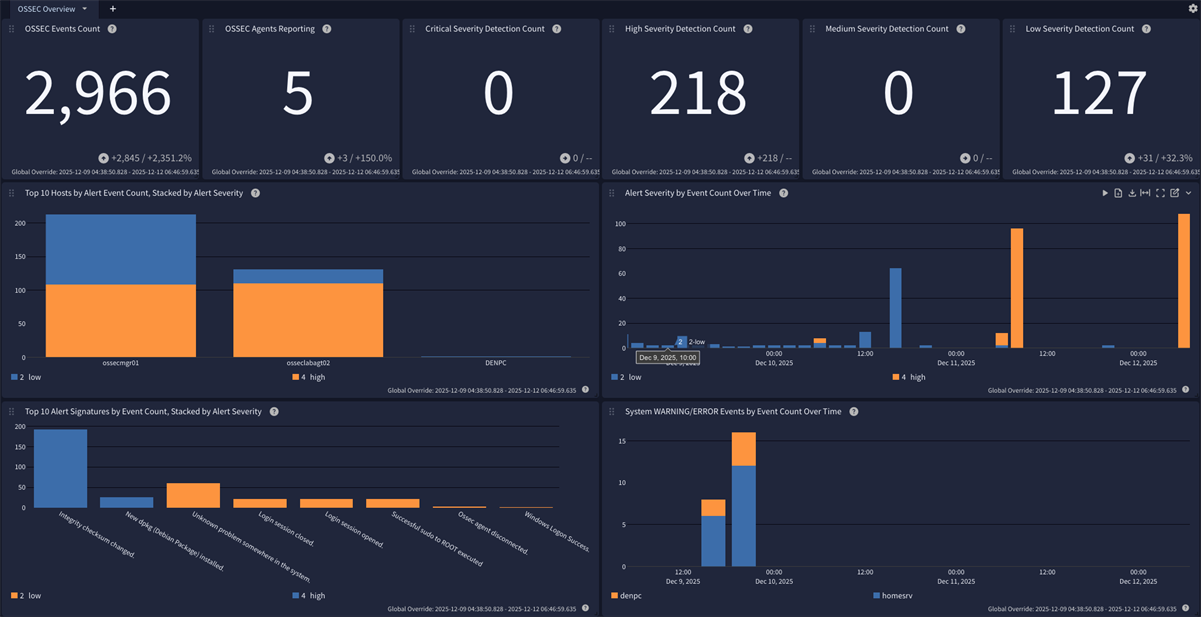
The OSSEC HIDS Processing Pack is designed to extract, normalize, and enrich OSSEC findings for more effective analysis and monitoring. It parses OSSEC HIDS logs into structured fields and adds useful context like event categorization (e.g., authentication). This enables faster search, correlation, and dashboarding across diverse environments.
Requirements
-
Graylog 7.0.0+ with a valid Enterprise license
-
OSSEC manager configured to generate alerts.json
-
Graylog Sidecar or stand-alone Filebeat agent installed on OSSEC system(s)
-
OSSEC manager and agents use default log file names: ossec.log, alerts.json, firewall.log, active-responses.log
Supported Versions
-
OSSEC 3.7.0+
Log Collection and Delivery
This pack was designed to use the Elastic Filebeat agent for log delivery. This can be configured easily using the Graylog Sidecar. The collection of OSSEC logs should be performed from the manager and all agents.
This configuration requires that the account used to run the Graylog Sidecar/Filebeat agent have the necessary permissions to access the OSSEC log files. When running Sidecar/Filebeat with a non-root service account it will be necessary to grant that service account account access to the log files.
Configuring OSSEC
The OSSEC manager must be configured to generate JSON-formatted alerts.
-
Edit the ossec.conf file on the OSSEC manager
-
locate the
<global>...</global>section in the OSSEC configuration -
Add the entry
<jsonout_output>yes</jsonout_output>inside the OSSEC<global>section -
The result should look like:
Copy<global>
<email_notification>no</email_notification>
<jsonout_output>yes</jsonout_output>
</global>
Configuring Sidecar
-
Please refer to the official documentation toset up Graylog Sidecar for Filebeat.
-
Create a matching Beats input in Graylog.
-
Ensure that the option Do not add Beats type as prefix is disabled.
-
Add the following example configuration snippet to your Filebeat configuration for Linux systems:
Copy- type: filestream
id: ossec-filestream
enabled: true
paths:
- /var/ossec/logs/alerts/alerts.json
- /var/ossec/logs/active-responses.log
- /var/ossec/logs/firewall/firewall.log
- /var/ossec/logs/ossec.log
fields_under_root: true
fields:
event_source_product: ossec -
Add the following example configuration snippet to your Filebeat configuration for Windows systems:
Copyfilebeat.inputs:
- type: filestream
id: ossec-agent-filestream
enabled: true
paths:
- 'C:\Program Files (x86)\ossec-agent\ossec.log'
- 'C:\Program Files\ossec-agent\logs\ossec.log'
parsers:
- multiline:
pattern: '^\d{4}/\d{2}/\d{2}'
negate: true
match: after
fields_under_root: true
fields:
event_source_product: ossec
Stream Configuration
This technology pack includes 1 stream:
- Illuminate:OSSEC Log Messages
Index Set Configuration
This technology pack includes 1 index set definition:
- OSSEC Log Messages
What is Provided
-
Rules to parse, normalize, and enrich OSSEC log messages.
-
A Spotlight containing a dashboard which can be used to analyze OSSEC log messages.
-
Graylog Information Model (GIM) categorization for authentication, IAM, network, audit, and detection alert categories.
-
Security Core coverage: 100000 (authentication.logon) for authentication groups with event_outcome distinguishing success/failure; 120000 (network.network_connection) for firewall events; 110000 (iam.object create) for adduser/account_changed alerts; 220500 (audit.policy) for policy_violation alerts; 300001 (detection.network_detection) for web attack, recon, IDS, SQL injection, XSS, and application security alerts; 301000 (detection.host_detection) for rootcheck/rootkit alerts.
-
Field normalization: vendor_srcip to source_ip, vendor_protocol lowercased to network_transport, vendor ports converted to long, host_hostname mapped to destination_reference, vendor_dstuser to user_name for IAM alerts.
-
SSH auth source-log parsing that extracts user_name and source_port from vendor_full_log.
OSSEC Logs Format Examples
OSSEC agents and managers generate multiple log files, each serving a distinct operational or security purpose:
alerts.json:JSON-formatted alert records generated by the OSSEC analysis engine. These entries represent detections produced by rules and decoders.Scope: OSSEC manager only.
ossec.log:Plain text service log containing messages related to OSSEC component startup, shutdown, internal state changes, errors, and operational warnings.Scope: All OSSEC systems (manager and agents).
active-responses.log:Plain text log recording the execution of active response actions (for example, command invocation, target address, and result). This log reflects what OSSEC attempted to do in response to an alert, not necessarily what the underlying system enforced.Scope:Any system with active responses enabled (manager and or agents).
firewall.log:Plain text log recording firewall-related activity associated with OSSEC active responses, such as IP blocking actions performed via firewall scripts (for example,firewall-drop.sh). Entries typically reflect actions taken by OSSEC against the local firewall rather than a complete record of firewall traffic. Scope:Systems where firewall-based active responses are executed (typically agents, but may include the manager if configured).
alerts.json
{"rule":{"level":2,"comment":"Unknown problem somewhere in the system.","sidid":1002,"firedtimes":2,"groups":["syslog","errors"]},"id":"1765569701.46775","TimeStamp":1765569701000,"location":"/var/log/syslog","full_log":"2025-12-12T20:01:41.366698+00:00 ossecmgr01 systemd[1]: Finished update-notifier-download.service - Download data for packages that failed at package install time.","hostname":"ossecmgr01","program_name":"systemd","decoder_desc":{},"agent_name":"ossecmgr01","timestamp":"2025 Dec 12 20:01:41","logfile":"/var/log/syslog"}
ossec.log
2025/12/05 23:31:54 INFO: Connected to 203.0.113.100 at address 203.0.113.100:1514, port 1514
        2025/12/05 23:31:54 ossec-syscheckd: INFO: Monitoring directory: 'C:\\Windows/System32/at.exe', with options perm | size | owner | group | md5sum | sha1sum.
active-responses.log
Thu Dec 4 08:30:14 PM UTC 2025 /var/ossec/active-response/bin/host-deny.sh add - 198.51.100.53 (from_the_server) (no_rule_id)
firewall.log
2025 Dec 05 14:03:47 (osseclabagt02) 198.51.100.254->/var/log/syslog UNKNOWN TCP 203.0.113.5:54321->192.0.2.10:22
GIM Categorization - OSSEC Alerts
Categorization is assigned according to the OSSEC alert signature ID which is stored in therule.sidid field in the source message, or alert_signature_id in the normalized message. These assignments are based on the default source ruleset included with OSSEC. The default rules can be found on the OSSEC manager, typically in the directory /var/ossec/rules/.
| OSSEC SIDID/Range or Property | Event Description | gim_event_type_code | gim_event_class | gim_event_category | gim_event_subcategory | gim_event_type |
|---|---|---|---|---|---|---|
| authentication_failed/success/failures, invalid_login groups | Authentication events | 100000 | authentication | authentication.logon | logon | |
| adduser group | New user account created | 110000 | iam | iam.object create | account created | |
| account_changed group | Existing account modified | 111000 | iam | iam.object modify | account modified | |
| Firewall log events | Firewall allow/deny events | 120000 | network | network.connection | network connection | |
| 593, 18118 | Windows Audit Log Cleared | 220000 | endpoint | audit | audit.integrity | audit log cleared |
| policy_violation group | Policy violation alerts | 220500 | endpoint | audit | audit.policy | audit policy changed |
| 594-598 | Windows Registry Integrity Events | 259999 | endpoint | registry | registry.default | registry event |
| Registry syscheck events | Windows Registry Integrity Events | 259999 | endpoint | registry | registry.default | registry event |
| Ossec agent * signature | Agent lifecycle events (started/stopped/disconnected) | 289999 | agent | agent.default | agent default | |
| web, attacks, attack, ids, recon groups | Web attack and recon detection | 300001 | detection | detection.network_detection | network_detection | |
| rootcheck/rootkit groups | Rootkit and host anomaly detection | 301000 | detection | detection.host_detection | host_malware_detection | |
| 550-555, File syscheck events | File Integrity Finding | 301003 | detection | detection.host_detection | fim_detection | |
| All other OSSEC SID IDs | Implicit mapping for all other OSSEC alerts | 301002 | detection | detection.host_detection | hips_detection |
Message Fields Included in This Pack
OSSEC Alert Log Field Normalization
OSSEC alerts refer to the messages generated, stored, and collected from the file alerts.json. The OSSEC alerts log file will only be generated on the OSSEC manager.
| Normalized Field Name | OSSEC Source Property | Notes |
|---|---|---|
alert_category
|
rule.groups | |
alert_signature
|
rule.comment or rule.description | The alert_signaturefield will be copied from the rule comment or description property, in that order. |
alert_signature_id
|
rule.sidid | |
file_hash_md5
|
SyscheckFile.md5_after | File integrity events only. |
file_hash_md5_previous
|
SyscheckFile.md5_before | File integrity events only. |
file_hash_sha1
|
SyscheckFile.sha1_after | File integrity events only. |
file_hash_sha1_previous
|
SyscheckFile.sha1_before | File integrity events only. |
file_path
|
SyscheckFile.path | File integrity events only. |
host_hostname
|
agent_name | |
host_ip
|
agentip | |
registry_hash_md5
|
SyscheckFile.md5_after | Registry integrity events only. |
registry_hash_md5_previous
|
SyscheckFile.md5_before | Registry integrity events only. |
registry_hash_sha1
|
SyscheckFile.sha1_after | Registry integrity events only. |
registry_hash_sha1_previous
|
SyscheckFile.sha1_before | Registry integrity events only. |
registry_path
|
SyscheckFile.path | Registry integrity events only. |
source_ip
|
srcip | |
user_name
|
various | This will either be pulled fromsrcuser, dstuser, or extracted depending upon the OSSEC source message. |
vendor_alert_severity_level
|
rule.level | |
vendor_event_description
|
rule.comment or rule.description | For log cleared alerts only. |
vendor_full_log
|
full_log | For log-based OSSEC alerts, a copy of the log used for the detection. |
vendor_rule_firedtimes
|
rule.firedtimes | |
vendor_source_user
|
(parsed from full_log) | SSH source log parsing: extracted user name from Failed/Accepted password logs. |
vendor_source_port
|
(parsed from full_log) | SSH source log parsing: extracted source port. |
vendor_source_ip
|
(parsed from full_log) | SSH source log parsing: extracted source IP. |
vendor_dstuser
|
dstuser | Target user for IAM events (e.g. user being created). |
source_user_name
|
(mapped) | Set to SOURCE_USER_NAME_NOT_DEFINED for IAM events. |
event_outcome
|
(mapped) | Set to failure for authentication_failed alerts and blocked firewall actions. |
application_name
|
(mapped) | Set to ossec for authentication events. |
destination_reference
|
(mapped) | Set from host_hostname or host_ip for all alerts. |
OSSEC System Log Field Extraction
The OSSEC system log messages are saved to the file ossec.log on the manager and all agents.
| Normalized Field Name | Example values | Description |
|---|---|---|
destination_hostname
|
ossecmgr01 | Hostname assigned to the target of an action described in the log. |
destination_ip
|
203.0.113.24 | Network IP address of the target system of an action described in the log. |
destination_port
|
1514 | Network service port of the target system of an action described in the log. |
service_name
|
OSSEC HIDS | OSSEC service name. |
vendor_event_action
|
Starting | OSSEC-defined action described in the log. |
vendor_subtype
|
system | The log subtype for system messages. |
OSSEC Firewall Log Field Extraction
The OSSEC firewall log messages are saved to the file firewall.logon the OSSEC systems were the activity is observed.
| Field Name | Description |
|---|---|
destination_ip
|
The IP address targeted by the network connection recorded in the firewall log entry. |
destination_port
|
The destination port number associated with the recorded network connection. |
event_observer_ip
|
The OSSEC-registered IP of the OSSEC agent that observed and reported the originating log event. |
source_ip
|
The remote IP address that initiated the network connection. |
source_port
|
The source port number used by the initiating host for the connection. |
vendor_action
|
The firewall action classification assigned by OSSEC (e.g., DROP, REJECT, UNKNOWN). |
vendor_agent_name
|
The OSSEC agent name reporting the event as recorded in the firewall log. |
vendor_logfile
|
The path to the original log file on the agent that triggered the firewall active response. |
vendor_protocol
|
The transport protocol (e.g., TCP, UDP, ICMP) extracted from the triggering event. |
vendor_subtype
|
The log subtype for OSSEC firewall log messages. |
vendor_timestamp
|
The timestamp applied by OSSEC when writing the firewall log entry. |
event_action
|
Normalized action: allowed for Allow actions, blocked for Drop/Deny/Block/Reject. |
event_outcome
|
Set to success for allowed actions, failure for blocked actions. |
network_transport
|
Normalized transport protocol (lowercased from vendor_protocol). |
gim_event_type_code
|
Set to 120000 (network connection) for all firewall events. |
OSSEC Spotlight
This spotlight offers a dashboard with 1 tab:
overview