F5 BIG-IP is an application delivery controller platform that combines load balancing, traffic management, and security services to optimize, secure, and scale networked applications.
Supported Versions
-
F5 BIG-IP ASM 17.5.1
-
F5 BIG-IP AFM 17.5.1
Supported Log Types
-
ASM,AFM -
For TMM logs:
HTTP_RESPONSE,HTTP_REQUEST
Requirements
-
Configure F5 BIG-IP to transmit Syslog to your Graylog server Syslog input.
Stream Configuration
This technology pack includes 1 stream:
- Illuminate:F5 Messages
Index Set Configuration
This technology pack includes 1 index set definition:
- F5 Bigip Messages
Log Collection
This pack parses logs from the following sources:
-
Filebeat
-
Syslog (beta support)
-
CEF (beta support)
Filebeat Configuration
-
Refer to the official documentation to set up Graylog Sidecar for Filebeat.
-
Create a matching Beats input in Graylog.
-
Ensure that the option Do not add Beats type as prefix is disabled.
-
Create an API access token and custom Windows Filebeat collector.
-
Configure the collector to ship messages to Graylog (select the right path). The Filebeat input must add the field
event_source_product: f5_bigipfor the parser to identify the log source as F5 BIG-IP. -
The option
fields_under_rootmust be set totruefor message identification to work. See the following example:Copyfilebeat.inputs:
- type: log
enabled: true
paths:
- /var/log/f5/*.log
fields:
event_source_product: f5_bigip
fields_under_root: true -
Adjust the file path in the configuration file if needed.
-
Install Graylog Sidecar on the client host.
-
Edit the Graylog Sidecar client configuration with your Graylog server API URL and API access token.
Sending Logs via Syslog
F5 BIG-IP supports Syslog. This content pack may support F5-BIG-IP Syslog for the modules ASM and AFM.
Sending Logs in CEF Format
F5 BIG-IP supports the CEF format. This content pack may work with CEF and Graylog's CEF Input, but due to a lack of example logs, the full function cannot be guaranteed. If you want to use CEF and you have test logs, please provide us with some sanitized samples.
Log Format Examples
Apr 10 09:25:46 172.16.1.2 ASM:unit_hostname="f5_01",management_ip_address="192.168.1.10",management_ip_address_2="N/A",http_class_name="/Common/App_WAF",web_application_name="/Common/App_WAF",policy_name="/Common/App_WAF",policy_apply_date="2025-04-08 2:29:51",violations="N/A",support_id="142371702665",request_status="passed",response_code="200",ip_client="11.10.5.46",route_domain="0",method="GET",protocol="HTTPS",query_string="",x_forwarded_for_header_value="11.10.5.2",sig_ids="N/A",sig_names="N/A",date_time="2025-04-10 2:25:46",severity="Informational",attack_type="N/A",geo_location="RO",ip_address_intelligence="N/A",username="N/A",session_id="C3c1eaf29ce05e59",src_port="51124",dest_port="443",dest_ip="172.16.1.11",sub_violations="N/A",virus_name="N/A",violation_rating="0",websocket_direction="N/A",websocket_message_type="N/A",device_id="N/A",staged_sig_ids="",staged_sig_names="",threat_campaign_names="N/A",staged_threat_campaign_names="N/A",blocking_exception_reason="N/A",captcha_result="not_received",microservice="N/A",tap_event_id="N/A",tap_vid="N/A",vs_name="/Common/vs-443-2021-apptest1.dom.ro-bkp",sig_cves="N/A",staged_sig_cves="N/A",uri="/notif/summary",fragment="",request="GET /notif/summary HTTP/1.1\r\nHost: apptest.dom.ro\r\nConnection: keep-alive\r\nsec-ch-ua-platform: %22Windows%22\r\nUser-Agent: Mozilla/5.0 (Windows NT 10.0; Win64; x64) AppleWebKit/537.36 (KHTML, like Gecko) Chrome/135.0.0.0 Safari/537.36\r\nsec-ch-ua: %22Google Chrome%22;v=%22135%22, %22Not-A.Brand%22;v=%228%22, %22Chromium%22;v=%22135%22\r\nsec-ch-ua-mobile: ?0\r\nAccept: */*\r\nSec-Fetch-Site: same-origin\r\nSec-Fetch-Mode: cors\r\nSec-Fetch-Dest: empty\r\nAccept-Encoding: gzip, deflate, br, zstd\r\nAccept-Language: en-US,en;q=0.9,ro;q=0.8\r\nCookie: _ga=GA1.1.845057894.1744101172; SESSION=6dceff56-9d1e-421c-ab0e-820e91591bf8; _ga_X2KD43T4E2=GS1.1.1744263.4.1.14265953.0.0.0; TS67d45652027=08fbd28c49065a7bf1423084f5cc3e81130007f7d872e9d324682b29696
Apr 10 2:25:46 172.16.1.2 AFM:acl_rule_name="",action="Open",hostname="bigip-3.pme-ds.f5.com",bigip_mgmt_ip="192.168.73.33",context_name="/Common/topaz3-all3",context_type="Virtual Server",date_time="Oct 04 2012 13:18:04",dest_ip="10.3.1.200",dest_port="443",device_product="Advanced Firewall Module",device_vendor="F5",device_version="11.3.0.2095.0",drop_reason="",errdefs_msgno="23003137",errdefs_msg_name="Network Event",ip_protocol="TCP",severity="8",partition_name="Common",route_domain="0",source_ip="10.3.1.101",source_port="39329",vlan="/Common/external"
Apr 10 2:24:59 172.16.1.2 1 2025-04-10T2:25:46.854685+03:00 f5_short tmm 8545 23003147 [F5@12276 hostname="f5_01" bigip_mgmt_ip="192.168.1.10" bigip_mgmt_ip2="::" client_ip="46.97.34.38" client_ip_geo_location="RO" client_port="28220" client_request_uri="/version.json"]
What Is Provided
-
Parsing rules to extract F5 BIG-IP logs (AFM, ASM) into Graylog schema compatible fields.
-
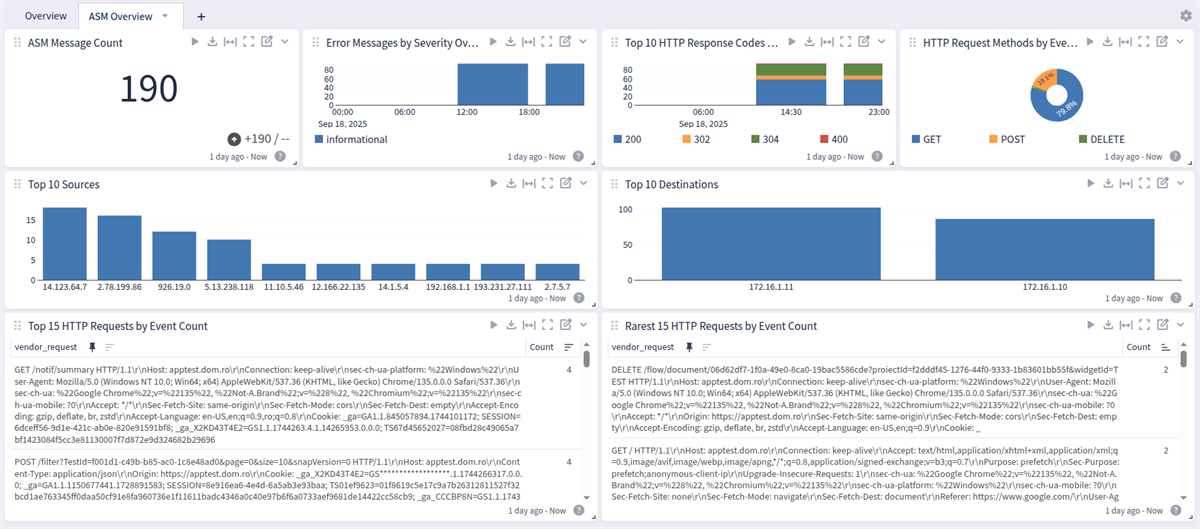
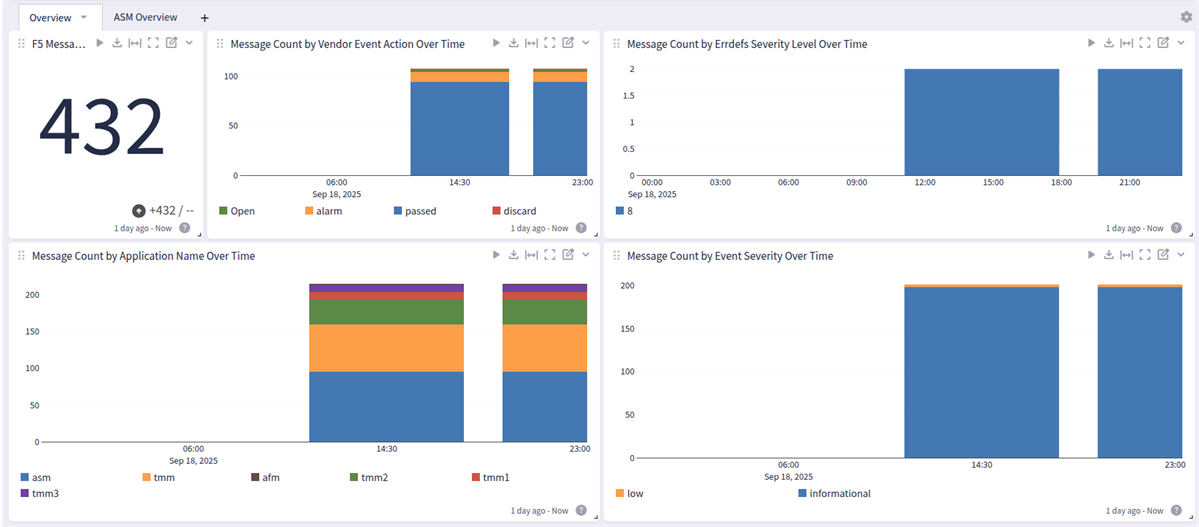
Simple dashboard with a general Overview and an Overview for ASM logs.
GIM Categorization
GIM categorization is provided for the following messages:
| vendor_event_type | gim_event_type_code |
|---|---|
| DNS Event | 149999 |
| Network Event | 120000 |
Message Fields Included in This Pack
General Parsing
| Original Field Name | Field Name | Example Value | Field Type | Description |
|---|---|---|---|---|
| part of the header | application_name | ASM | string | Application Name or Syslog Application Name |
| dest_ip | destination_ip | 172.16.1.11 | string | Destination IP address |
| dest_port | destination_port | 443 | long | Destination Port |
| hostname | host_hostname | bigip-3.pme-ds.f5.com | string | Hostname of the F5 instance |
| Mapped | event_action | allowed | string | Mapped Event Action |
| Mapped | event_severity | informational | string | mapped Event Severity |
| Mapped | event_severity_level | 1 | long | mapped Event Severity Level |
| method | http_request_method | GET | string | HTTP method used |
| ip_protocol | network_transport | tcp | string | Network Transport |
| response_code | http_response_code | 200 | long | HTTP Response Code used |
| uri | http_uri | /notif/summary | string | HTTP URI used |
| protocol | network_protocol | https | string | Network Protocol |
| session_id | session_id | C3c1eaf29ce05e59 | string | used Session ID |
| src_ip | source_ip | 11.10.5.46 | string | Source IP address |
| src_port | source_port | 51124 | long | Source Port |
| username | user_name | Tom | string | User Name |
F5 BIG-IP Spotlight Pack
This F5 BIG-IP spotlight has a general overview and an ASM overview dashboard
F5 BIG-IP: Overview Tab
F5 BIG-IP ASM Overview Tab