The Core DNS Processing Illuminate content pack includes supplementary processing of DNS-related messages and a Spotlight pack to gain additional insights into DNS-related log messages.
Requirement(s)
-
A log source that includes DNS-related messages, either analyzed DNS traffic including DNS queries and/or network traffic logs that include traffic associated with DNS servers.
-
Graylog Server with a valid security license, running Graylog version 5.1.11 or later.
Graylog Server Requirement
The Core DNS Processing Illuminate pack requires a Graylog Security license and Graylog 5.1.11 or later due to integration with the Graylog Security Asset Enrichment functionality and the entropy generation functionality.
Background
DNS
DNS, or the Domain Name System, is one of the important protocols in modern networks and is also an important data point for security monitoring and incident response.
Features
Asset Integration
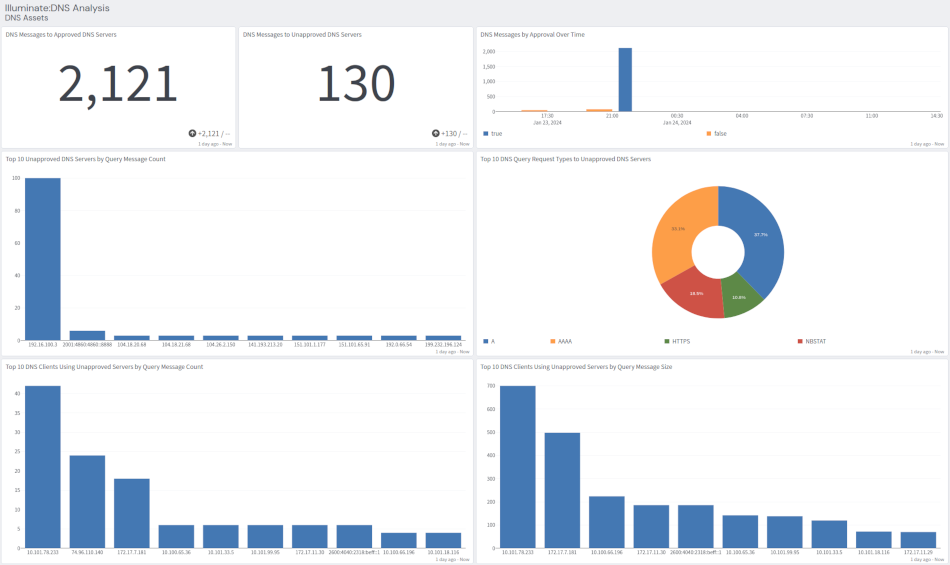
This pack, when enabled, works with the Asset Enrichment feature that is part of Graylog Security. It allows users to identify approved DNS servers, allowing for identification of traffic to non-approved DNS servers.
DNS Request Calculations
This pack enables the calculation of multiple data points related to DNS requests:
-
DNS Query Request Length
-
DNS Query Response Length
-
DNS Query Entropy
-
DNS Server Approval Status
DNS Query Request/Response Length
This is a simple count of the number of characters in a DNS request or response. This is valuable as it can be used, when measured in aggregate, to expose some attacks that use DNS for data exfiltration and command control.
DNS Query Length
When the field query_request exists, this pack generates the field query_request_length.
DNS Query Response Length
When the field query_response exists, this pack generates the field query_response_length.
The query response length is an approximate measurement of the response length. DNS responses can often include multiple values with a separator character. This measurement includes those characters.
DNS Query Request Entropy Calculations
This pack calculates the entropy, using Shannon's entropy algorithm for the value of the field query_response when that field exists, and assigns it to the field query_request_entropy.
Entropy, in this context, is the measurement of the variability of the data. Some attacks that use Domain Generation Algorithms (DGA) can be detected by measuring the entropy of the DNS request value.
DNS Server Approval Status
This pack works in concert with the Asset Enrichment functionality included with Graylog Server and identifies systems that have been identified as approved DNS servers. This can be used to detect misconfigured/unauthorized devices attached to your network and increase your situational awareness with respect to the operation of your network.
This pack adds the field approved_dns_server with the boolean value of true if the device has been identified as an approved DNS server and false if it has not been identified as approved. Note that until a server has been
identified as an approved DNS server that all DNS traffic will be considered unapproved.
Configuring Approved DNS Servers
In order to define a device as an "approved" DNS server, it must be added to the asset list and assigned a
category of approved_dns_servers.
-
In the Graylog web interface, navigate to Security > Assets.
-
If there are already assets defined, look for an existing entry for the DNS server to assign approval to. If there is already an asset entry for the DNS server to approve:
-
Select the asset entry.
-
Click in or tab to the Categories text box.
-
Enter the text
approved_dns_serversand hit the Enter key. -
Click Next repeatedly until you see the Save Asset button.
-
Click Save Asset.
-
-
If there is no existing asset entry:
-
Select New Asset.
-
Enter the Asset Name.
-
Enter the IP address associated with the DNS server in the IP Addresses field, then hit Enter.
-
Repeat the previous step for any additional IP addresses associated with the approved DNS server.
-
Add any relevant information to the other fields for this asset.
-
Select Next to advance to the next page of the asset entry form.
-
Enter any of the additional fields desired, then select Next when done.
-
Repeat this process for each page of the asset entry dialog.
-
Click Save Entry on the last page of the asset entry dialog.
-
DNS Processing Spotlight Content Pack
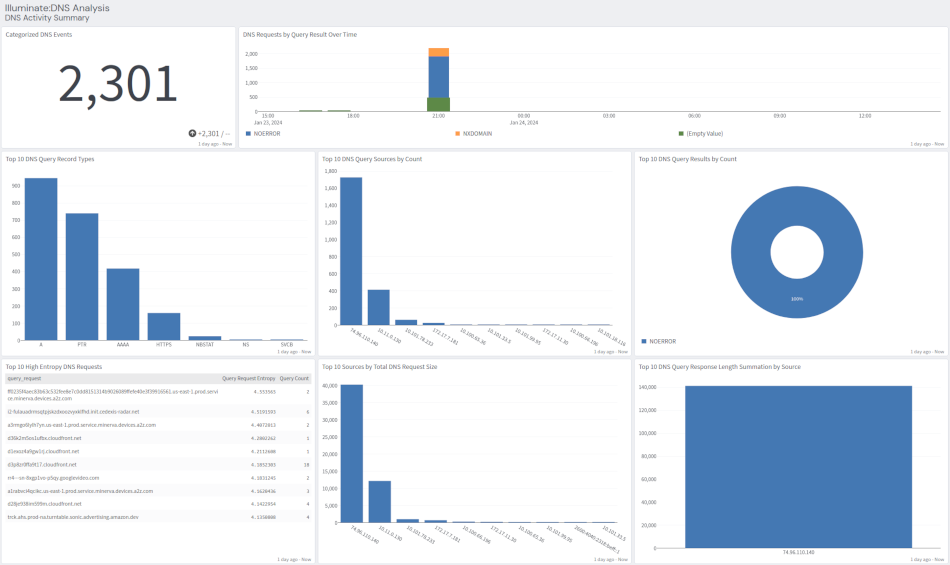
The DNS Processing Spotlight content pack contains a dashboard that provides insights in to DNS activity collected in Graylog
Dashboard: Illuminate:DNS Analysis
DNS Activity Summary tab: A high-level view of categorized DNS events.
DNS Assets tab: Review DNS traffic to approved/unapproved DNS servers.