Cisco ISE Content Pack
Cisco Identity Services Engine (ISE) is a robust, centralized network security policy management platform. It enables organizations to enforce secure access policies for endpoints, network devices, and users across wired, wireless, and VPN networks.
Supported Version(s)
-
Identity Services Engine 3.2
Requirements
-
Graylog 6.3.7+
Warning: The default length of remote log target messages configured in the Cisco ISE GUI is set to 1024. This setting will truncate messages and prevent proper parsing by Illuminate. You must configure this value to be 8192 so the full message is sent to Graylog. See the Cisco documentation for more information.
Stream Configuration
This technology pack includes 1 stream:
- Illuminate:Cisco Device Messages
Index Set Configuration
This technology pack includes 1 index set definition:
- Cisco Devices Event Log Messages
Log Collection and Delivery
You can choose to send logs via syslog or raw format (TCP or UDP). Note that Cisco products often include timestamps in logs that might not be compatible with Graylog. If this occurs, we recommend you send logs to a raw input.
TCP/UDP Syslog or RAW Input
-
See the Graylog documentation for information on different input types.
full_message option in the input if needed.
Log Format Example
Here is an example log of the various processed log types.
CISE_Failed_Attempts
<18>Jul 31 03:39:53 DEVICE-01 CISE_Failed_Attempts 0000001161 1 0 2024-12-18 13:10:56.252 +00:00 0045534800 5440 NOTICE RADIUS: Endpoint abandoned EAP session and started new, ConfigVersionId=53, Device IP Address=192.168.1.1, DestinationIPAddress=192.168.1.1, UserName=blah.blah, AcsSessionID=ATH-ISE-POL03/522862485/1041418, SelectedAccessService=RADIUS 802.1X Wireless, RequestLatency=36, FailureReason=5440 Endpoint abandoned EAP session and started new, Step=11001, Step=11017, Step=15049, Step=15008, Step=15048, Step=15048, Step=15048, Step=15048, Step=15048, Step=11507, Step=12500, Step=12625, Step=11006, Step=11001, Step=11018, Step=12301, Step=12300, Step=12625, Step=11006, Step=11001, Step=11018, Step=12302, Step=12319, Step=12800, Step=12805, Step=12806, Step=12807, Step=12808, Step=12810, Step=12305, Step=11006, Step=11001, Step=11018, Step=12304, Step=12305, Step=11006, Step=11001, Step=11018, Step=12304, Step=12305, Step=11006, Step=11001, Step=11018, Step=12304, Step=12305, Step=11006, Step=11001, Step=11018, Step=12304, Step=12305, Step=11006, Step=11001, Step=11018, Step=12304, Step=12305, Step=11006, Step=11001, Step=11018, Step=12304, Step=12319, Step=12810, Step=12812, Step=12803, Step=12804, Step=12801, Step=12802, Step=12816, Step=12310, Step=12305, Step=11006, Step=11001, Step=11018, Step=12304, Step=12313, Step=11521, Step=12305, Step=11006, Step=11001, Step=11018, Step=12304, Step=11522, Step=11806, Step=12305, Step=11006, Step=5440, NetworkDeviceName=HOME-HOME, NetworkDeviceGroups=Location#All Locations#HOME#HOME, NetworkDeviceGroups=Device Type#All Device Types#Wireless Controller, NetworkDeviceGroups=IPSEC#Is IPSEC Device#No, EapTunnel=PEAP, EapAuthentication=EAP-MSCHAPv2, User-Name=blah.blah, NAS-IP-Address=192.168.1.1, NAS-Port=1615, Called-Station-ID=HOME-AP1:Digital, Calling-Station-ID=1e-f7-a9-dd-d3-f7, NAS-Identifier=HOME-HOME:Home Digital, NAS-Port-Type=Wireless - IEEE 802.11, CPMSessionID=0B10A8C000171CA2D9E45D65, EndPointMACAddress=01-01-01-01-01-01, ISEPolicySetName=802.1X Wireless - Digital, StepLatency=84=13745, StepData=4= DEVICE.Device Type, StepData=5= Radius.NAS-Port-Type, StepData=6= Normalised Radius.RadiusFlowType, StepData=7= Radius.Called-Station-ID, StepData=8= DEVICE.Location, TLSCipher=ECDHE-RSA-AES256-GCM-SHA384, TLSVersion=TLSv1.2, DTLSSupport=Unknown, RadiusFlowType=Wireless802_1x, Network Device Profile=Cisco, Location=Location#All Locations#HOME#HOME, Device Type=Device Type#All Device Types#Wireless Controller, IPSEC=IPSEC#Is IPSEC Device#No, Response={RadiusPacketType=Drop; },
What Is Provided
-
Rules to parse, normalize, and enrich Cisco ISE log messages
-
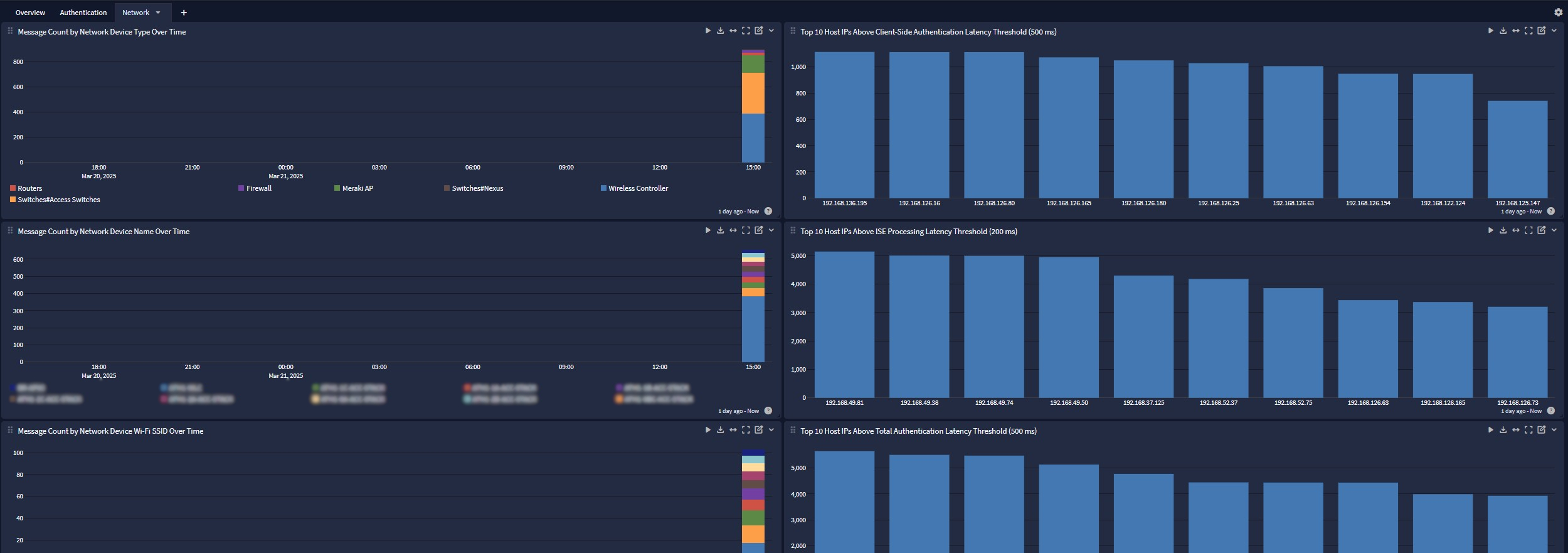
A dashboard that delivers an overview and details related to authentication and network logs.
Events Processed by This Technology Pack
The Cisco ISE content pack supports the following event IDs. Generic processing is provided for event IDs not listed.
Event Codes
During processing, a vendor_event_description and vendor_subtype field is created via a lookup of the event_code field.
| Event Code | Vendor Event Description | Vendor Subtype |
|---|---|---|
| 3000 | RADIUS Accounting start request | RADIUS Accounting |
| 3001 | RADIUS Accounting stop request | RADIUS Accounting |
| 3002 | RADIUS Accounting watchdog update | RADIUS Accounting |
| 3003 | RADIUS Accounting is on | RADIUS Accounting |
| 3004 | RADIUS Accounting is off | RADIUS Accounting |
| 3005 | RADIUS Accounting tunnel start request | RADIUS Accounting |
| 3006 | RADIUS Accounting tunnel stop request | RADIUS Accounting |
| 3007 | RADIUS Accounting tunnel rejected | RADIUS Accounting |
| 3008 | RADIUS Accounting tunnel link start | RADIUS Accounting |
| 3009 | RADIUS Accounting tunnel link stop | RADIUS Accounting |
| 3010 | RADIUS Accounting tunnel link rejected | RADIUS Accounting |
| 3300 | Received a TACACS+ Accounting request containing a command | TACACS Accounting |
| 3301 | Received a TACACS+ Accounting START request | TACACS Accounting |
| 3302 | Received a TACACS+ Accounting STOP request | TACACS Accounting |
| 3303 | Received a TACACS+ Accounting WATCHDOG request | TACACS Accounting |
| 3304 | Received a TACACS+ Accounting request but it has been rejected. See FailureReason for more information | TACACS Accounting |
| 5200 | User authentication ended successfully | Passed Authentications |
| 5201 | User authentication ended successfully | Passed Authentications |
| 5202 | The requested Command Authorization passed | Passed Authentications |
| 5203 | The requested Session Authorization passed | Passed Authentications |
| 5204 | User change password ended successfully | Passed Authentications |
| 5205 | Dynamic Authorization succeeded | Passed Authentications |
| 5206 | Access rejected after successful in-band PAC provisioning | Passed Authentications |
| 5207 | Access rejected after successful PAC-less authentication | Passed Authentications |
| 5208 | PAC-less failed | Passed Authentications |
| 5231 | Guest Authentication Passed | Passed Authentications |
| 5232 | DACL Download Succeeded | Passed Authentications |
| 5233 | TrustSec Data Download Succeeded | Passed Authentications |
| 5234 | TrustSec Peer Policy Download Succeeded | Passed Authentications |
| 5236 | Authorize-Only ended successfully | Passed Authentications |
| 5237 | Device Registration Web Authentication passed | Passed Authentications |
| 5238 | Endpoint authentication problem was fixed | Passed Authentications |
| 5239 | NAS problem was fixed | Passed Authentications |
| 5240 | Previously rejected endpoint was released to continue authentications | Passed Authentications |
| 5241 | RADIUS DTLS handshake succeeded | Passed Authentications |
| 5400 | User authentication failed. See FailureReason for more information | Failed Attempts |
| 5401 | User authentication failed. See FailureReason for more information | Failed Attempts |
| 5402 | Command Authorization failed | Failed Attempts |
| 5403 | Session Authorization failed | Failed Attempts |
| 5404 | Authorization failed | Failed Attempts |
| 5405 | RADIUS request dropped | Failed Attempts |
| 5406 | TACACS+ request dropped | Failed Attempts |
| 5407 | TACACS+ Authorization failed | Failed Attempts |
| 5408 | Command Authorization encountered error. See FailureReason for more information | Failed Attempts |
| 5409 | Session Authorization encountered an error. See FailureReason for more information | Failed Attempts |
| 5410 | TACACS+ Authorization encountered an error | Failed Attempts |
| 5411 | Supplicant did not respond to the last message that ISE sent to it | Failed Attempts |
| 5412 | TACACS+ authentication request ended with an error | Failed Attempts |
| 5413 | The RADIUS Accounting-Request was dropped. | Failed Attempts |
| 5414 | TACACS+ accounting has failed. For more information, see the failure reason records. | Failed Attempts |
| 5415 | User change password failed. See FailureReason for more information. | Failed Attempts |
| 5416 | The RADIUS PAP session has been cleaned up | Failed Attempts |
| 5417 | Dynamic Authorization failed | Failed Attempts |
| 5418 | Guest Authentication failed; please see Failure code for more details | Failed Attempts |
| 5419 | DACL Download Failed | Failed Attempts |
| 5420 | TrustSec Data Download Failed | Failed Attempts |
| 5421 | TrustSec Peer Policy Download Failed | Failed Attempts |
| 5422 | Authorize-Only failed. See FailureReason for more information | Failed Attempts |
| 5423 | Device Registration Web Authentication Failed | Failed Attempts |
| 5434 | Endpoint conducted several failed authentications of the same scenario | Failed Attempts |
| 5435 | NAS conducted several failed authentications of the same scenario | Failed Attempts |
| 5436 | Ignoring this request because it is a duplicate of another packet that is currently being processed | Failed Attempts |
| 5437 | A duplicate RADIUS request was detected for the packet that was already processed or for the packet that was already accepted but this time with at least one different parameter in Source IP, Source Port, RADIUS ID. Dropping. Possible unexpected NAD behavior. | Failed Attempts |
| 5438 | Session was not found on this ISE. Possible unexpected NAD behavior. Session belongs to this ISE according to hostname but may has already been reaped by timeout. This packet arrived too late. | Failed Attempts |
| 5439 | Session does not belong to this ISE according to hostname. Possible unexpected NAD behavior. Maybe NAD sent a packet from the middle of the conversation with another ISE. | Failed Attempts |
| 5440 | Endpoint started new authentication while previous is still in progress. Most probable that supplicant on that endpoint stopped conducting the previous authentication and started the new one. Closing the previous authentication. | Failed Attempts |
| 5441 | Endpoint started new session while the packet of previous session is being processed | Failed Attempts |
| 5442 | A RADIUS request was dropped due to system overload. This condition can be caused by too many parallel authentication requests. | Failed Attempts |
| 5443 | A RADIUS request was dropped due to reaching EAP sessions limit. This condition can be caused by too many parallel EAP authentication requests. | Failed Attempts |
| 5447 | MDM Authentication passed | Failed Attempts |
| 5448 | MDM Authentication failed; please see Failure code for more details | Failed Attempts |
| 5449 | Endpoint failed authentication of the same scenario several times and all further requests will be rejected for the duration of the Request Rejection Interval | Failed Attempts |
| 5450 | RADIUS DTLS handshake failed | Failed Attempts |
| 5451 | Indicates that User did not grant permission for ISE application to read user's information from Facebook | Failed Attempts |
| 5452 | Indicates that there is an error while getting Social User info | Failed Attempts |
| 10000 | Handling incoming Administrator authentication request | Administrator Authentication and Authorization |
| 10001 | An internal error occurred: Undetermined configuration version | Administrator Authentication and Authorization |
| 10002 | Internal error: Failure to load AAC service | Administrator Authentication and Authorization |
| 10003 | Internal error: AAC RT component received Administrator authentication request with blank Administrator name | Administrator Authentication and Authorization |
| 10004 | Internal error: AAC RT component received an Administrator authentication request with blank admin password | Administrator Authentication and Authorization |
| 10005 | Administrator authenticated successfully | Administrator Authentication and Authorization |
| 10006 | Administrator authentication failed | Administrator Authentication and Authorization |
| 10007 | Administrator authentication failed - DB Error | Administrator Authentication and Authorization |
| 10008 | Received valid Administrator authentication request | Administrator Authentication and Authorization |
| 10009 | Successfully performed service selection | Administrator Authentication and Authorization |
| 10010 | Reminder - Please change the admin password | Administrator Authentication and Authorization |
| 10011 | Admin password has expired -Please change it. | Administrator Authentication and Authorization |
| 10012 | Due to admin account inactivity the admin password must be changed. | Administrator Authentication and Authorization |
| 10013 | Admin account cannot be disabled since 'never disable' option is set. | Administrator Authentication and Authorization |
| 10014 | Admin account is set to change password at the next login | Administrator Authentication and Authorization |
| 11001 | Received RADIUS Access-Request | RADIUS Diagnostics |
| 11002 | Returned RADIUS Access-Accept - authentication succeeded | RADIUS Diagnostics |
| 11003 | Returned RADIUS Access-Reject - authentication failed | RADIUS Diagnostics |
| 11004 | Received RADIUS Accounting-Request | RADIUS Diagnostics |
| 11005 | Returned RADIUS Accounting-Response - acknowledging receipt of Accounting-Request | RADIUS Diagnostics |
| 11006 | Returned RADIUS Access-Challenge asking for additional information | RADIUS Diagnostics |
| 11007 | Could not find the network device or the AAA Client while accessing NAS by IP during authentication. | RADIUS Diagnostics |
| 11008 | Although the request contained a Service-Type attribute with the value, Call Check (10), the Host Lookup UseCase was not detected. This is because the Calling-Station-ID attribute was not present in the request | RADIUS Diagnostics |
| 11009 | Started listening for incoming RADIUS requests on submitted ports | RADIUS Diagnostics |
| 11010 | Stopped listening for RADIUS requests | RADIUS Diagnostics |
| 11011 | Could not open one or more of the ports used to receive RADIUS requests | RADIUS Diagnostics |
| 11012 | The header of the RADIUS packet did not parse correctly | RADIUS Diagnostics |
| 11014 | One of the attributes in the RADIUS packet did not parse correctly | RADIUS Diagnostics |
| 11015 | According to the RADIUS standard, an Access-Request MUST contain at least a NAS-IP-Address, NAS-IPv6-Address or a NAS-Identifier. This condition is ignored and processing continues. | RADIUS Diagnostics |
| 11016 | Translating EAP protocol result into RADIUS result | RADIUS Diagnostics |
| 11017 | RADIUS created a new session for the request | RADIUS Diagnostics |
| 11018 | RADIUS is re-using an existing session while processing this request | RADIUS Diagnostics |
| 11019 | The Service Selection policy selected the DenyAccess Service | RADIUS Diagnostics |
| 11020 | An unexpected error occurred. The RADIUS session authorization should return a valid result. | RADIUS Diagnostics |
| 11021 | RADIUS could not decipher password because the packet does not have the necessary attributes | RADIUS Diagnostics |
| 11022 | The Downloadable ACL (dACL) specified in the Authorization Profile, was added to the set of attributes that should be returned in the response | RADIUS Diagnostics |
| 11023 | Could not find the Downloadable ACL (dACL) specified in the Authorization Profile | RADIUS Diagnostics |
| 11024 | The Access-Request does not have a Message-Authenticator attribute that is required for Downloadable ACL requests. The request is rejected because of this | RADIUS Diagnostics |
| 11025 | The Access-Request is missing a cisco-av-pair attribute with the value aaa:event=acl-download that is required for Downloadable ACL requests. The request is rejected because of this. | RADIUS Diagnostics |
| 11026 | The version of the Downloadable ACL requested in the Access-Request is not found. The request is rejected because of this. | RADIUS Diagnostics |
| 11027 | Detected Host Lookup UseCase (Service-Type = Call Check (10)) | RADIUS Diagnostics |
| 11028 | Detected Host Lookup UseCase (UserName = Calling-Station-ID) | RADIUS Diagnostics |
| 11029 | The RADIUS packet type is not supported by ISE | RADIUS Diagnostics |
| 11030 | Pre-parsing of the RADIUS packet failed. This packet does not appear to be a valid RADIUS packet | RADIUS Diagnostics |
| 11031 | RADIUS packet type is not a valid Request. | RADIUS Diagnostics |
| 11032 | TACACS+ requests can only be processed by Access Services that are of type Device Administration | RADIUS Diagnostics |
| 11033 | RADIUS requests can only be processed by Access Services that are of type Network Access | RADIUS Diagnostics |
| 11034 | Process Host Lookup option was not enabled in the Allowed Protocols; so the earlier detection of Service-Type = Call Check (10) is ignored | RADIUS Diagnostics |
| 11035 | The session associated with the requested Downloadable ACL (dACL) has timed out. The request is rejected | RADIUS Diagnostics |
| 11036 | The Message-Authenticator RADIUS attribute is invalid. This maybe because of mismatched Shared Secrets. | RADIUS Diagnostics |
| 11037 | Accounting request was dropped because it was received via an unsupported UDP port number. | RADIUS Diagnostics |
| 11038 | ISE cannot validate the Authenticator field in the header of the RADIUS Accounting-Request packet. Note that the Authenticator field should not be confused with the Message-Authenticator RADIUS attribute. | RADIUS Diagnostics |
| 11039 | A RADIUS authentication request was rejected due to a critical logging error. | RADIUS Diagnostics |
| 11040 | The RADIUS accounting request was dropped due to a critical logging error. | RADIUS Diagnostics |
| 11041 | A RADIUS PAP session timed out. | RADIUS Diagnostics |
| 11042 | Received a duplicate RADIUS request. Retransmitting the previously transmitted corresponding RADIUS response. | RADIUS Diagnostics |
| 11043 | Received RADIUS CoA request | RADIUS Diagnostics |
| 11044 | Received RADIUS disconnect request | RADIUS Diagnostics |
| 11045 | Returned RADIUS CoA ACK | RADIUS Diagnostics |
| 11046 | Returned RADIUS CoA NAK | RADIUS Diagnostics |
| 11047 | Returned RADIUS disconnect ACK | RADIUS Diagnostics |
| 11048 | Returned RADIUS disconnect NAK | RADIUS Diagnostics |
| 11049 | Settings of RADIUS default network device will be used | RADIUS Diagnostics |
| 11051 | The state attribute in the RADIUS packet did not match any active session. | RADIUS Diagnostics |
| 11052 | An authentication request was dropped because it was received through an unsupported port number. | RADIUS Diagnostics |
| 11053 | The RADIUS response packet is invalid. A likely reason is that at least one of the attributes has exceeded its allowed length or that the total size of the attributes attached to this response packet exceeded 4k (max radius packet size) | RADIUS Diagnostics |
| 11054 | The RADIUS request from a non-wireless device was dropped because the installed license is for wireless devices only | RADIUS Diagnostics |
| 11055 | User name change detected for the session. Attributes for the session will be removed from the cache | RADIUS Diagnostics |
| 11056 | Duplicate of previously processed (but not the last) RADIUS Request packet received | RADIUS Diagnostics |
| 11057 | Please mention that Message-Authenticator RADIUS attribute is configured as mandatory in Allowed Protocols | RADIUS Diagnostics |
| 11058 | According to the RADIUS standard, an Access-Request MUST contain at least a NAS-IP-Address, NAS-IPv6-Address or a NAS-Identifier. This condition is ignored and processing continues. This message reports on every Access-Request. | RADIUS Diagnostics |
| 11059 | DACL attribute is not found due to bad configuration | RADIUS Diagnostics |
| 11100 | RADIUS-Client about to send request | RADIUS Diagnostics |
| 11101 | RADIUS-Client received a response | RADIUS Diagnostics |
| 11102 | RADIUS-Client silently discarded an invalid response | RADIUS Diagnostics |
| 11103 | RADIUS-Client encountered an error during processing flow | RADIUS Diagnostics |
| 11104 | RADIUS-Client request timeout expired | RADIUS Diagnostics |
| 11105 | Request received from a device that is configured with KeyWrap in ISE. | RADIUS Diagnostics |
| 11106 | Error in KeyWrap configuration | RADIUS Diagnostics |
| 11107 | Required attributes for KeyWrap are missing | RADIUS Diagnostics |
| 11108 | The RADIUS request from a KeyWrap enabled device is missing the required EapMessage attribute | RADIUS Diagnostics |
| 11109 | RADIUS request improperly contains both KeyWrap and MessageAuthenticator attributes | RADIUS Diagnostics |
| 11110 | Request received from a KeyWrap enabled device. The TunnelPassword attribute is present in KeyWrap. | RADIUS Diagnostics |
| 11111 | RADIUS request has been received with KeyWrap attributes. However, KeyWrap is not configured for the requesting device in ISE. | RADIUS Diagnostics |
| 11112 | KeyWrap keys accepted from PAC_OPAQUE. | RADIUS Diagnostics |
| 11113 | KeyWrap is not supported in Proxy. | RADIUS Diagnostics |
| 11114 | KeyWrap parameters on RADIUS request packet are not compatible with the earlier KeyWrap request in this session. | RADIUS Diagnostics |
| 11115 | The AAA Client Message Authenticator Code Key does not match the configured ISE Server Message Authenticator Code Key. | RADIUS Diagnostics |
| 11116 | Stitched existing session from Session Cache. Session ID is reused. | RADIUS Diagnostics |
| 11117 | Generated a new session ID based on the Radius attributes | RADIUS Diagnostics |
| 11200 | An invalid dynamic authorization request was received. | RADIUS Diagnostics |
| 11201 | A disconnect dynamic authorization request was received | RADIUS Diagnostics |
| 11202 | A disconnect and port shutdown dynamic authorization request was received | RADIUS Diagnostics |
| 11203 | A disconnect and port bounce dynamic authorization request was received | RADIUS Diagnostics |
| 11204 | A reauthenticate request was received | RADIUS Diagnostics |
| 11205 | Cannot find the Network Access Device designated for applying dynamic authorization change. | RADIUS Diagnostics |
| 11206 | Cannot find the Client ISE Node. | RADIUS Diagnostics |
| 11207 | A disconnect dynamic authorization response has been received | RADIUS Diagnostics |
| 11208 | A disconnect and port shutdown dynamic authorization response has been received | RADIUS Diagnostics |
| 11209 | Received disconnect and port bounce dynamic authorization response. | RADIUS Diagnostics |
| 11210 | Received a reauthenticate response. | RADIUS Diagnostics |
| 11211 | Forwarding your request to Dynamic Authorization Client in ISE. | RADIUS Diagnostics |
| 11212 | Forwarding your request to Network Access Device. | RADIUS Diagnostics |
| 11213 | No response received from Network Access Device after sending a Dynamic Authorization request | RADIUS Diagnostics |
| 11214 | An invalid response received from Network Access Device. | RADIUS Diagnostics |
| 11215 | No response has been received from Dynamic Authorization Client in ISE. | RADIUS Diagnostics |
| 11216 | The Internal Proxy PAC generation has failed. | RADIUS Diagnostics |
| 11217 | Prepared the disconnect dynamic authorization request. | RADIUS Diagnostics |
| 11218 | Prepared the disconnect and port shutdown dynamic authorization request. | RADIUS Diagnostics |
| 11219 | Prepared the disconnect and port bounce dynamic authorization request. | RADIUS Diagnostics |
| 11220 | Prepared the reauthenticate request. | RADIUS Diagnostics |
| 11221 | Received a disconnect dynamic authorization ACK response. | RADIUS Diagnostics |
| 11222 | Received a disconnect dynamic authorization NAK response. | RADIUS Diagnostics |
| 11223 | Received a dynamic authorization CoA ACK response. | RADIUS Diagnostics |
| 11224 | Received a dynamic authorization CoA NAK response. | RADIUS Diagnostics |
| 11225 | The dynamic authorization request was rejected due to a critical logging error. | RADIUS Diagnostics |
| 11226 | ISE Proxy Node, functioning as Dynamic Authorization Client, is deregistered from the deployment. | RADIUS Diagnostics |
| 11227 | ISE Proxy Node, functioning as Dynamic Authorization Client, is marked as inactive in the deployment. | RADIUS Diagnostics |
| 11300 | Could not find an TrustSec device using the SGA ID. | RADIUS Diagnostics |
| 11301 | Succeeded in locating the TrustSec device using the TrustSec ID. | RADIUS Diagnostics |
| 11302 | The request does not have a cisco-av-pair attribute starting with the value cts-pac-opaque. This value is a required attribute for Secure RADIUS requests. | RADIUS Diagnostics |
| 11303 | The cts-pac-opaque cisco-av-pair attribute contained in the Secure RADIUS request did not parse. | RADIUS Diagnostics |
| 11304 | The request for a Security Group Tag contains a non-exist value. | RADIUS Diagnostics |
| 11305 | The request for a Security Group ACL contains a non-exist value. | RADIUS Diagnostics |
| 11306 | The PAC received in the cts-pac-opaque RADIUS attribute has expired. | RADIUS Diagnostics |
| 11307 | Incorrect RADIUS CHAP attribute. | RADIUS Diagnostics |
| 11308 | Incorrect RADIUS MS-CHAP v1 attribute. | RADIUS Diagnostics |
| 11309 | Incorrect RADIUS MS-CHAP v2 attribute. | RADIUS Diagnostics |
| 11310 | Successfully sent the Security Group Access Control List to the client. | RADIUS Diagnostics |
| 11311 | Failed to locate the ACE number in the Security Group Access Control List. | RADIUS Diagnostics |
| 11312 | Successfully sent fragmented Security Group Access Control List data to the client. | RADIUS Diagnostics |
| 11313 | ISE provisioned the Unknown SGT as part of the authorization flow. Unknown SGT should not be assigned as part of a known flow | RADIUS Diagnostics |
| 11314 | ISE could not parse a TrustSec PAC recieved from device. | RADIUS Diagnostics |
| 11315 | ISE recieved illigal Environment Data request | RADIUS Diagnostics |
| 11316 | ISE sent a TrustSec CoA message and didn't receive a response. Verify network device is CoA capable. Check network device configuration | RADIUS Diagnostics |
| 11317 | ISE failed to establish SSH connection to a network device. Verify network device SSH credentials in the Network Device page are similar to the credentials configured on the network device. Check network device enabled ssh connections from ISE (ip address) | RADIUS Diagnostics |
| 11318 | ISE identified some network devices have a different IP-SGT mapping sets then ISE. Use the IP-SGT mapping Deploy option to update the devices | RADIUS Diagnostics |
| 11319 | TrustSec works only with TLS1.0, if you plan to use TrustSec, make sure it is enabled | RADIUS Diagnostics |
| 11320 | Successfully sent fragmented Environment data to the client. | RADIUS Diagnostics |
| 11321 | The TrustSec default egress policy cell was modified, make sure it is aligned with your security policy | RADIUS Diagnostics |
| 11322 | Trustsec egress policy was successfully downloaded | RADIUS Diagnostics |
| 11323 | Failed to download Trustsec egress policy | RADIUS Diagnostics |
| 11324 | Failed to send mail regarding workflow operation | RADIUS Diagnostics |
| 11325 | Successfully sent Security Group Access Control List data to the client. | RADIUS Diagnostics |
| 11350 | ISE has detected a proxy loop, because the IP address of this ISE server is already present in the sequence of RADIUS proxy servers that have forwarded this RADIUS request. | RADIUS Diagnostics |
| 11351 | ISE detected an error when trying to read the RADIUS server sequence configuration. Dropping the request. | RADIUS Diagnostics |
| 11352 | Response Proxy-State attribute must contain this ISE stamp to allow verification that the response from external RADIUS server matches the request sent to it. Verification failed. Dropping the request. | RADIUS Diagnostics |
| 11353 | Failover is not possible because no more external RADIUS servers are configured. Dropping the request. | RADIUS Diagnostics |
| 11354 | An accounting request was received; however, neither local nor remote accounting is configured. | RADIUS Diagnostics |
| 11355 | The request is being forwarded to the next remote RADIUS server from the list configured for the selected ISE proxy service. | RADIUS Diagnostics |
| 11356 | Current remote RADIUS server has failed to process the forwarded request due to any of the following reasons: The remote RADIUS server is down ; The remote RADIUS server is not configured properly ; The remote RADIUS server dropped the request. | RADIUS Diagnostics |
| 11357 | Current remote RADIUS server successfully processed the forwarded request and replied with a valid response, which is being forwarded back to the NAS. | RADIUS Diagnostics |
| 11358 | The RADIUS server sequence has received an incoming request. Validating the request and preparing to forward it to a configured external RADIUS server. | RADIUS Diagnostics |
| 11359 | The current remote RADIUS server has replied with an invalid response that would be forwarded to the next remote RADIUS server, if available. | RADIUS Diagnostics |
| 11360 | RADIUS server sequence failed to validate the incoming request. | RADIUS Diagnostics |
| 11361 | The RADIUS server sequence has received a valid incoming authentication request. | RADIUS Diagnostics |
| 11362 | The RADIUS server sequence has received a valid incoming accounting request. | RADIUS Diagnostics |
| 11363 | The RADIUS server sequence is performing a local accounting based on the incoming accounting request received. | RADIUS Diagnostics |
| 11364 | The RADIUS server sequence is performing a remote accounting based on the incoming accounting request received. | RADIUS Diagnostics |
| 11365 | The RADIUS server sequence is modifing attributes before sending request to external radius server | RADIUS Diagnostics |
| 11366 | The RADIUS server sequence is modify attributes before sending RADIUS-accept. | RADIUS Diagnostics |
| 11367 | Could not add attribute(s) to the request since attribute already exist and the attribute is not multiple allowed. | RADIUS Diagnostics |
| 11368 | Please review logs on the External RADIUS Server to determine the precise failure reason. | RADIUS Diagnostics |
| 11369 | ISE received an RADIUS proxy request but the external RADIUS server that handled previous related EAP messages is now down. Without the context of the previous EAP messages, there is no point in sending this request to another external RADIUS server | RADIUS Diagnostics |
| 11400 | The attempt to change the password failed because password change for the MS-CHAPv2 inner method is disabled in Allowed Protocols. | RADIUS Diagnostics |
| 11401 | As part of the standard in-band PAC provisioning behavior, a result of EAP-Failure and RADIUS Access-Reject will be returned, even when the PAC request was successfully approved. | RADIUS Diagnostics |
| 11402 | The attempt to change the password failed because the relevant Allowed Protocols does not allow password change for the EAP-GTC inner method. | RADIUS Diagnostics |
| 11500 | Internal error, possibly in the supplicant: Could not validate an EAP payload. | RADIUS Diagnostics |
| 11501 | Internal error, possibly in the supplicant: Could not validate an EAP payload. | RADIUS Diagnostics |
| 11502 | Internal error, possibly in the supplicant: The EAP packet contains an invalid EAP type; Could not find a corresponding protocol handler. | RADIUS Diagnostics |
| 11503 | Created an EAP-Success packet, to be attached to a RADIUS message. | RADIUS Diagnostics |
| 11504 | Created an EAP-Failure packet, to be attached to a RADIUS message. | RADIUS Diagnostics |
| 11506 | Created an EAP-Request/Identity packet, to be attached to a RADIUS message. | RADIUS Diagnostics |
| 11507 | Extracted an EAP-Response/Identity packet from the RADIUS message. | RADIUS Diagnostics |
| 11508 | As part of fallback processing due to an invalid PAC, the inner method extracted an EAP-Response/Identity packet. Since this packet's identity data does not match the originally received identity, it is considered as invalid. | RADIUS Diagnostics |
| 11509 | EAP-negotiation failed because the Allowed Protocols has no EAP-based protocols enabled. | RADIUS Diagnostics |
| 11510 | In previous EAP message ISE started an EAP method selected by Authentication Policy. Supplicant declined this EAP method by sending EAP NAK message but did not propose another EAP method that it is ready to conduct. | RADIUS Diagnostics |
| 11511 | An invalid EAP-Response/NAK packet was extracted from the RADIUS message. This packet rejected the EAP-based protocol that was proposed earlier. | RADIUS Diagnostics |
| 11512 | Extracted from the RADIUS message an EAP-Response/NAK packet, rejecting the previously-proposed EAP-based protocol, and requesting to use another protocol instead, per the configuration of the client's supplicant. | RADIUS Diagnostics |
| 11513 | For the second time in the current EAP conversation, extracted from the RADIUS message an EAP-Response/NAK packet rejecting the previously-proposed EAP-based protocol. | RADIUS Diagnostics |
| 11514 | While trying to negotiate a TLS handshake with the client, ISE expected to receive a non-empty TLS message or TLS alert message, but instead received an empty TLS message. | RADIUS Diagnostics |
| 11515 | In previous inner EAP message ISE started an inner EAP method selected by Authentication Policy. Supplicant declined this inner EAP method by sending inner EAP NAK message but did not proposed another inner EAP method that it is ready to conduct. | RADIUS Diagnostics |
| 11516 | From the EAP-Response packet encountered in the outer EAP method, extracted an EAP-Response/NAK packet rejecting the EAP-based protocol previously proposed for the inner EAP method | RADIUS Diagnostics |
| 11517 | From the EAP-Response packet encountered in the outer EAP method, extracted an EAP-Response/NAK packet rejecting the EAP-based protocol previously proposed for the inner EAP method, and requesting to use another protocol instead | RADIUS Diagnostics |
| 11518 | For the second time in the current inner EAP conversation, extracted from the EAP-Response packet in the outer EAP method an EAP-Response/NAK packet rejecting the EAP-based protocol previously proposed for the inner EAP method. | RADIUS Diagnostics |
| 11519 | Created an EAP-Success packet, for encapsulation within the outer EAP method's outgoing EAP-Request packet, and for ultimate attachment to a RADIUS message. | RADIUS Diagnostics |
| 11520 | Created an EAP-Failure packet, for encapsulation within the outer EAP method's outgoing EAP-Request packet, and for ultimate attachment to a RADIUS message. | RADIUS Diagnostics |
| 11521 | Created an EAP-Request/Identity packet, for encapsulation within the outer EAP method's outgoing EAP-Request packet, and for ultimate attachment to a RADIUS message. | RADIUS Diagnostics |
| 11522 | From the EAP-Response packet encountered in the outer EAP method, extracted an EAP-Response/Identity packet for the inner EAP method. | RADIUS Diagnostics |
| 11523 | Internal error, possibly in the supplicant: failed to validate an EAP inner-method payload. | RADIUS Diagnostics |
| 11524 | Internal error, possibly in the supplicant: failed to validate an EAP inner-method payload. | RADIUS Diagnostics |
| 11525 | Sent NDAC Authentication to client. | RADIUS Diagnostics |
| 11526 | Received NDAC Authentication response from client. | RADIUS Diagnostics |
| 11527 | Successfully finished the TEAP tunnel PAC provisioning or update. | RADIUS Diagnostics |
| 11528 | Successfully finished the TEAP machine PAC provisioning or update. | RADIUS Diagnostics |
| 11529 | Successfully finished the TEAP user authorization PAC provisioning or update. | RADIUS Diagnostics |
| 11530 | Successfully finished the TEAP machine authorization PAC provisioning or update. | RADIUS Diagnostics |
| 11531 | Successfully finished the TEAP CTS PAC provisioning or update. | RADIUS Diagnostics |
| 11532 | Successfully finished the TEAP posture PAC provisioning or update. | RADIUS Diagnostics |
| 11533 | Successfully finished TEAP PAC provisioning/update. | RADIUS Diagnostics |
| 11534 | One Tunnel PAC has already been requested in this conversation. Another Tunnel PAC request will be ignored | RADIUS Diagnostics |
| 11535 | One CTS PAC has already been requested in this conversation. Another Tunnel PAC request will be ignored | RADIUS Diagnostics |
| 11536 | One Tunnel PAC has already been requested in this conversation. Another CTS PAC request will be ignored | RADIUS Diagnostics |
| 11537 | One CTS PAC has already been requested in this conversation. Another CTS PAC request will be ignored | RADIUS Diagnostics |
| 11538 | One Machine PAC has already been requested in this conversation. Another Machine PAC request will be ignored | RADIUS Diagnostics |
| 11539 | One Authorization PAC has already been requested in this conversation. Another Authorization PAC request will be ignored | RADIUS Diagnostics |
| 11540 | Invalid PAC type requested. Ignoring this request | RADIUS Diagnostics |
| 11541 | ISE performed fallback on invalid PAC to provisioning. However during this provisioning conversation supplicant sent the PAC again. ISE will ignore this PAC. | RADIUS Diagnostics |
| 11542 | User Authorization PAC request ignored because PAC of the same type was already used to skip inner method. Authorization PAC could be provided only after full authentication conversation. | RADIUS Diagnostics |
| 11543 | Ignore Machine Authorization PAC request because of current PAC of the same type was used to skip inner method. Authorization PAC could be provided only after full authentication conversation. | RADIUS Diagnostics |
| 11544 | ISE ignores Machine Authorization PAC request when there is no EAP chaining happens in the conversation. Machine Authorization PAC can be provided only during EAP chaining conversation. | RADIUS Diagnostics |
| 11545 | TEAP authentication failed because Machine Authentication is disabled. | RADIUS Diagnostics |
| 11546 | Allowed Protocols configuration does not allow Stateless Session Resume; performing full authentication. | RADIUS Diagnostics |
| 11547 | Cannot provision Machine PAC on anonymous provisioning. Machine PAC can be provisioned only on authenticated provisioning | RADIUS Diagnostics |
| 11548 | Cannot provision Authorization PAC when the stateless session resume is disabled. Enable the stateless session resume in service settings to allow Authorization PAC provisioning | RADIUS Diagnostics |
| 11549 | Cannot provision Authorization PAC on anonymous provisioning. Authorization PAC can be provisioned only on authenticated provisioning | RADIUS Diagnostics |
| 11550 | Authorization PAC can be provided only with Tunnel PAC | RADIUS Diagnostics |
| 11551 | Authorization PAC I-ID does not match user identity. Ignoring this Authorization PAC request | RADIUS Diagnostics |
| 11552 | Machine PAC request does not contain I-ID. Ignoring this Machine PAC request | RADIUS Diagnostics |
| 11553 | Reject User Authorization PAC since its Initiator-ID does not match the Tunnel PAC Initiator-ID | RADIUS Diagnostics |
| 11554 | Received Authorization PAC from client. | RADIUS Diagnostics |
| 11555 | Received User Authorization PAC from client. | RADIUS Diagnostics |
| 11556 | Received Machine Authorization PAC from client. | RADIUS Diagnostics |
| 11557 | ISE received client certificate during tunnel establishment or inside the tunnel. ISE is going to verify this certificate and use it for authentication. | RADIUS Diagnostics |
| 11558 | The supplicant provided client certificate inside the tunnel (certificate was send encrypted) | RADIUS Diagnostics |
| 11559 | ISE requested client certificate inside the tunnel but the supplicant has not provided the client certificate. ISE will continue authenticating the supplicant by running the inner method. | RADIUS Diagnostics |
| 11560 | The supplicant provided a client certificate during tunnel establishment (certificate was sent not encrypted) | RADIUS Diagnostics |
| 11561 | ISE requested client certificate during tunnel establishment but the supplicant did not provided the client certificate. The supplicant may be configured to not send the client certificte unless encrypted. | RADIUS Diagnostics |
| 11562 | ISE received client certificate during tunnel establishment or inside the tunnel but the authentication failed. | RADIUS Diagnostics |
| 11563 | Skipped the TEAP inner method. | RADIUS Diagnostics |
| 11564 | Started the TEAP inner method. | RADIUS Diagnostics |
| 11565 | TEAP inner method finished successfully. | RADIUS Diagnostics |
| 11566 | TEAP inner method finished with failure. | RADIUS Diagnostics |
| 11567 | ISE requested a specific identity type from the client for current inner method and the client confirmed usage of this identity type. | RADIUS Diagnostics |
| 11568 | ISE requested a specific identity type from the client for the current inner method and the client denied usage of this identity type. | RADIUS Diagnostics |
| 11569 | Client sugested using the identity type 'User' in the current inner method. | RADIUS Diagnostics |
| 11570 | Client sugested using the identity type 'Machine' in the current inner method. | RADIUS Diagnostics |
| 11571 | Client sugested to use an identity type in the current inner method that was already used in a previous inner method. ISE is rejecting this identity type. | RADIUS Diagnostics |
| 11572 | Client sugested using an identity type in current inner method that is not supported by ISE. ISE is rejecting this identity type. | RADIUS Diagnostics |
| 11573 | ISE selected identity type 'User' to use in current inner method. | RADIUS Diagnostics |
| 11574 | ISE selected identity type 'Machine' to use in current inner method. | RADIUS Diagnostics |
| 11575 | ISE send Identity Type TLV in EAP request to client to conduct EP chaining. However Identity Type TLV is not present in client response. So EAP chaining is not supported by the client. ISE is switching to usual mode. | RADIUS Diagnostics |
| 11576 | TEAP cryptobinding verification passed. | RADIUS Diagnostics |
| 11577 | TEAP cryptobinding verification failed. | RADIUS Diagnostics |
| 11578 | Rejected the PAC provisioning request because the client's supplicant failed to properly adhere to the TEAP protocol. | RADIUS Diagnostics |
| 11579 | Client did not send valid PAC request at the end of TEAP provisioning conversation. | RADIUS Diagnostics |
| 11580 | Despite the fact that Allowed protocols has configured TEAP to use the PAC-less mode of operation, the client's supplicant has sent a PAC to ISE, as if the PAC-based mode is being used. | RADIUS Diagnostics |
| 11581 | ISE received an invalid PAC during authentication and perform fallback to PAC provisioning. | RADIUS Diagnostics |
| 11582 | Approved the TEAP request by the client's supplicant to provision a Tunnel PAC. | RADIUS Diagnostics |
| 11583 | Approved the TEAP request by the client's supplicant to provision a Machine PAC. | RADIUS Diagnostics |
| 11584 | Approved the TEAP request by the client's supplicant to provision an Authorization PAC. | RADIUS Diagnostics |
| 11585 | Received Tunnel PAC from client. | RADIUS Diagnostics |
| 11586 | Received Machine PAC from client. | RADIUS Diagnostics |
| 11587 | Received CTS PAC from client | RADIUS Diagnostics |
| 11588 | Client's supplicant failed to properly adhere to the TEAP protocol. It did fail to send a correct Result Tlv. | RADIUS Diagnostics |
| 11589 | TEAP Anonymous TLS renegotiation finished with success | RADIUS Diagnostics |
| 11590 | Anonymous TLS renegotiation failed. | RADIUS Diagnostics |
| 11591 | Accept client on authenticated provisioning | RADIUS Diagnostics |
| 11592 | As part of the standard in-band PAC provisioning behavior, a result of EAP-Failure and RADIUS Access-Reject will be returned, even when the PAC request was successfully approved. | RADIUS Diagnostics |
| 11593 | TEAP provisioning failed. Could not build secure tunnel. | RADIUS Diagnostics |
| 11594 | Client certificate authentication failed | RADIUS Diagnostics |
| 11595 | Continuing the TEAP protocol; processing the TEAP challenge-response in the extracted EAP-Response. | RADIUS Diagnostics |
| 11596 | As part of the continuation of the TEAP protocol, created an EAP-Request packet containing another TEAP challenge, for attachment to a RADIUS message. | RADIUS Diagnostics |
| 11597 | TEAP authentication phase finished successfully. | RADIUS Diagnostics |
| 11598 | TEAP authentication failed. | RADIUS Diagnostics |
| 11599 | TEAP provisioning phase finished successfully. | RADIUS Diagnostics |
| 11600 | Completed the TEAP PAC-provisioning phase. According to the standard, a result of EAP-Failure and RADIUS Access-Reject will be returned, even when the PAC request was successfully approved. | RADIUS Diagnostics |
| 11601 | TEAP failed SSL/TLS handshake because the client rejected the ISE local-certificate | RADIUS Diagnostics |
| 11602 | TEAP failed SSL/TLS handshake after a client alert | RADIUS Diagnostics |
| 11603 | Received from the client a PAC that failed to pass verification. | RADIUS Diagnostics |
| 11604 | The Authority ID of the client's PAC does not match that of the ISE server that processed the authentication request, probably because the client's PAC was created by another ISE. | RADIUS Diagnostics |
| 11605 | Received from the client a PAC containing an invalid PAC type. | RADIUS Diagnostics |
| 11606 | Received from the client a PAC that has expired. Rejecting it. | RADIUS Diagnostics |
| 11607 | Received from the client User Authorization PAC that has expired. Expired Authorization PAC cannot be used for fast reconnect so ISE will run inner method to authenticate the user. | RADIUS Diagnostics |
| 11608 | Received from the client Machine Authorization PAC that has expired. Expired Authorization PAC cannot be used for fast reconnect so ISE will run inner method to authenticate the machine. | RADIUS Diagnostics |
| 11609 | Received from the client a PAC that cannot be decrypted because of specified master key was not found. Rejecting it. | RADIUS Diagnostics |
| 11610 | Received from the client a PAC containing an invalid Authentication Tag. | RADIUS Diagnostics |
| 11611 | Failed to decrypt the PAC received from the client's supplicant. | RADIUS Diagnostics |
| 11612 | Failed to derive TEAP Master Key. | RADIUS Diagnostics |
| 11613 | Fallback on invalid PAC: no available additional cipher configured on server. | RADIUS Diagnostics |
| 11614 | There seems to be an internal problem with the client's supplicant, which is incorrectly trying to send an invalid PAC more then once during a single TEAP conversation. | RADIUS Diagnostics |
| 11615 | ISE is unable to complete the TLS handshake, because none of the ciphersuites suggested by the client's supplicant are compatible with invalid PAC fallback. | RADIUS Diagnostics |
| 11616 | The attempt to provision a PAC failed because the relevant Allowed Protocols allows neither anonymous nor authenticated in-band PAC provisioning. | RADIUS Diagnostics |
| 11617 | The TEAP in-band PAC-provisioning request issued by the client's supplicant has internally specified a cipher. | RADIUS Diagnostics |
| 11618 | The TEAP in-band PAC-provisioning request issued by the client's supplicant internally specified a cipher that is not compatible with the only provisioning method currently allowed by Allowed Protocols configuration: Authenticated In-Band PAC Provisioning. | RADIUS Diagnostics |
| 11619 | The TEAP in-band PAC-provisioning request issued by the client's supplicant has internally specified a cipher. | RADIUS Diagnostics |
| 11620 | TEAP full handshake finished successfully | RADIUS Diagnostics |
| 11621 | Using the PAC-less mode of TEAP authentication. The tunnel was successfully built using short handshake. | RADIUS Diagnostics |
| 11622 | TEAP full handshake finished successfully - built authenticated tunnel for purpose of phase-0 PAC provisioning. | RADIUS Diagnostics |
| 11623 | TEAP full handshake finished successfully - built anonymous tunnel for purpose of phase-0 PAC provisioning. | RADIUS Diagnostics |
| 11624 | TEAP short handshake finished successfully - built PAC-based tunnel for purpose of phase-1 authentication. | RADIUS Diagnostics |
| 11625 | The cipher specified by the client's supplicant during the TLS handshake portion of TEAP is not compatible with the PAC-less mode of operation currently configured in Allowed protocols configuration. | RADIUS Diagnostics |
| 11626 | While trying to negotiate a TLS handshake with the client inside the TEAP tunnel, ISE expected to receive a non-empty TLS message or TLS alert message, but instead received an empty TLS message. | RADIUS Diagnostics |
| 11627 | ISE is configured to perform EAP chaining. ISE is starting EAP chanining and assume that client also supports EAP chaining. | RADIUS Diagnostics |
| 11628 | TEAP needs to proactively update PAC that is about to expire. | RADIUS Diagnostics |
| 11629 | Machine Authorization PAC I-ID does not match user identity. Ignoring this Machine Authorization PAC request | RADIUS Diagnostics |
| 11630 | TEAP channelbinding verification passed. | RADIUS Diagnostics |
| 11631 | TEAP channelbinding verification failed. | RADIUS Diagnostics |
| 11632 | Created an Identity Type Tlv packet, for encapsulation within the outer EAP method's outgoing EAP-Request packet, and for ultimate attachment to a RADIUS message. | RADIUS Diagnostics |
| 11633 | Client requested TLSv1.1 as the highest version but it is not allowed. | RADIUS Diagnostics |
| 11634 | Client requested TLS of version that does not supported. | RADIUS Diagnostics |
| 11635 | Client send Crypto-Binding TLV without EMSK compound MAC. TEAP settings forbid downgrading to MSK when EMSK is available (e.g. w/ EAP-TLS inner method). | RADIUS Diagnostics |
| 11636 | ISE requested client certificate during tunnel establishment but the supplicant did not provide the client certificate. The supplicant may be not configured to send the client certificate in the clear. | RADIUS Diagnostics |
| 11637 | Inner method supports EMSK but the client provided only MSK. Allow downgrade as per configuration | RADIUS Diagnostics |
| 11639 | Client requested TLSv1.0 as the highest version. This version is not allowed by ISE. | RADIUS Diagnostics |
| 11640 | Client requested TLSv1.2 as the highest version. This version is not allowed by ISE. | RADIUS Diagnostics |
| 11641 | Client requested TLSv1.3 as the highest version. This version is not allowed by ISE. | RADIUS Diagnostics |
| 11642 | Client requested TLSv1.3 as the highest version. Currently TLSv1.2 is the highest version supported with EAP-TTLS by ISE. EAP-TLS and TEAP protocols can be used with TLSv1.3. | RADIUS Diagnostics |
| 11643 | Client requested TLSv1.3 as the highest version. Currently TLSv1.2 is the highest version supported with PEAP by ISE. EAP-TLS and TEAP protocols can be used with TLSv1.3. | RADIUS Diagnostics |
| 11644 | Client requested TLSv1.3 as the highest version. Currently TLSv1.2 is the highest version supported with EAP-FAST by ISE. EAP-TLS and TEAP protocols can be used with TLSv1.3. | RADIUS Diagnostics |
| 11645 | Client requested TLSv1.3 as EAP-TLS inner method. Currently TLSv1.2 is the highest version supported as EAP-TLS inner method. | RADIUS Diagnostics |
| 11700 | 5G AKA Authentication succeeded. | RADIUS Diagnostics |
| 11701 | 5G AKA request detected. | RADIUS Diagnostics |
| 11702 | 5G AKA Protocol is not allowed. | RADIUS Diagnostics |
| 11703 | IMSI was parsed successfully. | RADIUS Diagnostics |
| 11704 | IMSI was found in the internal database. | RADIUS Diagnostics |
| 11705 | 5G AKA Authentication data was generated successfully. | RADIUS Diagnostics |
| 11706 | Single IMEI was found, will return it in the response. | RADIUS Diagnostics |
| 11707 | 5G AKA Authentication failed. | RADIUS Diagnostics |
| 11708 | 5G Serving Network Name is missing in request. | RADIUS Diagnostics |
| 11709 | 5G Serving Network Name has invalid format. | RADIUS Diagnostics |
| 11710 | 5G Invalid User Name Format. | RADIUS Diagnostics |
| 11711 | 5G Invalid SUPI. | RADIUS Diagnostics |
| 11712 | 5G AKA Invalid SUCI. | RADIUS Diagnostics |
| 11713 | 5G Serving Network Name Was Found. | RADIUS Diagnostics |
| 11714 | Cellular request detected. | RADIUS Diagnostics |
| 11715 | No IMEI found for IMSI. | RADIUS Diagnostics |
| 11716 | Multiple IMEIs found for IMSI. | RADIUS Diagnostics |
| 11717 | User Equipment with this IMEI was not found, creating user equipment. | RADIUS Diagnostics |
| 11718 | Looking up User Equipment. | RADIUS Diagnostics |
| 11719 | The User Equipment was not found. | RADIUS Diagnostics |
| 11720 | Found User Equipment. | RADIUS Diagnostics |
| 11721 | 5G AKA user lookup failed. | RADIUS Diagnostics |
| 11722 | 5G AKA failed to generate auth data. | RADIUS Diagnostics |
| 11724 | 5G Authorize Only request detected. | RADIUS Diagnostics |
| 11725 | 5G Authorize Only failed. | RADIUS Diagnostics |
| 11726 | 5G Authorize Only user lookup failed. | RADIUS Diagnostics |
| 11800 | Created an EAP-Request packet proposing to use the EAP-MSCHAP protocol, and also providing an MSCHAP challenge, for attachment to a RADIUS message. The EAP-MSCHAP protocol was proposed because it was one of the EAP-based protocols allowed in Allowed Protocols. | RADIUS Diagnostics |
| 11801 | Extracted from the RADIUS message an EAP-Response/NAK packet, rejecting the previously-proposed EAP-based protocol, and requesting to use EAP-MSCHAP instead, per the configuration of the client's supplicant. | RADIUS Diagnostics |
| 11802 | Extracted from the RADIUS message an EAP-Response packet containing an EAP-MSCHAP challenge-response, and accepting EAP-MSCHAP as negotiated. | RADIUS Diagnostics |
| 11803 | The client's supplicant sent an EAP-Response/NAK packet rejecting the previously-proposed EAP-based protocol, and requesting to use EAP-MSCHAP instead. However, EAP-MSCHAP is not allowed in Allowed Protocols. | RADIUS Diagnostics |
| 11804 | Continuing the EAP-MSCHAP protocol; processing the EAP-MSCHAP challenge-response in the extracted EAP-Response. | RADIUS Diagnostics |
| 11805 | As part of the continuation of the EAP-MSCHAP protocol, created an EAP-Request packet containing another EAP-MSCHAP challenge, for attachment to a RADIUS message. | RADIUS Diagnostics |
| 11806 | Created an EAP-Request packet proposing to use the EAP-MSCHAP protocol for the inner method, and also providing an MSCHAP challenge, for attachment to a RADIUS message. | RADIUS Diagnostics |
| 11807 | From the EAP-Response packet encountered in the outer EAP method, extracted an EAP-Response/NAK packet, rejecting the EAP-based protocol previously proposed for the inner method, and requesting to use EAP-MSCHAP instead, per the configuration of the client's supplicant. | RADIUS Diagnostics |
| 11808 | From the EAP-Response packet encountered in the outer EAP method, extracted an EAP-Response packet containing an EAP-MSCHAP challenge-response, and accepting EAP-MSCHAP as negotiated for the inner method. | RADIUS Diagnostics |
| 11809 | The client's supplicant sent an EAP-Response/NAK packet rejecting the EAP-based protocol previously proposed for the inner method, and requesting to use EAP-MSCHAPv2 instead. However, EAP-MSCHAPv2 is not allowed in Allowed Protocols. | RADIUS Diagnostics |
| 11810 | Continuing the inner EAP-MSCHAP protocol; processing the EAP-MSCHAP challenge-response in the extracted EAP-Response. | RADIUS Diagnostics |
| 11811 | As part of the continuation of the inner EAP-MSCHAP protocol, created an EAP-Request packet containing another EAP-MSCHAP challenge, for encapsulation within the outer EAP method's outgoing EAP-Request packet, and for ultimate attachment to a RADIUS message. | RADIUS Diagnostics |
| 11812 | EAP-MSCHAP authentication succeeded. | RADIUS Diagnostics |
| 11813 | EAP-MSCHAP authentication failed. | RADIUS Diagnostics |
| 11814 | EAP-MSCHAP authentication for the inner EAP method succeeded. | RADIUS Diagnostics |
| 11815 | EAP-MSCHAP authentication for the inner EAP method failed. | RADIUS Diagnostics |
| 11816 | The MSCHAP username does not match the username received in the inner method EAP-Response/Identity packet. One possible reason might be that the client's supplicant is preconfigured with another username not matching that entered by the user. | RADIUS Diagnostics |
| 11817 | ISE was expecting certain EAP-MSCHAP message, but received another one. This could be due to a possible inconformity in the implementation of the protocol between ISE and the supplicant. | RADIUS Diagnostics |
| 11818 | Failed to parse EAP-MSCHAP packet. | RADIUS Diagnostics |
| 11819 | Received EAP-MSCHAP packet with invalid argument. | RADIUS Diagnostics |
| 11821 | The attempt to change the password failed because password change for the MS-CHAPv2 inner method is not enabled in Allowed Protocols. | RADIUS Diagnostics |
| 11822 | The attempt to change the EAP-MSCHAP password passed. | RADIUS Diagnostics |
| 11823 | EAP-MSCHAP authentication attempt failed. | RADIUS Diagnostics |
| 11824 | EAP-MSCHAP authentication attempt passed. | RADIUS Diagnostics |
| 11825 | The username received in the inner method EAP-Response/Identity packet was empty. One possible reason might be that the user did not enter a username. | RADIUS Diagnostics |
| 12000 | Created an EAP-Request packet proposing to use the EAP-MD5 protocol, and also providing an EAP-MD5 challenge, for attachment to a RADIUS message. The EAP-MD5 protocol was proposed because it was one of the EAP-based protocols allowed in Allowed Protocols. | RADIUS Diagnostics |
| 12001 | Extracted from the RADIUS message an EAP-Response/NAK packet, rejecting the previously-proposed EAP-based protocol, and requesting to use EAP-MD5 instead, per the configuration of the client's supplicant. | RADIUS Diagnostics |
| 12002 | Extracted from the RADIUS message an EAP-Response packet containing an EAP-MD5 challenge-response, and accepting EAP-MD5 as negotiated | RADIUS Diagnostics |
| 12003 | The client's supplicant sent an EAP-Response/NAK packet rejecting the previously-proposed EAP-based protocol, and requesting to use EAP-MD5 instead. However, EAP-MD5 is not allowed in Allowed Protocols. | RADIUS Diagnostics |
| 12004 | Continuing the EAP-MD5 protocol; processing the EAP-MD5 challenge-response in the extracted EAP-Response. | RADIUS Diagnostics |
| 12005 | EAP-MD5 authentication succeeded. | RADIUS Diagnostics |
| 12006 | EAP-MD5 authentication failed. | RADIUS Diagnostics |
| 12007 | Internal error: invalid EAP-MD5 state. | RADIUS Diagnostics |
| 12008 | Failed to parse EAP-MD5 packet. | RADIUS Diagnostics |
| 12100 | Created an EAP-Request packet proposing to use the EAP-FAST protocol, and also providing an EAP-FAST challenge, for attachment to a RADIUS message. The EAP-FAST protocol was proposed because it was one of the EAP-based protocols allowed in Allowed Protocols. | RADIUS Diagnostics |
| 12101 | Extracted from the RADIUS message an EAP-Response/NAK packet, rejecting the previously-proposed EAP-based protocol, and requesting to use EAP-FAST instead, per the configuration of the client's supplicant. | RADIUS Diagnostics |
| 12102 | Extracted from the RADIUS message an EAP-Response packet containing an EAP-FAST challenge-response, and accepting EAP-FAST as negotiated | RADIUS Diagnostics |
| 12103 | The client's supplicant sent an EAP-Response/NAK packet rejecting the previously-proposed EAP-based protocol, and requesting to use EAP-FAST instead. However, EAP-FAST is not allowed in Allowed Protocols. | RADIUS Diagnostics |
| 12104 | Continuing the EAP-FAST protocol; processing the EAP-FAST challenge-response in the extracted EAP-Response. | RADIUS Diagnostics |
| 12105 | As part of the continuation of the EAP-FAST protocol, created an EAP-Request packet containing another EAP-FAST challenge, for attachment to a RADIUS message. | RADIUS Diagnostics |
| 12106 | EAP-FAST authentication phase finished successfully. | RADIUS Diagnostics |
| 12107 | EAP-FAST provisioning phase finished successfully. | RADIUS Diagnostics |
| 12108 | EAP-FAST authentication failed. | RADIUS Diagnostics |
| 12109 | Completed the EAP-FAST PAC-provisioning phase. According to the standard, a result of EAP-Failure and RADIUS Access-Reject will be returned, even when the PAC request was successfully approved. | RADIUS Diagnostics |
| 12110 | Received from the client a PAC that failed to pass verification. | RADIUS Diagnostics |
| 12111 | The Authority ID of the client's PAC does not match that of the ISE server that processed the authentication request, probably because the client's PAC was created by another ISE. | RADIUS Diagnostics |
| 12112 | Received from the client a PAC containing an invalid PAC type. | RADIUS Diagnostics |
| 12113 | Received from the client a PAC that has expired. Rejecting it. | RADIUS Diagnostics |
| 12114 | Received from the client a PAC containing an invalid Authentication Tag. | RADIUS Diagnostics |
| 12115 | Successfully finished EAP-FAST PAC provisioning/update. | RADIUS Diagnostics |
| 12116 | EAP-FAST authentication failed because client sent Result TLV indicating failure. | RADIUS Diagnostics |
| 12117 | EAP-FAST inner method finished with failure. | RADIUS Diagnostics |
| 12118 | EAP-FAST cryptobinding verification failed. | RADIUS Diagnostics |
| 12119 | EAP-FAST needs to proactively update PAC that is about to expire. | RADIUS Diagnostics |
| 12120 | The attempt to provision a PAC failed because the relevant Allowed Protocols allows neither anonymous nor authenticated in-band PAC provisioning. | RADIUS Diagnostics |
| 12121 | The EAP-FAST in-band PAC-provisioning request issued by the client's supplicant has internally specified a cipher. | RADIUS Diagnostics |
| 12122 | The EAP-FAST in-band PAC-provisioning request issued by the client's supplicant internally specified a cipher that is not compatible with the only provisioning method currently allowed by Allowed Protocols configuration: Authenticated In-Band PAC Provisioning. | RADIUS Diagnostics |
| 12123 | The EAP-FAST in-band PAC-provisioning request issued by the client's supplicant has internally specified a cipher. | RADIUS Diagnostics |
| 12124 | Skipped the EAP-FAST inner method. | RADIUS Diagnostics |
| 12125 | Started the EAP-FAST inner method. | RADIUS Diagnostics |
| 12126 | EAP-FAST cryptobinding verification passed. | RADIUS Diagnostics |
| 12127 | Approved the EAP-FAST request by the client's supplicant to provision a PAC. | RADIUS Diagnostics |
| 12128 | EAP-FAST inner method finished successfully. | RADIUS Diagnostics |
| 12129 | EAP-FAST provisioning failed. Could not build secure tunnel. | RADIUS Diagnostics |
| 12130 | Failed to decrypt the PAC received from the client's supplicant. | RADIUS Diagnostics |
| 12131 | EAP-FAST full handshake finished successfully - built anonymous tunnel for purpose of phase-0 PAC provisioning. | RADIUS Diagnostics |
| 12132 | EAP-FAST short handshake finished successfully - built PAC-based tunnel for purpose of phase-1 authentication. | RADIUS Diagnostics |
| 12133 | Successfully updated the Seed key, used for further generation of master keys. | RADIUS Diagnostics |
| 12134 | Internal error: failed to update seed key, needed for further generation of master keys, most likely because an internal configuration object could not be properly fetched. | RADIUS Diagnostics |
| 12135 | Updated the Master Key Generation period. | RADIUS Diagnostics |
| 12136 | Sent NDAC Authentication to client. | RADIUS Diagnostics |
| 12137 | Received NDAC Authentication response from client. | RADIUS Diagnostics |
| 12138 | Received Authorization PAC from client. | RADIUS Diagnostics |
| 12139 | EAP-FAST Anonymous TLS renegotiation finished with success | RADIUS Diagnostics |
| 12140 | Anonymous TLS renegotiation failed. | RADIUS Diagnostics |
| 12141 | Failed to find EAP-FAST Legacy Master Key. | RADIUS Diagnostics |
| 12142 | EAP-FAST Legacy Master Key expired. | RADIUS Diagnostics |
| 12143 | Failed to derive EAP-FAST Master Key. | RADIUS Diagnostics |
| 12144 | Fallback on invalid PAC: no available additional cipher configured on server. | RADIUS Diagnostics |
| 12145 | There seems to be an internal problem with the client's supplicant, which is incorrectly trying to send an invalid PAC more then once during a single EAP-FAST conversation. | RADIUS Diagnostics |
| 12146 | ISE is unable to complete the TLS handshake, because none of the ciphersuites suggested by the client's supplicant are compatible with invalid PAC fallback. | RADIUS Diagnostics |
| 12147 | EAP-FAST authentication failed because Machine Authentication is disabled. | RADIUS Diagnostics |
| 12148 | Allowed Protocols configuration does not allow Stateless Session Resume; performing full authentication. | RADIUS Diagnostics |
| 12149 | EAP-FAST full handshake finished successfully - built authenticated tunnel for purpose of phase-0 PAC provisioning. | RADIUS Diagnostics |
| 12151 | ISE received an invalid PAC during authentication and perform fallback to PAC provisioning. | RADIUS Diagnostics |
| 12152 | Rejected the PAC provisioning request because the client's supplicant failed to properly adhere to the EAP-FAST protocol. | RADIUS Diagnostics |
| 12153 | EAP-FAST failed SSL/TLS handshake because the client rejected the ISE local-certificate | RADIUS Diagnostics |
| 12154 | EAP-FAST failed SSL/TLS handshake after a client alert | RADIUS Diagnostics |
| 12155 | One Tunnel PAC has already been requested in this conversation. Another Tunnel PAC request will be ignored | RADIUS Diagnostics |
| 12156 | One CTS PAC has already been requested in this conversation. Another Tunnel PAC request will be ignored | RADIUS Diagnostics |
| 12157 | One Tunnel PAC has already been requested in this conversation. Another CTS PAC request will be ignored | RADIUS Diagnostics |
| 12158 | One CTS PAC has already been requested in this conversation. Another CTS PAC request will be ignored | RADIUS Diagnostics |
| 12159 | One Machine PAC has already been requested in this conversation. Another Machine PAC request will be ignored | RADIUS Diagnostics |
| 12160 | Cannot provision Machine PAC on anonymous provisioning. Machine PAC can be provisioned only on authenticated provisioning | RADIUS Diagnostics |
| 12161 | Cannot provision Authorization PAC when the stateless session resume is disabled. Enable the stateless session resume in service settings to allow Authorization PAC provisioning | RADIUS Diagnostics |
| 12162 | Cannot provision Authorization PAC on anonymous provisioning. Authorization PAC can be provisioned only on authenticated provisioning | RADIUS Diagnostics |
| 12163 | One Authorization PAC has already been requested in this conversation. Another Authorization PAC request will be ignored | RADIUS Diagnostics |
| 12164 | Invalid PAC type requested. Ignoring this request | RADIUS Diagnostics |
| 12165 | Authorization PAC I-ID does not match user identity. Ignoring this Authorization PAC request | RADIUS Diagnostics |
| 12166 | Machine PAC request does not contain I-ID. Ignoring this Machine PAC request | RADIUS Diagnostics |
| 12167 | Authorization PAC can be provided only with Tunnel PAC | RADIUS Diagnostics |
| 12168 | Received CTS PAC from client | RADIUS Diagnostics |
| 12169 | Successfully finished the EAP-FAST tunnel PAC provisioning or update. | RADIUS Diagnostics |
| 12170 | Successfully finished the EAP-FAST machine PAC provisioning or update. | RADIUS Diagnostics |
| 12171 | Successfully finished the EAP-FAST user authorization PAC provisioning or update. | RADIUS Diagnostics |
| 12172 | Successfully finished the EAP-FAST posture PAC provisioning or update. | RADIUS Diagnostics |
| 12173 | Successfully finished the EAP-FAST CTS PAC provisioning or update. | RADIUS Diagnostics |
| 12174 | Received Machine PAC from client. | RADIUS Diagnostics |
| 12175 | Received Tunnel PAC from client. | RADIUS Diagnostics |
| 12176 | Using the PAC-less mode of EAP-FAST authentication. The tunnel was successfully built using full handshake. | RADIUS Diagnostics |
| 12177 | The cipher specified by the client's supplicant during the TLS handshake portion of EAP-FAST is not compatible with the PAC-less mode of operation currently configured in Allowed protocols configuration. | RADIUS Diagnostics |
| 12178 | Despite the fact that Allowed protocols has configured EAP-FAST to use the PAC-less mode of operation, the client's supplicant has sent a PAC to ISE, as if the PAC-based mode is being used. | RADIUS Diagnostics |
| 12179 | Successfully finished the EAP-FAST machine authorization PAC provisioning or update. | RADIUS Diagnostics |
| 12200 | Approved the EAP-FAST request by the client's supplicant to provision a Tunnel PAC. | RADIUS Diagnostics |
| 12201 | Approved the EAP-FAST request by the client's supplicant to provision a Machine PAC. | RADIUS Diagnostics |
| 12202 | Approved the EAP-FAST request by the client's supplicant to provision an Authorization PAC. | RADIUS Diagnostics |
| 12203 | ISE received client certificate during tunnel establishment or inside the tunnel. ISE is going to verify this certificate and use it for authentication. | RADIUS Diagnostics |
| 12204 | The supplicant provided client certificate inside the tunnel (certificate was send encrypted) | RADIUS Diagnostics |
| 12205 | ISE requested client certificate inside the tunnel but the supplicant has not provided the client certificate. ISE will continue authenticating the supplicant by running the inner method. | RADIUS Diagnostics |
| 12206 | The supplicant provided a client certificate during tunnel establishment (certificate was sent not encrypted) | RADIUS Diagnostics |
| 12207 | ISE requested client certificate during tunnel establishment but the supplicant did not provided the client certificate. | RADIUS Diagnostics |
| 12208 | ISE received client certificate during tunnel establishment or inside the tunnel but the authentication failed. | RADIUS Diagnostics |
| 12209 | ISE is configured to perform EAP chaining. ISE is starting EAP chanining and assume that client also supports EAP chaining. | RADIUS Diagnostics |
| 12210 | Received User Authorization PAC from client. | RADIUS Diagnostics |
| 12211 | Received Machine Authorization PAC from client. | RADIUS Diagnostics |
| 12212 | ISE requested a specific identity type from the client for current inner method and the client confirmed usage of this identity type. | RADIUS Diagnostics |
| 12213 | ISE requested a specific identity type from the client for the current inner method and the client denied usage of this identity type. | RADIUS Diagnostics |
| 12214 | Client sugested using the identity type 'User' in the current inner method. | RADIUS Diagnostics |
| 12215 | Client sugested using the identity type 'Machine' in the current inner method. | RADIUS Diagnostics |
| 12216 | Client sugested to use an identity type in the current inner method that was already used in a previous inner method. ISE is rejecting this identity type. | RADIUS Diagnostics |
| 12217 | Client sugested using an identity type in current inner method that is not supported by ISE. ISE is rejecting this identity type. | RADIUS Diagnostics |
| 12218 | ISE selected identity type 'User' to use in current inner method. | RADIUS Diagnostics |
| 12219 | ISE selected identity type 'Machine' to use in current inner method. | RADIUS Diagnostics |
| 12220 | ISE send Identity Type TLV in EAP request to client to conduct EP chaining. However Identity Type TLV is not present in client response. So EAP chaining is not supported by the client. ISE is switching to usual mode. | RADIUS Diagnostics |
| 12221 | ISE tried to renegotiate handshake to ask for client certificate inside the tunnel but client does not support TLS renegotiation | RADIUS Diagnostics |
| 12222 | Using the PAC-less mode of EAP-FAST authentication. The tunnel was successfully built using short handshake. | RADIUS Diagnostics |
| 12223 | ISE performed fallback on invalid PAC to provisioning. However during this provisioning conversation supplicant sent the PAC again. ISE will ignore this PAC. | RADIUS Diagnostics |
| 12224 | User Authorization PAC request ignored because PAC of the same type was already used to skip inner method. Authorization PAC could be provided only after full authentication conversation. | RADIUS Diagnostics |
| 12225 | Ignore Machine Authorization PAC request because of current PAC of the same type was used to skip inner method. Authorization PAC could be provided only after full authentication conversation. | RADIUS Diagnostics |
| 12226 | ISE preformed TLS renegotiation and started another TLS handshake. | RADIUS Diagnostics |
| 12227 | Received from the client User Authorization PAC that has expired. Expired Authorization PAC cannot be used for fast reconnect so ISE will run inner method to authenticate the user. | RADIUS Diagnostics |
| 12228 | Received from the client Machine Authorization PAC that has expired. Expired Authorization PAC cannot be used for fast reconnect so ISE will run inner method to authenticate the machine. | RADIUS Diagnostics |
| 12229 | Client did not send valid PAC request at the end of EAP-FAST provisioning conversation. Provisioning conversation should always finish with sending requested one or more PACs to the client. | RADIUS Diagnostics |
| 12230 | ISE ignores any PAC requests when it is configured for PAC-less mode | RADIUS Diagnostics |
| 12231 | ISE ignores Machine Authorization PAC request when there is no EAP chaining happens in the conversation. Machine Authorization PAC can be provided only during EAP chaining conversation. | RADIUS Diagnostics |
| 12232 | Received from the client a PAC that cannot be decrypted because of specified master key was not found. Rejecting it. | RADIUS Diagnostics |
| 12233 | Turn EAP chaining off for Cisco IP Phone authentication | RADIUS Diagnostics |
| 12234 | Client is detected as Cisco IP Phone | RADIUS Diagnostics |
| 12235 | While trying to negotiate a TLS handshake with the client inside the EAP-FAST tunnel, ISE expected to receive a non-empty TLS message or TLS alert message, but instead received an empty TLS message. | RADIUS Diagnostics |
| 12236 | Machine Authorization PAC I-ID does not match user identity. Ignoring this Machine Authorization PAC request | RADIUS Diagnostics |
| 12237 | PAC-less request by the client's supplicant to bypass PAC. | RADIUS Diagnostics |
| 12238 | Successfully processed PAC-less | RADIUS Diagnostics |
| 12239 | As part of the standard PAC provisioning behavior, a result of EAP-Failure and RADIUS Access-Reject will be returned, even when the PAC-less request was successfully approved. | RADIUS Diagnostics |
| 12300 | Created an EAP-Request packet proposing to use the PEAP protocol, and also providing a PEAP challenge, for attachment to a RADIUS message. The PEAP protocol was proposed because it was one of the EAP-based protocols allowed in Allowed Protocols. | RADIUS Diagnostics |
| 12301 | Extracted from the RADIUS message an EAP-Response/NAK packet, rejecting the previously-proposed EAP-based protocol, and requesting to use PEAP instead, per the configuration of the client's supplicant. | RADIUS Diagnostics |
| 12302 | Extracted from the RADIUS message an EAP-Response packet containing a PEAP challenge-response, and accepting PEAP as negotiated. | RADIUS Diagnostics |
| 12303 | The client's supplicant sent an EAP-Response/NAK packet rejecting the previously-proposed EAP-based protocol, and requesting to use PEAP instead. However, PEAP is not allowed in Allowed Protocols. | RADIUS Diagnostics |
| 12304 | Continuing the PEAP protocol; processing the PEAP challenge-response in the extracted EAP-Response. | RADIUS Diagnostics |
| 12305 | As part of the continuation of the PEAP protocol, created an EAP-Request packet containing another PEAP challenge, for attachment to a RADIUS message. | RADIUS Diagnostics |
| 12306 | PEAP authentication succeeded. | RADIUS Diagnostics |
| 12307 | PEAP authentication failed. | RADIUS Diagnostics |
| 12308 | Internal error, possibly in the supplicant: PEAP v0 authentication failed because client sent Result TLV indicating failure. Client indicates that it does not support Crypto-Binding TLV | RADIUS Diagnostics |
| 12309 | PEAP handshake failed. | RADIUS Diagnostics |
| 12310 | PEAP full handshake finished successfully. | RADIUS Diagnostics |
| 12311 | PEAP short handshake finished successfully - resumed previous session. | RADIUS Diagnostics |
| 12312 | PEAP fast-reconnect - skipping inner method. | RADIUS Diagnostics |
| 12313 | Started the PEAP inner method. | RADIUS Diagnostics |
| 12314 | PEAP inner method finished successfully. | RADIUS Diagnostics |
| 12315 | PEAP inner method finished with failure. | RADIUS Diagnostics |
| 12316 | PEAP version negotiation failed, apparently because the supplicant supports neither v0 nor v1. | RADIUS Diagnostics |
| 12317 | PEAP fast-reconnect failed, possibly due to internal caching-related issues, or to the possibility that the inner method used in the previous authentication is no longer enabled for PEAP. | RADIUS Diagnostics |
| 12318 | Successfully negotiated PEAP version 0. | RADIUS Diagnostics |
| 12319 | Successfully negotiated PEAP version 1. | RADIUS Diagnostics |
| 12320 | Internal error, possibly in the supplicant: PEAP v1 authentication failed because client failed to acknowledge receipt of success or failure result. | RADIUS Diagnostics |
| 12321 | PEAP failed SSL/TLS handshake because the client rejected the ISE local-certificate | RADIUS Diagnostics |
| 12322 | PEAP failed SSL/TLS handshake after a client alert | RADIUS Diagnostics |
| 12323 | PEAP cryptobinding verification failed. | RADIUS Diagnostics |
| 12324 | PEAP cryptobinding verification passed. | RADIUS Diagnostics |
| 12500 | Created an EAP-Request packet proposing to use the EAP-TLS protocol, and also providing an EAP-TLS challenge, for attachment to a RADIUS message. The TLS protocol was proposed because it was one of the EAP-based protocols allowed in Allowed Protocols. | RADIUS Diagnostics |
| 12501 | Extracted from the RADIUS message an EAP-Response/NAK packet, rejecting the previously-proposed EAP-based protocol, and requesting to use EAP-TLS instead, per the configuration of the client's supplicant. | RADIUS Diagnostics |
| 12502 | Extracted from the RADIUS message an EAP-Response packet containing an EAP-TLS challenge-response, and accepting EAP-TLS as negotiated | RADIUS Diagnostics |
| 12503 | The client's supplicant sent an EAP-Response/NAK packet rejecting the previously-proposed EAP-based protocol, and requesting to use EAP-TLS instead. However, EAP-TLS is not allowed in the Allowed Protocols. | RADIUS Diagnostics |
| 12504 | Continuing the EAP-TLS protocol; processing the EAP-TLS challenge-response in the extracted EAP-Response. | RADIUS Diagnostics |
| 12505 | As part of the continuation of the EAP-TLS protocol, created an EAP-Request packet containing another EAP-TLS challenge, for attachment to a RADIUS message. | RADIUS Diagnostics |
| 12506 | EAP-TLS authentication succeeded. | RADIUS Diagnostics |
| 12507 | EAP-TLS authentication failed. | RADIUS Diagnostics |
| 12508 | EAP-TLS handshake failed. | RADIUS Diagnostics |
| 12509 | EAP-TLS full handshake finished successfully. | RADIUS Diagnostics |
| 12510 | EAP-TLS short handshake finished successfully - resumed previous session. | RADIUS Diagnostics |
| 12511 | While trying to negotiate a TLS handshake with the client, ISE received an unexpected TLS alert message. | RADIUS Diagnostics |
| 12512 | Treat the unexpected TLS acknowledge message during tunnel building as a rejection from the client | RADIUS Diagnostics |
| 12513 | Could not establish the EAP TLS SSL session | RADIUS Diagnostics |
| 12514 | EAP-TLS failed SSL/TLS handshake because of an unknown CA in the client certificates chain | RADIUS Diagnostics |
| 12515 | EAP-TLS failed SSL/TLS handshake because of an expired CRL associated with a CA in the client certificates chain | RADIUS Diagnostics |
| 12516 | EAP-TLS failed SSL/TLS handshake because of an expired certificate in the client certificates chain | RADIUS Diagnostics |
| 12517 | EAP-TLS failed SSL/TLS handshake because of a revoked certificate in the client certificate chain | RADIUS Diagnostics |
| 12518 | EAP-TLS failed SSL/TLS handshake because of a bad certificate in the client certificate chain | RADIUS Diagnostics |
| 12519 | EAP-TLS failed SSL/TLS handshake because of an unsupported certificate in the client certificate chain | RADIUS Diagnostics |
| 12520 | EAP-TLS failed SSL/TLS handshake because the client rejected the ISE local-certificate | RADIUS Diagnostics |
| 12521 | EAP-TLS failed SSL/TLS handshake after a client alert | RADIUS Diagnostics |
| 12522 | Created an EAP-Request packet proposing to use the EAP-TLS protocol for the inner method, and also providing an TLS challenge, for attachment to a RADIUS message. | RADIUS Diagnostics |
| 12523 | From the EAP-Response packet encountered in the outer EAP method, extracted an EAP-Response/NAK packet, rejecting the EAP-based protocol previously proposed for the inner method, and requesting to use EAP-TLS instead, per the configuration of the client's supplicant. | RADIUS Diagnostics |
| 12524 | From the EAP-Response packet encountered in the outer EAP method, extracted an EAP-Response packet containing an EAP-TLS challenge-response, and accepting EAP-TLS as negotiated for the inner method. | RADIUS Diagnostics |
| 12525 | The client's supplicant sent an EAP-Response/NAK packet rejecting the EAP-based protocol previously proposed for the inner method, and requesting to use EAP-TLS instead. However, EAP-TLS is not allowed in Allowed Protocols. | RADIUS Diagnostics |
| 12526 | Continuing the inner EAP-TLS protocol; processing the EAP-TLS challenge-response in the extracted EAP-Response. | RADIUS Diagnostics |
| 12527 | As part of the continuation of the inner EAP-TLS protocol, created an EAP-Request packet containing another EAP-TLS challenge, for encapsulation within the outer EAP method's outgoing EAP-Request packet, and for ultimate attachment to a RADIUS message. | RADIUS Diagnostics |
| 12528 | EAP-TLS authentication for the inner EAP method succeeded. | RADIUS Diagnostics |
| 12529 | EAP-TLS authentication for the inner EAP method failed. | RADIUS Diagnostics |
| 12530 | EAP-TLS failed SSL/TLS handshake because of the client certificate is not yet valid | RADIUS Diagnostics |
| 12531 | Successfully updated the EAP-TLS seed key, used for further generation of master keys. | RADIUS Diagnostics |
| 12532 | Internal error: failed to update EAP-TLS seed key, needed for further generation of master keys, most likely because an internal configuration object could not be properly fetched. | RADIUS Diagnostics |
| 12533 | Updated the EAP-TLS Master Key Generation period. | RADIUS Diagnostics |
| 12534 | EAP-TLS session ticket received from supplicant. | RADIUS Diagnostics |
| 12535 | Received from the supplicant the session ticket that has expired. Rejecting it. | RADIUS Diagnostics |
| 12536 | Failed to verify the EAP-TLS session ticket received from supplicant. | RADIUS Diagnostics |
| 12537 | The EAP-TLS session ticket identity does not match the EAP identity. | RADIUS Diagnostics |
| 12538 | The EAP-TLS session ticket received from supplicant contains an invalid authentication code. | RADIUS Diagnostics |
| 12539 | Failed to decrypt the EAP-TLS session ticket received from supplicant. | RADIUS Diagnostics |
| 12540 | Successfully finished EAP-TLS session ticket provisioning/update, | RADIUS Diagnostics |
| 12541 | EAP-TLS needs to proactively update session ticket that is about to expire. | RADIUS Diagnostics |
| 12542 | The EAP-TLS session ticket received from supplicant while the stateless session resume is disabled. Performing full authentication. | RADIUS Diagnostics |
| 12543 | Encountered an internal error while attempting to issue a new session ticket. | RADIUS Diagnostics |
| 12544 | The Authority ID of the session ticket received from the client does not match that of the ISE deployment that processed the authentication request, probably because the session ticket of the client was created by another ISE deployment. | RADIUS Diagnostics |
| 12545 | Client sent empty EAP-TLS session ticket client hello extension awaiting new EAP-TLS session ticket in reposnse from ISE. | RADIUS Diagnostics |
| 12546 | The EAP-TLS session ticket received from supplicant. Inner EAP-TLS does not support stateless session resume. Performing full authentication. | RADIUS Diagnostics |
| 12550 | Send an OCSP request to the primary OCSP server for the CA. | RADIUS Diagnostics |
| 12551 | Send an OCSP request to the secondary OCSP server for the CA. | RADIUS Diagnostics |
| 12552 | Conversation with OCSP server ended with failure. | RADIUS Diagnostics |
| 12553 | Received OCSP response. | RADIUS Diagnostics |
| 12554 | The OCSP server reported that the user certificate status is good. | RADIUS Diagnostics |
| 12555 | The OCSP server reported that the user certificate status is revoked. | RADIUS Diagnostics |
| 12556 | The OCSP server reported that the user certificate status is unknown or ISE was unable to connect to the OCSP server. | RADIUS Diagnostics |
| 12557 | User Auth failed because OCSP status is unknown. | RADIUS Diagnostics |
| 12558 | Performed fallback to secondary OCSP server. | RADIUS Diagnostics |
| 12559 | Internal error during communication with the OCSP server. The configuration of the OCSP server doesn't match the ISE OCSP client. | RADIUS Diagnostics |
| 12560 | OCSP server URL is invalid and cannot be properly parsed. | RADIUS Diagnostics |
| 12561 | Connection attempt to OCSP server failed. | RADIUS Diagnostics |
| 12562 | OCSP server returned a response that cannot be parsed by ISE. | RADIUS Diagnostics |
| 12563 | OCSP server returned an error in response to the ISE OCSP request. | RADIUS Diagnostics |
| 12564 | Specific OCSP service in ISE is configured to use nonce for OCSP server verification but the OCSP server did not provide a nonce in response. | RADIUS Diagnostics |
| 12565 | Cryptographic verification of nonce returned in OCSP server response failed. | RADIUS Diagnostics |
| 12566 | In the OCSP server response verification of 'This Update' or 'Next Update' fields failed. | RADIUS Diagnostics |
| 12567 | OCSP server response signature verification failed. | RADIUS Diagnostics |
| 12568 | Lookup user certificate status in OCSP cache. | RADIUS Diagnostics |
| 12569 | User certificate status was not found in OCSP cache; ISE is going to perform OCSP request to the configured OCSP server. | RADIUS Diagnostics |
| 12570 | Lookup user certificate status in OCSP cache succeeded; ISE is going to use this status without performing OCSP request to the configured OCSP server. | RADIUS Diagnostics |
| 12571 | OCSP verification either failed or returned unknown certificate status. ISE will continue to CRL verification if it is configured for specific CA. | RADIUS Diagnostics |
| 12572 | Response from OCSP server indicates that the contents of the response should not be cached | RADIUS Diagnostics |
| 12600 | Created an EAP-Request packet to propose to use the EAP-GTC protocol, and also providing an GTC challenge, for attachment to a RADIUS message. The EAP-GTC protocol was proposed because it was one of the EAP-based protocols allowed in Allowed Protocols. | RADIUS Diagnostics |
| 12601 | Extracted from the RADIUS message an EAP-Response/NAK packet, rejecting the previously-proposed EAP-based protocol, and requesting to use EAP-GTC instead, per the configuration of the client's supplicant. | RADIUS Diagnostics |
| 12602 | Extracted from the RADIUS message an EAP-Response packet containing an EAP-GTC challenge-response, and accepting EAP-GTC as negotiated. | RADIUS Diagnostics |
| 12603 | The client's supplicant sent an EAP-Response/NAK packet rejecting the previously-proposed EAP-based protocol, and requesting to use EAP-GTC instead. However, EAP-GTC is not allowed in Allowed Protocols. | RADIUS Diagnostics |
| 12604 | Continuing the EAP-GTC protocol; processing the EAP-GTC challenge-response in the extracted EAP-Response. | RADIUS Diagnostics |
| 12605 | As part of the continuation of the EAP-GTC protocol, created an EAP-Request packet containing another EAP-GTC challenge, for attachment to a RADIUS message. | RADIUS Diagnostics |
| 12606 | Created an EAP-Request packet to propose to use the EAP-GTC protocol for the inner method, and also providing an GTC challenge, for attachment to a RADIUS message. The EAP-GTC protocol was proposed because it was one of the EAP-based protocols allowed in Allowed Protocols. | RADIUS Diagnostics |
| 12607 | From the EAP-Response packet encountered in the outer EAP method, extracted an EAP-Response/NAK packet, rejecting the EAP-based protocol previously proposed for the inner method, and requesting to use EAP-GTC instead, per the configuration of the client's supplicant. | RADIUS Diagnostics |
| 12608 | From the EAP-Response packet encountered in the outer EAP method, extracted an EAP-Response packet containing an EAP-GTC challenge-response, and accepting EAP-GTC as negotiated for the inner method. | RADIUS Diagnostics |
| 12609 | The client's supplicant sent an EAP-Response/NAK packet rejecting the EAP-based protocol previously proposed for the inner method, and requesting to use EAP-GTC instead. However, EAP-GTC is not allowed in Allowed Protocols. | RADIUS Diagnostics |
| 12610 | Continuing the inner EAP-GTC protocol; processing the EAP-GTC challenge-response in the extracted EAP-Response. | RADIUS Diagnostics |
| 12611 | As part of the continuation of the inner EAP-GTC protocol, created an EAP-Request packet containing another EAP-GTC challenge, for encapsulation within the outer EAP method's outgoing EAP-Request packet, and for ultimate attachment to a RADIUS message. | RADIUS Diagnostics |
| 12612 | EAP-GTC authentication has succeeded. | RADIUS Diagnostics |
| 12613 | EAP-GTC authentication has failed. | RADIUS Diagnostics |
| 12614 | EAP-GTC authentication for the inner EAP method has succeeded. | RADIUS Diagnostics |
| 12615 | EAP-GTC authentication for the inner EAP method has failed. | RADIUS Diagnostics |
| 12616 | The GTC username does not match the username received in the inner method EAP-Response/Identity packet. One possible reason might be that the client's supplicant is preconfigured with another username not matching that entered by the user. | RADIUS Diagnostics |
| 12617 | Internal error: invalid EAP-GTC state. | RADIUS Diagnostics |
| 12618 | Failed to parse the EAP-GTC packet. | RADIUS Diagnostics |
| 12619 | Received an EAP-GTC packet with an invalid argument. | RADIUS Diagnostics |
| 12621 | The attempt to change the password failed because the Allowed Protocols does not allow password change for the GTC inner method. | RADIUS Diagnostics |
| 12622 | The EAP-GTC password change attempt has passed. | RADIUS Diagnostics |
| 12623 | The EAP-GTC authentication attempt has failed. | RADIUS Diagnostics |
| 12624 | The EAP-GTC authentication attempt has passed. | RADIUS Diagnostics |
| 12625 | A valid EAP-Key-Name attribute was received. ISE will provide the EAP-Key-Name attribute filled with EAP-Session-ID on RADIUS Access-Accept message. | RADIUS Diagnostics |
| 12626 | An invalid EAP-Key-Name attribute was received. The attribute value must be empty. | RADIUS Diagnostics |
| 12628 | Internal error, invalid operation performed, cannot continue current conversation. Refer to debug log for detailed information and contact TAC engineer to report the problem | RADIUS Diagnostics |
| 12650 | Internal error, invalid operation performed. Refer to debug log for detailed information and contact TAC engineer to report the problem | RADIUS Diagnostics |
| 12651 | Accept client on authenticated provisioning | RADIUS Diagnostics |
| 12652 | Accept client on provisioning after invalid PAC fallback | RADIUS Diagnostics |
| 12653 | The client's supplicant sent an EAP-Response/NAK packet rejecting the EAP-based protocol previously proposed for the inner method, and requesting to use EAP-GTC instead. However, EAP-GTC cannot be used for anonymous PAC provisioning. | RADIUS Diagnostics |
| 12700 | Created an EAP-Request packet to propose to use the LEAP protocol, and also providing a LEAP challenge, for attachment to a RADIUS message. The LEAP protocol was proposed because it was one of the EAP-based protocols allowed in Allowed Protocols. | RADIUS Diagnostics |
| 12701 | Extracted from the RADIUS message an EAP-Response/NAK packet, rejecting the previously-proposed EAP-based protocol, and requesting to use LEAP instead, per the configuration of the client's supplicant. | RADIUS Diagnostics |
| 12702 | Extracted from the RADIUS message an EAP-Response packet containing a LEAP challenge-response, and accepting LEAP as negotiated | RADIUS Diagnostics |
| 12703 | The client's supplicant sent an EAP-Response/NAK packet rejecting the previously-proposed EAP-based protocol, and requesting to use LEAP instead. However, LEAP is not allowed in Allowed Protocols. | RADIUS Diagnostics |
| 12704 | Completed the LEAP protocol. Sent the LEAP challenge-response in EAP-Response, and LEAP session-key in cisco-av-pair. | RADIUS Diagnostics |
| 12705 | LEAP authentication passed. Continue LEAP protocol. | RADIUS Diagnostics |
| 12706 | LEAP authentication has failed. Protocol finished with a failure. | RADIUS Diagnostics |
| 12707 | A LEAP authentication error has occurred. Protocol finished with an error. | RADIUS Diagnostics |
| 12708 | Failed to validate LEAP packet. | RADIUS Diagnostics |
| 12709 | Failed to parse LEAP packet. | RADIUS Diagnostics |
| 12710 | LEAP internal error: Invalid state. | RADIUS Diagnostics |
| 12711 | LEAP internal error: LEAP challenge was not created. | RADIUS Diagnostics |
| 12712 | LEAP internal error: LEAP challenge-response and session-key were not created. | RADIUS Diagnostics |
| 12750 | The client's supplicant sent an EAP-Response/NAK packet rejecting the EAP-based protocol previously proposed for the inner method, and requesting to use EAP-MSCHAP instead. However, EAP-MSCHAP is not allowed under PEAP configuration in Allowed Protocols. | RADIUS Diagnostics |
| 12751 | The client's supplicant sent an EAP-Response/NAK packet rejecting the EAP-based protocol previously proposed for the inner method, and requesting to use EAP-MSCHAP instead. However, EAP-MSCHAP is not allowed under EAP-FAST configuration in Allowed Protocols. | RADIUS Diagnostics |
| 12752 | The client's supplicant sent an EAP-Response/NAK packet rejecting the EAP-based protocol that was previously proposed for the inner method, and requested to use EAP-TLS instead. However, ISE does not allow EAP-TLS under PEAP configuration in the Allowed Protocols. | RADIUS Diagnostics |
| 12753 | The client's supplicant sent an EAP-Response/NAK packet rejecting the EAP-based protocol that was previously proposed for the inner method, and requested to use EAP-TLS instead. However, ISE does not allow EAP-TLS under EAP-FAST configuration in the Allowed Protocols. | RADIUS Diagnostics |
| 12754 | The client's supplicant sent an EAP-Response/NAK packet rejecting the EAP-based protocol previously proposed for the inner method, and requesting to use EAP-GTC instead. However, EAP-GTC is not allowed under PEAP configuration in Allowed Protocols. | RADIUS Diagnostics |
| 12755 | The client's supplicant sent an EAP-Response/NAK packet rejecting the EAP-based protocol that was previously proposed for the inner method, and requested to use EAP-GTC instead. However, ISE does not allow EAP-GTC under EAP-FAST configuration in Allowed Protocols. | RADIUS Diagnostics |
| 12756 | Created an EAP-Request packet proposing to use the TEAP protocol, and also providing an TEAP challenge, for attachment to a RADIUS message. The TEAP protocol was proposed because it was one of the EAP-based protocols allowed in Allowed Protocols. | RADIUS Diagnostics |
| 12757 | Extracted from the RADIUS message an EAP-Response/NAK packet, rejecting the previously-proposed EAP-based protocol, and requesting to use TEAP instead, per the configuration of the client's supplicant. | RADIUS Diagnostics |
| 12758 | Extracted from the RADIUS message an EAP-Response packet containing an TEAP challenge-response, and accepting TEAP as negotiated | RADIUS Diagnostics |
| 12759 | The client's supplicant sent an EAP-Response/NAK packet rejecting the previously-proposed EAP-based protocol, and requesting to use TEAP instead. However, TEAP is not allowed in Allowed Protocols. | RADIUS Diagnostics |
| 12760 | The client's supplicant sent an EAP-Response/NAK packet rejecting the EAP-based protocol previously proposed for the inner method, and requesting to use EAP-MSCHAP instead. However, EAP-MSCHAP is not allowed under TEAP configuration in Allowed Protocols. | RADIUS Diagnostics |
| 12761 | The client's supplicant sent an EAP-Response/NAK packet rejecting the EAP-based protocol that was previously proposed for the inner method, and requested to use EAP-TLS instead. However, ISE does not allow EAP-TLS under TEAP configuration in the Allowed Protocols. | RADIUS Diagnostics |
| 12762 | The client's supplicant sent an EAP-Response/NAK packet rejecting the EAP-based protocol that was previously proposed for the inner method, and requested to use EAP-GTC instead. However, ISE does not allow EAP-GTC under TEAP configuration in Allowed Protocols. | RADIUS Diagnostics |
| 12763 | Encrypted extentions server write | RADIUS Diagnostics |
| 12764 | Encrypted extentions server read | RADIUS Diagnostics |
| 12765 | Server certificate verify write | RADIUS Diagnostics |
| 12766 | Server read certificate yerify | RADIUS Diagnostics |
| 12767 | Server write key update | RADIUS Diagnostics |
| 12768 | Client write key update | RADIUS Diagnostics |
| 12769 | Client read key update | RADIUS Diagnostics |
| 12770 | Server read key update | RADIUS Diagnostics |
| 12771 | Early data | RADIUS Diagnostics |
| 12772 | Pending early data end | RADIUS Diagnostics |
| 12773 | Write end of early data | RADIUS Diagnostics |
| 12774 | Server read end of early data | RADIUS Diagnostics |
| 12775 | Client read end of early data | RADIUS Diagnostics |
| 12776 | Unknown state | RADIUS Diagnostics |
| 12777 | Write client session ticket | RADIUS Diagnostics |
| 12800 | For the first time in the current EAP conversation, extracted from the EAP-Response packet a TLS record, presumably containing in turn a TLS ClientHello message. ISE recognizes this as an attempt by the client's supplicant to initiate a TLS handshake. | RADIUS Diagnostics |
| 12801 | As part of the TLS handshake currently in progress, prepared a TLS record containing a TLS ChangeCipherSpec message, for encapsulation within the outgoing EAP-Request packet, and for ultimate attachment to a RADIUS message. | RADIUS Diagnostics |
| 12802 | As part of the TLS handshake currently in progress, prepared a TLS record containing a TLS Finished message, for encapsulation within the outgoing EAP-Request packet, and for ultimate attachment to a RADIUS message. ISE is indicating that it is ready to finish the TLS handshake. | RADIUS Diagnostics |
| 12803 | As part of the TLS handshake currently in progress, extracted from the EAP-Response packet a TLS record containing a TLS ChangeCipherSpec message. | RADIUS Diagnostics |
| 12804 | As part of the TLS handshake currently in progress, extracted from the EAP-Response packet a TLS record containing a TLS Finished message. The client's supplicant is indicating that it is ready to finish the TLS handshake. | RADIUS Diagnostics |
| 12805 | As part of the TLS handshake currently in progress, extracted from the EAP-Response packet a TLS record containing a TLS ClientHello message. | RADIUS Diagnostics |
| 12806 | As part of the TLS handshake currently in progress, prepared a TLS record containing a TLS ServerHello message, for encapsulation within the outgoing EAP-Request packet, and for ultimate attachment to a RADIUS message. | RADIUS Diagnostics |
| 12807 | As part of the TLS handshake currently in progress, prepared a TLS record containing a TLS Certificate message, in turn containing the ISE local server certificate, for encapsulation within the outgoing EAP-Request packet, and for ultimate attachment to a RADIUS message. | RADIUS Diagnostics |
| 12808 | As part of the TLS handshake currently in progress, prepared a TLS record containing a TLS ServerKeyExchange message, for encapsulation within the outgoing EAP-Request packet, and for ultimate attachment to a RADIUS message. | RADIUS Diagnostics |
| 12809 | As part of the TLS handshake currently in progress, prepared a TLS record containing a TLS CertificateRequest message, for encapsulation within the outgoing EAP-Request packet, and for ultimate attachment to a RADIUS message. | RADIUS Diagnostics |
| 12810 | As part of the TLS handshake currently in progress, prepared a TLS record containing a TLS ServerDone message, for encapsulation within the outgoing EAP-Request packet, and for ultimate attachment to a RADIUS message. | RADIUS Diagnostics |
| 12811 | As part of the TLS handshake currently in progress, extracted from the EAP-Response packet a TLS record containing a TLS Certificate message, in turn containing the client's certificate. | RADIUS Diagnostics |
| 12812 | As part of the TLS handshake currently in progress, extracted from the EAP-Response packet a TLS record containing a TLS ClientKeyExchange message. | RADIUS Diagnostics |
| 12813 | As part of the TLS handshake currently in progress, extracted from the EAP-Response packet a TLS record containing a TLS CertificateVerify message. | RADIUS Diagnostics |
| 12814 | ISE has detected a problem with the TLS handshake currently in progress. Prepared a TLS record containing a TLS Alert message, for encapsulation within the outgoing EAP-Request packet, and for ultimate attachment to a RADIUS message. | RADIUS Diagnostics |
| 12815 | As part of the TLS handshake currently in progress, extracted from the EAP-Response packet a TLS record containing a TLS Alert message, indicating that the client has detected a problem with the handshake. | RADIUS Diagnostics |
| 12816 | The TLS handshake initiated by the client's supplicant has completed successfully. | RADIUS Diagnostics |
| 12817 | The TLS handshake initiated by the client's supplicant has failed. | RADIUS Diagnostics |
| 12818 | ISE recently sent TLS alert to supplicant and expected TLS acknowledge from supplicant for the alert but received another message. This could be due to a possible incomformity in the implementation of the protocol between ISE and the supplicant. | RADIUS Diagnostics |
| 12819 | ISE recently has successfully finished TLS handshake with the supplicant and expected TLS acknowledge from supplicant to confirm the handshake but received another message. | RADIUS Diagnostics |
| 12820 | Lock Identity feature is enabled and the identity was locked due to previous failed attempts | RADIUS Diagnostics |
| 12830 | ISE was unable to download CRL; CRL verification bypassed | RADIUS Diagnostics |
| 12831 | ISE was unable to download CRL; corresponding authentication has failed | RADIUS Diagnostics |
| 12832 | Local server certificate has a specific period of time when it is active and can be used. The certificate cannot be used now because of either its 'Valid From' field is greater then the current date and time or its 'Valid To' field is less then the current date and time. | RADIUS Diagnostics |
| 12833 | Local server certificate is invalid because it is not yet active or it has already expired. Thus, the EAP-FAST provisioning mode is restricted to anonymous (if anonymous provisioning is allowed in configuration). Authenticated provisioning is prohibited even if it is allowed in configuration | RADIUS Diagnostics |
| 12834 | ISE used a CRL even though it is not yet active or has expired | RADIUS Diagnostics |
| 12835 | ISE accepted expired user or machine certificate per configuration | RADIUS Diagnostics |
| 12850 | ISE expects for regular conversation continuation but client sent NAK TLV inside the tunnel. It means that client rejected conversation for some reason that is unknown to ISE. | RADIUS Diagnostics |
| 12851 | ISE expects for regular conversation continuation but client sent outer EAP method NAK message. It means that client rejected conversation for some reason that is unknown to ISE. | RADIUS Diagnostics |
| 12852 | ISE received invalid encrypted buffer from client. Cryptographic processing of this buffer failed. | RADIUS Diagnostics |
| 12853 | ISE received empty EAP-GTC message inside the tunnel during EAP-FAST conversation. Known issue: CSSC 5.1.1.10 sends empty EaP-GTC message after it prompts user to retry entering passcode. | RADIUS Diagnostics |
| 12854 | ISE did not receive user password or received empty password. Plain password authentication cannot be performed with no password or empty password | RADIUS Diagnostics |
| 12855 | ISE did not send a PAC to the supplicant because authorization failed and thus the whole conversation is considered failed | RADIUS Diagnostics |
| 12856 | CRL verification returned revoked certificate status. | RADIUS Diagnostics |
| 12857 | Client certificate authentication failed | RADIUS Diagnostics |
| 12858 | Server indicates that it will not send any more messages on this connection | RADIUS Diagnostics |
| 12859 | Server indicates that a field in the handshake was incorrect or inconsistent with other fields | RADIUS Diagnostics |
| 12860 | Invalid connection retry attempt from a client | RADIUS Diagnostics |
| 12861 | User is canceling the handshake for some reason unrelated to a protocol failure | RADIUS Diagnostics |
| 12862 | Client receive a handshake message not containing an extension that is mandatory to send for the offered TLS version or other negotiated parameters | RADIUS Diagnostics |
| 12863 | Server indicates that there is no server with the name provided by the client via the server_name extension | RADIUS Diagnostics |
| 12864 | Client indicates that an invalid or unacceptable OCSP response is provided by the server via the status_request extension | RADIUS Diagnostics |
| 12865 | Sent by servers when PSK key establishment is desired but no acceptable PSK identity is provided by the client. Sending this alert is OPTIONAL; servers MAY instead choose to send a decrypt_error alert to merely indicate an invalid PSK | RADIUS Diagnostics |
| 12866 | Server indicates that a client certificate is desired but none was provided by the client | RADIUS Diagnostics |
| 12867 | Server indicates that a client application_layer_protocol_negotiation extension advertises only protocols that the server does not support | RADIUS Diagnostics |
| 12868 | Client indicates that handshake message containing an extension known to be prohibited for inclusion in the given handshake message, or including any extensions in a ServerHello or Certificate not first offered in the corresponding CertificateRequest | RADIUS Diagnostics |
| 12869 | Client indicates that it will not send any more messages on this connection | RADIUS Diagnostics |
| 12870 | Client is canceling the handshake for some reason unrelated to a protocol failure | RADIUS Diagnostics |
| 12871 | Server receive a handshake message not containing an extension that is mandatory to send for the offered TLS version or other negotiated parameters | RADIUS Diagnostics |
| 12872 | Server indicates that handshake message containing an extension known to be prohibited for inclusion in the given handshake message, or including any extensions in a ServerHello or Certificate not first offered in the corresponding ClientHello or CertificateRequest | RADIUS Diagnostics |
| 12902 | NAS sends RADIUS accounting modem start messages too frequently | RADIUS Diagnostics |
| 12903 | NAS sends RADIUS accounting modem stop messages too frequently | RADIUS Diagnostics |
| 12904 | NAS sends RADIUS accounting cancel messages too frequently | RADIUS Diagnostics |
| 12905 | NAS sends RADIUS accounting on messages too frequently | RADIUS Diagnostics |
| 12906 | NAS sends RADIUS accounting off messages too frequently | RADIUS Diagnostics |
| 12907 | NAS sends RADIUS accounting tunnel start messages too frequently | RADIUS Diagnostics |
| 12908 | NAS sends RADIUS accounting tunnel stop messages too frequently | RADIUS Diagnostics |
| 12909 | NAS sends RADIUS accounting tunnel reject messages too frequently | RADIUS Diagnostics |
| 12910 | NAS sends RADIUS accounting tunnel link start messages too frequently | RADIUS Diagnostics |
| 12911 | NAS sends RADIUS accounting tunnel link stop messages too frequently | RADIUS Diagnostics |
| 12912 | NAS sends RADIUS accounting tunnel link reject messages too frequently | RADIUS Diagnostics |
| 12913 | NAS sends RADIUS accounting reserved for failed messages too frequently | RADIUS Diagnostics |
| 12914 | Using weak TLS cipher | RADIUS Diagnostics |
| 12915 | PEAP version negotiation failed because supplicant proposed version 1 while the option 'Allow PEAPv 0 Only' is turned on. | RADIUS Diagnostics |
| 12916 | ISE recently has sent another TLS fragment to the supplicant and expected TLS acknowledge from supplicant to confirm the fragment before sending it the next one but received another message. | RADIUS Diagnostics |
| 12917 | ISE recently has sent PEAPv1 protected termination EAP Success message to the supplicant and expected TLS acknowledge from supplicant to confirm that but received another message. | RADIUS Diagnostics |
| 12918 | ISE sent EAP Request to the supplicant with a certain identifier. According to EAP specification supplicant must respond to this request with EAP Response packet with the same identifier. However the EAP identifier in the response was different from the request. | RADIUS Diagnostics |
| 12919 | ISE sent inner EAP Request to the supplicant with a certain identifier. According to EAP specification supplicant must respond to this request with EAP Response packet with the same identifier. However the EAP identifier in the response was different from the request. | RADIUS Diagnostics |
| 12921 | Supplicant stopped responding to ISE during TEAP tunnel establishment | RADIUS Diagnostics |
| 12928 | Supplicant stopped responding to ISE during TEAP protected termination | RADIUS Diagnostics |
| 12929 | NAS sends RADIUS accounting update messages too frequently | RADIUS Diagnostics |
| 12930 | Supplicant stopped responding to ISE after sending it the first PEAP message | RADIUS Diagnostics |
| 12931 | Supplicant stopped responding to ISE after sending it the first EAP-TLS message | RADIUS Diagnostics |
| 12932 | Supplicant stopped responding to ISE after sending it the first EAP-FAST message | RADIUS Diagnostics |
| 12933 | Supplicant stopped responding to ISE during EAP-FAST tunnel establishment | RADIUS Diagnostics |
| 12934 | Supplicant stopped responding to ISE during PEAP tunnel establishment | RADIUS Diagnostics |
| 12935 | Supplicant stopped responding to ISE during EAP-TLS certificate exchange | RADIUS Diagnostics |
| 12936 | Supplicant stopped responding to ISE after sending it inner EAP Identity Request | RADIUS Diagnostics |
| 12937 | Supplicant stopped responding to ISE after sending it the first inner EAP-MSCHAPv2 message | RADIUS Diagnostics |
| 12938 | Supplicant stopped responding to ISE after sending it the first inner EAP-GTC message | RADIUS Diagnostics |
| 12939 | Supplicant stopped responding to ISE after sending it the first inner EAP-TLS message | RADIUS Diagnostics |
| 12940 | Supplicant stopped responding to ISE during conducting inner EAP-MSCHAPv2 method | RADIUS Diagnostics |
| 12941 | Supplicant stopped responding to ISE during conducting inner EAP-GTC method | RADIUS Diagnostics |
| 12942 | Supplicant stopped responding to ISE during conducting inner EAP-TLS method | RADIUS Diagnostics |
| 12943 | Supplicant stopped responding to ISE during PEAPv0 protected termination | RADIUS Diagnostics |
| 12944 | Supplicant stopped responding to ISE during PEAPv1 protected termination | RADIUS Diagnostics |
| 12945 | Supplicant stopped responding to ISE during EAP-FAST protected termination | RADIUS Diagnostics |
| 12946 | Supplicant stopped responding to ISE during LEAP | RADIUS Diagnostics |
| 12947 | Supplicant stopped responding to ISE during EAP-MD5 | RADIUS Diagnostics |
| 12948 | Supplicant sent unexpected unencrypted TLS handshake message instead of TLS application data in PEAP protocol | RADIUS Diagnostics |
| 12949 | Supplicant sent malformed PEAP message - wrong block cioher padding | RADIUS Diagnostics |
| 12950 | Supplicant sent malformed PEAP message - bad record MAC | RADIUS Diagnostics |
| 12951 | Unexpected renegotiation received. Renegotiation is not supported in PEAP | RADIUS Diagnostics |
| 12952 | Session does not belong to this PSN according to hostname. Possible unexpected NAD behavior. Maybe NAD sent a packet from the middle of the conversation with another PSN. | RADIUS Diagnostics |
| 12953 | Session was not found on this PSN. Possible unexpected NAD behavior. Session belongs to this PSN according to hostname but may has already been reaped by timeout. This packet arrived too late. | RADIUS Diagnostics |
| 12954 | The CRL found for specific CA does not fit the CA. Possible usage of more than one CA with the same name and CRL with no AKI for one of them. So ISE cannot determine to which CA the CRL belongs. | RADIUS Diagnostics |
| 12955 | RADIUS request that contains EAP message must contain MessageAuthenticator attribute | RADIUS Diagnostics |
| 12956 | Client certificate validation failed due to name constraints permitted subtree violation | RADIUS Diagnostics |
| 12957 | Client certificate validation failed due to name constraints excluded subtree violation | RADIUS Diagnostics |
| 12958 | Client certificate validation failed due to min or max name constraints values violation | RADIUS Diagnostics |
| 12959 | Client certificate validation failed due to unsupported name constraint type | RADIUS Diagnostics |
| 12960 | Client certificate validation failed due to bad or unsupported name constraint syntax | RADIUS Diagnostics |
| 12961 | Client certificate validation failed due to bad or unsupported name syntax of the constraint | RADIUS Diagnostics |
| 12962 | Reject User Authorization PAC since its Initiator-ID does not match the Tunnel PAC Initiator-ID | RADIUS Diagnostics |
| 12963 | ISE received malformed EAP Payload TLV from the supplicat | RADIUS Diagnostics |
| 12964 | ISE sent EAP Result TLV indicating success | RADIUS Diagnostics |
| 12965 | ISE sent EAP Result TLV indicating failure | RADIUS Diagnostics |
| 12966 | ISE sent EAP Intermediate Result TLV indicating success | RADIUS Diagnostics |
| 12967 | ISE sent EAP Intermediate Result TLV indicating failure | RADIUS Diagnostics |
| 12968 | Client didn't provide suitable ciphers that are allowed on ISE | RADIUS Diagnostics |
| 12970 | EAP-TTLS inner method finished with failure. | RADIUS Diagnostics |
| 12971 | Continuing the EAP-TTLS protocol; processing the EAP-TTLS challenge-response in the extracted EAP-Response. | RADIUS Diagnostics |
| 12972 | EAP-TTLS failed SSL/TLS handshake because the client rejected the ISE local-certificate | RADIUS Diagnostics |
| 12973 | EAP-TTLS failed SSL/TLS handshake after a client alert | RADIUS Diagnostics |
| 12974 | EAP-TTLS handshake failed. | RADIUS Diagnostics |
| 12975 | EAP-TTLS authentication succeeded. | RADIUS Diagnostics |
| 12976 | EAP-TTLS authentication failed. | RADIUS Diagnostics |
| 12977 | EAP-TTLS short handshake finished successfully - built tunnel for purpose of authentication. | RADIUS Diagnostics |
| 12978 | Extracted from the RADIUS message an EAP-Response packet containing a EAP-TTLS challenge-response, and accepting EAP-TTLS as negotiated. | RADIUS Diagnostics |
| 12979 | Extracted from the RADIUS message an EAP-Response/NAK packet, rejecting the previously-proposed EAP-based protocol, and requesting to use EAP-TTLS instead, per the configuration of the client's supplicant. | RADIUS Diagnostics |
| 12980 | The client's supplicant sent an EAP-Response/NAK packet rejecting the previously-proposed EAP-based protocol, and requesting to use EAP-TTLS instead. However, EAP-TTLS is not allowed in Allowed Protocols. | RADIUS Diagnostics |
| 12981 | Supplicant stopped responding to ISE during EAP-TTLS tunnel establishment | RADIUS Diagnostics |
| 12982 | Supplicant stopped responding to ISE during EAP-TTLS plain inner MSCHAPv2 authentication flow | RADIUS Diagnostics |
| 12983 | Created an EAP-Request packet proposing to use the EAP-TTLS protocol, and also providing a EAP-TTLS challenge, for attachment to a RADIUS message. The EAP-TTLS protocol was proposed because it was one of the EAP-based protocols allowed in Allowed Protocols. | RADIUS Diagnostics |
| 12984 | Unexpected renegotiation received. Renegotiation is not supported in EAP_TTLS | RADIUS Diagnostics |
| 12985 | As part of the continuation of the EAP-TTLS protocol, created an EAP-Request packet containing another EAP-TTLS challenge, for attachment to a RADIUS message. | RADIUS Diagnostics |
| 12986 | Client requested TLSv1.0 or TLSv1.1 as the highest version but it is not allowed in the security settings | RADIUS Diagnostics |
| 12987 | Take OCSP servers list from AIA extension of client certificate | RADIUS Diagnostics |
| 12988 | Take OCSP servers list from OCSP service configuration | RADIUS Diagnostics |
| 12989 | Sent an OCSP request to the next OCSP server in the list | RADIUS Diagnostics |
| 12990 | If the OCSP service was configured to take OCSP servers list from the AIA extension of client certificate then at least one valid OCSP server URL must be present. | RADIUS Diagnostics |
| 12991 | No more OCSP servers in AIA estension of client certificate | RADIUS Diagnostics |
| 12992 | No AIA extension in client certificate | RADIUS Diagnostics |
| 12993 | User Auth failed because OCSP is unreachable | RADIUS Diagnostics |
| 12994 | EAP-TTLS inner method CHAP is not allowed in Allowed Protocols | RADIUS Diagnostics |
| 12995 | EAP-TTLS inner method MSCHAPv1 is not allowed in Allowed Protocols | RADIUS Diagnostics |
| 12996 | EAP-TTLS inner method MSCHAPv2 is not allowed in Allowed Protocols | RADIUS Diagnostics |
| 12997 | EAP-TTLS inner method PAP is not allowed in Allowed Protocols | RADIUS Diagnostics |
| 12998 | The client's supplicant sent an EAP-Response/NAK packet rejecting the EAP-based protocol that was previously proposed for the inner method, and requested to use EAP-MD5 instead. However, ISE does not allow EAP-MD5 under EAP-TTLS configuration in Allowed Protocols. | RADIUS Diagnostics |
| 12999 | From the EAP-Response packet encountered in the outer EAP method, extracted an EAP-Response/NAK packet, rejecting the EAP-based protocol previously proposed for the inner method, and requesting to use EAP-MD5 instead, per the configuration of the client's supplicant. | RADIUS Diagnostics |
| 13000 | The TACACS+ authorization request was not one that ISE supports | TACACS Diagnostics |
| 13001 | The TACACS+ accounting request was not one that ISE supports | TACACS Diagnostics |
| 13002 | Started TACACS+ listener | TACACS Diagnostics |
| 13003 | Stopped TACACS+ listener | TACACS Diagnostics |
| 13004 | TACACS+ listener failed | TACACS Diagnostics |
| 13005 | Received TACACS+ Authorization Request | TACACS Diagnostics |
| 13006 | Received TACACS+ Accounting Request | TACACS Diagnostics |
| 13007 | The header of the TACACS+ packet failed to parse correctly | TACACS Diagnostics |
| 13008 | Check the Network Device or AAA Client and/or the network in between that device and ISE for hardware problems | TACACS Diagnostics |
| 13009 | The attempt to accept a connection request from a TACACS+ client failed. This could occur if the client, after initiating the request 'hangs up' before ISE is able to accept the connection. If this happens frequently it could indicate a faulty device or a potential DOS attack | TACACS Diagnostics |
| 13010 | Received TACACS+ packet with less then 12 bytes or more than the defined maximum length | TACACS Diagnostics |
| 13011 | The TACACS+ request packet was invalid. A likely reason is that the Shared Secret configured in the device and the Shared Secret configured for the Network Device or AAA Client in ISE do not match | TACACS Diagnostics |
| 13013 | Received TACACS+ Authentication START Request | TACACS Diagnostics |
| 13014 | Received TACACS+ Authentication CONTINUE Request | TACACS Diagnostics |
| 13015 | Returned TACACS+ Authentication Reply | TACACS Diagnostics |
| 13017 | A TACACS+ packet was received with a source IP Address that did not match any configured Network Device or AAA Client | TACACS Diagnostics |
| 13019 | Internal Error: Failed to obtain TACACS+ settings from the configuration database | TACACS Diagnostics |
| 13020 | Obtain TACACS+ default network device setting. | TACACS Diagnostics |
| 13021 | TACACS+ request was dropped because of system overload. | TACACS Diagnostics |
| 13023 | The requested Command matched a Deny-Always rule in one of the Command Sets | TACACS Diagnostics |
| 13024 | Command matched a Permit rule | TACACS Diagnostics |
| 13025 | The requested command failed to match a Permit rule in any of the Command Sets | TACACS Diagnostics |
| 13027 | The TACACS+ authorization request is missing both the User and Remote-Address attributes | TACACS Diagnostics |
| 13029 | The TACACS+ user requested a higher privilege level than the Maximum Privilege Level configured in the Shell Profile | TACACS Diagnostics |
| 13030 | The TACACS+ authentication request did not provide a User name | TACACS Diagnostics |
| 13031 | The TACACS+ authentication request did not provide a user Password | TACACS Diagnostics |
| 13032 | Internal Error: Unable to access Access Service configuration in the database | TACACS Diagnostics |
| 13034 | Returned TACACS+ Authorization Reply | TACACS Diagnostics |
| 13035 | Returned TACACS+ Accounting Reply | TACACS Diagnostics |
| 13036 | Selected Shell Profile fails for thsi request | TACACS Diagnostics |
| 13037 | Shell Profile Privilege Level not configured correctly | TACACS Diagnostics |
| 13038 | The TACACS+ request failed because of a critical logging error. | TACACS Diagnostics |
| 13039 | The TACACS+ authentication request does not contain the user's new password. | TACACS Diagnostics |
| 13040 | The TACACS+ authentication request does not contain the user's new password to confirm the change password request. | TACACS Diagnostics |
| 13041 | The TACACS+ authentication request switches from Login to Change Password functionality. | TACACS Diagnostics |
| 13042 | The TACACS+ authentication request to change a user's password does not contain a confirmation password. | TACACS Diagnostics |
| 13043 | Challenge-response mechanism is not supported by the selected TACACS+ authentication type. | TACACS Diagnostics |
| 13044 | TACACS+ will use the password prompt returned by the identity store. | TACACS Diagnostics |
| 13045 | TACACS+ will use the password prompt from global TACACS+ configuration. | TACACS Diagnostics |
| 13046 | TACACS+ ASCII change password request. | TACACS Diagnostics |
| 13050 | Invalid TACACS+ MSCHAP flag value. | TACACS Diagnostics |
| 13051 | Size of data fieid is small. | TACACS Diagnostics |
| 13052 | Size of data fieid is small. | TACACS Diagnostics |
| 13060 | ACS detected an error when trying to read the TACACS proxy configuration. | TACACS Diagnostics |
| 13061 | An accounting request was received; however, neither local nor remote accounting is configured. | TACACS Diagnostics |
| 13062 | Failover is not possible because no more external TACACS servers are configured. | TACACS Diagnostics |
| 13063 | The request is being forwarded to the next remote TACACS server from the list configured for the selected ACS proxy service. | TACACS Diagnostics |
| 13064 | The TACACS proxy has received an incoming request. Validating the request and preparing to forward it to a configured remote TACACS server. | TACACS Diagnostics |
| 13065 | The TACACS proxy has received a valid incoming authentication request. | TACACS Diagnostics |
| 13066 | The TACACS proxy has received a valid incoming authorization request. | TACACS Diagnostics |
| 13067 | The TACACS proxy has received a valid incoming accounting request. | TACACS Diagnostics |
| 13068 | The TACACS proxy is performing a local accounting based on the incoming accounting request received. | TACACS Diagnostics |
| 13069 | The TACACS proxy is performing a remote accounting based on the incoming accounting request received. | TACACS Diagnostics |
| 13070 | Current remote TACACS server has failed to process the forwarded request due to any of the following reasons: The remote TACACS server is down ; The remote TACACS server is not configured properly ; The remote TACACS server dropped the request. | TACACS Diagnostics |
| 13071 | Continue previous flow. Request will be send to server, what response to the previous request. | TACACS Diagnostics |
| 13072 | Failed to forward request to current remote TACACS server. Becouse flow is continue request can not be forward to the next TACACS server. | TACACS Diagnostics |
| 13073 | The TACACS+ Proxy request failed because of a critical logging error. | TACACS Diagnostics |
| 13074 | Finished to process TACACS Proxy request. | TACACS Diagnostics |
| 13075 | TACACS+ Proxy request won't continue. | TACACS Diagnostics |
| 13076 | TACACS Diagnostics | |
| 13077 | TACACS Diagnostics | |
| 13078 | TACACS Diagnostics | |
| 15001 | This is a database configuration problem | Policy Diagnostics |
| 15002 | This is a database configuration problem, the operator and value type mismatch | Policy Diagnostics |
| 15003 | Incorrect database configuration | Policy Diagnostics |
| 15004 | Matched rule | Policy Diagnostics |
| 15005 | Matched monitored rule | Policy Diagnostics |
| 15006 | The policy default rule matched | Policy Diagnostics |
| 15007 | Policy result type did not match expected result | Policy Diagnostics |
| 15008 | Evaluating Service Selection Policy | Policy Diagnostics |
| 15009 | Exception Authorization Policy not configured | Policy Diagnostics |
| 15010 | Identity policy is not configured. | Policy Diagnostics |
| 15011 | Authorization Policy not configured | Policy Diagnostics |
| 15012 | Selected Access Service | Policy Diagnostics |
| 15013 | Selected Identity Source | Policy Diagnostics |
| 15015 | Could not find ID Store in the database | Policy Diagnostics |
| 15016 | Selected Authorization Profile | Policy Diagnostics |
| 15017 | Selected Shell Profile | Policy Diagnostics |
| 15018 | Selected Command Set | Policy Diagnostics |
| 15019 | Could not find selected Authorization Profiles | Policy Diagnostics |
| 15020 | Could not find selected Shell Profiles | Policy Diagnostics |
| 15021 | Could not find selected Command Set | Policy Diagnostics |
| 15022 | Could not find selected Access Service | Policy Diagnostics |
| 15023 | Could not match rule | Policy Diagnostics |
| 15024 | PAP is not allowed | Policy Diagnostics |
| 15025 | External Policy Check Policy not configured | Policy Diagnostics |
| 15026 | External Policy Server not found | Policy Diagnostics |
| 15027 | External Policy Server selected | Policy Diagnostics |
| 15028 | Sending request to External Policy Server | Policy Diagnostics |
| 15029 | Could not retrieve attributes from External Policy Server | Policy Diagnostics |
| 15030 | Apparent misconfiguration of External Policy Server | Policy Diagnostics |
| 15031 | External Policy attributes retrieved | Policy Diagnostics |
| 15032 | Evaluating External Policy Check Policy | Policy Diagnostics |
| 15033 | Group Mapping Policy not configured | Policy Diagnostics |
| 15034 | Skip External Policy Check | Policy Diagnostics |
| 15035 | Evaluating Exception Authorization Policy | Policy Diagnostics |
| 15036 | Evaluating Authorization Policy | Policy Diagnostics |
| 15037 | Using previously selected Access Service | Policy Diagnostics |
| 15038 | Skipping External Policy because of missing or malformed required attributes | Policy Diagnostics |
| 15039 | Selected Authorization Profile contains ACCESS_REJECT attribute | Policy Diagnostics |
| 15040 | User name attribute not defined in certificate profile | Policy Diagnostics |
| 15041 | Evaluating Identity Policy | Policy Diagnostics |
| 15042 | The evaluated policy did not match any rule | Policy Diagnostics |
| 15043 | Dynamic attribute value is unavailable, Referenced attribute that contains the value does not exist | Policy Diagnostics |
| 15044 | Evaluating Group Mapping Policy | Policy Diagnostics |
| 15045 | CHAP is not allowed. | Policy Diagnostics |
| 15046 | MS-CHAP v1 is disabled under allowed protocols. | Policy Diagnostics |
| 15047 | MS-CHAP v2 is disabled under allowed protocols. | Policy Diagnostics |
| 15048 | The Policy Engine queried a PIP for attributes that were referenced by the policy | Policy Diagnostics |
| 15049 | Evaluating Policy Group | Policy Diagnostics |
| 15050 | Network Access Device does not support configuration of VLAN | Policy Diagnostics |
| 15051 | Network Access Device does not support configuration of ACL | Policy Diagnostics |
| 15052 | Authorization profile/s specified are not suited for this Network Access Device | Policy Diagnostics |
| 15053 | Network Access Device does not support CoA | Policy Diagnostics |
| 15054 | Sending SNMP set : | Policy Diagnostics |
| 15055 | SNMP CoA failed | Policy Diagnostics |
| 15056 | IP Address for interface selected in portal settings is undefined. Please use CLI to configure IP address for selected interface | Policy Diagnostics |
| 15057 | Evaluating Multi-Factor Authentication Policy | Policy Diagnostics |
| 15503 | Policy Engine request queue is full. | Policy Diagnostics |
| 15504 | No Policy Engine request consumer threads are running. | Policy Diagnostics |
| 15505 | Some unexpected exception has occurred while adding request to Policy Engine request queue. | Policy Diagnostics |
| 15506 | Response queue provided for policy-engine is full. | Policy Diagnostics |
| 22000 | Authentication resulted in internal error | Authentication Flow Diagnostics |
| 22001 | Restricted attribute(s) found | Authentication Flow Diagnostics |
| 22002 | Authentication complete | Authentication Flow Diagnostics |
| 22003 | Missing attribute for authentication | Authentication Flow Diagnostics |
| 22004 | Wrong password | Authentication Flow Diagnostics |
| 22005 | Could not get shell profile object | Authentication Flow Diagnostics |
| 22006 | Shell profile object is not configured | Authentication Flow Diagnostics |
| 22007 | Username attribute is not present in the authentication request. | Authentication Flow Diagnostics |
| 22008 | Changing enable password is not allowed because user was authenticated against regular password | Authentication Flow Diagnostics |
| 22015 | Identity sequence continues to the next IDStore | Authentication Flow Diagnostics |
| 22016 | Identity sequence completed iterating the IDStores | Authentication Flow Diagnostics |
| 22017 | Selected Identity Source is DenyAccess | Authentication Flow Diagnostics |
| 22019 | Identity Policy was evaluated before. Identity Sequence continuing | Authentication Flow Diagnostics |
| 22020 | Configuration error: identity source blank | Authentication Flow Diagnostics |
| 22021 | Configuration error, authentication IDStores list blank | Authentication Flow Diagnostics |
| 22022 | Error in setting fail open options | Authentication Flow Diagnostics |
| 22023 | Authentication completed successfully. Proceed to attribute retrieval | Authentication Flow Diagnostics |
| 22028 | Authentication of the user failed and the advanced option settings specified in the identity portion of the relevant authentication policy were ignored. | Authentication Flow Diagnostics |
| 22034 | Attribute retrieval failed | Authentication Flow Diagnostics |
| 22036 | Retrieved Attributes successfully from the current IDStore | Authentication Flow Diagnostics |
| 22037 | Authentication Passed, Skipping Attribute Retrieval | Authentication Flow Diagnostics |
| 22038 | Skipping the next IDStore for attribute retrieval because it is the one we authenticated against | Authentication Flow Diagnostics |
| 22039 | Invalid workflow sequence type | Authentication Flow Diagnostics |
| 22040 | Wrong password or invalid shared secret | Authentication Flow Diagnostics |
| 22043 | Current Identity Store does not support the authentication method. Skipping it. | Authentication Flow Diagnostics |
| 22044 | Identity policy result is configured for certificate based authentication methods but received password based | Authentication Flow Diagnostics |
| 22045 | Identity policy result is configured for password based authentication methods but received certificate based authentication request | Authentication Flow Diagnostics |
| 22046 | Identity sequence received a certificate authentication request | Authentication Flow Diagnostics |
| 22047 | User name attribute is missing in client certificate | Authentication Flow Diagnostics |
| 22048 | Client certificate binary is missing | Authentication Flow Diagnostics |
| 22049 | Binary comparison of certificates failed | Authentication Flow Diagnostics |
| 22050 | The user or host is disabled in the current IDStore in attribute retrieval mode | Authentication Flow Diagnostics |
| 22051 | The user or host is disabled in the Internal IDStore, proceed according to Advanced Option | Authentication Flow Diagnostics |
| 22052 | Authentication IDStore empty after completing authentication | Authentication Flow Diagnostics |
| 22054 | Binary comparison of certificates succeeded. | Authentication Flow Diagnostics |
| 22055 | The user's certificate does not contain the specific Principal Username X509 Attribute that has been configured in the selected Certificate Authentication Profile. | Authentication Flow Diagnostics |
| 22056 | Subject not found in the applicable identity store(s). | Authentication Flow Diagnostics |
| 22057 | The advanced option that is configured for a failed authentication request is used. | Authentication Flow Diagnostics |
| 22058 | The advanced option that is configured for an unknown user is used. | Authentication Flow Diagnostics |
| 22059 | The advanced option that is configured for process failure is used. | Authentication Flow Diagnostics |
| 22060 | In case of a failed authentication request, the Continue advanced option is configured. | Authentication Flow Diagnostics |
| 22061 | In case of a failed authentication request, the Reject advanced option is configured. | Authentication Flow Diagnostics |
| 22062 | In case of a failed authentication request, the Drop advanced option is configured. | Authentication Flow Diagnostics |
| 22063 | Wrong password | Authentication Flow Diagnostics |
| 22064 | Authentication method is not supported by any applicable identity store(s) | Authentication Flow Diagnostics |
| 22065 | Guest session limit could not be enforced as MnT node not reachable | Authentication Flow Diagnostics |
| 22066 | Guest session limit is active; removing older guest sessions | Authentication Flow Diagnostics |
| 22067 | Guest session limit response is missing relevant information in order to remove old guest sessions | Authentication Flow Diagnostics |
| 22068 | Binary comparison of certificates skipped on EAP session resume. | Authentication Flow Diagnostics |
| 22069 | Attribute selected in Certificate Authentication Profile for AD account search is missing in client certificate | Authentication Flow Diagnostics |
| 22070 | Identity name is taken from certificate attribute according to Certificate Authentication Profile settings | Authentication Flow Diagnostics |
| 22071 | Identity name is taken from AD account Implicit UPN according to Certificate Authentication Profile settings | Authentication Flow Diagnostics |
| 22072 | Selected identity source sequence | Authentication Flow Diagnostics |
| 22073 | Guest session limit is active; removing newest guest session | Authentication Flow Diagnostics |
| 22074 | Protocol is disabled in FIPS mode. | Authentication Flow Diagnostics |
| 22075 | Multi-factor Authentication Successful | Authentication Flow Diagnostics |
| 22076 | Multi-factor Authentication Failed | Authentication Flow Diagnostics |
| 22077 | Failed to decipher password. User password is corrupted | Authentication Flow Diagnostics |
| 22080 | New accounting session created in Session cache. | Authentication Flow Diagnostics |
| 22081 | Max sessions policy passed. | Authentication Flow Diagnostics |
| 22082 | Max sessions policy disabled. | Authentication Flow Diagnostics |
| 22083 | User/group session counters incremented on accounting start | Authentication Flow Diagnostics |
| 22084 | User/group session counters decremented on accounting stop. The session was removed. | Authentication Flow Diagnostics |
| 22085 | The accounting session was updated in Session cache | Authentication Flow Diagnostics |
| 22086 | The active sessions were purged for device | Authentication Flow Diagnostics |
| 22087 | The accounting session was timed out | Authentication Flow Diagnostics |
| 22088 | The accounting session was purged | Authentication Flow Diagnostics |
| 22089 | New user session not permitted. Max sessions user limit exceeded. | Authentication Flow Diagnostics |
| 22090 | One or more attributes are missing for the accounting Session Key. Please ACS and network device configuration. | Authentication Flow Diagnostics |
| 22091 | Authentication failed. User account is disabled due to excessive failed authentication attempts at global level. | Authentication Flow Diagnostics |
| 22092 | No accounting start was received for the session. The request will be ignored. | Authentication Flow Diagnostics |
| 22093 | Duplicate session was found with a different user name. The request will be ignored. Check the session key configuration. | Authentication Flow Diagnostics |
| 22094 | Audit session was not found. The session is expired or purged. | Authentication Flow Diagnostics |
| 22095 | Accounting start was received for the session that was not found in the cache. Either the session was not created or it was purged. | Authentication Flow Diagnostics |
| 22096 | Max session policy is not available for Proxy. | Authentication Flow Diagnostics |
| 22097 | New user session not permitted. Max sessions group limit has been reached. | Authentication Flow Diagnostics |
| 22098 | New user session not permitted. Max sessions user in group limit has been reached. | Authentication Flow Diagnostics |
| 24000 | Connection established with LDAP server | Identity Stores Diagnostics |
| 24001 | Cannot establish connection with LDAP server | Identity Stores Diagnostics |
| 24002 | Cannot bind connection with administrator credentials | Identity Stores Diagnostics |
| 24003 | Cannot bind connection with anonymous credentials | Identity Stores Diagnostics |
| 24004 | User search finished successfully in LDAP Server | Identity Stores Diagnostics |
| 24005 | Host search finished successfully in LDAP Server | Identity Stores Diagnostics |
| 24006 | User search ended with an error | Identity Stores Diagnostics |
| 24007 | Host search ended with an error | Identity Stores Diagnostics |
| 24008 | User is not found in LDAP Server | Identity Stores Diagnostics |
| 24009 | Host is not found in LDAP Server | Identity Stores Diagnostics |
| 24010 | Multiple users matching the username are found in LDAP Server | Identity Stores Diagnostics |
| 24011 | Multiple users matching the hostname are found in LDAP Server | Identity Stores Diagnostics |
| 24014 | Noncompliant attributes detected in LDAP | Identity Stores Diagnostics |
| 24015 | Authenticating user against LDAP Server | Identity Stores Diagnostics |
| 24016 | Looking up user in LDAP Server | Identity Stores Diagnostics |
| 24017 | Looking up host in LDAP Server | Identity Stores Diagnostics |
| 24018 | Certificate is not found on user's record in LDAP Server | Identity Stores Diagnostics |
| 24019 | ISE cannot connect to LDAP external ID store | Identity Stores Diagnostics |
| 24020 | User authentication against the LDAP Server failed. The user entered the wrong password or the user record in the LDAP Server is disabled or expired | Identity Stores Diagnostics |
| 24021 | User authentication against LDAP Server ended with an error | Identity Stores Diagnostics |
| 24022 | User authentication against LDAP Server succeeded | Identity Stores Diagnostics |
| 24023 | User's groups are retrieved from LDAP Server | Identity Stores Diagnostics |
| 24024 | Host's groups are retrieved from LDAP Server | Identity Stores Diagnostics |
| 24025 | No user's groups are found on LDAP Server | Identity Stores Diagnostics |
| 24026 | No host's groups are found on LDAP Server | Identity Stores Diagnostics |
| 24027 | Groups search ended with an error | Identity Stores Diagnostics |
| 24028 | User's attributes are retrieved from LDAP Server | Identity Stores Diagnostics |
| 24029 | Host's attributes are retrieved from LDAP Server | Identity Stores Diagnostics |
| 24030 | SSL connection error was encountered | Identity Stores Diagnostics |
| 24031 | Sending request to primary LDAP server | Identity Stores Diagnostics |
| 24032 | Sending request to secondary LDAP server | Identity Stores Diagnostics |
| 24033 | Unable to connect to the primary server | Identity Stores Diagnostics |
| 24034 | Unable to connect to the secondary server | Identity Stores Diagnostics |
| 24035 | Perform domain prefix stripping | Identity Stores Diagnostics |
| 24036 | Perform domain suffix stripping | Identity Stores Diagnostics |
| 24037 | Sent a subject search request. | Identity Stores Diagnostics |
| 24038 | Received a subject search response. | Identity Stores Diagnostics |
| 24039 | Sent a subject's group search request. | Identity Stores Diagnostics |
| 24040 | Received a subject's group search response. | Identity Stores Diagnostics |
| 24041 | Sent subject bind request | Identity Stores Diagnostics |
| 24042 | Received subject bind response | Identity Stores Diagnostics |
| 24043 | Sent an administrator bind request. | Identity Stores Diagnostics |
| 24044 | Received an administrator bind response. | Identity Stores Diagnostics |
| 24045 | Secure LDAP connection failed because server certificate is revoked. | Identity Stores Diagnostics |
| 24046 | Secure LDAP connection failed because it was unable to download CRL for the CA that signed server certificate | Identity Stores Diagnostics |
| 24047 | Secure LDAP connection failed because server certificate is rejected | Identity Stores Diagnostics |
| 24050 | ISE did not receive user password or received empty password. Plain password authentication cannot be performed with no password or empty password | |
| 24051 | Secure LDAP failed SSL handshake because of an unknown CA in the certificates chain | |
| 24052 | OCSP check result is that the certificate used for LDAP connection is revoked | |
| 24053 | CRL check result is that the certificate used for LDAP connection is revoked | |
| 24054 | The password has expired but there are remaining grace authentications. The user needs to change it | |
| 24055 | The user needs to change his password immediately | |
| 24056 | The user needs to contact the password administrator in order to have its password reset | |
| 24057 | The user needs to retry later or contact the password administrator to reset the password | |
| 24058 | ACS Administrator should disable password change on LDAP Identity Store configuration | |
| 24059 | LDAP server logs should be examined for getting more details | |
| 24060 | Changing user's password on LDAP Server | |
| 24061 | Sent password modify request | |
| 24062 | Received password modify response | |
| 24063 | The user's password will expire soon | |
| 24064 | The user doesn't have sufficient rights to change password | |
| 24065 | The new password does not conform to LDAP password policy | |
| 24066 | User password change on LDAP Server succeeded | |
| 24067 | The password change is not enabled on LDAP Identity Store configuration page | |
| 24100 | Some of the expected attributes are not found on the subject record. The default values, if configured, will be used for these attributes. | |
| 24101 | Some of the retrieved attributes contain multiple values. These values are discarded. The default values, if configured, will be used for these attributes. | |
| 24102 | Some of the retrieved attributes contain values that are of an incompatible type. These values are discarded. The default values, if configured, will be used for these attributes. | |
| 24201 | Internal ID Store successfully connected to database | |
| 24202 | Internal ID Store could not connect to the database | |
| 24203 | User was marked to change password in Internal database | |
| 24204 | Password of user was changed successfully in Internal database | |
| 24205 | Could not change password to new password in Internal database | |
| 24206 | User marked disabled in Internal database. | |
| 24207 | Host marked disabled in Internal database. | |
| 24208 | Looking up Admin in Internal Admins IDStore | |
| 24209 | Looking up Endpoint in Internal Endpoints IDStore | |
| 24210 | Looking up User in Internal Users IDStore | |
| 24211 | Found Endpoint in Internal Endpoints IDStore | |
| 24212 | Found User in Internal Users IDStore | |
| 24213 | Found TrustSec Device in Network Devices and AAA Clients | |
| 24214 | MSCHAP is used for the change password request in the internal users identity store. | |
| 24215 | PAP is used for the change password request in the internal identity store. | |
| 24216 | The specified user is not found in the internal users identity store. | |
| 24217 | The specified host is not found in the internal endpoints identity store. | |
| 24218 | The specified TrustSec device is not defined under Network Devices and AAA Clients in ISE. | |
| 24219 | User account is suspended due to multiple failed authentication attempts | |
| 24300 | No domain controller available | |
| 24301 | No writable domain controller available | |
| 24302 | No global catalog available | |
| 24303 | Communication with domain controller failed | |
| 24304 | Communication with global catalog failed | |
| 24305 | Failover threshold has been exceeded | |
| 24306 | No DNS server available | |
| 24307 | DNS server returned error | |
| 24308 | None of required domains is joined | |
| 24309 | Identity name with no domain markup has been rejected according to AD Identity Store Advanced Settings | |
| 24310 | User Principal Name (UPN) format recognized | |
| 24311 | Down-Level Logon (NetBIOS) Name format recognized | |
| 24312 | SAM Account Name format recognized | |
| 24313 | Search for matching accounts at join point | |
| 24314 | No matching account found in domain | |
| 24315 | Single matching account found in domain | |
| 24316 | Multiple matching accounts found in domain | |
| 24317 | LDAP search in domain failed | |
| 24318 | No matching account found in forest | |
| 24319 | Single matching account found in forest | |
| 24320 | Multiple matching accounts in forest | |
| 24321 | LDAP search in forest failed | |
| 24322 | Identity resolution detected no matching account | |
| 24323 | Identity resolution detected single matching account | |
| 24324 | Identity resolution detected multiple matching accounts | |
| 24325 | Resolving identity | |
| 24326 | Searching subject object by UPN | |
| 24327 | Subject object found in a cache | |
| 24328 | Subject object not found in a cache | |
| 24329 | Subject cache entry expired | |
| 24330 | Lookup SID By Name request succeeded | |
| 24331 | Lookup SID By Name request failed | |
| 24332 | Lookup Object By SID request succeeded | |
| 24333 | Lookup Object By SID request failed | |
| 24336 | Subject object cached | |
| 24337 | Authentication Ticket (TGT) request succeeded | |
| 24338 | Authentication Ticket (TGT) request failed | |
| 24339 | Service Ticket request succeeded | |
| 24340 | Service Ticket request failed | |
| 24341 | Service Ticket validation succeeded | |
| 24342 | Service Ticket validation failed | |
| 24343 | RPC Logon request succeeded | |
| 24344 | RPC Logon request failed | |
| 24345 | RPC Change Password request succeeded | |
| 24346 | RPC Change Password request failed | |
| 24347 | Account disabled | |
| 24348 | Account locked | |
| 24349 | Account expired | |
| 24350 | Password expired | |
| 24351 | Account validation succeeded | |
| 24352 | Identity resolution failed | |
| 24353 | Resolving identity | |
| 24354 | LDAP fetch found no matching account in domain | |
| 24355 | LDAP fetch succeeded | |
| 24356 | LDAP fetch failed | |
| 24357 | Incoming identity was rewritten | |
| 24358 | Match was not found for any existing identity rewrite rule | |
| 24359 | Incoming identity was not rewritten | |
| 24360 | [Diagnostic step] : Identity was found, but filtered since it is not in authentication domains | |
| 24361 | Machine authentication is disabled for some of the configured join points | |
| 24362 | Client certificate matches AD account certificate | |
| 24363 | Client certificate does not match AD account certificate | |
| 24364 | Resolve certificate identity ambiguity using certificates match | |
| 24365 | Resolve identity ambiguity using password verification | |
| 24366 | Identity search in join point was skipped because ISE is not joined to the domain | |
| 24367 | Identity search in join point was skipped because the domain is unusable | |
| 24368 | Identity search in join point was skipped because the domain is unavailable | |
| 24369 | Identity search in join point was skipped because the forest is unavailable | |
| 24370 | User credentials have been revoked. | |
| 24371 | The ISE machine account does not have the required privileges to fetch groups. | |
| 24400 | Connection to ISE Active Directory agent established successfully | |
| 24401 | Could not establish connection with ISE Active Directory agent | |
| 24402 | User authentication against Active Directory succeeded | |
| 24403 | User authentication against Active Directory failed | |
| 24404 | Active Directory operation failed because of an invalid input parameter | |
| 24405 | Active Directory operation failed because of a timeout error | |
| 24406 | User authentication against Active Directory failed since user has invalid credentials | |
| 24407 | User authentication against Active Directory failed since user is required to change his password | |
| 24408 | User authentication against Active Directory failed since user has entered the wrong password | |
| 24409 | User authentication against Active Directory failed since the user's account is disabled | |
| 24410 | User authentication against Active Directory failed since user is considered to be in restricted logon hours | |
| 24411 | Change password against Active Directory failed since user has a non-compliant password | |
| 24412 | User not found in Active Directory | |
| 24413 | User's domain is not recognized by Active Directory | |
| 24414 | User authentication against Active Directory failed since the user's account has expired | |
| 24415 | User authentication against Active Directory failed since user's account is locked out | |
| 24416 | User's Groups retrieval from Active Directory succeeded | |
| 24417 | User's Groups retrieval from Active Directory failed | |
| 24418 | Machine authentication against Active Directory failed since it is disabled in configuration | |
| 24419 | User's Attributes retrieval from Active Directory failed | |
| 24420 | User's Attributes retrieval from Active Directory succeeded | |
| 24421 | Change password against Active Directory failed since it is disabled in configuration | |
| 24422 | ISE has confirmed previous successful machine authentication for user in Active Directory | |
| 24423 | ISE has not been able to confirm previous successful machine authentication | |
| 24424 | Noncompliant attributes detected in Active Directory | |
| 24425 | User change password against Active Directory succeeded | |
| 24426 | User change password against Active Directory failed | |
| 24427 | Access to Active Directory failed | |
| 24428 | This RPC connection problem may be because the stub received incorrect data | |
| 24429 | Could not establish connection with Active Directory | |
| 24430 | Authenticating user against Active Directory | |
| 24431 | Authenticating machine against Active Directory | |
| 24432 | Looking up user in Active Directory | |
| 24433 | Looking up machine in Active Directory | |
| 24434 | Performing Change Password in Active Directory | |
| 24435 | Machine Groups retrieval from Active Directory succeeded | |
| 24436 | Machine Lookup in Active Directory failed | |
| 24437 | Machine not found in Active Directory | |
| 24438 | Found multiple occurrences of the machine in Active Directory | |
| 24439 | Machine Attributes retrieval from Active Directory succeeded | |
| 24440 | Machine primary group name does not exist in Active Directory | |
| 24441 | ISE machine account is not permitted to log on | |
| 24442 | User-related object retrieval operation from Active Directory has failed | |
| 24443 | Only a partial retrieval of user's groups has occurred. This is because either Lookup by Group SID has failed or that canonical name attribute was not found. | |
| 24444 | Active Directory operation has failed because of an unspecified error in the ISE | |
| 24445 | Partial retrieval of machine groups because Canonical Name attribute was not found | |
| 24446 | Active Directory domain controller is unreachable | |
| 24447 | ISE appliance machine in Active Directory is disabled, deleted or reset. | |
| 24448 | User object retrieval from Active Directory failed because of a timeout error | |
| 24449 | User's Groups retrieval from Active Directory failed because of a timeout error | |
| 24450 | User's Attributes retrieval from Active Directory failed because of a timeout error | |
| 24451 | Machine object retrieval from Active Directory failed because of a timeout error | |
| 24452 | Machine primary group retrieval from Active Directory failed because of a timeout error | |
| 24453 | Machine Attributes retrieval from Active Directory failed because of a timeout error | |
| 24454 | User authentication against Active Directory failed because of a timeout error | |
| 24455 | Change password against Active Directory failed because of a timeout error | |
| 24456 | Not all user Active Directory groups are retrieved successfully. One of the groups was not retrieved by its SID | |
| 24457 | Not all user Active Directory groups are retrieved successfully. One or more of the group's canonical name was not retrieved | |
| 24458 | Not all Active Directory attributes are retrieved successfully | |
| 24459 | Host memberOf groups do not exist or cannot be retrieved | |
| 24460 | There are multiple occurrences of the user name in the Active directory | |
| 24461 | Could not locate the user in the Active directory using User Lookup | |
| 24462 | The ISE Active Directory module does not have sufficient memory | |
| 24463 | A function related to the Active Directory may have received an illegal parameter, option, or session handler. Alternatively, this directory may be missing a parameter, option, or session handler. | |
| 24464 | The Active Directory does not have the required privileges to perform the specified task. | |
| 24465 | ISE is not joined to an Active Directory Domain Controller | |
| 24466 | ISE Active Directory agent is down | |
| 24467 | Could not retrieve the specified object because it belongs to an inaccessible domain | |
| 24468 | Failed to retrieve the user certificate from Active Directory. | |
| 24469 | The user certificate was retrieved from Active Directory successfully. | |
| 24470 | Machine authentication against Active Directory is successful. | |
| 24471 | Active Directory does not support the change EnablePassword option. | |
| 24472 | The user or host account is locked out; ISE sets the IdentityAccessRestricted flag to true. | |
| 24473 | The user's password has expired; ISE sets the IdentityAccessRestricted flag to true. | |
| 24474 | The user's or host's account has expired; ISE sets the IdentityAccessRestricted flag to true. | |
| 24475 | The user's or host's account is disabled; ISE sets the IdentityAccessRestricted flag to true. | |
| 24476 | The user's or host's account is in restricted logon hours; ISE sets the IdentityAccessRestricted flag to true. | |
| 24477 | The user is not permitted to log in to Active Directory using the current workstation; setting the IdentityAccessRestricted flag to true. | |
| 24478 | If there is an error while validating the user or host in Active Directory, ISE does not alter the IdentityAccessRestricted flag. | |
| 24479 | Not all machines in the Active Directory groups are retrieved; one or more of the group's canonical name is not retrieved. | |
| 24480 | The machine-related object retrieval operation from Active Directory has failed. | |
| 24481 | The machine's attribute retrieval from Active Directory has failed. | |
| 24482 | Successfully retrieved the machine certificate from Active Directory. | |
| 24483 | Failed to retrieve the machine certificate from Active Directory. | |
| 24484 | Machine authentication against Active Directory has failed because the machine's password has expired. | |
| 24485 | Machine authentication against Active Directory has failed because of wrong password. | |
| 24486 | Machine authentication against Active Directory has failed because the machine's account is disabled. | |
| 24487 | Machine authentication against Active Directory failed since machine is considered to be in restricted logon hours | |
| 24488 | The machine's domain is not recognized by Active Directory. | |
| 24489 | Machine authentication against Active Directory has failed because the machine's account has expired. | |
| 24490 | Machine authentication against Active Directory has failed because the machine's account is locked out. | |
| 24491 | Machine authentication against Active Directory has failed because the machine has invalid credentials. | |
| 24492 | Machine authentication against Active Directory has failed. | |
| 24493 | ISE has problems communicating with Active Directory using its machine credentials. | |
| 24494 | Active Directory DNS servers are not available. | |
| 24495 | Active Directory servers are not available. | |
| 24496 | Authentication rejected due to a white or black list restriction | |
| 24497 | Selected Active Directory Scope is empty | |
| 24498 | User's Attributes retrieval from Active Directory failed because of a timeout error | |
| 24500 | Authenticating user against the RSA SecurID Server. | |
| 24501 | A session is established with the RSA SecurID Server. | |
| 24502 | The session with RSA SecurID Server is closed | |
| 24503 | Cannot establish a session with the RSA SecurID Server. | |
| 24504 | The lock user request has failed. | |
| 24505 | User authentication against the RSA SecurID Server has succeeded. | |
| 24506 | Check passcode operation against RSA SecurID Server succeeded | |
| 24507 | Next Tokencode operation against RSA SecurID Server succeeded | |
| 24508 | User authentication against RSA SecurID Server failed | |
| 24509 | Check passcode resulted in Next Tokencode required | |
| 24510 | Check passcode resulted in setting New PIN required | |
| 24511 | Check passcode operation against RSA SecurID Server resulted in error | |
| 24512 | Next tokencode operation in RSA SecurID Server resulted in error | |
| 24513 | Set New PIN operation in RSA SecurID Server resulted in error | |
| 24514 | Next tokencode operation in RSA SecurID Server failed | |
| 24515 | Set New PIN operation in RSA SecurID Server failed | |
| 24516 | New PIN was set successfully | |
| 24517 | User chose to accept system's PIN | |
| 24518 | User canceled New PIN operation; User authentication against RSA SecurID Server failed | |
| 24519 | User entered invalid PIN; PIN must only contain alpha-numeric characters | |
| 24520 | User entered invalid PIN; PIN must only contain numeric characters | |
| 24521 | User entered PIN with invalid length | |
| 24522 | PIN Accepted. Wait for the token code to change, then reauthenticate using the new passcode. | |
| 24523 | Returned challenge asking the enter next tokencode | |
| 24524 | Received user response for next tokencode challenge | |
| 24525 | Returned challenge asking the user to accept system's PIN | |
| 24526 | Received user response for accept system PIN challenge | |
| 24527 | Returned challenge asking the user to enter new PIN | |
| 24528 | Received user response for enter new PIN challenge | |
| 24529 | Returned challenge displaying the user his new PIN | |
| 24530 | Received user response for challenge displaying him his new PIN | |
| 24531 | Returned challenge asking the user to reenter new PIN | |
| 24532 | Received user response for challenge asking the user to reenter new PIN | |
| 24533 | User reentered a different PIN | |
| 24534 | Returned challenge asking the user whether he is going to accept system's PIN or will enter a new PIN by himself | |
| 24535 | Received user response for challenge asking the user to accept system's PIN or enter a new PIN | |
| 24536 | User chose to enter a new PIN | |
| 24537 | User chose to accept system's PIN | |
| 24538 | RSA Session was invalidated due to agent configuration changes during session | |
| 24539 | RSA agent configuration loaded, RSA agent started | |
| 24540 | RSA agent configuration initialized, RSA agent started | |
| 24541 | RSA agent configuration updated, RSA agent restarted | |
| 24542 | RSA agent configuration deleted, RSA agent stopped | |
| 24543 | RSA session timeout, session cancelled | |
| 24544 | RSA agent initialization failed | |
| 24545 | The securid file has been removed | |
| 24546 | The sdstatus.12 file has been removed | |
| 24547 | RSA request timeout expired. RSA authentication session cancelled. | |
| 24548 | RSA agent configuration load failed | |
| 24549 | RSA agent configuration initialization failed | |
| 24550 | RSA agent configuration update failed | |
| 24551 | RSA request is declined, because RSA agent initialization has failed. | |
| 24552 | According to the configuration of RSA Identity Store, reject response from the RSA server is considered as User not found. | |
| 24553 | Following a successful authentication against the RSA SecurID server, user record was cached. | |
| 24554 | User record was not cached. | |
| 24555 | User record was found and retrieved from the cache | |
| 24556 | User record was not found in the cache. | |
| 24557 | An error occurred while searching for user records in the cache. | |
| 24558 | User cache is not enabled in the RSA Identity Store configuration. | |
| 24559 | Searching for user in the RSA identity store. | |
| 24560 | Token Cache for RSA identity store is enabled. Searching for user record in RSA identity store Passcode cache in order to authenticate via cache. | |
| 24561 | User record was found in RSA identity store Passcode cache. | |
| 24562 | User record was not found in RSA identity store Passcode cache. ISE will try to authenticate user against RSA Identity Store. | |
| 24563 | An error occurred while searching for user record in the Passcode cache. | |
| 24564 | Passcode cache is not enabled in the RSA Identity Store configuration. | |
| 24565 | User record was found in Passcode cache, passcode matches the passcode on the authentication request. Authentication passed via Passcode cache. | |
| 24566 | Cached Passcode doesn't match passcode in authentication request. ISE will try to authenticate user against RSA Identity Store. | |
| 24567 | Following a successful authentication against the RSA SecurID server, user record was cached in passcode cache. | |
| 24568 | User record was not cached in Passcode cache | |
| 24600 | RADIUS token identity store is created. | |
| 24601 | RADIUS token identity store is destroyed. | |
| 24602 | RADIUS token identity store is configured with static prompt. | |
| 24603 | RADIUS token identity store configured to obtain prompt from RADIUS token server | |
| 24604 | RADIUS token primary server was created | |
| 24605 | RADIUS token secondary server was created | |
| 24606 | RADIUS token identity store configured to fail on authentication reject | |
| 24607 | RADIUS token identity store configured to return unknown user error on authentication reject | |
| 24608 | RADIUS token identity store has failed due to wrong input. | |
| 24609 | RADIUS token identity store is authenticating against the primary server. | |
| 24610 | RADIUS token identity store is authenticating against the secondary server. | |
| 24611 | RADIUS token server configuration error | |
| 24612 | Authentication against the RADIUS token server succeeded. | |
| 24613 | Authentication against the RADIUS token server failed. | |
| 24614 | RADIUS token server authentication failure is translated as Unknown user failure. | |
| 24615 | RADIUS token identity store received access challenge response. | |
| 24616 | RADIUS token identity store received timeout error | |
| 24617 | RADIUS token identity store received external error | |
| 24618 | RADIUS token identity store received unknown error | |
| 24619 | Non-compliant attributes are detected in the RADIUS token identity store. | |
| 24620 | User name format was changed after authentication with the RADIUS token server. | |
| 24621 | RADIUS token identity store has been configured to return defined prompt. | |
| 24622 | RADIUS token identity store has been configured to return prompt from the RADIUS token server. | |
| 24623 | User record was cached after successful authentication against Radius Token Server | |
| 24624 | User record was not cached. | |
| 24625 | User record was found and retrieved from the cache. | |
| 24626 | User record was not found in the cache. | |
| 24627 | An error occurred while searching for user records in the cache. | |
| 24628 | User cache is not enabled in the RADIUS token identity store configuration. | |
| 24629 | Searching for user in the RADIUS token identity store. | |
| 24630 | Failed to get Server IP by name | |
| 24631 | Looking up User in Internal Guests IDStore | |
| 24632 | Found User in Internal Guests IDStore | |
| 24633 | The specified user is not found in the internal guests identity store. | |
| 24634 | Token Cache for RADIUS token identity store is enabled. Searching for user record in RADIUS token identity store Passcode cache in order to authenticate via cache. | |
| 24635 | User record was found in RADIUS token identity store Passcode cache. | |
| 24636 | User record was not found in RADIUS token identity store Passcode cache. ISE will try to authenticate user against RADIUS token Identity Store. | |
| 24637 | An error occurred while searching for user record in the Passcode cache. | |
| 24638 | Passcode cache is not enabled in the RADIUS token Identity Store configuration. | |
| 24639 | User record was found in Passcode cache, passcode matches the passcode on the authentication request. Authentication passed via Passcode cache. | |
| 24640 | Cached Passcode doesn't match passcode in authentication request. ISE will try to authenticate user against RADIUS token Identity Store. | |
| 24641 | Following a successful authentication against the RADIUS token SecurID server, user record was cached in passcode cache. | |
| 24642 | User record was not cached in Passcode cache. | |
| 24700 | Identity resolution by certificate succeeded | |
| 24701 | Identity resolution by certificate failed | |
| 24702 | Identity resolution by certificate found no matching account | |
| 24703 | Identity resolution by certificate found ambiguous accounts | |
| 24704 | Authentication found several accounts matching to the given credentials (i.e identity name and password) | |
| 24705 | Authentication failed because ISE server is not joined to required domains | |
| 24706 | Authentication failed because NTLM was blocked | |
| 24707 | Authentication failed all identity names has been rejected according AD Identity Store Advanced Settings | |
| 24708 | User not found in Active Directory. Some authentication domains were not available during identity resolution | |
| 24709 | Host not found in Active Directory. Some authentication domains were not available during identity resolution | |
| 24710 | Identity resolution is configured to drop request if required domain is not available | |
| 24711 | Domain controller cannot pass request through the trust path from the join point domain to the domain where user account is located | |
| 24712 | Authentication failed because domain trust is restricted | |
| 24713 | ISE peer has confirmed previous successful machine authentication for user in Active Directory | |
| 24714 | ISE peers have not confirmed previous successful machine authentication for user in Active Directory | |
| 24715 | ISE has not confirmed locally previous successful machine authentication for user in Active Directory. ACS is quering peers for confirmation | |
| 24716 | Active Directory Kerberos ticket authentication succeeded | |
| 24717 | Active Directory Kerberos ticket authentication failed | |
| 24718 | Active Directory Kerberos ticket expired | |
| 24719 | Active Directory Kerberos ticket authentication failed because of the ISE account password mismatch, integrity check failure or expired ticket | |
| 24797 | Signed assertion is required by ISE configuration but SAML assertion is not signed | |
| 24798 | Signed response is required by ISE configuration but SAML response is not signed | |
| 24799 | Encrypted assertion is required by ISE configuration but SAML assertion is not encrypted | |
| 24800 | SAML Portal metadata was exported | |
| 24801 | Unable to decode SAML request | |
| 24802 | Unknown SAML attribute value type assertion used for 'username' | |
| 24803 | Unable to find 'username' attribute assertion | |
| 24804 | SAML message intended destination (required by binding) was not present | |
| 24805 | SAML message intended destination endpoint did not match recipient endpoint | |
| 24806 | SAML IdentityProvider Certificate is not valid | |
| 24807 | SAML IdentityProvider Certificate was not checked | |
| 24808 | SAML IdentityProvider Certificate is expired | |
| 24809 | SAML IdentityProvider Certificate is revoked | |
| 24810 | SAML IdentityProvider CA Certificate is not valid | |
| 24811 | The request could not be performed due to an error on the part of the requester | |
| 24812 | The request could not be performed due to an error on the part of the SAML responder or SAML authority | |
| 24813 | The SAML responder could not process the request because the version of the request message was incorrect | |
| 24814 | The responding provider was unable to successfully authenticate the principal | |
| 24815 | Unexpected or invalid content was encountered within a saml:Attribute or saml:AttributeValue element | |
| 24816 | The SAML responder or SAML authority is able to process the request but has chosen not to respond. | |
| 24817 | The SAML responder or SAML authority does not support the request | |
| 24818 | The SAML responder cannot properly fulfil the request using the protocol binding specified in the request | |
| 24819 | Failed to retrieve signing certificate from the SAML response | |
| 24820 | Assertion must contain Issuer | |
| 24821 | Assertion must contain authentication statement | |
| 24822 | Assertion must contain audience restriction conditions | |
| 24823 | Assertion must contain matching service provider identifier in the audience restriction conditions | |
| 24824 | Subject confirmation must contain subject confirmation data | |
| 24825 | The response must contain single assertion | |
| 24826 | Recipient must match assertion consumption URL | |
| 24827 | Subject confirmation data must contain NotOnOrAfter | |
| 24828 | Assertion is expired | |
| 24829 | Subject confirmation data IP address does not match end user IP address | |
| 24830 | Subject confirmation data must contain InResponseTo | |
| 24831 | The InResponseTo must match the original request id | |
| 24832 | Issuer format must be equal to urn:oasis:names:tc:SAML:2.0:nameid-format:entity | |
| 24833 | Issuer does not match Identity Provider ID | |
| 24834 | Assertion must contain subject | |
| 24835 | Assertion must contain subject confirmation | |
| 24836 | Assertion must contain bearer subject confirmation | |
| 24837 | The signed response must contain a Destination | |
| 24838 | The Destination on the response must match the assertion consumer URL | |
| 24839 | The response must contain assertion | |
| 24840 | The response signature is invalid | |
| 24841 | Response signature did not validate against the signature certificate configured on SAML Identity Provider in ISE | |
| 24842 | The assertion signature on the response is invalid | |
| 24843 | Assertion signature did not validate against the signature certificate configured on SAML Identity Provider in ISE | |
| 24844 | Neither SAML response nor assertion are signed | |
| 24845 | SAML response contains several certificates, can not determine certificate for signature validation | |
| 24846 | Several certificates configured on SAML Identity Provider in ISE but SAML response doesn't contain signing certificate. Can not determine certificate for signature validation | |
| 24847 | Certificate is invalid | |
| 24848 | Unexpected problem with Identity Provider configuration in ISE, Failed to get signing certificate | |
| 24849 | ISE is going to establish a new connection to external ODBC database | |
| 24850 | ISE successfully established a new connection to external ODBC database | |
| 24851 | ISE failed to establish a new connection to external ODBC database | |
| 24852 | ISE is starting plain text password authentication against the external ODBC database | |
| 24853 | Plain text password authentication in external ODBC database succeeded | |
| 24854 | Plain text password authentication in external ODBC database failed | |
| 24855 | Expect external ODBC database stored procedure to return results in a recordset | |
| 24856 | Expect external ODBC database stored procedure to return results in output parameters | |
| 24857 | Failed processing external ODBC database stored procedure results in a returned recordset | |
| 24858 | Failed processing external ODBC database stored procedure results in a returned output parameters | |
| 24859 | ISE failed to call external ODBC database stored procedure configured for specific credential check type | |
| 24860 | ODBC database indicated plain text password authentication failure | |
| 24861 | ISE is starting fetching plain text password from the external ODBC database | |
| 24862 | Fetch plain text password from external ODBC database succeeded | |
| 24863 | Fetch plain text password from external ODBC database failed | |
| 24864 | ODBC database indicated fetching plain text password failure | |
| 24865 | ISE is starting lookup of the user the external ODBC database | |
| 24866 | Lookup of the user in external ODBC database succeede | |
| 24867 | Lookup of the user in external ODBC database failed | |
| 24868 | ODBC database indicated user lookup failure | |
| 24869 | ISE is starting fetching of the user groups in external ODBC database | |
| 24870 | Fetching of the user groups in external ODBC database succeeded | |
| 24871 | Fetching of the user groups in external ODBC database failed | |
| 24872 | ISE is starting fetching of the user attributes in external ODBC database | |
| 24873 | Fetching of the user attributes in external ODBC database succeeded | |
| 24874 | Fetching of the user attributes in external ODBC database failed | |
| 24875 | Faied to process results of fetching of the user attributes from external ODBC database | |
| 24876 | Faied to process results of fetching of the user groups from external ODBC database | |
| 24877 | Subject format in assertions is persistent or transient. These formats are not supported as Identity Attribute | |
| 24878 | Previous ODBC operation failed and retry is possible. Pefrom the next retry | |
| 24879 | Identity provider metadata is not loaded | |
| 24880 | ODBC operation failed due to timeout elapsed | |
| 24890 | Social Login operation failed. Check the message details for more information | |
| 24900 | ||
| 24901 | ||
| 25000 | ISE server password update succeeded | AD Connector |
| 25001 | ISE server has failed to update its AD machine account password. | AD Connector |
| 25002 | ISE server TGT refresh succeeded | AD Connector |
| 25003 | ISE server TGT (Ticket Granting Ticket) refresh has failed; it is used for AD connectivity and services. | AD Connector |
| 25004 | AD Connector started | AD Connector |
| 25005 | AD Connector stopped | AD Connector |
| 25006 | AD Connector had to be automatically restarted as it stopped unexpectedly. | AD Connector |
| 25007 | Join point connector started | AD Connector |
| 25008 | Join point connector stopped | AD Connector |
| 25009 | Trusted domains discovery succeeded | AD Connector |
| 25010 | Trusted domains discovery failed | AD Connector |
| 25011 | Domain join succeeded | AD Connector |
| 25012 | Domain join failed | AD Connector |
| 25013 | Domain leave succeeded | AD Connector |
| 25014 | Domain leave failed | AD Connector |
| 25015 | DNS SRV query succeeded | AD Connector |
| 25016 | DNS SRV query failed | AD Connector |
| 25017 | DC discovery succeeded | AD Connector |
| 25018 | DC discovery failed | AD Connector |
| 25019 | KDC discovery succeeded | AD Connector |
| 25020 | KDC discovery failed | AD Connector |
| 25021 | GC discovery succeeded | AD Connector |
| 25022 | GC discovery failed | AD Connector |
| 25023 | LDAP connect to domain controller succeeded | AD Connector |
| 25024 | LDAP connect to domain controller failed | AD Connector |
| 25025 | LDAP connect to domain controller succeeded | AD Connector |
| 25026 | LDAP connect to domain controller failed | AD Connector |
| 25027 | RPC connect to domain controller succeeded | AD Connector |
| 25028 | RPC connect to domain controller failed | AD Connector |
| 25029 | KDC connect to domain controller succeeded | AD Connector |
| 25030 | KDC connect to domain controller failed | AD Connector |
| 25031 | AD Provider failed to start | AD Connector |
| 25032 | Trusted domain discovered | AD Connector |
| 25033 | DNS A/AAAA query succeeded | AD Connector |
| 25034 | DNS A/AAAA query failed | AD Connector |
| 25035 | Writeable DC discovery succeeded | AD Connector |
| 25036 | Writeable DC discovery failed | AD Connector |
| 25037 | DC record cached | AD Connector |
| 25038 | GC record cached | AD Connector |
| 25039 | LDAP SASL bind failed | AD Connector |
| 25040 | RPC secure channel establishment failed | AD Connector |
| 25041 | ISE Server site discovered | AD Connector |
| 25042 | ISE Server is not assigned to any AD site | AD Connector |
| 25043 | No domain controller found in ISE Server site | AD Connector |
| 25044 | Communication to domain failed | AD Connector |
| 25045 | The configured nameserver is down. As a result AD operations will fail. | AD Connector |
| 25046 | Joined domain is unavailable, and cannot be used for authentication, authorization and group and attribute retrieval | AD Connector |
| 25047 | Authentication domain is unavailable, and cannot be used for authentication, authorization and group and attribute retrieval | AD Connector |
| 25048 | Active Directory forest GC (Global Catalog) is unavailable, and cannot be used for authentication, authorization and group and attribute retrieval | AD Connector |
| 25049 | Machine account was not found during leave operation with credentials. | AD Connector |
| 25050 | Machine account was deleted from AD | AD Connector |
| 25051 | User credentials permissions is insufficient to delete the machine account | AD Connector |
| 25052 | Periodic trusts discovery started | AD Connector |
| 25053 | Detected offline forest | AD Connector |
| 25054 | Trust removed bt discovery | AD Connector |
| 25055 | Domain Controller added to black list | AD Connector |
| 25056 | Domain Controller removed from black list | AD Connector |
| 25057 | The ISE machine account does not have the required privileges to fetch groups. | AD Connector |
| 25058 | ISE is not joined to an Active Directory Domain Controller | AD Connector |
| 25059 | Domain Controller services are unavailable | AD Connector |
| 25060 | Domain Controller was skipped - Unstable | AD Connector |
| 25061 | Domain Controller lookup failed - Name or service not known | AD Connector |
| 25100 | ISE is going to establish a new connection to external REST ID store server | AD Connector |
| 25101 | ISE successfully connect to external REST ID store server | AD Connector |
| 25102 | ISE failed to establish a new connection to external REST database | AD Connector |
| 25103 | ISE is starting plain text password authentication against the external REST ID store server | AD Connector |
| 25104 | Plain text password authentication in external REST ID store server succeeded | AD Connector |
| 25105 | Plain text password authentication in external REST ID store server failed | AD Connector |
| 25106 | REST ID store server indicated plain text password authentication failure | AD Connector |
| 25107 | REST ID store server respond with groups in authentication as part of authentication | AD Connector |
| 25108 | REST ID store server does not include any user groups as part of authentication response | AD Connector |
| 25109 | ISE starts set user groups in session cache to be used later in authorization process | AD Connector |
| 25110 | ISE succeed to set user groups for current session in cache | AD Connector |
| 25111 | ISE failed to set user groups in session cache, groups will not be used in authorization process | AD Connector |
| 25112 | REST database indicated plain text password authentication failure | AD Connector |
| 25113 | Number of bad password attempts for AD instance is higher than the configuration in Active Directory, Skipping the AD authentication. | AD Connector |
| 25114 | Number of bad password attempts for AD instance is lower than the configuration in Active Directory, Continuing to AD authentication. | AD Connector |
| 25115 | Cannot fetch user attributes from AD instance to determine current bad password count, Continuing to AD authentication. | AD Connector |
| 25116 | Cannot determine current bad password count, no Bad-Pwd-Count attribute in AD instance, Continuing to AD authentication. | AD Connector |
| 25117 | Prevent AD account lockout due to too many bad password attempts feature does not work when AD is part of ID Sequence or in a Scope Mode. | AD Connector |
| 30000 | MGMT fatal unknown error.To recover try to re-run ISE | Internal Operations Diagnostics |
| 31000 | Could not initialize notification dispatcher | Internal Operations Diagnostics |
| 31001 | Could not send configuration notification message | Internal Operations Diagnostics |
| 31100 | Applying configuration changes in Runtime initiated | Internal Operations Diagnostics |
| 31101 | Applying configuration changes in Runtime succeeded. A new configuration version was activated | Internal Operations Diagnostics |
| 31102 | Applying configuration changes failed. Runtime process will restart. | Internal Operations Diagnostics |
| 31103 | Start up configuration load succeeded | Internal Operations Diagnostics |
| 31104 | Start up configuration load failed. Runtime process will go down | Internal Operations Diagnostics |
| 31105 | A transaction with wrong ID is ignored. Runtime is waiting for transaction with another ID. | Internal Operations Diagnostics |
| 31106 | Configuration management could not translate configuration change. Runtime configuration changes will not take effect | Internal Operations Diagnostics |
| 31107 | Cold configuration restart complete | Internal Operations Diagnostics |
| 31108 | Cold configuration restart failed. Runtime process will restart. | Internal Operations Diagnostics |
| 31109 | Warm configuration restart complete | Internal Operations Diagnostics |
| 31110 | Warm configuration restart failed. Falling back to the cold configuration restart | Internal Operations Diagnostics |
| 31111 | The Runtime notifications are out of sync. Issuing a sync message to Management. | Internal Operations Diagnostics |
| 31200 | Invalid or null log record | Internal Operations Diagnostics |
| 31201 | Could not create corresponding system message from opcode | Internal Operations Diagnostics |
| 31202 | Encountered invalid or null user context | Internal Operations Diagnostics |
| 31203 | Encountered error while recording the audit record for successful login | Internal Operations Diagnostics |
| 31204 | Encountered error while recording the audit record for failed login | Internal Operations Diagnostics |
| 31205 | Encountered error while recording the audit record for logout | Internal Operations Diagnostics |
| 31206 | Encountered error while recording the audit record for failover mode | Internal Operations Diagnostics |
| 31207 | Encountered error while recording the audit record for session timeout | Internal Operations Diagnostics |
| 31500 | Started Management | Internal Operations Diagnostics |
| 31501 | Stopped Management | Internal Operations Diagnostics |
| 31502 | Started Runtime | Internal Operations Diagnostics |
| 31503 | Stopped Runtime | Internal Operations Diagnostics |
| 31504 | The cryptographic module could not initialize | Internal Operations Diagnostics |
| 32000 | Started logging component | Internal Operations Diagnostics |
| 32001 | Shut down logging component | Internal Operations Diagnostics |
| 32002 | Using startup default configuration | Internal Operations Diagnostics |
| 32005 | Could not log message to logger | Internal Operations Diagnostics |
| 32006 | Could not log to critical logger | Internal Operations Diagnostics |
| 32008 | Logging successfully subscribed to receive logging configuration changes | Internal Operations Diagnostics |
| 32012 | Could not write to local storage CSV file | Internal Operations Diagnostics |
| 32013 | Could not create a local storage CSV file | Internal Operations Diagnostics |
| 32014 | Could not delete a local storage CSV file | Internal Operations Diagnostics |
| 32015 | Local storage CSV file deleted | Internal Operations Diagnostics |
| 32016 | System reached low disk space limit. Change local storage cleanup settings to free space | Internal Operations Diagnostics |
| 32017 | Could not open a UDP socket | Internal Operations Diagnostics |
| 32018 | Could not send data on socket | Internal Operations Diagnostics |
| 32025 | Rolled over local storage CSV file | Internal Operations Diagnostics |
| 32026 | Could not roll over local storage CSV file | Internal Operations Diagnostics |
| 32500 | General database error | Internal Operations Diagnostics |
| 32600 | Connected message bus | Internal Operations Diagnostics |
| 32601 | Could not start message bus | Internal Operations Diagnostics |
| 32602 | Retrying message bus connection | Internal Operations Diagnostics |
| 32603 | Dropped connection. Reconnecting | Internal Operations Diagnostics |
| 32604 | Unknown bus error | Internal Operations Diagnostics |
| 32605 | Unknown attribute | Internal Operations Diagnostics |
| 32606 | Dropped unknown message type | Internal Operations Diagnostics |
| 32607 | Missing attribute | Internal Operations Diagnostics |
| 32700 | Failover mode caused by an internal error. Configuration changes may not take effect | Internal Operations Diagnostics |
| 33101 | acs-config CLI was invoked | Internal Operations Diagnostics |
| 33102 | ISE administrator logged in to ISE configuration mode | Internal Operations Diagnostics |
| 33103 | Login to ISE configuration mode failed | Internal Operations Diagnostics |
| 33104 | Closed ISE configuration session. Possibly because of request timeout | Internal Operations Diagnostics |
| 33105 | Set debug log level through CLI for a specific component. (See attribute.) | Internal Operations Diagnostics |
| 33106 | Reset debug log level to the default level ('warn') for a single component or a group of components | Internal Operations Diagnostics |
| 33107 | Invoked show debugging log CLI. (See attribute component) | Internal Operations Diagnostics |
| 33108 | The CLI reset the ACSAdmin user to its default value | Internal Operations Diagnostics |
| 33201 | ISE failed during any of the following: While initiating an event to join Active Directory domain. While disconnecting from Active Directory domain. While getting status from Active Directory domain. | Internal Operations Diagnostics |
| 33202 | ISE initiated an event for the following reasons: To join the AD domain. To disconnect from the AD domain. To get the status from the AD domain. | Internal Operations Diagnostics |
| 33203 | Administrator requested to reset hit count counters for all configured policies | Internal Operations Diagnostics |
| 33204 | Periodic request initiated to collect and accumulate the hit count counter values for all configured policies | Internal Operations Diagnostics |
| 33205 | Unexpected error found by the ISE web service provisioning component. | Internal Operations Diagnostics |
| 33206 | ISE information during any of the following: While initiating an event to join Active Directory domain. While disconnecting from Active Directory domain. While getting status from Active Directory domain. | Internal Operations Diagnostics |
| 33207 | ISE encountered warnings during getting status from Active Directory domain. | Internal Operations Diagnostics |
| 33208 | ISE reports on test connection against active directory server. | Internal Operations Diagnostics |
| 33209 | ISE reports on test connection against LDAP server. | Internal Operations Diagnostics |
| 33210 | LDAP traffic info against LDAP server. | Internal Operations Diagnostics |
| 33211 | ISE is using a self signed certificate for Management Interface authentication | Internal Operations Diagnostics |
| 33212 | Due to system failure, ISE could not load the associated certificate for the Management Interface. The default self signed certificate is used. | Internal Operations Diagnostics |
| 33300 | Unexpected error found by ISE graphical user interface. | Internal Operations Diagnostics |
| 33400 | Certificate Revocation List was downloaded and will be used by ISE | Internal Operations Diagnostics |
| 33450 | Received a request to clear OCSP cache | Internal Operations Diagnostics |
| 33451 | Successfully clear OCSP cache | Internal Operations Diagnostics |
| 33452 | Failed to clear OCSP cache | Internal Operations Diagnostics |
| 33500 | The EAP-TLS module could not initialize and will be disabled. | Internal Operations Diagnostics |
| 33501 | The EAP-FAST module could not initialize and will be disabled | Internal Operations Diagnostics |
| 33502 | The PEAP module could not initialize and will be disabled | Internal Operations Diagnostics |
| 33503 | The EAP-TLS module has initialized with a blank CTL | Internal Operations Diagnostics |
| 33504 | The EAP-TLS or EAP-FAST module could not initialize part of the CTL configuration. | Internal Operations Diagnostics |
| 33505 | The EAP-TLS module could not initialize the server-certificate because of a configuration problem. | Internal Operations Diagnostics |
| 33506 | The EAP-FAST module could not initialize the server-certificate because of a configuration problem. This problem affects only the authenticated provisioning mode of EAP-FAST. | Internal Operations Diagnostics |
| 33507 | The EAP-TLS module could not initialize the server-certificate because of a configuration problem. | Internal Operations Diagnostics |
| 33508 | The EAP-TLS module could not initialize the server-certificate complete chain because of a configuration problem. | Internal Operations Diagnostics |
| 33509 | The PEAP module could not initialize the server-certificate complete chain because of a configuration problem. | Internal Operations Diagnostics |
| 33510 | The EAP-FAST module could not initialize the server-certificate complete chain because of a configuration problem. | Internal Operations Diagnostics |
| 34000 | The transaction was applied to the configuration and appended to the transaction log | Internal Operations Diagnostics |
| 34001 | The transaction was sent to Secondary nodes for replication | Internal Operations Diagnostics |
| 34002 | The transaction was received from the Primary node | Internal Operations Diagnostics |
| 34003 | The replicated transaction was applied to the local configuration | Internal Operations Diagnostics |
| 34005 | Failed to synchronize policy cache | Internal Operations Diagnostics |
| 34050 | RT is listening on RT Control port. | Internal Operations Diagnostics |
| 34051 | RT failed to open the RT Control port. RT Control services are not available. RT will try to open the port again. | Internal Operations Diagnostics |
| 34110 | Server has encountered error while processing the REST request | Internal Operations Diagnostics |
| 34111 | REST Request is successfully processed | Internal Operations Diagnostics |
| 34112 | REST Request data has invalid syntax | Internal Operations Diagnostics |
| 34113 | Specified resource is not found | Internal Operations Diagnostics |
| 34114 | Specified resource already exists | Internal Operations Diagnostics |
| 34115 | Specified associated resource does not exist | Internal Operations Diagnostics |
| 34116 | Specified policy is not found | Internal Operations Diagnostics |
| 34117 | This message is generated when remote feed site is down | Internal Operations Diagnostics |
| 34118 | Error processing package from Cisco download feed site | Internal Operations Diagnostics |
| 34119 | Profiler sends a notification event to NAC Manager, but the notification fails because NAC Manager cannot process it. Check NAC Manager logs for details | Internal Operations Diagnostics |
| 34120 | Profiler sends a notification event to NAC Manager, but the notification fails because could not connect to NAC Manager | Internal Operations Diagnostics |
| 34123 | The virtual memory is high indicating the process may be running out of memory resources | Internal Operations Diagnostics |
| 34124 | Due to low memory resources the amount of concurrent EAP sessions will be limited | Internal Operations Diagnostics |
| 34125 | Due to low memory resources a CRL could not be updated. | Internal Operations Diagnostics |
| 34126 | Remote syslog target is unavailable | Internal Operations Diagnostics |
| 34127 | Remote syslog target connection resume | Internal Operations Diagnostics |
| 34128 | Remote syslog target buffer is cleared due to configuration change | Internal Operations Diagnostics |
| 34129 | Could not initialize syslog client certificate because of configuration problem | Internal Operations Diagnostics |
| 34130 | CTL for syslog server certificate is empty. No syslog server will be accepted | Internal Operations Diagnostics |
| 34131 | Could not initialize the complete syslog client certificate chain because of a configuration problem | Internal Operations Diagnostics |
| 34132 | TLS handshake with syslog server succeeded | Internal Operations Diagnostics |
| 34133 | TLS handshake with syslog server failed | Internal Operations Diagnostics |
| 34134 | Could not initialize CTL for syslog server certificate verification | Internal Operations Diagnostics |
| 34135 | Syslog sever is slow, down or unable to read syslog messages. Buffered syslog messages are being deleted. This may be due to server, network or load balancer issues. | Internal Operations Diagnostics |
| 34137 | Secure syslog server rejected ISE syslog client certificate | Internal Operations Diagnostics |
| 34138 | ISE failed secure syslog connection because of unsupported certificate in syslog server certificate chain | Internal Operations Diagnostics |
| 34139 | ISE failed secure syslog connection because it was unable to download CRL for the CA that signed syslog server certificate | Internal Operations Diagnostics |
| 34140 | ISE failed secure syslog connection because of unknown certificate in syslog server certificate chain | Internal Operations Diagnostics |
| 34141 | ISE failed secure syslog connection because of expired certificate in syslog server certificate chain | Internal Operations Diagnostics |
| 34142 | ISE failed secure syslog connection because of expired CRL for the CA that signed syslog server certificate | Internal Operations Diagnostics |
| 34143 | ISE failed secure syslog connection because of revoked certificate in syslog server certificate chain | Internal Operations Diagnostics |
| 34144 | ISE failed secure syslog connection because of bad certificate in syslog server certificate chain | Internal Operations Diagnostics |
| 34145 | OCSP check result is that the certificate used for syslog connection is revoke | Internal Operations Diagnostics |
| 34146 | CRL check result is that the certificate used for syslog connection is revoke | Internal Operations Diagnostics |
| 34147 | JGroups TLS Handshake Failed | Internal Operations Diagnostics |
| 34148 | JGroups TLS Handshake Succeeded | Internal Operations Diagnostics |
| 34149 | HTTPS TLS Handshake Failed | Internal Operations Diagnostics |
| 34150 | HTTPS TLS Handshake Succeeded | Internal Operations Diagnostics |
| 34151 | Certificate Validation Failed | Internal Operations Diagnostics |
| 34152 | Certificate Validation Succeeded | Internal Operations Diagnostics |
| 34153 | Secure LDAP ID Store Connecion Failed | Internal Operations Diagnostics |
| 34154 | Secure LDAP ID Store Connecion Succeeded | Internal Operations Diagnostics |
| 34155 | Endpoint with the same Mac Address already exists | Internal Operations Diagnostics |
| 34156 | CARS Network configuration has been reset | Internal Operations Diagnostics |
| 34157 | The EAP-TTLS module could not initialize and will be disabled. | Internal Operations Diagnostics |
| 34158 | The EAP-TTLS module could not initialize the server-certificate because of a configuration problem. | Internal Operations Diagnostics |
| 34159 | LDAPS connection established successfully | Internal Operations Diagnostics |
| 34160 | LDAPS connection terminated successfully | Internal Operations Diagnostics |
| 34161 | LDAPS connection establishment failed with SSL error | Internal Operations Diagnostics |
| 34162 | LDAPS connection terminated with SSL error | Internal Operations Diagnostics |
| 34163 | LDAPS connection establishment failed with non-SSL error | Internal Operations Diagnostics |
| 34164 | LDAPS connection terminated with non-SSL error | Internal Operations Diagnostics |
| 34165 | Docker Metrics | Internal Operations Diagnostics |
| 34170 | Active pxGrid cloud node was unable to connect to cloud. Switchover will be attempted if standby pxGrid cloud node is available. | Internal Operations Diagnostics |
| 35000 | Smart Licensing registration failed | Licensing |
| 35001 | Smart Licensing disabled | Licensing |
| 35002 | Smart Licensing communication failure | Licensing |
| 35003 | Smart Licensing communication restored | Licensing |
| 35004 | Smart Licensing Id Certificate renew failure | Licensing |
| 35005 | Smart Licensing Id Certificate renew success | Licensing |
| 35006 | Smart Licensing Agent is Out Of Compliance | Licensing |
| 35007 | Smart Licensing evaluation period expired | Licensing |
| 35008 | Smart Licensing authorization expired | Licensing |
| 35009 | Invalid Smart Licensing request issued | Licensing |
| 35010 | A License that is currently installed in the ISE Deployment is set to expire soon. | Licensing |
| 35011 | A License in the ISE Deployment has expired. | Licensing |
| 35012 | Device count exceeded for base license. Upgrade to large deployment required. | Licensing |
| 35013 | License deletion failed | Licensing |
| 35014 | License create failed | Licensing |
| 35015 | License update failed | Licensing |
| 35016 | Smart Licensing registration success | Licensing |
| 35017 | Smart Licensing authorization renewal success | Licensing |
| 35018 | Smart Licensing authorization renewal failure | Licensing |
| 35019 | Smart Licensing de-registration success | Licensing |
| 35020 | Smart Licensing de-registration failure | Licensing |
| 35021 | Smart Licensing id certificate expired | Licensing |
| 35022 | Smart Licensing HA Role changed | Licensing |
| 35023 | License expiring within 90 Days | Licensing |
| 35024 | License expiring within 60 Days | Licensing |
| 35025 | License expiring within 30 Days | Licensing |
| 35026 | License Out of Compliance for 5 or more days | Licensing |
| 35027 | License Out of Compliance for 15 or more days | Licensing |
| 35028 | License Out of Compliance for 30 or more days | Licensing |
| 35029 | License Out of Compliance for more than 45 Days Services Configuration Disabled | Licensing |
| 35030 | License exceeded 100% session usage | Licensing |
| 35031 | License exceeded 125% session usage | Licensing |
| 35032 | License expiring Within 90 Days | Licensing |
| 35033 | License expiring Within 60 Days | Licensing |
| 35034 | License expiring Within 30 Days | Licensing |
| 35035 | License expired | Licensing |
| 35036 | License expiring Within 90 Days | Licensing |
| 35037 | License expiring Within 60 Days | Licensing |
| 35038 | License expiring Within 30 Days | Licensing |
| 35039 | License expired | Licensing |
| 35040 | The number of VM licenses installed is fewer than the number of VM nodes deployed | Licensing |
| 35041 | The number of Device Admin licenses installed is fewer than the number of Device Admin nodes deployed | Licensing |
| 35042 | Communication to Satellite server failed | Licensing |
| 35043 | Communication to Satellite server is restored | Licensing |
| 35044 | Authorization Renewal to satellite server is successful | Licensing |
| 35045 | Authorization Renewal to satellite server failed | Licensing |
| 35046 | Permanent license Reservation , Generate Reservation Code Success | Licensing |
| 35047 | Permanent license Reservation , Authorization Code Installation Success | Licensing |
| 35048 | Permanent license Reservation , Reservation Failed | Licensing |
| 35049 | Permanent license Reservation , Return Reservation Success | Licensing |
| 35050 | Permanent license Reservation , Disabled Successfully | Licensing |
| 35051 | Specific license Reservation , Generate Reservation Code Success | Licensing |
| 35052 | Specific license Reservation , Upload SLR Key Success | Licensing |
| 35053 | Specific license Reservation , Reservation Failed | Licensing |
| 35054 | Specific license Reservation , Return Reservation Success | Licensing |
| 35055 | Specific license Reservation , Disabled Successfully | Licensing |
| 41000 | The system call made to generate the local system's memory usage failed. | Distributed Management |
| 41001 | The system call made to generate the total system memory failed. | Distributed Management |
| 41002 | The system call made to generate the Total Swap size failed. | Distributed Management |
| 41003 | The system call made to generate the Disk Size failed. | Distributed Management |
| 41004 | The system call made to generate the list of Disk Devices failed. | Distributed Management |
| 41005 | The system call made to obtain the ISE Software version failed. | Distributed Management |
| 41007 | The underlying ISE Node record could not be found in the database. | Distributed Management |
| 41008 | Since the appropriate ISE Node record for the local device could not be found, the Primary ISE Node record was found. Therefore, the local node is taking over the Primary role. | Distributed Management |
| 41009 | During system initialization the default ISE Deployment record was created in the database. This is the normal behavior for the system. | Distributed Management |
| 41010 | During system initialization the Default ISE Node record was created in the database. This is the normal behavior for the system. | Distributed Management |
| 41011 | During system initialization Node Status initialized. | Distributed Management |
| 41012 | A new ISE instance has joined the deployment. | Distributed Management |
| 41013 | The ISE Node has been deregistered and is now running as a Primary node | Distributed Management |
| 41014 | The system call that obtains the ISE Software version failed. | Distributed Management |
| 41015 | The system call that was activated, did not run correctly. | Distributed Management |
| 41016 | While running a system call, the stdout of the system call could not be read. | Distributed Management |
| 41017 | The system call that obtains the local system's hostname failed. | Distributed Management |
| 41018 | During system initialization the Default Service Selection Policy update failed. | Distributed Management |
| 41019 | During system initialization the Default Service Selection Policy update failed. | Distributed Management |
| 41020 | During system initialization the Default Service Selection Policy update failed. | Distributed Management |
| 41021 | Failed to update ISE Node with the local node information when the system started. | Distributed Management |
| 41022 | Collection of the local node information failed. | Distributed Management |
| 41023 | Collection of the replication status failed. | Distributed Management |
| 41024 | The NodeInfo file did not load correctly. | Distributed Management |
| 41025 | NodeInfo file contains incomplete information and has loaded incorrectly. | Distributed Management |
| 41026 | The Management config directory could not be created. | Distributed Management |
| 41027 | NodeInfo file could not be created in the config directory. | Distributed Management |
| 41028 | Machine Network Address could not be found in the system network interface output during initialization. | Distributed Management |
| 41029 | During system initialization the ISE Node record representing the local instance was not found in the existing nodes. ISE Management could not to start. | Distributed Management |
| 41030 | The Machine address field was not found in the ACSNodeInfo record in the database. | Distributed Management |
| 41031 | An attempt is being made to register the Secondary hostname. However, it already exists in the Primary database. | Distributed Management |
| 41032 | An attempt is being made to register the machine address of the Secondary hostname. However, it already exists in the Primary database. | Distributed Management |
| 41033 | ISE instance de-registration failed since the Secondary's ISE Node record was not found in Primary database. | Distributed Management |
| 41034 | Activation of the Secondary node from the Primary database failed because the Secondary ACSNode record was not found in the database. | Distributed Management |
| 41035 | During a Distributed Management Remote operation connection to the Primary was not possible because the host is not a Primary instance. | Distributed Management |
| 41036 | The Primary instance of a deployment cannot be de-registered. | Distributed Management |
| 41037 | During system initialization the ISE Deployment record could not be found and the system could not start correctly. | Distributed Management |
| 41038 | During the System call to obtain the Network Interface configuration, a failure occurred. | Distributed Management |
| 41039 | During the system call to obtain the Network Interface eth0 configuration, a failure occurred and the interface was not found. | Distributed Management |
| 41040 | During the system call to obtain the Network Interface eth0 configuration hardware address, a failure occurred and the hardware address was not found. | Distributed Management |
| 41041 | During the System call to obtain the Network Interface eth0 configuration IP address, a failure occurred and the IP address was not found. | Distributed Management |
| 41042 | During the system call to obtain the Network Interface eth0 configuration subnet mask a failure occurred and the subnet mask was not found. | Distributed Management |
| 41043 | The system failed to create AcsNodeInfo record and attach it to the AcsNode record for the instance. | Distributed Management |
| 41044 | During a Hardware Replacement or LocalMode reconnection the AcsNode record with the specified Replacement Keyword could not be found. This keyword is the hostname of the system by default. | Distributed Management |
| 41045 | During hardware replacement the specified replacement keyword is associated with an ISE instance that has already been registered. | Distributed Management |
| 41046 | An ISE instance is in the process of registering to the Primary node. | Distributed Management |
| 41047 | A full synchronization of data from the Primary node has been initiated for the specified ISE instance. | Distributed Management |
| 41048 | The specified ISE instance has been hardware-replaced correctly. | Distributed Management |
| 41049 | A new ISE instance has been registered to the Primary node. | Distributed Management |
| 41050 | The specified ISE instance is being activated on the Primary. | Distributed Management |
| 41051 | The specified ISE instance is being deactivated on the Primary. | Distributed Management |
| 41053 | The specified ISE instance is being promoted to the Primary node of the deployment. | Distributed Management |
| 41054 | The specified ISE instance is switching to Local Mode Operation. | Distributed Management |
| 41055 | The specified ISE instance is being upgraded/patched to a new software version. | Distributed Management |
| 41056 | A software upgrade is being applied to the local ISE instance. | Distributed Management |
| 41057 | The system is being backed up as part of applying an upgrade or patch. | Distributed Management |
| 41058 | The Primary node is downloading the software upgrade/patch bundle from the remote host so it can be hosted on the primary node. | Distributed Management |
| 41059 | The upgrade or patch process has completed on the local node. | Distributed Management |
| 41060 | Enabling Log Collector Target for the ISE deployment. After it is enabled, remote logging from each instance in the deployment will be sent to the collector. | Distributed Management |
| 41061 | Disabling Log Collector Target for the ISE Deployment. Remote logging to the Log collector will cease until re-enabled. | Distributed Management |
| 41062 | The Log Collector ISE instance has been selected for the deployment. After Log Collector is enabled, remote logging will appear on the collector. | Distributed Management |
| 41063 | Remote Syslog Target for the Log Collector has been created and remote logging to the Log Collector will begin. | Distributed Management |
| 41064 | The deployment cannot be left without a Log Collector configured. De-registering this node will remove the selected Log Collector. | Distributed Management |
| 41065 | Apply upgrade diagnostic messages | Distributed Management |
| 51000 | Administrator authentication failed | Administrative and Operational Audit |
| 51001 | Administrator authentication succeeded | Administrative and Operational Audit |
| 51002 | Administrator logged off | Administrative and Operational Audit |
| 51003 | Administrator had a session timeout | Administrative and Operational Audit |
| 51004 | An attempt to start an administration session from an unauthorized client IP address was rejected. Check the client's administration access setting. | Administrative and Operational Audit |
| 51005 | Administrator authentication failed. Administrator account is disabled. | Administrative and Operational Audit |
| 51006 | Administrator authentication failed. Account is disabled due to inactivity. | Administrative and Operational Audit |
| 51007 | Authentication failed. Account is disabled due to password expiration | Administrative and Operational Audit |
| 51008 | Administrator authentication failed. Account is disabled due to excessive failed authentication attempts. | Administrative and Operational Audit |
| 51009 | Authentication failed. ISE Runtime is not running | Administrative and Operational Audit |
| 51020 | Administrator authentication failed. Login username does not exist. | Administrative and Operational Audit |
| 51021 | Administrator authentication failed. Wrong password. | Administrative and Operational Audit |
| 51022 | Administrator authentication failed. System Error | Administrative and Operational Audit |
| 51023 | Administrator account is unlocked | Administrative and Operational Audit |
| 51025 | Authentication for web services failed. | Administrative and Operational Audit |
| 51100 | The password has been changed successfully | Administrative and Operational Audit |
| 51101 | Invalid new password. Password too short. | Administrative and Operational Audit |
| 51102 | Invalid new password. Too many repeating characters. | Administrative and Operational Audit |
| 51103 | Invalid new password. Missing required character type. | Administrative and Operational Audit |
| 51104 | Invalid new password. A password cannot contain a username. | Administrative and Operational Audit |
| 51105 | Invalid new password. A password cannot contain a reserved word. | Administrative and Operational Audit |
| 51106 | Authentication for web services failed. | Administrative and Operational Audit |
| 51107 | Invalid new password | Administrative and Operational Audit |
| 51115 | The new password is invalid. This password has been previously used. | Administrative and Operational Audit |
| 51116 | Invalid new password. Password must not contain dictionary words or their characters in reverse order | Administrative and Operational Audit |
| 52000 | Added configuration | Administrative and Operational Audit |
| 52001 | Changed configuration | Administrative and Operational Audit |
| 52002 | Deleted configuration | Administrative and Operational Audit |
| 52003 | One of the ISE instances in the deployment has been de-registered. | Administrative and Operational Audit |
| 52004 | A new ISE instance has been registered and has joined the deployment. | Administrative and Operational Audit |
| 52005 | An ISE instance has been activated to receive updates from the Primary node. | Administrative and Operational Audit |
| 52006 | An ISE instance has been deactivated and will no longer receive updates from the Primary node. | Administrative and Operational Audit |
| 52007 | A Force Full replication has been issued for an ISE instance. | Administrative and Operational Audit |
| 52008 | A new ISE instance has joined the deployment through hardware replacement. | Administrative and Operational Audit |
| 52009 | A Secondary node has been promoted to be the Primary node of the deployment. | Administrative and Operational Audit |
| 52010 | A Secondary node has been promoted to be the Primary node of the deployment. | Administrative and Operational Audit |
| 52011 | An ISE instance has been switched to Local Mode operation and is no longer receiving updates from the Primary node. | Administrative and Operational Audit |
| 52012 | An ISE instance has been switched to Local Mode operation and is no longer receiving updates from the Primary node. | Administrative and Operational Audit |
| 52013 | A new ISE instance has joined the deployment through hardware replacement. | Administrative and Operational Audit |
| 52014 | One of the ISE instances in the deployment has been de-registered. | Administrative and Operational Audit |
| 52015 | Enable the deployment Log Collector target. | Administrative and Operational Audit |
| 52016 | The Log Collector node for the deployment has been selected. | Administrative and Operational Audit |
| 52017 | Apply a software update to the selected ISE instances. | Administrative and Operational Audit |
| 52018 | An ISE Instance has had its Log Categories overridden to allow it to be configured separately from the Global Log Categories configuration. | Administrative and Operational Audit |
| 52019 | An ISE Instance has had its Log Categories restored to use the Global Log Categories configuration. | Administrative and Operational Audit |
| 52020 | The primary requested full replication | Administrative and Operational Audit |
| 52021 | The secondary requested full replication | Administrative and Operational Audit |
| 52022 | Creating a link between the primary and secondary nodes | Administrative and Operational Audit |
| 52023 | Failed to create a link between the primary and secondary nodes | Administrative and Operational Audit |
| 52024 | Creating a local credential file on the node | Administrative and Operational Audit |
| 52025 | Retrieving the remote database key | Administrative and Operational Audit |
| 52026 | Retrieving the database from the primary over the secure Sybase channel | Administrative and Operational Audit |
| 52027 | Stopping the message bus heartbeat channel | Administrative and Operational Audit |
| 52028 | Deleting backup files | Administrative and Operational Audit |
| 52029 | Running the cleanup script and restarting ISE services | Administrative and Operational Audit |
| 52030 | Full replication was completed successfully | Administrative and Operational Audit |
| 52031 | Failed to complete full replication | Administrative and Operational Audit |
| 52032 | An ISE instance requested to join a distributed environment | Administrative and Operational Audit |
| 52033 | Registration with the primary node was completed successfully | Administrative and Operational Audit |
| 52034 | The primary instance has requested full replication | Administrative and Operational Audit |
| 52035 | Failed to perform the full replication requested by the primary instance | Administrative and Operational Audit |
| 52036 | Changing an ISE instance from primary to secondary | Administrative and Operational Audit |
| 52037 | Updating the primary instance to secondary in the database | Administrative and Operational Audit |
| 52038 | The ISE instance was successfully joined to a distributed ISE deployment | Administrative and Operational Audit |
| 52039 | The ISE instance was unable to join a distributed deployment | Administrative and Operational Audit |
| 52040 | Issued a request to promote a secondary instance | Administrative and Operational Audit |
| 52041 | A secondary instance requested to be promoted to be the primary instance | Administrative and Operational Audit |
| 52042 | Demotion of the existing primary instance was completed successfully | Administrative and Operational Audit |
| 52043 | Demotion of the existing primary instance failed | Administrative and Operational Audit |
| 52044 | The global deployment ID was successfully updated | Administrative and Operational Audit |
| 52045 | Promotion of the secondary instance was completed successfully | Administrative and Operational Audit |
| 52046 | Promotion of a secondary instance failed | Administrative and Operational Audit |
| 52047 | The ISE instance in local mode issued a request to reconnect to the deployment | Administrative and Operational Audit |
| 52048 | The ISE instance in local mode issued a remote call to the primary to reconnect to the deployment | Administrative and Operational Audit |
| 52049 | Initiating full replication for an ISE instance in local mode | Administrative and Operational Audit |
| 52050 | Changing ISE instance status to secondary | Administrative and Operational Audit |
| 52051 | Updating instance status to secondary in the database | Administrative and Operational Audit |
| 52052 | Reconnecting a local mode instance to the deployment was completed successfully | Administrative and Operational Audit |
| 52053 | Reconnect a local mode instance to the deployment failed | Administrative and Operational Audit |
| 52054 | Issued a request to local mode | Administrative and Operational Audit |
| 52055 | The secondary instance requested to be placed in local mode | Administrative and Operational Audit |
| 52056 | Changing the ISE instance status to local mode | Administrative and Operational Audit |
| 52057 | Updating the instance status to local mode in the database | Administrative and Operational Audit |
| 52058 | Local mode request was completed successfully | Administrative and Operational Audit |
| 52059 | Local mode request failed | Administrative and Operational Audit |
| 52060 | A primary requested to deregister a secondary from the distributed deployment | Administrative and Operational Audit |
| 52061 | A secondary requested to deregister from the distributed deployment | Administrative and Operational Audit |
| 52062 | Removing the connection between the secondary and the primary | Administrative and Operational Audit |
| 52063 | Restarting registration heartbeat channel | Administrative and Operational Audit |
| 52070 | The secondary requested that the primary deregister itself | Administrative and Operational Audit |
| 52071 | The primary deleted the secondary certificate information | Administrative and Operational Audit |
| 52072 | Deregistration was completed successfully | Administrative and Operational Audit |
| 52073 | Deregistration failed | Administrative and Operational Audit |
| 52074 | The ISE secondary instance in inactive mode requested to disconnect from the deployment | Administrative and Operational Audit |
| 52075 | The ISE secondary instance in inactive mode requested to disconnect from the primary instance | Administrative and Operational Audit |
| 52076 | The ISE primary instance requested to delete the secondary instance in inactive mode | Administrative and Operational Audit |
| 52077 | The ISE secondary instance in inactive mode successfully disconnected from the deployment | Administrative and Operational Audit |
| 52078 | Failed to delete the ISE secondary instance in inactive mode from the deployment | Administrative and Operational Audit |
| 52079 | The ISE primary instance successfully deleted the secondary instance in inactive mode | Administrative and Operational Audit |
| 52080 | Failed to delete the ISE secondary instance in inactive mode from the primary instance | Administrative and Operational Audit |
| 52081 | An immediate backup for the secondary instance was requested | Administrative and Operational Audit |
| 52082 | An immediate backup for the secondary instance failed | Administrative and Operational Audit |
| 52083 | An immediate backup for the primary instance was requested | Administrative and Operational Audit |
| 52084 | An immediate backup for the primary instance was completed successfully | Administrative and Operational Audit |
| 52085 | An immediate backup for the primary failed | Administrative and Operational Audit |
| 52086 | A software update was requested | Administrative and Operational Audit |
| 52088 | Applying software update | Administrative and Operational Audit |
| 52089 | Software update requires backup before the update | Administrative and Operational Audit |
| 52090 | The software update is downloading the update bundle from the primary instance | Administrative and Operational Audit |
| 52091 | Software update download of update bundle failed | Administrative and Operational Audit |
| 52092 | The software update was completed successfully | Administrative and Operational Audit |
| 52093 | The software update failed | Administrative and Operational Audit |
| 52094 | Request to activate a secondary instance | Administrative and Operational Audit |
| 52095 | Request to perform hardware replacement of secondary instance in the deployment | Administrative and Operational Audit |
| 52096 | Unable to retrieve the primary instance information | Administrative and Operational Audit |
| 52097 | Requested the secondary to initiate full replication | Administrative and Operational Audit |
| 52098 | Request to activate a secondary instance completed successfully | Administrative and Operational Audit |
| 52099 | Request to activate a secondary instance failed | Administrative and Operational Audit |
| 52100 | Check status process on secondary detected that it is now deregistered on the primary. | Administrative and Operational Audit |
| 52101 | Check status process on primary detected that a secondary instance has deregistered itself. | Administrative and Operational Audit |
| 52102 | Scheduled backup starting on primary instance. | Administrative and Operational Audit |
| 52103 | Scheduled backup failed to start due to invalid character in backup name. | Administrative and Operational Audit |
| 52104 | Scheduled backup failed to start due to invalid repository. | Administrative and Operational Audit |
| 52105 | Scheduled backup failed due to internal error. | Administrative and Operational Audit |
| 52106 | Scheduled backup successfully completed. | Administrative and Operational Audit |
| 57000 | Deleted rolled-over local log file(s) | Administrative and Operational Audit |
| 58001 | An ISE process has started | Administrative and Operational Audit |
| 58002 | An ISE process has stopped | Administrative and Operational Audit |
| 58003 | All ISE processes have started | Administrative and Operational Audit |
| 58004 | All ISE processes have stopped | Administrative and Operational Audit |
| 58005 | The watchdog service has restarted an ISE process | Administrative and Operational Audit |
| 58006 | The watchdog configuration has been reloaded | Administrative and Operational Audit |
| 58007 | An ISE process has reported a start or stop | Administrative and Operational Audit |
| 58008 | The CARS backup was completed successfully | Administrative and Operational Audit |
| 58009 | The CARS restore was completed successfully | Administrative and Operational Audit |
| 58010 | The ISE database backup was completed successfully | Administrative and Operational Audit |
| 58011 | The ISE database restore was completed successfully | Administrative and Operational Audit |
| 58012 | The ISE support bundle has been collected | Administrative and Operational Audit |
| 58013 | The ISE database has been reset | Administrative and Operational Audit |
| 58014 | The ISE core files have been deleted | Administrative and Operational Audit |
| 58015 | The ISE log files have been deleted | Administrative and Operational Audit |
| 58016 | The ISE upgrade was completed successfully | Administrative and Operational Audit |
| 58017 | The ISE patch was successfully installed | Administrative and Operational Audit |
| 58018 | The ISE migration interface has been enabled or disabled | Administrative and Operational Audit |
| 58019 | The ISE administrator password has been reset | Administrative and Operational Audit |
| 58020 | The clock has been set | Administrative and Operational Audit |
| 58021 | The time zone has been set | Administrative and Operational Audit |
| 58022 | The NTP Server has been set | Administrative and Operational Audit |
| 58023 | The hostname has been set | Administrative and Operational Audit |
| 58024 | The IP address has been set | Administrative and Operational Audit |
| 58025 | IP address state | Administrative and Operational Audit |
| 58026 | The default gateway has been set | Administrative and Operational Audit |
| 58027 | The name server has been set | Administrative and Operational Audit |
| 58028 | An error occurred in the ADE OS Xfer library | Administrative and Operational Audit |
| 58029 | An error occurred in the ADE OS install library | Administrative and Operational Audit |
| 58030 | The ISE schema upgrade is complete | Administrative and Operational Audit |
| 58031 | The ISE dictionary upgrade is complete | Administrative and Operational Audit |
| 58032 | ISE upgrade - data manipulation stage complete | Administrative and Operational Audit |
| 58033 | The ISE AAC upgrade is complete | Administrative and Operational Audit |
| 58034 | The ISE PKI upgrade is complete | Administrative and Operational Audit |
| 58035 | The MnT upgrade is complete | Administrative and Operational Audit |
| 58036 | The ISE upgrade has been started | Administrative and Operational Audit |
| 58037 | The ISE installation has been started | Administrative and Operational Audit |
| 58038 | The AD agent failed to join the AD domain | Administrative and Operational Audit |
| 58039 | The AD agent has joined the AD domain | Administrative and Operational Audit |
| 58040 | The AD agent has left the AD domain | Administrative and Operational Audit |
| 58041 | The import/export process has aborted | Administrative and Operational Audit |
| 58042 | The import/export process has started | Administrative and Operational Audit |
| 58043 | The import/export process is complete | Administrative and Operational Audit |
| 58044 | An error occurred during the import/export process | Administrative and Operational Audit |
| 58045 | Only single network interface is allowed | Administrative and Operational Audit |
| 59000 | The administrator requested to revoke all previously issued EAP-FAST-related keys and PACs by generating a new EAP-FAST seed key. | Administrative and Operational Audit |
| 59001 | A new EAP-FAST seed key was successfully generated. All EAP-FAST-related keys and PACs will be revoked. | Administrative and Operational Audit |
| 59002 | Successfully updated the EAP-FAST seed key, which will be used to derive master keys. All previously generated EAP-FAST keys and PACs have been revoked. | Administrative and Operational Audit |
| 59003 | The user is not authorized to revoke all EAP-FAST PACs. | Administrative and Operational Audit |
| 59004 | The ISE runtime experienced a timeout while attempting to revoke previously generated EAP-FAST keys and PACs. | Administrative and Operational Audit |
| 59005 | The administrator requested to manually issue an out-of-band EAP-FAST Tunnel PAC. | Administrative and Operational Audit |
| 59006 | The administrator requested to manually issue an out-of-band EAP-FAST Machine PAC. | Administrative and Operational Audit |
| 59007 | Encountered an error while attempting to issue an out-of-band EAP-FAST PAC. | Administrative and Operational Audit |
| 59008 | Succeeded in manually issuing an out-of-band EAP-FAST PAC. | Administrative and Operational Audit |
| 59009 | The administrator requested to manually issue an out-of-band EAP-FAST TrustSec PAC. | Administrative and Operational Audit |
| 59010 | Encountered an error while attempting to issue an out-of-band EAP-FAST TrustSec PAC. | Administrative and Operational Audit |
| 59011 | Succeeded in manually issuing an out-of-band EAP-FAST TrustSec PAC. | Administrative and Operational Audit |
| 59050 | The administrator requested to revoke all previously issued EAP-TLS-related keys and Tickets by generating a new EAP-TLS seed key. | Administrative and Operational Audit |
| 59051 | A new EAP-TLS seed key was successfully generated. All EAP-TLS-related keys and Tickets will be revoked. | Administrative and Operational Audit |
| 59052 | Successfully updated the EAP-TLS seed key, which will be used to derive master keys. All previously generated EAP-TLS keys and tickets have been revoked. | Administrative and Operational Audit |
| 59100 | The admin requested to delete the local store logs | Administrative and Operational Audit |
| 59101 | The local store log file was deleted successfully | Administrative and Operational Audit |
| 59102 | The local store log files were deleted successfully | Administrative and Operational Audit |
| 59103 | Failed to delete the local store log files | Administrative and Operational Audit |
| 59200 | The admin requested to set a log collector | Administrative and Operational Audit |
| 59201 | A log collector was set successfully | Administrative and Operational Audit |
| 59202 | An error occurred while setting a log collector | Administrative and Operational Audit |
| 59203 | The admin requested to resume the log collector | Administrative and Operational Audit |
| 59204 | The log collector was resumed successfully | Administrative and Operational Audit |
| 59205 | An error occurred while resuming the log collector | Administrative and Operational Audit |
| 59206 | The admin requested to suspend the log collector | Administrative and Operational Audit |
| 59207 | The log collector was suspended successfully | Administrative and Operational Audit |
| 59208 | An error occurred while suspending the log collector | Administrative and Operational Audit |
| 59250 | The administrator successfully activated the access-setting command from the config-acs shell. See the command-line information within this message for details. | Administrative and Operational Audit |
| 59251 | The administrator has successfully activated the debug-adclient command from the config-acs shell. See the command-line information within this message for details. | Administrative and Operational Audit |
| 59252 | The administrator has successfully activated the debug-log command from the config-acs shell. See the command-line information within this message for details. | Administrative and Operational Audit |
| 59253 | The administrator has successfully activated the export-data command from the config-acs shell. See the command-line information within this message for details. | Administrative and Operational Audit |
| 59254 | The administrator has successfully activated the import-data command from the config-acs shell. See the command-line information within this message for details. | Administrative and Operational Audit |
| 59255 | The administrator has successfully activated the import-export-abort command from the config-acs shell. See the command-line information within this message for details. | Administrative and Operational Audit |
| 59256 | The administrator has successfully activated the replication command from the config-acs shell. See the command-line information within this message for details. | Administrative and Operational Audit |
| 59257 | The administrator has successfully activated the reset-management-interface-certificate command from the config-acs shell. See the command-line information within this message for details. | Administrative and Operational Audit |
| 59258 | The administrator has successfully activated the decrypt-support-bundle command from the config-acs shell. More details can be found in the command line information within this message | Administrative and Operational Audit |
| 59259 | Replicated failed and will stop applying new configuration changes | Administrative and Operational Audit |
| 60000 | Patch installation completed successfully on the node | Administrative and Operational Audit |
| 60001 | Patch installation failed on the node | Administrative and Operational Audit |
| 60002 | Patch rollback completed successfully on the node | Administrative and Operational Audit |
| 60003 | Patch rollback failed on the node | Administrative and Operational Audit |
| 60050 | Node added to deployment successfully | Administrative and Operational Audit |
| 60051 | Failed to add node to deployment | Administrative and Operational Audit |
| 60052 | Node removed from deployment | Administrative and Operational Audit |
| 60053 | Failed to remove node from deployment | Administrative and Operational Audit |
| 60054 | Node updated successfully | Administrative and Operational Audit |
| 60055 | Failed to update node | Administrative and Operational Audit |
| 60056 | There is a change in the cluster state | Administrative and Operational Audit |
| 60057 | One of the PSN nodes in the node group has gone down | Administrative and Operational Audit |
| 60058 | The initial status of the heartbeat system | Administrative and Operational Audit |
| 60059 | Node has successfully registered with MnT | Administrative and Operational Audit |
| 60060 | The ISE Administrator invoked OCSP Clear Cache operation for all Policy Service nodes | Administrative and Operational Audit |
| 60061 | OCSP Clear Cache operation completed successfully on all Policy Service nodes | Administrative and Operational Audit |
| 60062 | OCSP Clear Cache clear operation terminated with error on one or more Policy Service nodes | Administrative and Operational Audit |
| 60063 | Replication of data to secondary node completed successfully | Administrative and Operational Audit |
| 60064 | Replication of data to secondary node failed | Administrative and Operational Audit |
| 60065 | The maximum number of Administrative sessions have been exceeded | Administrative and Operational Audit |
| 60066 | The delta between the old and the new is not matched | Administrative and Operational Audit |
| 60067 | The Profiler Feed Service has begun the scheduled check and download of new and/or updated Profiles | Administrative and Operational Audit |
| 60068 | The Profiler Feed Service has begun the check and download of new and/or updated Profiles in response to Administrator's request | Administrative and Operational Audit |
| 60069 | The Profiler Feed Service has downloaded new and/or updated Profiles | Administrative and Operational Audit |
| 60070 | The Profiler Feed Service found no new and/or updated Profiles to download | Administrative and Operational Audit |
| 60071 | The Profiler Feed Service could not be reached | Administrative and Operational Audit |
| 60072 | The Feed that was queried for was not known by the Profiler Feed Service | Administrative and Operational Audit |
| 60073 | Received an unexpected error when querying the the Profiler Feed Service | Administrative and Operational Audit |
| 60074 | Received an unexpected error when importing downloaded profiles from the Profiler Feed Service | Administrative and Operational Audit |
| 60075 | Sponsor has successfully authenticated | Administrative and Operational Audit |
| 60076 | Sponsor authentication has failed; please see Failure Code for more details | Administrative and Operational Audit |
| 60077 | MyDevices user authentication has failed | Administrative and Operational Audit |
| 60078 | MyDevices user has successfully authenticated | Administrative and Operational Audit |
| 60079 | A failure to establish an SSL session was detected | Administrative and Operational Audit |
| 60080 | A SSH CLI User has successfully logged in | Administrative and Operational Audit |
| 60081 | A SSH CLI user has attempted unsuccessfully to login | Administrative and Operational Audit |
| 60082 | A SSH CLI user has attempted to login, however account is locked out | Administrative and Operational Audit |
| 60083 | Syslog Server configuration change has occurred | Administrative and Operational Audit |
| 60084 | Configuration change occurred for ADEOS CLI user | Administrative and Operational Audit |
| 60085 | Configuration change occurred for ADEOS repository | Administrative and Operational Audit |
| 60086 | Configuration change occurred for ADEOS SSH Service | Administrative and Operational Audit |
| 60087 | Configuration change occurred for ADEOS Maximum CLI sessions | Administrative and Operational Audit |
| 60088 | Configuration change occurred for ADEOS SNMP agent | Administrative and Operational Audit |
| 60089 | Configuration change occurred for ADEOS CLI kron scheduler policy | Administrative and Operational Audit |
| 60090 | Configuration change occurred for ADEOS CLI kron scheduler occurrence | Administrative and Operational Audit |
| 60091 | Configuration change occurred for ADEOS CLI pre-login banner | Administrative and Operational Audit |
| 60092 | Configuration change occurred for ADEOS CLI post-login banner | Administrative and Operational Audit |
| 60093 | ISE Backup has started | Administrative and Operational Audit |
| 60094 | ISE Backup has completed successfully | Administrative and Operational Audit |
| 60095 | ISE Backup has failed | Administrative and Operational Audit |
| 60096 | ISE Log Backup has started | Administrative and Operational Audit |
| 60097 | ISE Log Backup has completed successfully | Administrative and Operational Audit |
| 60098 | ISE Log Backup has failed | Administrative and Operational Audit |
| 60099 | ISE Restore has started | Administrative and Operational Audit |
| 60100 | ISE Restore has completed successfully | Administrative and Operational Audit |
| 60101 | ISE Restore has failed | Administrative and Operational Audit |
| 60102 | Application installation completed successfully | Administrative and Operational Audit |
| 60103 | Application installation failed | Administrative and Operational Audit |
| 60104 | Application remove started | Administrative and Operational Audit |
| 60105 | Application remove completed successfully | Administrative and Operational Audit |
| 60106 | Application remove failed | Administrative and Operational Audit |
| 60107 | Application upgrade failed | Administrative and Operational Audit |
| 60108 | Application patch started | Administrative and Operational Audit |
| 60109 | Application patch remove has started | Administrative and Operational Audit |
| 60111 | Application patch remove has completed successfully | Administrative and Operational Audit |
| 60112 | Application patch remove has failed | Administrative and Operational Audit |
| 60113 | ISE server reload has been initiated | Administrative and Operational Audit |
| 60114 | ISE server shutdown has been initiated | Administrative and Operational Audit |
| 60115 | A CLI user has logged in from SSH | Administrative and Operational Audit |
| 60116 | A CLI user has logged out from SSH | Administrative and Operational Audit |
| 60117 | ADEOS CLI user has force logged out | Administrative and Operational Audit |
| 60118 | ADEOS CLI user has used delete CLI to delete file | Administrative and Operational Audit |
| 60119 | ADEOS CLI user has used copy CLI to copy file | Administrative and Operational Audit |
| 60120 | ADEOS CLI user has used mkdir CLI to create a directory | Administrative and Operational Audit |
| 60121 | ADEOS CLI user has copied out running system configuration | Administrative and Operational Audit |
| 60122 | ADEOS CLI user has copied in system configuration | Administrative and Operational Audit |
| 60123 | ADEOS CLI user has saved running system configuration | Administrative and Operational Audit |
| 60124 | ADEOS CLI user failed to login because password has expired | Administrative and Operational Audit |
| 60125 | A malformed SSH requested has been detected | Administrative and Operational Audit |
| 60126 | Application patch installation failed | Administrative and Operational Audit |
| 60127 | Maximum number of concurrent CLI sessions has been reached | Administrative and Operational Audit |
| 60128 | Failure occurred trying to copy file in from ADEOS CLI | Administrative and Operational Audit |
| 60129 | Failure occurred trying to copy file out from ADEOS CLI | Administrative and Operational Audit |
| 60130 | ISE Scheduled Backup has been configured | Administrative and Operational Audit |
| 60131 | ISE Support bundle has been created from web UI | Administrative and Operational Audit |
| 60132 | ISE Support bundle has been deleted from web UI | Administrative and Operational Audit |
| 60133 | ISE Support bundle generation from web UI has failed | Administrative and Operational Audit |
| 60134 | DNS Resolution failure on node | Administrative and Operational Audit |
| 60135 | MyDevices user SSO logout has failed | Administrative and Operational Audit |
| 60136 | Sponsor user SSO logout has failed | Administrative and Operational Audit |
| 60150 | Replication is slow | Administrative and Operational Audit |
| 60151 | Replication is slow | Administrative and Operational Audit |
| 60152 | Replication is slow | Administrative and Operational Audit |
| 60153 | Certificate has been exported | Administrative and Operational Audit |
| 60154 | Application patch install has completed successfully | Administrative and Operational Audit |
| 60155 | Secure communication with syslog server established | Administrative and Operational Audit |
| 60156 | Secure communication establishment with syslog server failed | Administrative and Operational Audit |
| 60157 | Copying the exported report file to configured repository failed | Administrative and Operational Audit |
| 60158 | All xGrid administrator actions are logged using this message | Administrative and Operational Audit |
| 60159 | The system received a request to check for posture requirement updates on remote feed URL. Update started. | Administrative and Operational Audit |
| 60160 | The posture update from the remote feed URL has finished successfully | Administrative and Operational Audit |
| 60161 | The Posture update from the remote feed URL has failed | Administrative and Operational Audit |
| 60162 | Starting the process of checking whether there are updated posture requirements on the remote feed URL | Administrative and Operational Audit |
| 60163 | Starting to process updated posture requirements received from the remote feed URL | Administrative and Operational Audit |
| 60164 | NTP Service is down on the node | Administrative and Operational Audit |
| 60165 | NTP failed to sync with the configured servers | Administrative and Operational Audit |
| 60166 | Certificate Expiration warning | Administrative and Operational Audit |
| 60167 | Certificate has expired | Administrative and Operational Audit |
| 60168 | Session Repeat Count has reset successfully | Administrative and Operational Audit |
| 60169 | Session Repeat Count reset has failed | Administrative and Operational Audit |
| 60170 | Resetting Repeat Count is successful for all sessions | Administrative and Operational Audit |
| 60171 | Resetting Repeat Count has failed for all sessions | Administrative and Operational Audit |
| 60172 | These alarms are acknowledged and will not be displayed on the Dashboard | Administrative and Operational Audit |
| 60173 | Only latest 15000 alarms would be retained and rest of them are purged | Administrative and Operational Audit |
| 60174 | Could not add Certificate Revocation List. The Certificate Revocation List will not be used by ISE | Administrative and Operational Audit |
| 60175 | Could not download Certificate Revocation List. The Certificate Revocation List will not be used by ISE | Administrative and Operational Audit |
| 60176 | Posture Update | Administrative and Operational Audit |
| 60177 | Application upgrade preparation failed | Administrative and Operational Audit |
| 60178 | Application upgrade preparation successful | Administrative and Operational Audit |
| 60179 | Application upgrade preparation started | Administrative and Operational Audit |
| 60180 | Syslog server Identity check failed, Secure communication not established with syslog server | Administrative and Operational Audit |
| 60181 | pxGrid cloud device cleanup request completed successfully | Administrative and Operational Audit |
| 60184 | A console CLI User has successfully logged in | Administrative and Operational Audit |
| 60185 | A console CLI user has attempted unsuccessfully to login | Administrative and Operational Audit |
| 60186 | A console CLI user has attempted to login, however account is locked out | Administrative and Operational Audit |
| 60187 | Application upgrade succeeded | Administrative and Operational Audit |
| 60188 | An attempted SSH connection has failed | Administrative and Operational Audit |
| 60189 | Configuration change occurred for ADEOS CLI Terminal Session timeout | Administrative and Operational Audit |
| 60190 | xGrid Administrator Action | Administrative and Operational Audit |
| 60191 | Insufficient Virtual Machine Resources on node | Administrative and Operational Audit |
| 60192 | Firmware update required on node | Administrative and Operational Audit |
| 60193 | Configuration change occurred for ADEOS CLI RSA key | Administrative and Operational Audit |
| 60194 | Configuration change occurred for ADEOS CLI host key | Administrative and Operational Audit |
| 60195 | CA Service started | Administrative and Operational Audit |
| 60196 | CA Service stopped | Administrative and Operational Audit |
| 60197 | Certificate issued to Endpoint by ISE CA is revoked by Administrator | Administrative and Operational Audit |
| 60198 | MnT purge event occurred | Administrative and Operational Audit |
| 60199 | An IP-SGT mapping was deployed successfully to a TrustSec device | Administrative and Operational Audit |
| 60200 | An IP-SGT mapping has failed deploying to a TrustSec device | Administrative and Operational Audit |
| 60201 | IP-SGT deployment to TrustSec device was successful | Administrative and Operational Audit |
| 60202 | IP-SGT deployment to TrustSec device failed | Administrative and Operational Audit |
| 60203 | IP-SGT deployment to the TrustSec devices finished | Administrative and Operational Audit |
| 60204 | System root CLI account has successfully logged in | Administrative and Operational Audit |
| 60205 | A CLI user has logged in from console | Administrative and Operational Audit |
| 60206 | A CLI user has logged out from console | Administrative and Operational Audit |
| 60207 | Configuration change occurred for ADEOS CLI logging loglevel | Administrative and Operational Audit |
| 60208 | Root CA certificate has been replaced | Administrative and Operational Audit |
| 60209 | CA service enabled | Administrative and Operational Audit |
| 60210 | CA service disabled | Administrative and Operational Audit |
| 60211 | ISE acquired subordinate certificate authority from 3rd party CA server | Administrative and Operational Audit |
| 60212 | Portal could not start on this node since Certificate tag is missing | Administrative and Operational Audit |
| 60213 | CA keys were replaced by import operation | Administrative and Operational Audit |
| 60214 | CA keys were exported | Administrative and Operational Audit |
| 60215 | Endpoint certs were marked expired by daily scheduled job | Administrative and Operational Audit |
| 60216 | Endpoint certs were purged by daily scheduled job | Administrative and Operational Audit |
| 60217 | The PAP failed to push a replicated certificate, such as a wildcard certificate, to a secondary node | Administrative and Operational Audit |
| 60218 | The PAP failed to push a replicated certificate, such as a wildcard certificate, to a secondary node | Administrative and Operational Audit |
| 60219 | Administration Node has not received any PAN HA monitoring request from monitoring node | Administrative and Operational Audit |
| 60221 | Misconfiguration in PAN HA monitoring | Administrative and Operational Audit |
| 60222 | PAN is not reachable or unhealthy | Administrative and Operational Audit |
| 60223 | PAN HA Promotion request failed | Administrative and Operational Audit |
| 60224 | Automatic failover to the Secondary PAN is successfully triggered | Administrative and Operational Audit |
| 60225 | Two or more certificates have been found with same value of CN attribute in the subject field leading to certificate chain building error | Administrative and Operational Audit |
| 60226 | Successfully performed CoA termination(s) for a user certificate being revoked | Administrative and Operational Audit |
| 60227 | Please make sure that the NAD is configured to send the client MAC Address when making RADIUS access-requests to ISE | Administrative and Operational Audit |
| 60228 | MSE Server is unreachable | Administrative and Operational Audit |
| 60229 | MSE Server is back online | Administrative and Operational Audit |
| 60231 | MSE server was queried to get endpoint location | Administrative and Operational Audit |
| 60232 | Started all ongoing TLS sessions check as soon as the CRL is downloaded. | Administrative and Operational Audit |
| 60233 | The endpoint session is terminated due to the revoked endpoint certificate, following the ongoing sessions check against downloaded CRL | Administrative and Operational Audit |
| 60234 | The SXP connection has been disconnected | Administrative and Operational Audit |
| 60235 | SXP connection succeeded | Administrative and Operational Audit |
| 60236 | SXP connection failed | Administrative and Operational Audit |
| 60237 | SXP binding is successful | Administrative and Operational Audit |
| 60238 | SXP binding failed | Administrative and Operational Audit |
| 60239 | SXP binding conflict has occurred | Administrative and Operational Audit |
| 60400 | Policy elements have been generated based on network device profile configuration. | Administrative and Operational Audit |
| 60401 | Network Access Devices now have a NAD Profile which defines their capabilities. All existing devices have been assigned a default Cisco NAD Profile which should be changed for non-Cisco devices. | Administrative and Operational Audit |
| 60451 | Telemetry is enabled on this deployment | Administrative and Operational Audit |
| 60452 | Telemetry is disabled on this deployment | Administrative and Operational Audit |
| 60453 | Telemetry messages were sent successfully | Administrative and Operational Audit |
| 60454 | Telemetry messages were not sent successfully | Administrative and Operational Audit |
| 60455 | Easy Wired is selected on Allowed Protocol but Identity Mapping has NOT been activated | Administrative and Operational Audit |
| 60456 | Started CRL/OCSP periodic certificate check | Administrative and Operational Audit |
| 60457 | Successful message for Authentication Type Method Configuration update | Administrative and Operational Audit |
| 60458 | Unsuccessful message for Authentication Type Method Configuration update | Administrative and Operational Audit |
| 60459 | SXP binding threshold reached | Administrative and Operational Audit |
| 60460 | Account disabled due to inactivity | Administrative and Operational Audit |
| 60461 | Account disabled due to user level date expiry | Administrative and Operational Audit |
| 60462 | Account disabled due to global level date expiry | Administrative and Operational Audit |
| 60463 | Account disabled due to global level days expiry | Administrative and Operational Audit |
| 60464 | Smart Call Home messages were sent successfully | Administrative and Operational Audit |
| 60465 | Smart Call Home messages were not sent successfully | Administrative and Operational Audit |
| 60466 | No new CA certificates has been generated for secondary node since the communication gap between primary and secondary nodes | Administrative and Operational Audit |
| 60467 | OCSP Certificate renewal failed. | Administrative and Operational Audit |
| 60468 | Regeneration of Root CA failed. | Administrative and Operational Audit |
| 60469 | Admin certificate replaced on PPAN and all node(s) will be restarted based on configuration | Administrative and Operational Audit |
| 60470 | Below node(s) will be restarted in 5 days, please plan accordingly | Administrative and Operational Audit |
| 60472 | Below node(s) restart failed, please check and restart manually if required | Administrative and Operational Audit |
| 60501 | Please review your xml input | Administrative and Operational Audit |
| 60502 | The request url is deprecated and recommended avoid using it | Administrative and Operational Audit |
| 60503 | the request url is out-dated and recommended to use a newer one. This url will not be removed in future releases | Administrative and Operational Audit |
| 60504 | The request resource version stated in the request content-type header is out-dated. That means that the resource schema has been modified. | Administrative and Operational Audit |
| 60505 | The ERS request was rejected because the input was invalid | Administrative and Operational Audit |
| 60506 | The ERS request is suspicious of a malicious attack. | Administrative and Operational Audit |
| 60507 | ERS request was rejected because the user who sent the request is unauthorized. | Administrative and Operational Audit |
| 60508 | The ERS request was rejected because an illegal request was sent to a non-primary node | Administrative and Operational Audit |
| 60509 | ERS request was denied as maximum possible connection was exceeded | Administrative and Operational Audit |
| 61001 | Self signed Certificate was used ? ISE verified APIC using a self signed certificate. | Administrative and Operational Audit |
| 61002 | ISE has learned a new SGT from IEPG | Administrative and Operational Audit |
| 61003 | ISE has propagated a new EEPG to APIC. | Administrative and Operational Audit |
| 61004 | ISE has learned a new SXP mapping from APIC endpoint | Administrative and Operational Audit |
| 61005 | ISE has propagated a new endpoint(SXP mapping) to APIC | Administrative and Operational Audit |
| 61006 | ISE has removed an SGT due to deleted IEPG | Administrative and Operational Audit |
| 61007 | ISE has removed EEPG from APIC due to SGT deletion | Administrative and Operational Audit |
| 61008 | ISE has removed an SXP mapping due to endpoint deletion on APIC | Administrative and Operational Audit |
| 61009 | ISE has removed endpoint APIC due to SXP mapping removal a new SXP mapping to APIC | Administrative and Operational Audit |
| 61010 | ISE has established connection to APIC | Administrative and Operational Audit |
| 61011 | ISE was disconnected from APIC | Administrative and Operational Audit |
| 61012 | ISE has authenticated against APIC successfully | Administrative and Operational Audit |
| 61013 | ISE failed to authenticate against APIC | Administrative and Operational Audit |
| 61014 | ISE has refreshed authentication against APIC successfully | Administrative and Operational Audit |
| 61015 | ISE failed to refresh authenticate against APIC | Administrative and Operational Audit |
| 61016 | ISE failed to refresh EPG subscriber against APIC | Administrative and Operational Audit |
| 61017 | ISE failed to refresh endpoint subscriber against APIC | Administrative and Operational Audit |
| 61018 | ISE failed to refresh EEPG subscriber against APIC | Administrative and Operational Audit |
| 61020 | ISE failed to refresh L3EXTOUT subscriber against APIC | Administrative and Operational Audit |
| 61021 | After 3 retries, ISE recieved EPG with class id: ANY. Ignoring this EPG | Administrative and Operational Audit |
| 61022 | ISE has failed to propagate SGT to EEPG | Administrative and Operational Audit |
| 61023 | ISE has failed to learn IEPG from APIC | Administrative and Operational Audit |
| 61024 | ISE has failed to parse VRF for EPG | Administrative and Operational Audit |
| 61025 | Secure connection established with TLS peer | Administrative and Operational Audit |
| 61026 | Secure connection with TLS peer shutdown | Administrative and Operational Audit |
| 61027 | The system detected an invalid or bad HTTP request. This could be an attempted security attack | Administrative and Operational Audit |
| 61028 | TrustSec deployment verification process has started. | Administrative and Operational Audit |
| 61029 | TrustSec deployment verification process has finished. | Administrative and Operational Audit |
| 61030 | TrustSec deployment verification process was canceled as a new TrustSec deploy started. | Administrative and Operational Audit |
| 61031 | TrustSec deployment verification process failed to connect to a network access device. | Administrative and Operational Audit |
| 61032 | TrustSec deploy verification process found a difference between a network access device and ISE TrustSec configuration. | Administrative and Operational Audit |
| 61033 | ISE trustsec configuration was successfully deployed to all network access devices. | Administrative and Operational Audit |
| 61034 | Maximum resource limit reached. | Administrative and Operational Audit |
| 61035 | IP SGT static mapping has been sent to the NAD. | Administrative and Operational Audit |
| 61051 | Synflood-limit configured | Administrative and Operational Audit |
| 61052 | rate-limit configured | Administrative and Operational Audit |
| 61053 | Invalid user input detected. * \ $ @ characters are not allowed | Administrative and Operational Audit |
| 61054 | ISE found Invalid authorization profile | Administrative and Operational Audit |
| 61055 | The memory consumed by the queue is high | Administrative and Operational Audit |
| 61056 | The federation link was down | Administrative and Operational Audit |
| 61057 | The space available to the queue is low | Administrative and Operational Audit |
| 61058 | ISE has failed to update the APIC server with SGT/SGT-IP mappings | Administrative and Operational Audit |
| 61059 | Deployment or Support information requested from Customer Success Network | Administrative and Operational Audit |
| 61060 | The ISE server is registered to Cisco Support Diagnostics | Administrative and Operational Audit |
| 61061 | The ISE server is de-registered from Cisco Support Diagnostics | Administrative and Operational Audit |
| 61062 | The Cisco Support Diagnostics bi-directional connectivity is enabled | Administrative and Operational Audit |
| 61063 | The Cisco Support Diagnostics bi-directional connectivity is disabled | Administrative and Operational Audit |
| 61064 | The Cisco Support Diagnostics bi-directional connectivity is established | Administrative and Operational Audit |
| 61065 | The Cisco Support Diagnostics bi-directional connectivity is broken | Administrative and Operational Audit |
| 61066 | The ISE SSE services were enrolled to Cisco Support Diagnostics | Administrative and Operational Audit |
| 61067 | The ISE SSE services were un-enrolled from Cisco Support Diagnostics | Administrative and Operational Audit |
| 61068 | The ACI feature has encountered a performance issue: it was not possible to forward all the Endpoints IP-SGT mappings generated from the Network Access Sessions to ACI. | Administrative and Operational Audit |
| 61069 | Rest request to ctsmatrix succeeded | Administrative and Operational Audit |
| 61070 | Rest request to ctssgacls succeeded | Administrative and Operational Audit |
| 61071 | Rest request to ctsenvdata succeeded | Administrative and Operational Audit |
| 61072 | Error processing the REST request related to Trustsec Audit | Administrative and Operational Audit |
| 61073 | The Cisco Support Diagnostics bi-directional connectivity is broken | Administrative and Operational Audit |
| 61074 | Node went out of sync due to expired system certificate | Administrative and Operational Audit |
| 61075 | The ACI feature could not contact DNA-C | Administrative and Operational Audit |
| 61076 | Sponsor has been successfully logged out | Administrative and Operational Audit |
| 61077 | MyDevices has been successfully logged out | Administrative and Operational Audit |
| 61078 | Rest request to ctsreportconfig succeeded | Administrative and Operational Audit |
| 61079 | NAD TrustSec Propagation Status | Administrative and Operational Audit |
| 61080 | The system is experiencing high database tablespace usage | Administrative and Operational Audit |
| 61081 | ERS packets dropped as packets rate limit was exceeded | Administrative and Operational Audit |
| 61082 | Synflood packets dropped as packets synflood limit was exceeded | Administrative and Operational Audit |
| 61083 | Unable to create ISE system certificate private key | Administrative and Operational Audit |
| 61084 | Unable to validate and attach private key of ISE system certificate private key | Administrative and Operational Audit |
| 61085 | Unable to store private key of ISE system certificate private key | Administrative and Operational Audit |
| 61086 | Unable to encrypt a new private key encryption password of ISE system certificate private key | Administrative and Operational Audit |
| 61087 | Unable to encode ISE system certificate private key | Administrative and Operational Audit |
| 61088 | Successfully imported ISE system certificate private key | Administrative and Operational Audit |
| 61089 | Successfully deleted ISE system certificate private key | Administrative and Operational Audit |
| 61090 | Unable to decrypt password of ISE system certificate private key | Administrative and Operational Audit |
| 61091 | Unable to find private key of ISE system certificate | Administrative and Operational Audit |
| 61092 | Unable to verify ISE system certificate private key | Administrative and Operational Audit |
| 61100 | ISE has learned a new tenant from ACI | Administrative and Operational Audit |
| 61101 | ISE has removed ACI tenant | Administrative and Operational Audit |
| 61102 | Failed to learn new tenant from ACI in ISE | Administrative and Operational Audit |
| 61103 | Failed to remove ACI tenant in ISE | Administrative and Operational Audit |
| 61104 | ISE has learned a new tenant from SDA | Administrative and Operational Audit |
| 61105 | IISE has learned a new VN info | Administrative and Operational Audit |
| 61106 | Failed to create VN info in ISE | Administrative and Operational Audit |
| 61107 | VN info is updated in ISE | Administrative and Operational Audit |
| 61108 | Failed to update VN info in ISE | Administrative and Operational Audit |
| 61109 | VN info is deleted in ISE | Administrative and Operational Audit |
| 61110 | Failed to deleted VN info in ISE | Administrative and Operational Audit |
| 61111 | Domain registration process failed | Administrative and Operational Audit |
| 61112 | Start domain registration process in SPHUB | Administrative and Operational Audit |
| 61113 | Send certificate request to domain manager | Administrative and Operational Audit |
| 61114 | Domain registration completed successfully | Administrative and Operational Audit |
| 61115 | DDomain registration failed | Administrative and Operational Audit |
| 61116 | Unable to store ACI certificate | Administrative and Operational Audit |
| 61117 | ACI connector started successfully | Administrative and Operational Audit |
| 61118 | Failed to start ACI connector | Administrative and Operational Audit |
| 61119 | Domain de-registration process started | Administrative and Operational Audit |
| 61120 | Successfully deleted ACI certificate from ISE | Administrative and Operational Audit |
| 61121 | Failed to delete ACI certificate from ISE | Administrative and Operational Audit |
| 61122 | Failed to delete ACI keystore | Administrative and Operational Audit |
| 61123 | ISE has learned a new ACI domain | Administrative and Operational Audit |
| 61124 | Failed to learn a new ACI domain | Administrative and Operational Audit |
| 61125 | ISE has removed ACI domain | Administrative and Operational Audit |
| 61126 | Failed to remove ACI domain | Administrative and Operational Audit |
| 61127 | ISE has learned a new SDA domain | Administrative and Operational Audit |
| 61128 | Failed to learn a new SDA domain | Administrative and Operational Audit |
| 61129 | ISE has removed SDA domain | Administrative and Operational Audit |
| 61130 | Failed to remove SDA domain | Administrative and Operational Audit |
| 61131 | SDA peering initiation failed. Response from ISE Domain registration is unsuccessful | Administrative and Operational Audit |
| 61132 | SDA peering Initialization failed. | Administrative and Operational Audit |
| 61133 | SDA successfully initiated peering process. | Administrative and Operational Audit |
| 61134 | SDA Domain advertisement failed publishing to ACI | Administrative and Operational Audit |
| 61135 | SDA Domain advertisement failed publishing to ISE | Administrative and Operational Audit |
| 61136 | Successful SDA Domain advertisement to ACI | Administrative and Operational Audit |
| 61137 | SDA Publishing SXP information to ISE | Administrative and Operational Audit |
| 61138 | Error processing the mdpGatewayAdv event from SDA | Administrative and Operational Audit |
| 61139 | Publishing SDA gateway advertisement information to ISE | Administrative and Operational Audit |
| 61140 | Error in Publishing SDA gateway advertisement information to ISE | Administrative and Operational Audit |
| 61141 | Publishing SDA's VN information to ACI | Administrative and Operational Audit |
| 61142 | Failed to publish SDA's VN information to ACI | Administrative and Operational Audit |
| 61143 | Publishing SDA's VN information to ISE | Administrative and Operational Audit |
| 61144 | Failed handling the SDA's VN information publish to ISE | Administrative and Operational Audit |
| 61145 | Publishing SDA extend VN response to ACI | Administrative and Operational Audit |
| 61146 | Failed to publish SDA extend VN response to ACI | Administrative and Operational Audit |
| 61147 | Tenant was not learned from SDA yet. Cannot publish message to ACI | Administrative and Operational Audit |
| 61148 | Failed parsing/storing SDA MdpEndpointGroupAdvEvent data | Administrative and Operational Audit |
| 61149 | Failed parsing/storing the SDA Ack message | Administrative and Operational Audit |
| 61150 | Publishing ACI extend VN response to ISE | Administrative and Operational Audit |
| 61151 | Failed to publish ACI extend VN response to ISE | Administrative and Operational Audit |
| 61152 | ACI notified ISE it received SDA extend vn | Administrative and Operational Audit |
| 61153 | SDA did not respond successfully to ACI message | Administrative and Operational Audit |
| 61154 | ISE successfully respond to peering status retrieval | Administrative and Operational Audit |
| 61156 | SDA published SXP configuration to ISE | Administrative and Operational Audit |
| 61157 | SDA SXP configuration successfully received by ISE | Administrative and Operational Audit |
| 61158 | ISE failed in receiving SDA SXP configuration | Administrative and Operational Audit |
| 61159 | ISE publishing Gateway advertisement message to ACI | Administrative and Operational Audit |
| 61160 | ISE failed to publish Gateway advertisement message to ACI | Administrative and Operational Audit |
| 61161 | ISE learned new SXP Listener | Administrative and Operational Audit |
| 61162 | ISE updates VN defined for SXP Listener | Administrative and Operational Audit |
| 61163 | ISE learned new VN defined for SXP Listener | Administrative and Operational Audit |
| 61164 | ISE updates SXP Listener | Administrative and Operational Audit |
| 61165 | ISE removed all SXP connections related to SXP Listener | Administrative and Operational Audit |
| 61166 | ACI published Gateway advertisement message to SDA | Administrative and Operational Audit |
| 61167 | Send ACI Gateway advertisement message to ISE | Administrative and Operational Audit |
| 61168 | Failed to send ACI Gateway advertisement message to ISE/SDA | Administrative and Operational Audit |
| 61169 | Successfully Send ACI Gateway advertisement message | Administrative and Operational Audit |
| 61170 | SDA published peer domain request to ACI | Administrative and Operational Audit |
| 61171 | SDA failed to publish peer domain request to ACI | Administrative and Operational Audit |
| 61172 | SDA published peer domain response to ACI | Administrative and Operational Audit |
| 61173 | SDA failed to publish peer domain response to ACI | Administrative and Operational Audit |
| 61174 | Process peer domain request | Administrative and Operational Audit |
| 61175 | Process peer domain response | Administrative and Operational Audit |
| 61176 | SDA initiate peering process with ACI | Administrative and Operational Audit |
| 61177 | ACI initiate peering process with SDA | Administrative and Operational Audit |
| 61178 | Peering already exist | Administrative and Operational Audit |
| 61179 | Peering process failed ACI Domain does not exist | Administrative and Operational Audit |
| 61180 | Peering process failed SDA Domain does not exist | Administrative and Operational Audit |
| 61181 | Peering established between SDA and ACI | Administrative and Operational Audit |
| 61182 | SDA-ACI Peering process failed | Administrative and Operational Audit |
| 61183 | Received peer domain request from ACI | Administrative and Operational Audit |
| 61184 | Failed to receive peer domain request from ACI | Administrative and Operational Audit |
| 61185 | Publish peer domain request to SDA from ACI | Administrative and Operational Audit |
| 61186 | Failed to publish peer domain request to SDA from ACI | Administrative and Operational Audit |
| 61187 | Peering status between ACI and SDA is created | Administrative and Operational Audit |
| 61188 | Peering status between ACI and SDA is removed | Administrative and Operational Audit |
| 61189 | Publishing consumer to ACI | Administrative and Operational Audit |
| 61190 | Failed to publish consumer to ACI | Administrative and Operational Audit |
| 61191 | Publishing consumer service request to ACI | Administrative and Operational Audit |
| 61192 | Failed to publish consumer service request to ACI | Administrative and Operational Audit |
| 61193 | Deleting consumer service from ISE | Administrative and Operational Audit |
| 61194 | Failed to delete consumer service from ISE | Administrative and Operational Audit |
| 61195 | ISE learned new SGACL from ACI | Administrative and Operational Audit |
| 61196 | Failed to learn new SGACL from ACI | Administrative and Operational Audit |
| 61197 | Successfully updated SGACL which learned from ACI | Administrative and Operational Audit |
| 61198 | Failed to update SGACL which learned from ACI | Administrative and Operational Audit |
| 61199 | ACI‚ SGACL was deleted from ISE | Administrative and Operational Audit |
| 61200 | Failed to delete ACI‚ SGACL from ISE | Administrative and Operational Audit |
| 61201 | Stored ACI Service in ISE | Administrative and Operational Audit |
| 61202 | Failed to store ACI Service in ISE | Administrative and Operational Audit |
| 61203 | Updated ACI Service in ISE | Administrative and Operational Audit |
| 61204 | Failed to update ACI Service in ISE | Administrative and Operational Audit |
| 61205 | Deleted ACI Service in ISE | Administrative and Operational Audit |
| 61206 | Failed to delete ACI Service in ISE | Administrative and Operational Audit |
| 61207 | Published mdpConsumerServiceRequest to ACI | Administrative and Operational Audit |
| 61208 | Failed to publish mdpConsumerServiceRequest to ACI | Administrative and Operational Audit |
| 61209 | ISE has propagated a new EEPG to ACI | Administrative and Operational Audit |
| 61210 | ISE has failed to propagate a new EEPG to ACI | Administrative and Operational Audit |
| 61211 | Received Endpoint message from ISE | Administrative and Operational Audit |
| 61212 | Published Endpoint to ACI | Administrative and Operational Audit |
| 61213 | Failed to publish Endpoint to ACI | Administrative and Operational Audit |
| 61214 | Publishing endpoints addition to SDA | Administrative and Operational Audit |
| 61215 | Publishing endpoints deletion to SDA | Administrative and Operational Audit |
| 61216 | Failed to publish ACI binding to SDA | Administrative and Operational Audit |
| 61217 | Failed to publish message to SXP | Administrative and Operational Audit |
| 61218 | Published ACI binding to SXP | Administrative and Operational Audit |
| 61219 | Failed to publish ACI binding to SXP | Administrative and Operational Audit |
| 61220 | Published sxp binding from SXP to ISE | Administrative and Operational Audit |
| 61221 | Failed to publish sxp binding from SXP to ISE | Administrative and Operational Audit |
| 61222 | Received EndPointGroup message from ACI | Administrative and Operational Audit |
| 61223 | Failed to store new SGT in ISE | Administrative and Operational Audit |
| 61224 | Received EndPointGroup message from SDA | Administrative and Operational Audit |
| 61225 | SGT is alreaty published to ACI | Administrative and Operational Audit |
| 61226 | Published SGT to ACI | Administrative and Operational Audit |
| 61227 | Failed publishing SGT to ACI | Administrative and Operational Audit |
| 61228 | ISE has created a new SGT based on learned IEPG | Administrative and Operational Audit |
| 61229 | ISE has updated a SGT based on learned IEPG | Administrative and Operational Audit |
| 61230 | ISE has removed a SGT based on deleted IEPG | Administrative and Operational Audit |
| 61231 | Kafka connection to ACI error while receiving message | Administrative and Operational Audit |
| 61232 | Kafka connection to ACI error while sending message | Administrative and Operational Audit |
| 61233 | Handling ACI message failure | Administrative and Operational Audit |
| 61234 | Got event with unknown properties | Administrative and Operational Audit |
| 61235 | SDA authenticated against ACI successfully | Administrative and Operational Audit |
| 61236 | SDA failed to authenticate against ACI | Administrative and Operational Audit |
| 61237 | ACI rejected SDA peering request | Administrative and Operational Audit |
| 61238 | SDA rejected ACI peering request | Administrative and Operational Audit |
| 61239 | ACI rejected SDA delete peering request | Administrative and Operational Audit |
| 61240 | SDA rejected ACI delete peering request | Administrative and Operational Audit |
| 61241 | ACI rejected SDA extend VN request | Administrative and Operational Audit |
| 61242 | ACI rejected SDA delete extend VN request | Administrative and Operational Audit |
| 61243 | ACI rejected SDA consume service request | Administrative and Operational Audit |
| 61244 | PxGrid is not enabled and connected now, cannot publish bindings | Administrative and Operational Audit |
| 61245 | PxGrid failed to publish bindings | Administrative and Operational Audit |
| 61246 | ACI rejected SDA delete consume service request | Administrative and Operational Audit |
| 61300 | Network Access policy request | Administrative and Operational Audit |
| 61301 | Device Admin policy request | Administrative and Operational Audit |
| 61302 | Policy component request | Administrative and Operational Audit |
| 61303 | OpenApi request | Administrative and Operational Audit |
| 62000 | Agentless script execute completed | Administrative and Operational Audit |
| 62001 | Agentless script execute failed | Administrative and Operational Audit |
| 62002 | Agentless script upload completed | Administrative and Operational Audit |
| 62003 | Agentless script upload failed | Administrative and Operational Audit |
| 62004 | Posture Remediation event was received | Administrative and Operational Audit |
| 62005 | This message is generated when endpoint has received vulnerable data for XSS vulnerability scan. | Administrative and Operational Audit |
| 62006 | Posture Script Condition event was received | Administrative and Operational Audit |
| 62007 | The upgrade flow was executed | Administrative and Operational Audit |
| 62008 | Meraki connector sync service starts | Administrative and Operational Audit |
| 62009 | Meraki connector sync service stops | Administrative and Operational Audit |
| 62010 | Meraki connector sync service failure | Administrative and Operational Audit |
| 62011 | Meraki connector sync cycle starts | Administrative and Operational Audit |
| 62012 | Meraki connector sync cycle stops | Administrative and Operational Audit |
| 62013 | Meraki connector sync cycle failure | Administrative and Operational Audit |
| 62014 | Meraki connector sync operation success | Administrative and Operational Audit |
| 62015 | Meraki connector sync operation failure | Administrative and Operational Audit |
| 62016 | Port 2484 opened for Data Connect | Administrative and Operational Audit |
| 62017 | Data Connect port 2484 closed | Administrative and Operational Audit |
| 63001 | Got Common Policy Context data was received | Administrative and Operational Audit |
| 63002 | Got Common Policy Context data was updated | Administrative and Operational Audit |
| 63003 | Got Common Policy Context data was deleted | Administrative and Operational Audit |
| 63004 | Got Common Policy Context data was published | Administrative and Operational Audit |
| 63005 | Got Common Policy Context sharing encountered unexpected error | Administrative and Operational Audit |
| 63006 | ACI connector service starts | Administrative and Operational Audit |
| 63007 | ACI connector service stops | Administrative and Operational Audit |
| 63008 | ACI connector service failure | Administrative and Operational Audit |
| 70000 | ISE Utilization | System Statistics |
| 70001 | ISE Process Health | System Statistics |
| 70002 | ISE Process Health Unavailable | System Statistics |
| 70010 | OCSP Statistics | System Statistics |
| 70011 | ISE Counters | System Statistics |
| 80001 | This message is generated when a profiler end point is collected | Profiler |
| 80002 | This message is generated when a profiler end point is profiled | Profiler |
| 80003 | This message is generated when a probe fails to start | Profiler |
| 80004 | This message is generated when a new Profiler performance-counters snapshot is reported | Profiler |
| 80005 | This message is generated when a profiler end point is profiled and matched an exception rule | Profiler |
| 80006 | Profiler is triggering Change Of Authorization Request | Profiler |
| 80007 | This message is generated when profiler sends the SNMP request. | Profiler |
| 80008 | This message is generated when profiler receives the SNMP response. | Profiler |
| 80009 | This message is generated when profiler SNMP request fails. | Profiler |
| 80010 | This message is generated when profiler sends the DNS request. | Profiler |
| 80013 | Profiler re-profiles the endpoint due to Feed Service policy | Profiler |
| 80014 | This message is generated when a profiler end point purge policy is evaluated and matched | Profiler |
| 80015 | Profiler queue size limit has been reached. Events received after the queue size limit has been reached will be dropped. | Profiler |
| 80016 | MAC spoofing detection is enabled and endpoints exhibit anomalous behavior | Profiler |
| 80017 | Edda schedular job started | Profiler |
| 80018 | Edda new connector has been added or modified | Profiler |
| 80019 | Edda connector has been deleted | Profiler |
| 83001 | Posture request from endpoint matched the policy | Posture And Client Provisioning Diagnostics |
| 83003 | A reassessment request is received from an endpoint | Posture And Client Provisioning Diagnostics |
| 83007 | A change of authorization request is sent to the device for terminating the current non-compliant endpoint session | Posture And Client Provisioning Diagnostics |
| 83009 | NAC agent on client is closed by the end user | Posture And Client Provisioning Diagnostics |
| 83015 | Posture service is triggering a new Change Of Authorization request due to changes in the session posture status | Posture And Client Provisioning Diagnostics |
| 84002 | Provisioning is disabled. You are not allowed to perform any provisioning related operations at this time | Posture And Client Provisioning Diagnostics |
| 84003 | Posture component on server is not compatible with agent version, hence it is not provisioned | Posture And Client Provisioning Diagnostics |
| 85000 | Endpoint Protection Service is triggering a new Change Of Authorization request | Posture And Client Provisioning Diagnostics |
| 86001 | Guest user has entered the guest portal login page | Guest |
| 86002 | Sponsor has suspended a guest user account | Guest |
| 86003 | Sponsor has enabled a guest user account | Guest |
| 86004 | Guest user has changed the password | Guest |
| 86005 | Guest user has accepted the use policy | Guest |
| 86006 | Guest user account is created | Guest |
| 86007 | Guest user account is updated | Guest |
| 86008 | Guest user account is deleted | Guest |
| 86009 | Guest user record is not found in the database | Guest |
| 86010 | Guest user authentication failed. Please check your password and account permission | Guest |
| 86011 | Guest user authentication failed. User is not enabled. Please contact your system administrator | Guest |
| 86012 | Guest User must accept Access-Use policy before network access is granted | Guest |
| 86013 | Portal is not found in the database. Please contact your system administrator | Guest |
| 86014 | User authentication failed. User account is suspended | Guest |
| 86015 | Invalid password change. Use correct password based on the password policy | Guest |
| 86016 | Timeout from server has exceeded the threshold. Please contact your system administrator | Guest |
| 86017 | SessionID is missing. Please contact your System Administrator | Guest |
| 86018 | Guest Change of Authorization has failed. Please contact your System Administrator | Guest |
| 86019 | User access is restricted based on time profile. Please contact your system administrator | Guest |
| 86020 | User authentication failed. Please contact your System Administrator | Guest |
| 86021 | Entering Device Registration Web Authentication Portal | Guest |
| 86022 | Device Registration Web Authentication AUP (Acceptable Use Policy) accepted | Guest |
| 86023 | Device Registration Web Authentication AUP (Acceptable Use Policy) declined | Guest |
| 86024 | Device Registration Web Authentication Portal successfully created an endpoint | Guest |
| 86025 | Device Registration Web Authentication Portal failed to created an endpoint | Guest |
| 86026 | Device Registration Web Authentication Portal failed to perform a CoA termination | Guest |
| 86027 | Device Registration Web Authentication sending CoA Termination message | Guest |
| 86028 | Successfully performed CoA termination(s) for a deleted guest or a suspended guest | Guest |
| 86029 | Failed to perform a CoA termination | Guest |
| 86030 | Indicates that a sponsor user accepted user policy | Guest |
| 86031 | Indicates that a sponsor user declined user policy | Guest |
| 87000 | Received a posture report from an endpoint | Posture And Client Provisioning Audit |
| 87001 | Received a PRA report request from an endpoint | Posture And Client Provisioning Audit |
| 87002 | A change of authorization request is sent to the device for terminating the current endpoint session per reassessment timeout | Posture And Client Provisioning Audit |
| 87004 | Received a USB-check report message from an endpoint | Posture And Client Provisioning Audit |
| 87005 | Anyconnect probes to PSN during posture compliant state | Posture And Client Provisioning Audit |
| 87006 | Posture Queries per hour for MNT session lookup is high | Posture And Client Provisioning Audit |
| 87500 | Client provisioning succeeded | |
| 87501 | Client provisioning failed | |
| 87600 | Supplicant provisioning for client succeeded | |
| 87601 | Supplicant provisioning failed | |
| 87602 | Supplicant provisioning is in progress | |
| 87603 | Supplicant provisioning for client is disabled | |
| 87604 | CA Server is down | |
| 87605 | CA Server is up | |
| 87606 | Certificate request forwarding failed | |
| 87607 | High volume of OCSP transactions | |
| 87608 | EST Service is down | |
| 87609 | EST Service is up | |
| 87750 | Endpoint Protection Service performs the requested operation on an endpoint | |
| 87751 | Endpoint Protection Service stores the result of an operation in the Operation Status | |
| 87752 | A certificate request is initiated from the Manual Certificate Provisioning Portal | |
| 87753 | Status update to a certificate request | |
| 87754 | The new sessions is created for a user logging into the Manual Certificate Provisioning Portal | |
| 87901 | A new job has been successfully created to execute admin scripts on the selected end-points | |
| 87921 | Endpoint scripts execution report of an endpoint from the given list is received | |
| 88000 | Successfully added a device (endpoint) | My Devices |
| 88001 | Please verify that the MAC Address format is valid and that the MAC Address is not already registered | My Devices |
| 88002 | Successfully modified the device (endpoint) | My Devices |
| 88003 | Endpoint may not exist or there is a communication error with server/db. Please contact your Administrator | My Devices |
| 88004 | Successfully deleted the device (endpoint) | My Devices |
| 88005 | Endpoint may not exist or there is a communication error with server/db. Please contact your Administrator | My Devices |
| 88006 | Successfully blacklisted the device (endpoint) | My Devices |
| 88007 | Endpoint may not exist or there is a communication error with server/db. Please contact your Administrator | My Devices |
| 88008 | Successfully reinstated the device (endpoint) | My Devices |
| 88009 | Endpoint may not exist or there is a communication error with server/db. Please contact your Administrator | My Devices |
| 88010 | Successfully registered/provisioned the device (endpoint) | My Devices |
| 88011 | Please contact your Administrator | My Devices |
| 88012 | Successfully performed a CoA termination | My Devices |
| 88013 | Please make sure that the NAD is configured to send the client MAC Address when making RADIUS access-requests to ISE. | My Devices |
| 88014 | Successfully performed a CoA re-authentication | My Devices |
| 88015 | Please contact your administrator | My Devices |
| 89000 | Device is not registered with Mobile device manager | External MDM |
| 89001 | Device is compliant with Mobile device management | External MDM |
| 89002 | Device is non-compliant with Mobile device management | External MDM |
| 89003 | Failed to connect to MDM server | External MDM |
| 89004 | MDM server API version doesn't match that configured in ISE | External MDM |
| 89005 | MDM server response error | External MDM |
| 89050 | An administrative action (of given type) has been submitted | Internal MDM |
| 89051 | Indicates that the mobile device has acknowledged the administrative action (of given type) | Internal MDM |
| 89052 | Indicates that the mobile device has failed the administrative action (of given type) | Internal MDM |
| 89100 | Indicates that the Mobile Device enrollment has started | Internal MDM |
| 89101 | Mobile device enrollment terminated due to a reason | Internal MDM |
| 89102 | Mobile Device is successfully enrolled | Internal MDM |
| 89103 | Unenrollment of a Mobile Device has completed | Internal MDM |
| 89104 | Mobile Device Service initialization is completed | Internal MDM |
| 89105 | Mobile Device Service is unable to start | Internal MDM |
| 89106 | Mobile Device Service is terminated | Internal MDM |
| 89107 | Indicates failures to notify mobile devices via Push Notification Systems | Internal MDM |
| 89108 | Indicates that the APNS Certificate used for Notification services is about to expire soon | Internal MDM |
| 89109 | Indicates that an endpoint certificate used for MDM operations is about to expire soon, within 1/2 of the configured renewal period, suggesting that its automatic renewal had previously failed. | Internal MDM |
| 89110 | Indicates that the Mobile Device check-in request has not been authorized due to unknown/revoked/expired client certificate. | Internal MDM |
| 89111 | Indicates that the Mobile Device check-in request has been authorized. | Internal MDM |
| 89112 | Indicates that an endpoint certificate used for MDM operations is renewed. | Internal MDM |
| 89113 | Indicates the mobile device is no longer active and possibly unenrolled | Internal MDM |
| 89114 | Indicates that the mobile device has responded with geolocation coordinates | Internal MDM |
| 89115 | Indicates that the mobile device has installed a profile. Profile information is provided in event details attribute | Internal MDM |
| 89116 | Indicates that the mobile device has removed a profile. Profile information is provided in event details attribute | Internal MDM |
| 89117 | Indicates that the mobile device has installed an application. Application information is provided in event details attribute | Internal MDM |
| 89118 | Indicates that the mobile device has removed an application. Application information is provided in event details attribute | Internal MDM |
| 89119 | Indicates that periodic, administrator or user initiated device reassessment has failed. The event details include the failure reason. | Internal MDM |
| 89132 | Indicates that an endpoint certificate used for MDM operations is about to expire soon, within 1/4 of the configured renewal period, suggesting that its automatic renewal according to the configured renewal period had previously failed. | Internal MDM |
| 89133 | Indicates that an endpoint certificate used for MDM operations has expired. The mobile device must be re-enrolled. | Internal MDM |
| 89142 | Indicates that a provisioning operation (profile/application) has failed. Profile/Application information and the failure reason is provided in the event details. | Internal MDM |
| 89143 | Indicates that the mobile device information (OS version, AnyConnect version, etc) has been retrieved and the database record is updated. The updated information is provided in the event details. | Internal MDM |
| 89144 | Indicates that renewal of an endpoint certificate used for MDM operations has failed. Certificate renewal will be reattempted during the next periodic reassessment. | Internal MDM |
| 89149 | Indicates the device is compliant with mobile device management policies | Internal MDM |
| 89150 | Indicates the device is not compliant with mobile device management policies | Internal MDM |
| 89151 | Indicates that a client certificate generated by an external CA is no longer needed on the mobile device. It can be manually revoked for additional security. | Internal MDM |
| 89152 | Indicates that the Mobile Device unenrollment has started | Internal MDM |
| 89153 | Indicates that one or more identity certificates required for authenticating ISE to Mobile Device Notification Systems have not been configured. | Internal MDM |
| 89154 | Indicates that service token for Apple Volume Purchase Plan (VPP) is invalid. | Internal MDM |
| 89155 | Errors encountered accessing Apple Volume Purchase Plan (VPP) service. More information is provided in the event details. | Internal MDM |
| 89156 | ISE is unable to communicate with the Cisco MDM Cloud Service | Internal MDM |
| 89157 | ISE is unable to authenticate with the Cisco MDM Cloud Service | Internal MDM |
| 89158 | ISE is unable to communicate with the Apple Push Notification System (APNS) | Internal MDM |
| 89159 | ISE is unable to authenticate with the Apple Push Notification System (APNS) | Internal MDM |
| 89160 | The User Authentication part of mobile device enrollment has completed | Internal MDM |
| 89200 | Indicates that the enrollment request contains an invalid payload. | MDM Diagnostics |
| 89201 | Indicates that the enrollment request contains invalid session information. | MDM Diagnostics |
| 89202 | Indicates that the enrollment request has failed due to authentication failure. | MDM Diagnostics |
| 89203 | Indicates that the enrollment request contains invalid authorization information. | MDM Diagnostics |
| 89204 | Indicates that the enrollment request contains invalid authorization information. The user must uninstall the iOS MDM profile before retrying the enrollment. | MDM Diagnostics |
| 89205 | Indicates that the enrollment request has failed due to an ISE internal error. | MDM Diagnostics |
| 89206 | Indicates that the enrollment attempt did not complete within an acceptable time frame. | MDM Diagnostics |
| 89207 | Indicates that the mobile device does not meet the minimum platform version requirements. The platform version is included in the event details. | MDM Diagnostics |
| 89208 | Indicates that the maximum number of authentication attempts has been exceeded during enrollment. | MDM Diagnostics |
| 89209 | Indicates that no MDM profile is configured for this mobile device. | MDM Diagnostics |
| 89210 | Indicates that the MDM trust anchor has not been configured. The device cannot be enrolled. | MDM Diagnostics |
| 89211 | Indicates that the check-in request contains an invalid payload. | MDM Diagnostics |
| 89212 | Indicates that the mobile device does not meet the minimum platform version requirements. The platform version is included in the event details. | MDM Diagnostics |
| 89213 | Indicates that the cryptographic signing of the profile via the configured profile signing certificate has failed. | MDM Diagnostics |
| 89214 | Indicates that the cryptographic encryption of the profile has failed. | MDM Diagnostics |
| 89215 | Indicates that the profile provisioning request has failed due to an invalid payload being encountered. | MDM Diagnostics |
| 89216 | Indicates that the profile provisioning request has failed due to an authorization failure. | MDM Diagnostics |
| 89217 | Indicates that the profile provisioning request has failed due to an ISE internal error. | MDM Diagnostics |
| 89218 | Indicates that the cryptographic signing of the profile has failed due to misconfiguration of the MDM certificate chain. | MDM Diagnostics |
| 89219 | Indicates that the application request has timed out. | MDM Diagnostics |
| 89220 | Indicates that the application request has failed due to an ISE internal error. | MDM Diagnostics |
| 89221 | Indicates that the profile request has timed out | MDM Diagnostics |
| 89222 | Indicates the user has exceeded the maximum number of token reset attempts and needs to wait until they can reset their token again | MDM Diagnostics |
| 89223 | Indicates a token could not be sent to the user using the configured SMS or email information | MDM Diagnostics |
| 89224 | Indicates token configurations are incomplete. Please ensure SMS or email information has been configured for the user | MDM Diagnostics |
| 90046 | Internal error | Passive ID |
| 90047 | PassiveID is now the primary node | Passive ID |
| 90048 | PassiveID is no longer the primary node | Passive ID |
| 90049 | PassiveID primary node was elected | Passive ID |
| 90050 | PassiveID primary node is not responsive | Passive ID |
| 90051 | Service started | Passive ID |
| 90052 | Keep alive between PassiveID services is unavailable | Passive ID |
| 90053 | Cannot resolve PassiveID service name | Passive ID |
| 90054 | Active PassiveID service is set | Passive ID |
| 90055 | Standby PassiveID service is set | Passive ID |
| 90056 | Service cannot apply configuration, service is unavailable | Passive ID |
| 90057 | Service applied configuration | Passive ID |
| 90058 | Cannot resolve hostname | Passive ID |
| 90059 | Cannot get Domain Controller Windows version | Passive ID |
| 90060 | Domain Controller Windows version is unsupported | Passive ID |
| 90061 | Cannot get Domain Controller NetBIOS | Passive ID |
| 90062 | Cannot connect to Domain Controller | Passive ID |
| 90063 | Successfully establish connection to Domain Controller | Passive ID |
| 90064 | Cannot get history login events | Passive ID |
| 90065 | Received history login events | Passive ID |
| 90066 | Lost connection with Domain Controller | Passive ID |
| 90067 | Received login event | Passive ID |
| 90068 | Received machine login event | Passive ID |
| 90069 | Replaced local IP | Passive ID |
| 90070 | Received incorrect login event | Passive ID |
| 90071 | Received unsupported login event | Passive ID |
| 90072 | Filtered login event | Passive ID |
| 90073 | Login events are being dropped as storage size has been exceeded | Passive ID |
| 90074 | Forwarded login event to session directory | Passive ID |
| 90075 | Cannot forward login event to session directory | Passive ID |
| 90076 | The number of events handled in the last 24 hours | Passive ID |
| 90077 | The number of events handled in the last hour | Passive ID |
| 90078 | Closed connection to Domain Controller | Passive ID |
| 90079 | Service shutdown | Passive ID |
| 90080 | PassiveID service collected details | Passive ID |
| 90081 | Failed to start REST server | Passive ID |
| 90082 | Failed to open syslog port | Passive ID |
| 90083 | Forwarded logout event to session directory | Passive ID |
| 90084 | Endpoint Probe Service is Starting | Passive ID |
| 90085 | Endpoint Probe Service stop | Passive ID |
| 90086 | Endpoint Probe Service stop | Passive ID |
| 90088 | Endpoint probe can only monitor known domain admins , list been updated | Passive ID |
| 90089 | Endpoint probe can only monitor known domain admins , list been updated | Passive ID |
| 90090 | Endpoint probe can only monitor known domain admins , list been updated | Passive ID |
| 90091 | Endpoint Probe service status changed to disabled | Passive ID |
| 90092 | Endpoint Probe service status changed to enabled | Passive ID |
| 90093 | Failed to change current probe status , please check debug logs for detailed information | Passive ID |
| 90094 | Failed to change current probe status , please check debug logs for detailed information | Passive ID |
| 90095 | PIC mode only , Endpoint Probe Setting set to Enabled | Passive ID |
| 90096 | PIC mode only , Endpoint Probe Setting set to disabled | Passive ID |
| 90097 | Create Endpoint Probe configuration was not successful. Please try service restated in order to fix the issue | Passive ID |
| 90098 | Delete Endpoint Probe configuration was not successful. Please try service restated in order to fix the issue | Passive ID |
| 90099 | Update Endpoint Probe configuration was not successful. Please try service restated in order to fix the issue | Passive ID |
| 90100 | Unexpected error occur during endpoint manual check request | Passive ID |
| 90101 | Starting manual endpoint check | Passive ID |
| 90102 | Starting to check endpoints. Retrieving list of session to query | Passive ID |
| 90103 | Retrieved list of endpoints to query | Passive ID |
| 90104 | Done querying all endpoints | Passive ID |
| 90105 | Endpoint check completed unsuccessfully | Passive ID |
| 90106 | Setting probe to check endpoints periodically | Passive ID |
| 90107 | Stopped querying new endpoints | Passive ID |
| 90108 | WMI Services were not enabled on the endpoint and were enabled for further checks | Passive ID |
| 90109 | Failed to enable WMI on endpoint. Please verify Active Directory configuration credentials | Passive ID |
| 90110 | WMI Services are not enable on endpoint will be set for further checks . | Passive ID |
| 90111 | chekc your PassiveID Active Directory configuration , is that a known DOMAIN ? | Passive ID |
| 90112 | The current known user is still logged on | Passive ID |
| 90113 | The current known user is no longer logged on. Removing the session | Passive ID |
| 90114 | Endpoint is unreachable. Please verify connectivity to endpoint | Passive ID |
| 90115 | DNS reverse lookup is mandatory for successful monitoring of endpoints | Passive ID |
| 90116 | Only endpoints that match one of the configured subnets will be monitor by this node | Passive ID |
| 90117 | DNS reverse lookup is mandatory in order to successful monitor endpoint login users . | Passive ID |
| 90118 | Fatal error occourd during SYSLOG probe startup | Passive ID |
| 90119 | Start listening to tcp port | Passive ID |
| 90120 | Start listening to udp port | Passive ID |
| 90121 | Applied template for hostname | Passive ID |
| 90122 | DNS resoultion failed for syslog client, Will not parse messages from this client, Please check DNS can resolve ip to hostname | Passive ID |
| 90123 | Receive message from unkown client, Droping message | Passive ID |
| 90124 | Receive unkown syslog format message | Passive ID |
| 90125 | Couldn't find session ID in ISE/ACS syslog message | Passive ID |
| 90126 | Couldn't find address in ISE/ACS syslog message | Passive ID |
| 90127 | Receive ISE/ACS start/update radius message without pass authentication, Can't create PassiveID session | Passive ID |
| 90128 | Failed to apply configuration | Passive ID |
| 90129 | Failed to publish DHCP event to MNT | Passive ID |
| 90130 | Failed to retrieve ad user's info from active directory | Passive ID |
| 90131 | Can not resolve syslog provider hostname to ip address | Passive ID |
| 90132 | Could not parse Syslog message | Passive ID |
| 90133 | Invalid Syslog message format | Passive ID |
| 90134 | Could not parse Syslog hostname from message | Passive ID |
| 90135 | Message received | Passive ID |
| 90136 | Received message in wrong format, dropped | Passive ID |
| 90137 | Syslog listener is up | Passive ID |
| 90138 | Syslog listener is down | Passive ID |
| 90139 | Identity Mapping message received, dropped | Passive ID |
| 90140 | Message parsed | Passive ID |
| 90141 | Incomplete message received, dropped | Passive ID |
| 90142 | No Active Directory with credentials were found. Endpoint probing will not run | Passive ID |
| 90143 | This IP is not part of any configured subnet. Endpoint check will not run | Passive ID |
| 90200 | Waiting for inconming requests | Passive ID |
| 90201 | Token will be used on further requests. | Passive ID |
| 90202 | Check credentials used for initial basic authentication | Passive ID |
| 90203 | Further requests with a revoked token will be denied. | Passive ID |
| 90204 | Failed to reverse resolve ip to hostname, configure reverse DNS for the REST client host. | Passive ID |
| 90205 | Request from unknown clinet was dropped. Try to configure client in ISE. | Passive ID |
| 90206 | Request dropped due to invalid or missing token. Make sure the client is sending valid token. | Passive ID |
| 90300 | Make sure agent is up and running. | Passive ID |
| 90301 | Check debug logs for further infomation. | Passive ID |
| 90500 | PassiveID new mapping event received | Passive ID |
| 90501 | PassiveID updated mapping event received | Passive ID |
| 90502 | PassiveID delete mapping event received | Passive ID |
| 90503 | Request from registered client was dropped due to unsupported protocol. Try to configure client in ISE with supported protocol. | Passive ID |
| 90504 | PassiveID no mapping event received | Passive ID |
| 90505 | Latency detected in receiving mappings | Passive ID |
| 90506 | Running Authorize Only Flow for Passive ID | Passive ID |
| 91001 | IRF Core Engine is not running | Threat Centric NAC |
| 91002 | Lost connection to adapter | Threat Centric NAC |
| 91003 | Stopped adapter instance | Threat Centric NAC |
| 91004 | Started adapter instance | Threat Centric NAC |
| 91005 | Configuration changed for adapter instance | Threat Centric NAC |
| 91006 | An error occurred for adapter instance | Threat Centric NAC |
| 91007 | Threat event received | Threat Centric NAC |
| 91008 | Vulnerability Scan failure | Threat Centric NAC |
| 91009 | Adapter had encountered a connection or configuration error | Threat Centric NAC |
| 91010 | An IRF Service component has reported some errors | Threat Centric NAC |
| 91011 | An IRF Service component has send some notification | Threat Centric NAC |
| 91012 | An IRF Service component is down | Threat Centric NAC |
| 91013 | Change of authority initiated | Threat Centric NAC |
| 91014 | Change of authority successful | Threat Centric NAC |
| 91015 | Change of authority initiated | Threat Centric NAC |
| 91016 | Adapter connection initiated | Threat Centric NAC |
| 91017 | Adapter connection success | Threat Centric NAC |
| 91018 | Adapter connection failed | Threat Centric NAC |
| 91019 | Vulnerability Assessment Scan Status | Threat Centric NAC |
| 91020 | Active Directory dialin access denied for user. | Threat Centric NAC |
| 91030 | RADIUS DTLS handshake started | Threat Centric NAC |
| 91031 | RADIUS DTLS: received client hello message | Threat Centric NAC |
| 91032 | RADIUS DTLS: sent server hello message | Threat Centric NAC |
| 91033 | RADIUS DTLS: sent server certificate | Threat Centric NAC |
| 91034 | RADIUS DTLS: sent client certificate request | Threat Centric NAC |
| 91035 | RADIUS DTLS: sent server done message | Threat Centric NAC |
| 91036 | RADIUS DTLS: received client certificate | Threat Centric NAC |
| 91037 | RADIUS DTLS: received client key exchange message | Threat Centric NAC |
| 91038 | RADIUS DTLS: received certificate verify message | Threat Centric NAC |
| 91039 | RADIUS DTLS: received finished message | Threat Centric NAC |
| 91040 | RADIUS DTLS: sent change cipher spec message | Threat Centric NAC |
| 91041 | RADIUS DTLS: sent finished message | Threat Centric NAC |
| 91042 | RADIUS DTLS: sent client hello message | Threat Centric NAC |
| 91043 | RADIUS DTLS: received server hello message | Threat Centric NAC |
| 91044 | RADIUS DTLS: received server certificate | Threat Centric NAC |
| 91045 | RADIUS DTLS: received server certificate request | Threat Centric NAC |
| 91046 | RADIUS DTLS: received server done message | Threat Centric NAC |
| 91047 | RADIUS DTLS: sent client certificate | Threat Centric NAC |
| 91048 | RADIUS DTLS: sent client key exchange message | Threat Centric NAC |
| 91049 | RADIUS DTLS: read server session ticket | Threat Centric NAC |
| 91050 | RADIUS DTLS: SSL handshake failed because of an unknown CA in the certificates chain | Threat Centric NAC |
| 91051 | RADIUS DTLS: TLS handshake failed because of a bad certificate in the certificate chain | Threat Centric NAC |
| 91052 | RADIUS DTLS: TLS handshake failed because decryption error | Threat Centric NAC |
| 91053 | RADIUS DTLS: TLS handshake failed because certificate has expired | Threat Centric NAC |
| 91054 | RADIUS DTLS: TLS handshake failed because unknown certificate | Threat Centric NAC |
| 91055 | RADIUS packet is encrypted | Threat Centric NAC |
| 91056 | RADIUS DTLS: TLS handshake failed because of unsupported protocol version | Threat Centric NAC |
| 91057 | RADIUS DTLS CoA: SSL handshake failed because of an unknown CA in the certificates chain | Threat Centric NAC |
| 91058 | RADIUS DTLS CoA: TLS handshake failed because of a bad certificate in the certificate chain | Threat Centric NAC |
| 91059 | RADIUS DTLS CoA: TLS handshake failed because decryption error | Threat Centric NAC |
| 91060 | RADIUS DTLS CoA: TLS handshake failed because certificate has expired | Threat Centric NAC |
| 91061 | RADIUS DTLS CoA: TLS handshake failed because unknown certificate | Threat Centric NAC |
| 91062 | RADIUS DTLS CoA: TLS handshake failed because of unsupported protocol version | Threat Centric NAC |
| 91063 | RADIUS DTLS CoA: Client Certificate in not found in System certificates list | Threat Centric NAC |
| 91064 | OCSP check result is that the certificate used for RADIUS DTLS connection is revoke | Threat Centric NAC |
| 91065 | CRL check result is that the certificate used for RADIUS DTLS connection is revoke | Threat Centric NAC |
| 91066 | OCSP check result is that the certificate used for RADIUS DTLS connection is not yet valid | Threat Centric NAC |
| 91067 | OCSP check result is that the certificate used for RADIUS DTLS CoA connection is revoke | Threat Centric NAC |
| 91068 | CRL check result is that the certificate used for RADIUS DTLS CoA connection is revoke | Threat Centric NAC |
| 91069 | OCSP check result is that the certificate used for RADIUS DTLS CoA connection is not yet valid | Threat Centric NAC |
| 91070 | RADIUS DTLS CoA handshake started | Threat Centric NAC |
| 91071 | RADIUS DTLS: Send an OCSP request to the primary OCSP server for the CA. | Threat Centric NAC |
| 91072 | RADIUS DTLS: Send an OCSP request to the secondary OCSP server for the CA. | Threat Centric NAC |
| 91073 | RADIUS DTLS: Conversation with OCSP server ended with failure. | Threat Centric NAC |
| 91074 | RADIUS DTLS: Received OCSP response. | Threat Centric NAC |
| 91075 | RADIUS DTLS: The OCSP server reported that the user certificate status is good. | Threat Centric NAC |
| 91076 | RADIUS DTLS: The OCSP server reported that the user certificate status is revoked. | Threat Centric NAC |
| 91077 | RADIUS DTLS: The OCSP server reported that the user certificate status is unknown or ISE was unable to connect to the OCSP server. | Threat Centric NAC |
| 91078 | RADIUS DTLS: Handshake failed because OCSP status is unknown. | Threat Centric NAC |
| 91079 | RADIUS DTLS: Performed fallback to secondary OCSP server. | Threat Centric NAC |
| 91080 | RADIUS DTLS: Internal error during communication with the OCSP server. The configuration of the OCSP server doesn't match the ISE OCSP client. | Threat Centric NAC |
| 91081 | RADIUS DTLS: OCSP server URL is invalid and cannot be properly parsed. | Threat Centric NAC |
| 91082 | RADIUS DTLS: Connection attempt to OCSP server failed. | Threat Centric NAC |
| 91083 | RADIUS DTLS: OCSP server returned a response that cannot be parsed by ISE. | Threat Centric NAC |
| 91084 | RADIUS DTLS: OCSP server returned an error in response to the ISE OCSP request. | Threat Centric NAC |
| 91085 | RADIUS DTLS: Specific OCSP service in ISE is configured to use nonce for OCSP server verification but the OCSP server did not provide a nonce in response. | Threat Centric NAC |
| 91086 | RADIUS DTLS: Cryptographic verification of nonce returned in OCSP server response failed. | Threat Centric NAC |
| 91087 | RADIUS DTLS: In the OCSP server response verification of 'This Update' or 'Next Update' fields failed. | Threat Centric NAC |
| 91088 | RADIUS DTLS: OCSP server response signature verification failed. | Threat Centric NAC |
| 91089 | RADIUS DTLS: Lookup certificate status in OCSP cache. | Threat Centric NAC |
| 91090 | RADIUS DTLS: Certificate status was not found in OCSP cache; ISE is going to perform OCSP request to the configured OCSP server. | Threat Centric NAC |
| 91091 | RADIUS DTLS: LookupCertificate status in OCSP cache succeeded; ISE is going to use this status without performing OCSP request to the configured OCSP server. | Threat Centric NAC |
| 91092 | RADIUS DTLS: OCSP verification either failed or returned unknown certificate status. ISE will continue to CRL verification if it is configured for specific CA. | Threat Centric NAC |
| 91093 | RADIUS DTLS: Response from OCSP server indicates that the contents of the response should not be cached | Threat Centric NAC |
| 91094 | RADIUS DTLS: Take OCSP servers list from AIA extension of client certificate | Threat Centric NAC |
| 91095 | RADIUS DTLS: Take OCSP servers list from OCSP service configuration | Threat Centric NAC |
| 91096 | RADIUS DTLS: Sent an OCSP request to the next OCSP server in the list | Threat Centric NAC |
| 91097 | RADIUS DTLS: If the OCSP service was configured to take OCSP servers list from the AIA extension of client certificate then at least one valid OCSP server URL must be present. | Threat Centric NAC |
| 91098 | RADIUS DTLS: No more OCSP servers in AIA estension of client certificate | Threat Centric NAC |
| 91099 | RADIUS DTLS: No AIA extension in client certificate | Threat Centric NAC |
| 91100 | RADIUS DTLS: Handshake failed because OCSP is unreachable | Threat Centric NAC |
| 91101 | RADIUS DTLS: CRL verification returned revoked certificate status. | Threat Centric NAC |
| 91102 | RADIUS DTLS: Client Identity check failed. | Threat Centric NAC |
| 91103 | RADIUS DTLS: Client Identity check needed. | Threat Centric NAC |
| 91104 | RADIUS DTLS: No need to run Client Identity check. | Threat Centric NAC |
| 91105 | RADIUS DTLS: sent client hello verify request. | Threat Centric NAC |
| 91106 | RADIUS DTLS: received client hello verify request. | Threat Centric NAC |
| 91107 | RADIUS DTLS: TLS handshake failed because of client hello verification failed. | Threat Centric NAC |
| 91110 | One or more Active Directory diagnostic tests failed during a scheduled run. | Threat Centric NAC |
| 91111 | High authentication load detected | Threat Centric NAC |
| 92001 | Got ACI binding create message | ACI Binding |
| 92002 | Got ACI binding update message | ACI Binding |
| 92003 | Got ACI binding delete message | ACI Binding |
| 92004 | ISE informed ACI about binding created | ACI Binding |
| 92005 | ISE informed ACI about binding updated | ACI Binding |
| 92006 | ISE informed ACI about binding deleted | ACI Binding |
| 93001 | IPSec message | IPsec |
| 93002 | IPSec tunnel proposal mismatch | IPsec |
| 93003 | IPSec connection established | IPsec |
| 93004 | IPSec connection initiation | IPsec |
| 93005 | Authentication failed | IPsec |
| 93006 | No issuer certificate | IPsec |
| 93007 | No trusted public key found | IPsec |
GIM Categorization
| Vendor Subtype | GIM Category | GIM Subcategory | GIM Event Type |
|---|---|---|---|
| Passed Authentications | authentication | authentication.default | 109999 |
Cisco ISE Spotlight Content Pack
Cisco ISE offers a dashboard with 3 tabs:
Overview
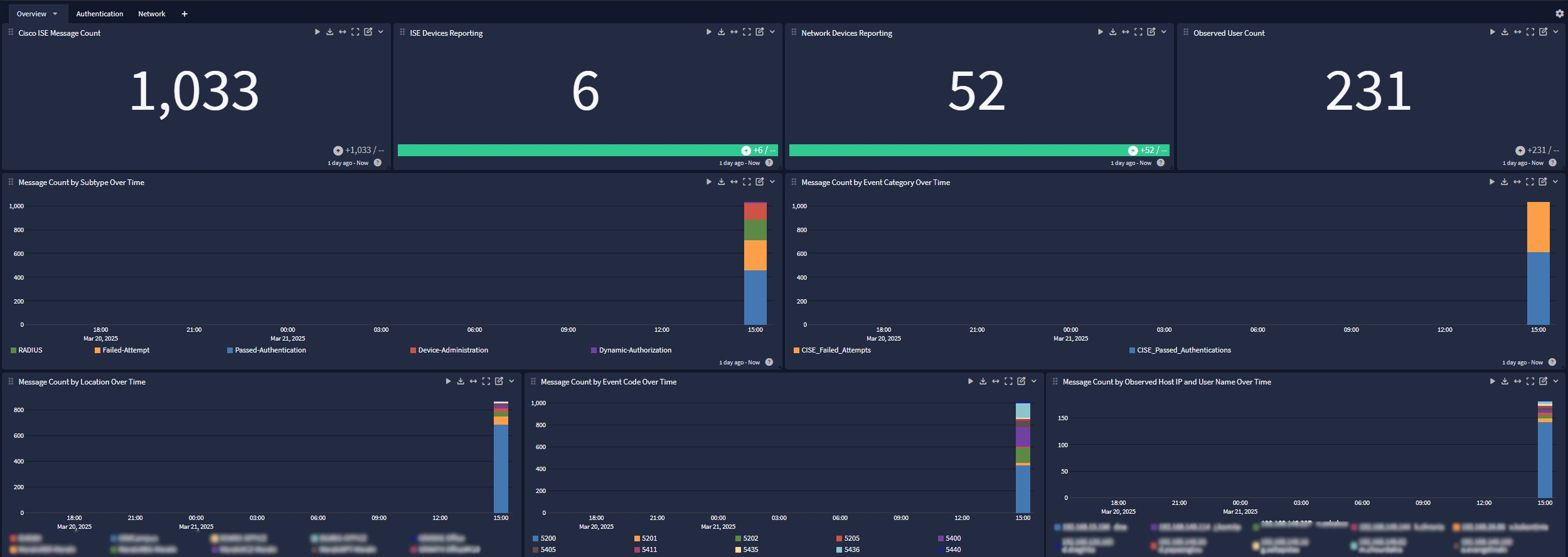
Authentication
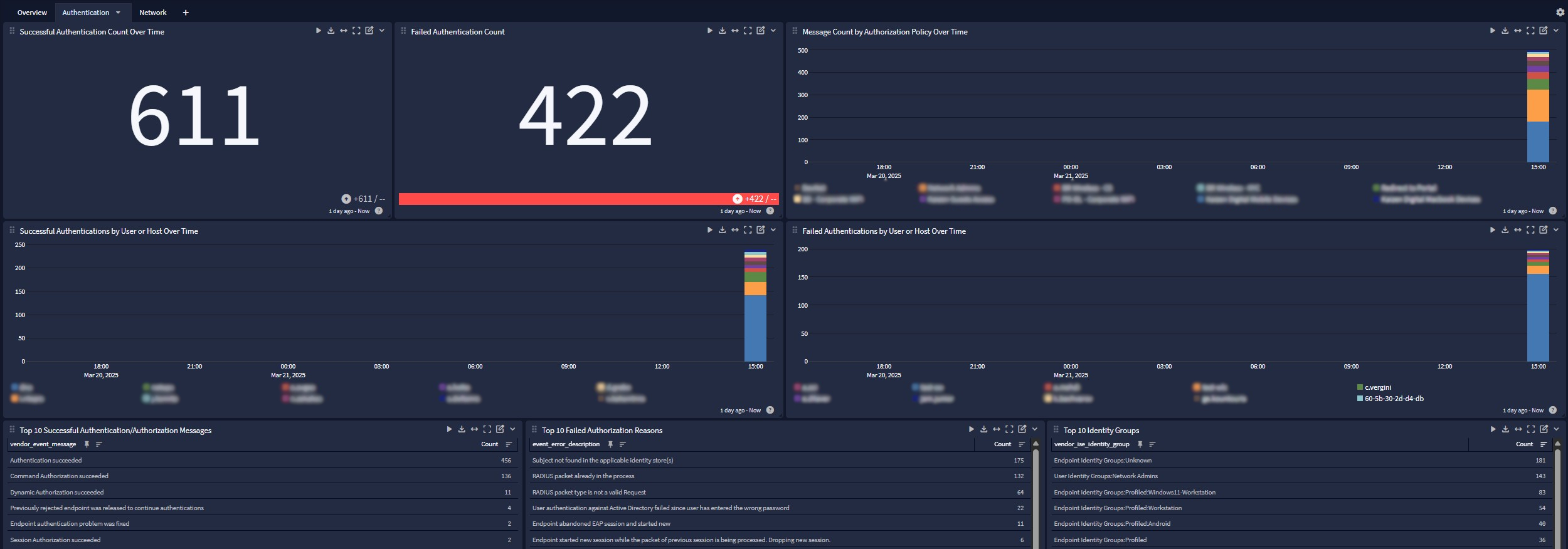
Network