This content pack is for Bitdefender GravityZone and parses the Event Push Service API events logs. Additionally, it applies to Bitdefender GravityZone On Premise and parses Bitdefender Syslog events (Appliance).
Supported Version(s)
-
GravityZone Version 6.56.0-1
Requirements
-
Graylog 6.1.2+ is required.
-
The Graylog server must be configured to accept TLS 1.2.
-
The Bitdefender GravityZone input must be set up and correctly configured for Push Events.
-
For GravityZone Event Push events, GravityZone must be configured to send CEF-formatted logs to the Graylog Bitdefender CEF input.
-
For GravityZone Syslog/Appliance events, GravityZone must be configured to send Syslog-formatted logs to a Syslog UDP input. GravityZone does not support TCP.
Stream Configuration
This technology pack includes 1 stream:
- "Illuminate:Bitdefender Messages"
Index Set Configuration
This technology pack includes 1 index set definition:
- "Bitdefender Logs"
Log Collection
This pack supports two delivery paths: CEF-formatted Event Push Service API events from GravityZone Cloud, and Syslog-formatted events from GravityZone On Premise (Appliance).
Configure Bitdefender GravityZone Input in Graylog
See the Graylog Bitdefender input documentation for information on configuring this input.
authorization.
Prepare Bitdefender GravityZone to Route Data
See the Bitdefender documentation for official guidance on setting up GravityZone to route logs externally. Please note that:
-
A valid server URL and port is required, e.g.
https://mydomain_name.dev:5555/bitdefender. In this example the port is 5555. In a local instance or with a static IP, it is possible an IP may work. -
The authorization header name must be
authorization. -
The service type must be
cef. -
The following is an example API call that may be generated:
Copycurl --tlsv1.2 -sS -k -X POST
https://cloud.gravityzone.bitdefender.com/api/v1.0/jsonrpc/push -H 'authorization: Basic
222jZDYwMDg4ZWRjNjdk2WZlYWZkYTk3O2I4ZGUw2DYwNzI4ODU2OWJhZm2kNTgzNjBhMTJ2MTJkY2Y52WYxMjo=' -H
'cache-control: no-cache' -H 'content-type: application/json' -d '{
"id": "1",
"jsonrpc": "2.0",
"method": "setPushEventSettings",
"params": {
"serviceSettings": {
"requireValidSslCertificate": true,
"authorization": "test",
"url": "https://mydomain_name.dev:5555/bitdefender"
},
"serviceType": "cef",
"status": 1,
"subscribeToEventTypes": {
"modules": true,
"sva": true,
"registration": true,
"supa-update-status": true,
"av": true,
"aph": true,
"fw": true,
"avc": true,
"uc": true,
"dp": true,
"device-control": true,
"hd": true,
"sva-load": true,
"task-status": true,
"exchange-malware": true,
"network-sandboxing": true,
"partner-changed": true,
"adcloud": true,
"exchange-user-credentials": true,
"exchange-organization-info": true,
"endpoint-moved-out": true,
"endpoint-moved-in": true,
"troubleshooting-activity": true,
"uninstall": true,
"install": true,
"hwid-change": true,
"new-incident": true,
"antiexploit": true,
"network-monitor": true,
"ransomware-mitigation": true,
"storage-antimalware": true,
"security-container-update-available": true,
"activity": true
}
}
}' -
The result should be:
Copy{"id":"1","jsonrpc":"2.0","result":true} -
Error messages can look like the following:
Copy{"id":"1","jsonrpc":"2.0","error":{"code":-32000,"message":"Server
error","data":{"details":"Invalid API key. Please generate an API key in Control Center."}}}
-
In this case, generate a correct API key or check that the format is correct.
-
Once configured, wait at least 10 minutes for the settings to take effect.
Example Application Control Configuration Steps (On Premise/Syslog)
Bitdefender Syslog events from GravityZone On Premise are very similar to Event Push events; if possible, the same or an adjusted field mapping is used. Syslog log fields may not have the BitdefenderGZ prefix.
-
Navigate to Policies > Enable Application Control > Add Rule.
-
Define the rule parameters: Rule Type, File Path, Application Name, Users.
-
Set an Action.
-
Syslog notifications are generated by events that are also triggering a Notification to be sent to Syslog.
-
Access the bell icon in the top-right corner of your web console, then select Notifications settings.
-
Enable Blocked Application and activate Log to syslog server under Visibility to ensure the notification is sent to Graylog.
-
Navigate to Configuration > Miscellaneous. Enable Syslog and add the SIEM Hostname/IP, Protocol UDP, Input Port, and Event Format.
-
Launch the Syslog UDP input in Graylog with the port number mentioned above.
Bitdefender Syslog Events Message Identification
These Syslog events emit a prefilled application_name but may have a header with
gravityzone:. The pack should detect it and route the message into the correct
stream. If the message does not have such a header, a static input field device_product with the value GravityZone can be used.
-
Filebeat is currently not supported, but an identification rule exists.
-
Add the static field
event_source_productin the Filebeat configuration file with the valueGravityZone. Messages go into the correct stream, but parsing may not work, unless fieldfacilityexists.
Log Format Examples
The following event types and modules have been verified for use with this content pack (Event Push events). The final entry is an example Syslog event from a GravityZone On Premise Appliance.
antiexploit
CEF:0|Bitdefender|GravityZone|6.36.0-1|131234|Exploit Mitigation|10|BitdefenderGZModule=antiexploit BitdefenderGZCompanyId=2e222e8fb12fb8700396d6375 dvchost=TEST_ENDPOINT BitdefenderGZComputerFQDN=Graylog-endpoint.dsd.ro dvc=10.10.18.226 deviceExternalId=2e22eba5e8ee8c5b1852a9d7 BitdefenderGZEndpointId=2e22eba5e8ee8c5b1852a9d6 act=kill BitdefenderGZThreatName=EICAR-Test-File (not a virus) dvcpid=2000 BitdefenderGZExploitType=Flash/Generic BitdefenderGZParentProcess=4000 filePath=C:\\file15c8ba8b90ea1de127962f464.exe BitdefenderGZParentProcessPath=C:\\file25c8ba8b90ea1de127962f464.exe BitdefenderGZDetectionCve=cve string suser=stefan@graylog.com BitdefenderGZDetectionTime=2024-10-10T13:58:30.000Z
adcloud
CEF:0|Bitdefender|GravityZone|6.36.0-1|231234|AD Integration Issue|6|BitdefenderGZModule=adcloud BitdefenderGZCompanyId=2e222e8fb12fb8700396d6375 BitdefenderGZSyncerId=22e2d9bfa849af3a1465b7e3 BitdefenderGZIssueType=ldap interrogation BitdefenderGZLastAdReportDate=2024-10-10T08:03:49.671Z
aph
CEF:0|Bitdefender|GravityZone|6.36.0-1|40|Antiphishing|9|BitdefenderGZModule=aph BitdefenderGZCompanyId=2e222e8fb12fb8700396d6375 dvchost=FC-EXCHANGE-01 BitdefenderGZComputerFQDN=fc-exchange-01.fc.dom dvc=192.168.0.1 deviceExternalId=22e2d9bfa849af3a1465b7e4 BitdefenderGZEventType=phishing request=http://example.com/account/support/ act=aph_blocked end=2024-10-10T08:49:43.000Z cnt=1
avc
CEF:0|Bitdefender|GravityZone|6.36.0-1|30|Behavioral scanning|9|BitdefenderGZModule=avc BitdefenderGZCompanyId=2e222e8fb12fb8700396d6375 dvchost=Graylog-Win11 BitdefenderGZComputerFQDN=Graylog-Win11 dvc=192.168.0.1 deviceExternalId=59a1604e60369e06732e2222 BitdefenderGZExploitType=AVC Blocked Exploit filePath=C:\\Users\\admin\\Desktop\\Tools\\avcsim\\win32\\avcsim32.exe act=Blocked BitdefenderGZDetectionTime=2024-10-10T07:56:33.000Z cnt=1
dp
CEF:0|Bitdefender|GravityZone|6.36.0-1|2000|Data Protection|9|BitdefenderGZModule=dp BitdefenderGZCompanyId=2e222e8fb12fb8700396d6375 dvchost=Graylog-Win11 BitdefenderGZComputerFQDN=Graylog-Win11 dvc=192.168.0.1 deviceExternalId=59a1604e60369e06732e2222 BitdefenderGZTargetType=http BitdefenderGZBlockingRuleName=dv request=http://example.com/ act=data_protection_blocked end=2024-10-10T10:23:43.000Z cnt=1
endpoint moved out
CEF:0|Bitdefender|GravityZone|6.36.0-1|75000|Endpoint moved out|3|BitdefenderGZModule=endpoint-moved-out BitdefenderGZCompanyId=2e222e8fb12fb8700396d6375 dvchost=TEST_ENDPOINT BitdefenderGZComputerFQDN=Graylog-endpoint.dsd.ro dvc=10.10.18.226 deviceExternalId=22e2d9bfa849af3a1465b7e4 BitdefenderGZEndpointId=5e2085febf255a545e52276b BitdefenderGZHwId=2e222ef-5b7e43d387ba-54a95
exchange-user-credentials
CEF:0|Bitdefender|GravityZone|6.36.0-1|211234|Invalid Exchange user credentials|3|BitdefenderGZModule=exchange-user-credentials BitdefenderGZCompanyId=2e222e8fb12fb8700396d6375 BitdefenderGZEndpointId=22e2d9bfa849af3a1465b7e3
exchange malware
CEF:0|Bitdefender|GravityZone|6.36.0-1|212340|Exchange Malware Detected|9|BitdefenderGZModule=exchange-malware BitdefenderGZCompanyId=2e222e8fb12fb8700396d6375 dvchost=FC-EXCHANGE-01 BitdefenderGZComputerFQDN=fc-exchange-01.fc.dom dvc=192.168.0.1 deviceExternalId=22e2d9bfa849af3a1465b7e4 BitdefenderGZEndpointId=22e2d9bfa849af3a1465b7e3 shost=FC-EXCHANGE-01 BitdefenderGZEmailSender=fc_test01@fc.dom duser=["fc_test02@fc.dom"] BitdefenderGZEmailSubject=Emailing Sending.. WL-cbe100c9f42a20ef9a4b1c20ed1a59f9-0 BitdefenderGZDetectionTime=2024-10-10T14: 20:37.000Z msg=[{"malwareName":"Trojan.Generic.KD.874127","malwareType":"virus","actionTaken":"quarantine","infectedObject":"WL-cbe100c9f42a20ef9a4b1c20ed1a59f9-0"}]
firewall
CEF:0|Bitdefender|GravityZone|6.36.0-1|50|Firewall|9|BitdefenderGZModule=fw BitdefenderGZCompanyId=2e222e8fb12fb8700396d6375 dvchost=Graylog-Win11 BitdefenderGZComputerFQDN=Graylog-Win11 dvc=192.168.0.1 deviceExternalId=59a1604e60369e06732e2222 act=portscan_blocked BitdefenderGZFwProtocolId=6 BitdefenderGZEventSourceIP=192.168.0.2 end=2024-10-10T12:52:03.000Z cnt=1
hwidchange
CEF:0|Bitdefender|GravityZone|6.36.0-1|73000|Hardware Id Change|3|BitdefenderGZModule=hwid-change BitdefenderGZCompanyId=2e222e8fb12fb8700396d6375 dvchost=A BitdefenderGZComputerFQDN=Graylog-endpoint.dsd.ro dvc=10.10.18.255 deviceExternalId=2e222ef5b7e43d387ba54a96 BitdefenderGZOldHwid=12341234-1234-1234-1234-406186b5bde7 BitdefenderGZNewHwid=12341234-1234-1234-1234-406186b5bde6 BitdefenderGZEndpointId=2e222ef5b7e43d387ba54a95
hd
CEF:0|Bitdefender|GravityZone|6.36.0-1|800|HyperDetect Activity|10|BitdefenderGZModule=hd BitdefenderGZCompanyId=2e222e8fb12fb8700396d6375 dvchost=Computer 1 BitdefenderGZComputerFQDN=computer1.local dvc=191.114.235.26 deviceExternalId=5c12612db1a43dc3097b23c6 BitdefenderGZMalwareType=file act=quarantined filePath=/Users/admin/Desktop/ BitdefenderGZAttackType=targeted attack BitdefenderGZDetectionLevel=permissive BitdefenderGZFilelessAttack=0 BitdefenderGZHwId=22574006-79523827-7401-9565-1295-798280775872 BitdefenderGZDetectionTime=2024-10-10T10:01:02.000Z suid=BF410F3B-5F3A-41E1-BF8F-28DE6948A355 suser=admin
install
CEF:0|Bitdefender|GravityZone|6.36.0-1|71000|Install|3|BitdefenderGZModule=install BitdefenderGZCompanyId=2e222e8fb12fb8700396d6375 dvchost=TEST_ENDPOINT BitdefenderGZComputerFQDN=Graylog-endpoint.dsd.ro dvc=10.10.18.226 deviceExternalId=2e22eba5e8ee8c5b1852a9d7 BitdefenderGZEndpointId=5e2085febf255a545e52276b BitdefenderGZHwId=12341234-1234-1234-1234-406186b5bdbdzzz50
modules
CEF:0|Bitdefender|GravityZone|6.36.0-1|35|Product Modules Status|5|BitdefenderGZModule=modules BitdefenderGZCompanyId=2e222e8fb12fb8700396d6375 dvchost=Graylog-Win11 BitdefenderGZComputerFQDN=Graylog-Win11 dvc=192.168.0.1 deviceExternalId=59a1604e60369e06732e2222 BitdefenderGZMalwareModuleStatus=enabled BitdefenderGZAntiphishingModuleStatus=enabled BitdefenderGZFirewallModuleStatus=enabled BitdefenderGZBehavioralScanAVCModuleStatus=enabled BitdefenderGZWebAccessControlModuleStatus=disabled BitdefenderGZWebCategoryScanModuleStatus=disabled BitdefenderGZUserControlApplicationFilteringModuleStatus=disabled BitdefenderGZDataProtectionModuleStatus=disabled BitdefenderGZPowerUserModuleStatus=enabled BitdefenderGZDataLossPreventionModuleStatus=disabled
moved in
CEF:0|Bitdefender|GravityZone|6.36.0-1|74000|Endpoint moved in|3|BitdefenderGZModule=endpoint-moved-in BitdefenderGZCompanyId=2e222e8fb12fb8700396d6375 dvchost=TEST_ENDPOINT BitdefenderGZComputerFQDN=Graylog-endpoint.dsd.ro dvc=10.10.18.226 deviceExternalId=22e2d9bfa849af3a1465b7e3 BitdefenderGZEndpointId=5e2085febf255a545e52276a BitdefenderGZHwId=2e222ef-5b7e43d387ba-54a95
network-sandboxing
CEF:0|Bitdefender|GravityZone|6.36.0-1|121234|Sandbox Analyzer Detection|7|BitdefenderGZModule=network-sandboxing BitdefenderGZCompanyId=2e222e8fb12fb8700396d6375 BitdefenderGZEndpointId=59a1604e60369e06733f8aba dvchost=Graylog-Win11 dvc=192.168.0.1 BitdefenderGZDetectionTime=2024-10-10T11:02:49.000Z BitdefenderGZMalwareType=RANSOMWARE BitdefenderGZFilePaths=["C:\\\\Users\\\\Administrator\\\\Documents\\\\installer.xml","D:\\\\opt\\\\bitdefender\\\\installer2.xml","D:\\\\sources\\\\console\\\\CommonConsole\\\\app\\\\modules\\\\policies\\\\view\\\\endpoints\\\\networkSandboxing\\\\installer3.xml"] BitdefenderGZFileSizes=["2614","2615","2616"] BitdefenderGZRemediationActions=["1","","1"]
registration
CEF:0|Bitdefender|GravityZone|6.36.0-1|71234|Registration|3|BitdefenderGZModule=registration BitdefenderGZCompanyId=2e222e8fb12fb8700396d6375 dvchost=GRAYLOG-EXCHANGE-01 BitdefenderGZComputerFQDN=fc-exchange-01.fc.dom dvc=192.168.0.1 deviceExternalId=22e2d9bfa849af3a1465b7e4 BitdefenderGZStatus=registered
ransomware-mitigation
CEF:0|Bitdefender|GravityZone|6.36.0-1|141234|Ransomware Detection|9|BitdefenderGZModule=ransomware-mitigation BitdefenderGZCompanyId=2e222e8fb12fb8700396d6375 dvchost=DC-Nebula BitdefenderGZComputerFQDN=undefined dvc=10.17.16.10 deviceExternalId=5ed4d2fef23f7325715dbb22 BitdefenderGZCompanyName=Graylog BitdefenderGZAttackType=remote cnt=23 BitdefenderGZDetectionTime=2024-10-10T10:33:14.000Z BitdefenderGZAttackSource=10.10.20.120 suser=user suid=S-11-22-33
security container
CEF:0|Bitdefender|GravityZone|6.36.0-1|18000|Security Container Update Available|2|BitdefenderGZModule=security-container-update-available BitdefenderGZCompanyId=2e222e8fb12fb8700396d6375 dvchost=security-container-x BitdefenderGZComputerFQDN=security-container-x-containers-host.dsd.ro dvc=10.17.15.247 deviceExternalId=60f6ba5e1b3272cce33c3281 BitdefenderGZHostName=TEST_ENDPOINT_2
sva-load
CEF:0|Bitdefender|GravityZone|6.36.0-1|111234|Overloaded SVA|8|BitdefenderGZModule=sva-load BitdefenderGZCompanyId=2e222e8fb12fb8700396d6375 dvchost=bitdefender-sva BitdefenderGZComputerFQDN=bitdefender-sva dvc=192.168.0.1 deviceExternalId=59b8f3aba849af3a1465b81e BitdefenderGZLoadAverage=1 BitdefenderGZCpuUsage=48 BitdefenderGZMemoryUsage=32 BitdefenderGZNetworkUsage=0 BitdefenderGZOverallUsage=48
sva
CEF:0|Bitdefender|GravityZone|6.36.0-1|112340|SVA status|4|BitdefenderGZModule=sva BitdefenderGZCompanyId=2e222e8fb12fb8700396d6375 dvchost=bitdefender-sva BitdefenderGZComputerFQDN=bitdefender-sva dvc=192.168.0.1 deviceExternalId=59b8f3aba849af3a1465b81e BitdefenderGZSVAPoweredOff=0 BitdefenderGZSVAUpdateAvailable=1 BitdefenderGZSVARebootRequired=0 BitdefenderGZSVASignatureVersion=7.72479
supa update status
CEF:0|Bitdefender|GravityZone|6.36.0-1|12000|Outdated update server|2|BitdefenderGZFromSupa=1 BitdefenderGZModule=supa-update-status BitdefenderGZCompanyId=2e222e8fb12fb8700396d6375 dvchost=Graylog-Win11 BitdefenderGZComputerFQDN=Graylog-Win11 dvc=192.168.0.1 deviceExternalId=59a1604e60369e06732e2222 BitdefenderGZStatus=outdated
troubleshooting-activity
CEF:0|Bitdefender|GravityZone|6.36.0-1|161234|Troubleshooting Activity|4|BitdefenderGZModule=troubleshooting-activity start=2020-06-24T06:06:48.000Z suser=test@test.com BitdefenderGZCompanyId=2e222e8fb12fb8700396d6375 dvchost=TEST_ENDPOINT_WINDOWS_10 BitdefenderGZComputerFQDN=Graylog-endpoint.dsd.ro dvc=10.10.0.101 deviceExternalId=5ee30e2b29a4e218489442b6 BitdefenderGZTaskId=5eea0105f23f731302405833 BitdefenderGZTaskType=Debug Session BitdefenderGZErrorCode=3 BitdefenderGZLocalPath=/test/dir BitdefenderGZNetworkSharePath=//1.2.3.4/dir BitdefenderGZSaveToBitdefenderCloud=false BitdefenderGZStatus=Finished BitdefenderGZStopReason=Partial Delivery BitdefenderGZFailedStorageType=Target Machine end=2024-10-24T06:09:28.000Z
task-status
CEF:0|Bitdefender|GravityZone|6.36.0-1|21234|Task Status|4|BitdefenderGZModule=task-status BitdefenderGZCompanyId=2e222e8fb12fb8700396d6375 dvchost=Graylog-Win11 BitdefenderGZComputerFQDN=Graylog-Win11 dvc=192.168.0.1 deviceExternalId=59a1604e60369e06732e2222 suid=59a14b2b1da197c6108b4568 BitdefenderGZTaskId=59b28dc81da19711058b4568 msg=Quick Scan 2024-10-10(sub-task) BitdefenderGZTaskType=272 dhost=Graylog-Win11 BitdefenderGZTaskSuccessful=1 BitdefenderGZStatus=processed BitdefenderGZErrorCode=0
uninstall
CEF:0|Bitdefender|GravityZone|6.36.0-1|72000|Uninstall|9|BitdefenderGZModule=uninstall BitdefenderGZCompanyId=2e222e8fb12fb8700396d6375 dvchost=TEST_ENDPOINT BitdefenderGZComputerFQDN=Graylog-endpoint.dsd.ro dvc=10.10.18.226 deviceExternalId=22e2d9bfa849af3a1465b7e4 BitdefenderGZEndpointId=5e2085febf255a545e52276b reason=local uninstall
uc
CEF:0|Bitdefender|GravityZone|6.36.0-1|1000|Web Control|9|BitdefenderGZModule=uc BitdefenderGZCompanyId=2e222e8fb12fb8700396d6375 dvchost=Graylog-Win11 BitdefenderGZComputerFQDN=Graylog-Win11 dvc=192.168.0.1 deviceExternalId=59a1604e60369e06732e2222 BitdefenderGZApplicationControlType=http request=http://192.168.0.1:2869/graylog/udhisapi.dll BitdefenderGZApplicationControlBlockType=http_timelimiter act=uc_site_blocked end=2024-10-10T12:46:30.000Z cnt=1
New Extended Incident
CEF: 0|Bitdefender|GravityZone|6.2000.1-1|170000|New Extended Incident|6|BitdefenderGZModule=new-extended-incident BitdefenderGZCompanyId=68aefac77bd6c20e140863b6 BitdefenderGZIncidentId=68c13ff07ab47b20f8a9ff3e BitdefenderGZIncidentNumber=56 BitdefenderGZIncidentVersion=1 BitdefenderGZSeverityScore=72 BitdefenderGZLastKillchainPhase=initial access BitdefenderGZKillchainPhases=["initial access"] BitdefenderGZAttackTypes=["Exploit"] BitdefenderGZCorrelatedIncidents=["68c13f530b75438a17f15a90"] BitdefenderGZIncidentNodes=["endpoint:68c13ff17ab47b20f8a9ff40:ta27m9pnmhje","endpoint:68c13ff17ab47b20f8a9ff41:10.17.135.71"] BitdefenderGZMainAction=action needed BitdefenderGZLastUpdated=2025-09-10T09:05:02.594Z BitdefenderGZLastProcessed=2025-09-10T09:08:00.974Z start=2025-09-10T09:05:02.594Z
Example Syslog Event (Application Control)
graylog gravityzone: [application-control] {"module":"application-control","product_installed":"BEST","user":{"id":"S-1-5-13","name":"SYSTEM"},"computer_name":"DESKTOP-TEST","computer_fqdn":"desktop-test","computer_ip":"192.168.40.11","computer_id":"222ab2a1d494e8a20f299845","mode":1,"scanMode":"production","filePath":"C:\\Users\\Defender\\Downloads\\AnyDesk.exe","fileVersion":"","productName":"","productVersion":"","publisher":"","fingerprint":"D99F9F19173473FF515A6956BC61BC22E84389","thumbprints":[],"ruleName":"","date":"2025-06-12T06:27:37.258Z","count":1}
What is Provided
-
GravityZone log parsing (Push Events and Syslog/Appliance Events), categorization, and a custom dashboard.
Limitations
-
Only the log types and fields officially documented by Bitdefender for GravityZone version 6.56 are supported in this content pack. Any undocumented fields that may appear are not mapped to the Graylog schema. If such fields exist within a subarray structure, they may not be extracted or parsed by default.
-
Only CEF-formatted logs are supported for Event Push events.
Categorization
The following event types and modules are currently categorized:
| vendor_event_module | gim_event_type_code | gim_event_type |
|---|---|---|
| antiexploit | 301000 | Malware Alert |
| avc | 301000 | Malware Alert |
| exchange-malware | 301000 | Malware Alert |
| fw | 129999 | Network Messages |
| new-incident | 309999 | Alert Default |
| new-extended-incident | 309999 | Alert Default |
| ransomware-mitigation | 309999 | Alert Default |
| av | 309999 | Alert Default |
| Malware Outbreak | 309999 | Alert Default |
| Storage Antimalware Event | 309999 | Alert Default |
| Login from new device | 100000 | logon |
Message Fields Included in This Pack
Most fields are renamed. The prefix BitdefenderGZ may be substituted with vendor_. Other fields are mapped to Graylog schema fields.
Parsed Fields
| Field Name | Mapped From | Example Value | Field Type | Description |
|---|---|---|---|---|
| alert_category | BitdefenderGZAttackType(s) | remote | ||
| alert_category | BitdefenderGZExploitType | AVC Blocked | ||
| alert_category | BitdefenderGZMalwareType | file | ||
| alert_category | BitdefenderGZTargetType | http | ||
| alert_signature | BitdefenderGZAttackType | remote | Only if MalwareName does not exist | |
| alert_signature | BitdefenderGZDetectionName | |||
| alert_signature | BitdefenderGZExploitTechnique | |||
| alert_signature | BitdefenderGZMalwareName | |||
| alert_signature | detection_exploitTechnique | |||
| alert_signature | detection_threatName | EICAR-Test-File | ||
| attacks_tactic_uid | BitdefenderGZAttCkId | |||
| destination_ip | dvc | 10.10.10.10 | ||
| email_from | BitdefenderGZEmailSender | stefan@graylog.com | ||
| email_subject | BitdefenderGZEmailSubject | Welcome | ||
| event_created | BitdefenderGZDate | 2024-09-14T08:03:49.671Z | date | |
| event_created | BitdefenderGZDetectionTime | 2024-09-14T08:03:49.671Z | date | |
| event_created | BitdefenderGZEventCreated | 2024-09-14T08:03:49.671Z | date | |
| event_created | start | 2024-09-14T08:03:49.671Z | date | |
| file_name | fname | example.exe | ||
| file_path | BitdefenderGZDetectionPath | c:\myfile | ||
| file_path | BitdefenderGZFilePath | c:\myfile | ||
| file_path | BitdefenderGZLocalPath | c:\myfile | ||
| file_path | filePath | c:\myfile | ||
| file_size | BitdefenderGZFileSize | 257 | ||
| hash | fileHash | |||
| hash_sha256 | BitdefenderGZFileHashSha256 | |||
| host_hostname | BitdefenderGZComputerFQDN | test-inst@graylog.com | ||
| host_hostname | BitdefenderGZHostName | test-inst | ||
| host_hostname | computer_name | test-inst | ||
| host_hostname | dvchost | test-inst | ||
| host_hostname | shost | test-inst | ||
| host_id | BitdefenderGZEndpointId | 5e2285febf225a545e22272b | ||
| http_request_path | BitdefenderGZRequest | http://example.com/account/support/ | ||
| http_request_path | BitdefenderGZUrl | http://example.com/account/support/ | ||
| network_iana_number | BitdefenderGZFwProtocolId | 6 | ||
| process_parent_path | sproc | |||
| source_id | BitdefenderGZComputerId | 623c18fb122b8700396d6322 | ||
| source_ip | BitdefenderGZComputerIp | 10.10.10.10 | ||
| source_ip | BitdefenderGZEventSourceIP | 10.10.10.10 | ||
| source_ip | BitdefenderGZSourceIp | 10.10.10.10 | ||
| source_user_name | BitdefenderGZSUser | stefan | ||
| source_user_name | suser | stefanadmin | ||
| user_name | BitdefenderGZSDetectionUsername | stefan | ||
| user_name | BitdefenderGZSUserName | stefan | ||
| user_name | detection_username | Administrator | ||
| user_name | duser | stefan | ||
| vendor_attack_source | BitdefenderGZAttackSource | 12.12.12.23 | ||
| vendor_company_id | BitdefenderGZCompanyId | 623228fb12f28700396d6222 | ||
| vendor_company_name | BitdefenderGZCompanyName | Graylog | ||
| vendor_computer_fqdn | BitdefenderGZComputerFQDN | test@graylog.com | ||
| vendor_computer_name | BitdefenderGZComputerName | test-machine | ||
| vendor_control_block_type | BitdefenderGZApplicationControlBlockType | http_timelimiter | ||
| vendor_control_type | BitdefenderGZApplicationControlType | http | ||
| vendor_count | BitdefenderGZCount | 2 | ||
| vendor_count | cnt | 3 | ||
| vendor_detection_level | BitdefenderGZDetectionLevel | 2 | ||
| vendor_detection_time | BitdefenderGZDetectionTime | 2024-06-01T10:22:12.000Z | date | |
| vendor_event_action | BitdefenderGZActionTaken | quarantine | array | |
| vendor_event_action | BitdefenderGZDetectionAction | |||
| vendor_event_action | BitdefenderGZFinalStatus | |||
| vendor_event_action | BitdefenderGZMainAction | |||
| vendor_event_action | act | |||
| vendor_event_action | detection_action | |||
| vendor_event_description | BitdefenderName | |||
| vendor_event_end_date | BitdefenderGZEnd | 2024-02-11T10:22:43.000Z | ||
| vendor_event_module | BitdefenderGZModule | |||
| vendor_event_module | BitdefenderName | If module does not exist | ||
| vendor_event_severity_level | severity | 3 | long | 0 to 10 |
| vendor_event_type | BitdefenderGZEventType | |||
| vendor_incident_id | BitdefenderGZIncidentId | |||
| vendor_severity_score | BitdefenderGZSeverityScore | 23 |
Dashboard
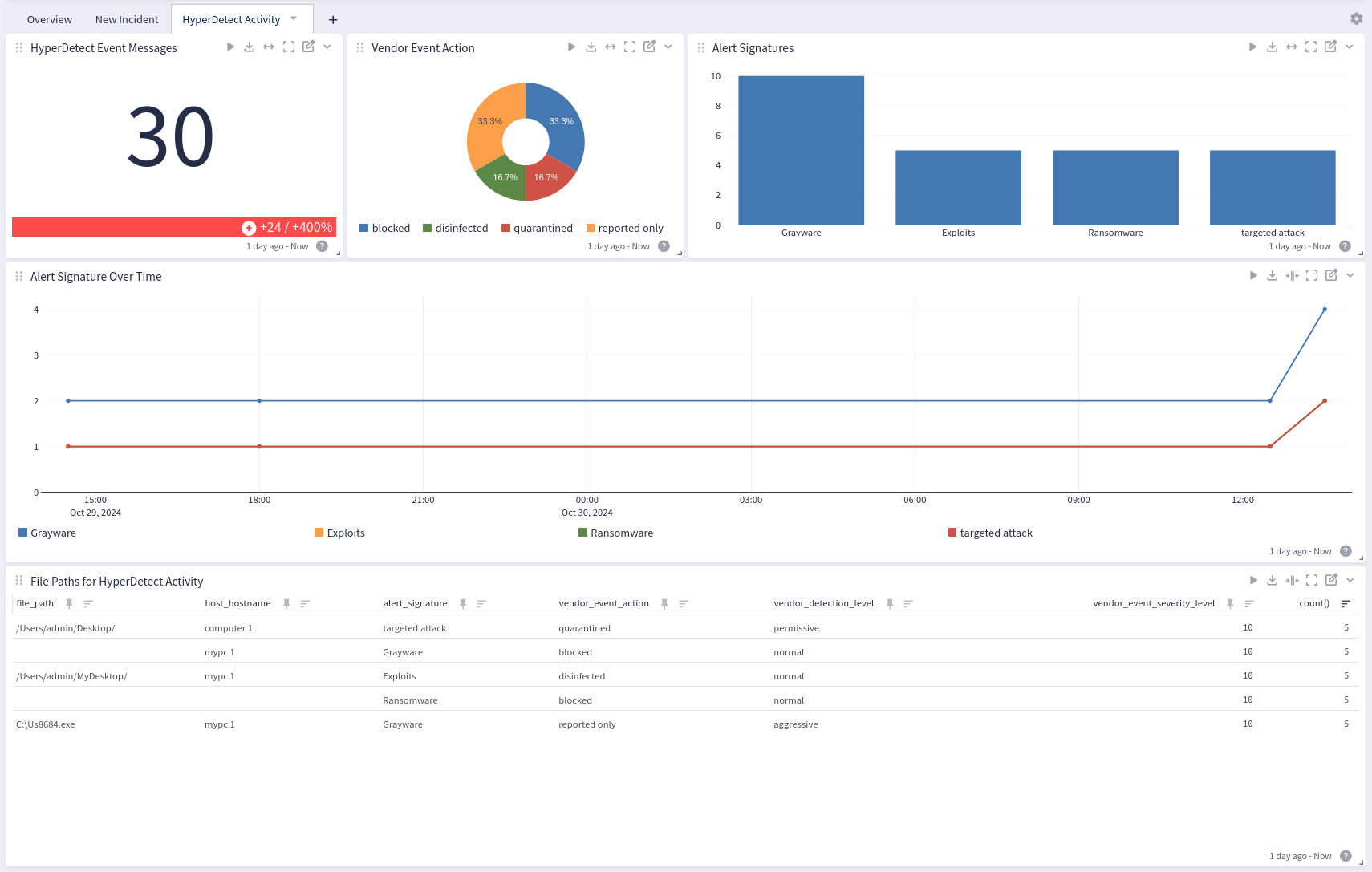
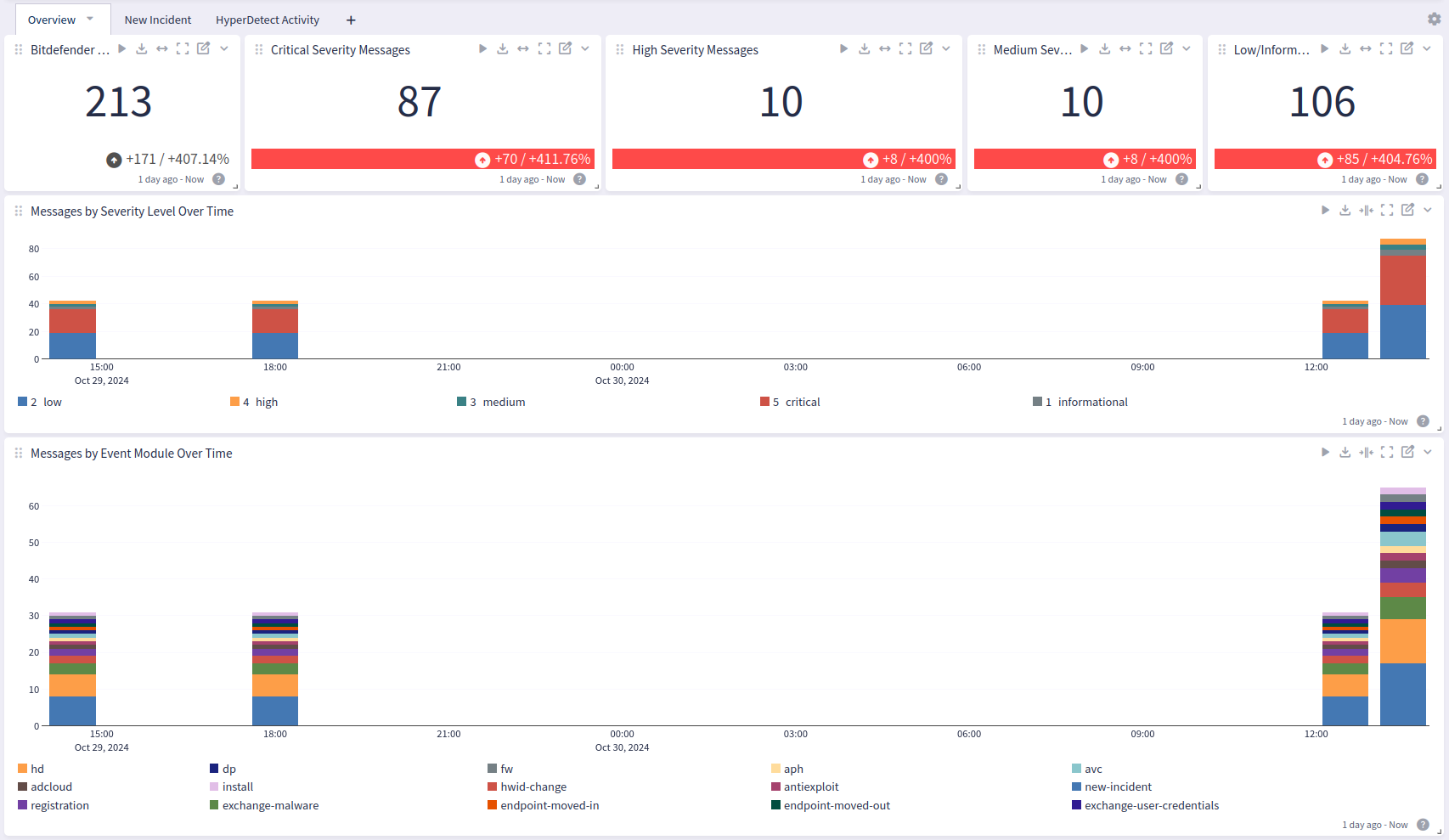
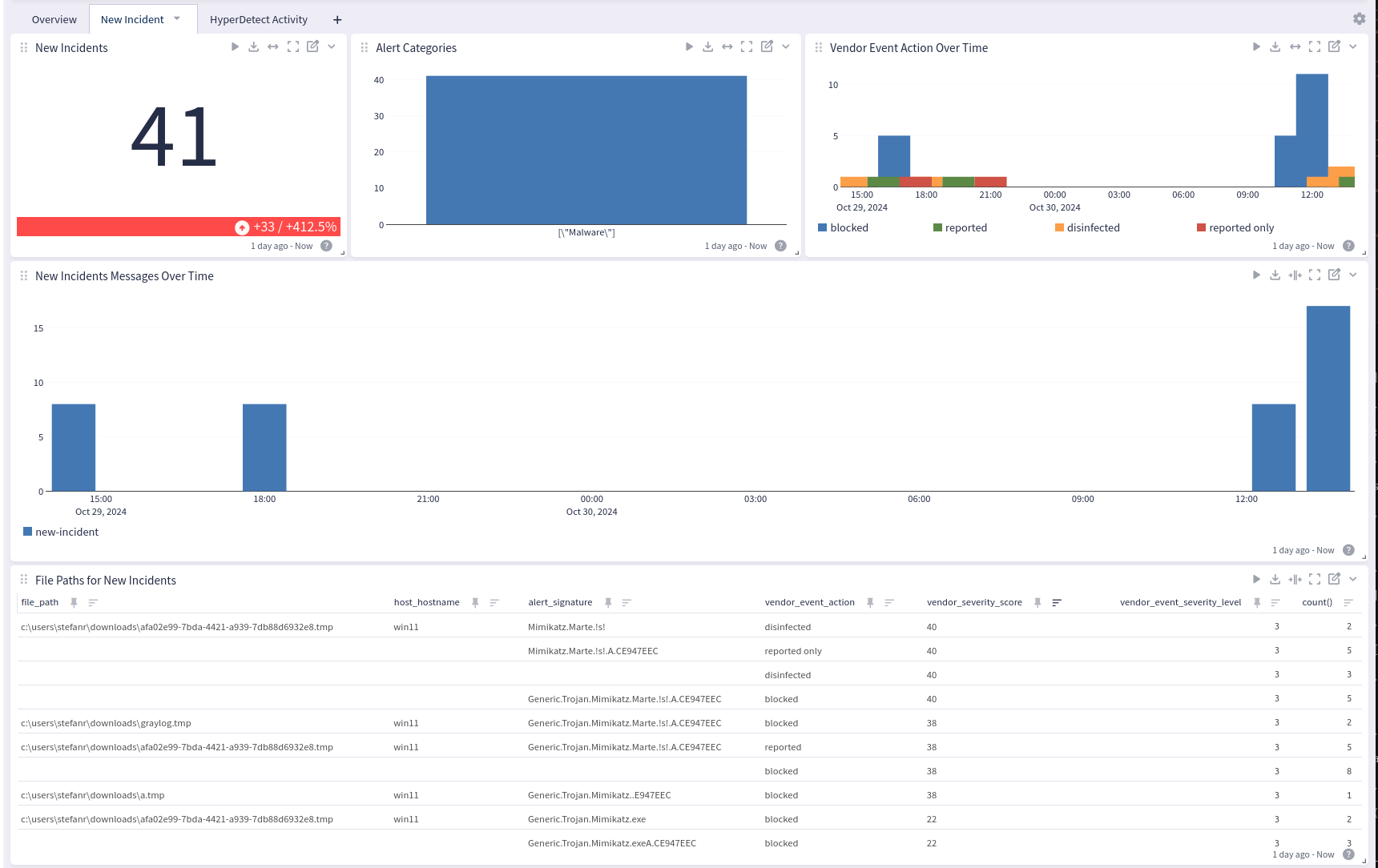
Bitdefender GravityZone offers a dashboard with 3 tabs: Overview, New Incident, and HyperDetect Activity.
Overview
New Incident
HyperDetect Activity