AWS WAF is Amazon's web application firewall. It inspects HTTP and HTTPS requests reaching application load balancers, Amazon CloudFront, Amazon API Gateway, and AWS AppSync, applying allow, block, count, CAPTCHA, or challenge actions based on managed or custom rule sets.
This technology pack identifies AWS WAF event log messages delivered through Kinesis, parses the WAF JSON payload, normalizes HTTP request and enforcement fields, and applies GIM categorization, severity, and alert fields so that blcok, CAPTCHA, and challenge outcomes surface as network detections.
Supported Versions
-
AWS WAF v2 (current generation web access control lists—web ACLs)
Requirements
-
Graylog 7.1.0+ with a valid Enterprise license
-
AWS WAF v2 with logging enabled for the web ACL with delivery through Amazon Kinesis Data Firehose
Stream Configuration
This technology pack includes 1 stream:
- "Illuminate:AWS WAF Messages"
Index Set Configuration
This technology pack includes 1 index set definition:
- "AWS WAF Event Log Messages"
Log Collection
This pack parses AWS WAF event log messages collected from an Amazon Kinesis Data Firehose stream that AWS WAF is configured to write to.
-
Enable logging on the target Web ACL and select an Amazon Kinesis Data Firehose stream as the destination.
-
Configure the Firehose stream to deliver records to Graylog using the AWS Kinesis/CloudWatch input.
-
Identification keys on the
aws_kinesis_streamandaws_kinesis_message_typefields set by the Graylog AWS Kinesis input, so no specific stream name is required.
Log Format Example
BLOCK - AWSManagedRulesCommonRuleSet
{
          "timestamp": 1778140491525,
          "formatVersion": 1,
          "webaclId": "arn:aws:wafv2:us-east-1:517803882956:regional/webacl/prod-waf/3b8a9ef3-9057-4538-acdd-bda6c27c2131",
          "terminatingRuleId": "AWS-AWSManagedRulesCommonRuleSet",
          "terminatingRuleType": "MANAGED_RULE_GROUP",
          "action": "BLOCK",
          "terminatingRuleMatchDetails": [],
          "httpSourceName": "ALB",
          "httpSourceId": "517803882956-app/waf-test-alb/8d72c561de3f870e",
          "ruleGroupList": [
            {
              "ruleGroupId": "AWS#AWSManagedRulesCommonRuleSet",
              "terminatingRule": {
                "ruleId": "NoUserAgent_HEADER",
                "action": "BLOCK",
                "ruleMatchDetails": null
              },
              "nonTerminatingMatchingRules": [],
              "excludedRules": null,
              "customerConfig": null
            }
          ],
          "rateBasedRuleList": [],
          "nonTerminatingMatchingRules": [],
          "requestHeadersInserted": null,
          "responseCodeSent": null,
          "httpRequest": {
            "clientIp": "185.142.236.41",
            "country": "SC",
            "headers": [
              { "name": "Host", "value": "34.238.104.93" }
            ],
            "uri": "/.well-known/security.txt",
            "args": "",
            "httpVersion": "HTTP/1.1",
            "httpMethod": "GET",
            "requestId": "1-69fc454b-529730c46a57df1c1f2d453d",
            "fragment": "",
            "scheme": "http",
            "host": "34.238.104.93"
          },
          "labels": [
            { "name": "awswaf:managed:aws:core-rule-set:NoUserAgent_Header" }
          ]
        }
ALLOW - Default_Action
{
          "timestamp": 1778154180000,
          "formatVersion": 1,
          "webaclId": "arn:aws:wafv2:us-east-1:517803882956:regional/webacl/prod-waf/3b8a9ef3-9057-4538-acdd-bda6c27c2131",
          "terminatingRuleId": "Default_Action",
          "terminatingRuleType": "REGULAR",
          "action": "ALLOW",
          "terminatingRuleMatchDetails": [],
          "httpSourceName": "ALB",
          "httpSourceId": "517803882956-app/waf-test-alb/8d72c561de3f870e",
          "ruleGroupList": [],
          "rateBasedRuleList": [],
          "nonTerminatingMatchingRules": [],
          "requestHeadersInserted": null,
          "responseCodeSent": null,
          "httpRequest": {
            "clientIp": "192.0.2.10",
            "country": "US",
            "headers": [
              { "name": "Host", "value": "app.example.com" },
              { "name": "User-Agent", "value": "Mozilla/5.0 (Macintosh; Intel Mac OS X 10_15_7) AppleWebKit/605.1.15" }
            ],
            "uri": "/",
            "args": "",
            "httpVersion": "HTTP/2.0",
            "httpMethod": "GET",
            "requestId": "1-69fc0004-dddddddddddddddddddddddd",
            "fragment": "",
            "scheme": "https",
            "host": "app.example.com"
          },
          "labels": []
        }
What is Provided
-
Parsing of the WAF JSON payload into normalized HTTP request, source, and vendor fields.
-
GIM event type code assignment for all supported message types.
-
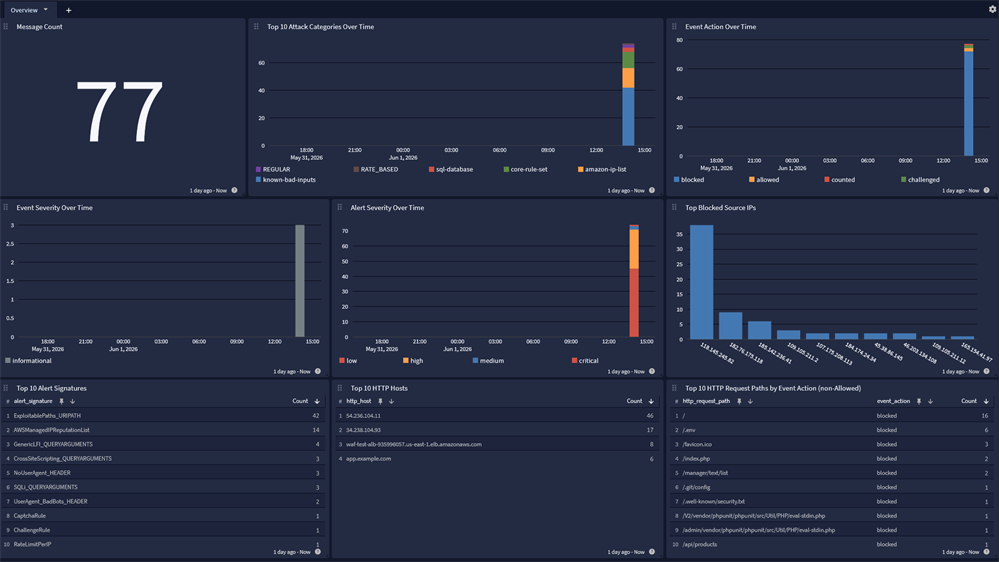
A spotlight dashboard summarizing AWS WAF activity.
GIM Categorization
GIM categorization is provided for the following messages:
| Log Type | Vendor Event Description | GIM Category | GIM Subcategory | GIM Event Type Code |
|---|---|---|---|---|
| aws_waf | WAF BLOCK - terminating rule matched and request was blocked | detection | detection.network detection | 300001 |
| aws_waf | WAF CAPTCHA - CAPTCHA challenge served to verify a human client | detection | detection.network detection | 300001 |
| aws_waf | WAF CHALLENGE - silent JavaScript browser challenge served | detection | detection.network detection | 300001 |
| aws_waf | WAF ALLOW - request inspected and allowed through | network | network.default | 129999 |
| aws_waf | WAF COUNT - telemetry-only match, request not blocked | network | network.default | 129999 |
Message Fields Included in This Pack
Normalized GIM Fields
| Field Name | Example Value | Field Type | Description |
|---|---|---|---|
| event_source_product | aws_waf | keyword | Identifies messages parsed by this pack |
| event_action | blocked | keyword | Normalized WAF action: blocked, allowed, counted, or challenged |
| event_outcome | success | keyword | Set to success for any deliberate enforcement decision (BLOCK, ALLOW, CAPTCHA, CHALLENGE); unset for COUNT |
| event_log_name | aws-waf-block-common | keyword | WAF rule family and action, derived from the primary label and action |
| event_severity | high | keyword | Normalized severity text: critical, high, medium, or informational |
| event_severity_level | 3 | long | Numeric severity, 1 (informational) through 4 (critical) |
| alert_severity | high | keyword | Alert severity text, mirrors event_severity |
| alert_severity_level | 3 | long | Alert severity numeric, mirrors event_severity_level |
| alert_category | core-rule-set | keyword | WAF rule-group identifier from the primary label, with fallback to vendor_data_terminating_rule_type |
| alert_signature | AWS-AWSManagedRulesCommonRuleSet | keyword | Terminating rule identifier reported by AWS WAF |
| gim_event_type_code | 300001 | keyword | GIM event type code assigned by this pack |
| source_ip | 185.142.236.41 | ip | Client IP address that originated the HTTP request |
| vendor_data_http_source_country | SC | keyword | Two-letter country code reported by AWS WAF for the client IP |
| destination_hostname | app.example.com | keyword | Host header value from the inspected HTTP request |
| http_request_method | GET | keyword | HTTP method of the inspected request |
| http_request_path | /.well-known/security.txt | keyword | URI path of the inspected request |
| http_uri_query | id=1 | keyword | Query string of the inspected request |
| http_user_agent | Mozilla/5.0 (Macintosh; Intel Mac OS X 10_15_7) AppleWebKit/605.1.15 | keyword | User-Agent header value from the inspected request |
Vendor-Specific Fields
| Field Name | Example Value | Field Type | Description |
|---|---|---|---|
| vendor_event_action | BLOCK | keyword | Raw WAF action: BLOCK, ALLOW, COUNT, CAPTCHA, or CHALLENGE |
| vendor_data_webacl_id | arn:aws:wafv2:us-east-1:517803882956:regional/webacl/prod-waf/3b8a9ef3-9057-4538-acdd-bda6c27c2131 | keyword | Full ARN of the Web ACL that processed the request |
| vendor_data_http_source | ALB | keyword | AWS service that fronted the request (ALB, CLOUDFRONT, APIGW, APPSYNC) |
| vendor_data_terminating_rule_id | AWS-AWSManagedRulesCommonRuleSet | keyword | Identifier of the rule whose action terminated WAF evaluation |
| vendor_data_terminating_rule_type | MANAGED_RULE_GROUP | keyword | Type of terminating rule (MANAGED_RULE_GROUP, REGULAR, RATE_BASED) |
| vendor_data_waf_primary_label_full | awswaf:managed:aws:core-rule-set:NoUserAgent_Header | keyword | Full WAF label string from the first entry of the labels array |
| vendor_data_waf_primary_label | core-rule-set | keyword | Rule-group portion extracted from the primary label |
| vendor_data_* | See description | keyword | Raw WAF JSON payload mirrored under vendor_data_ keys for unmapped fields |
AWS WAF Spotlight Content Pack
This spotlight offers a dashboard with 1 tab:
Overview